
Kong is a strong API management platform, but some teams find its AI Gateway too heavy or less flexible for modern AI workloads. When AI traffic grows, gaps in routing, visibility, cost control, and model switching can become harder to ignore.
That is why more teams now look at AI-first alternatives. The market has grown fast, and there are now several strong options built for generative AI from the start. Here is a closer look at the best Kong AI alternatives and how to choose the right one.
The top 7 Kong AI alternatives
Based on current market momentum, developer interest, and feature depth, these are the top 7 platforms to manage, route, and monitor LLM traffic. Kong does offer AI-specific tooling today, including token usage tracking and observability, but many teams still compare it against platforms built around AI workloads first.
LLMAPI
LLMAPI is a unified AI API platform built for teams that want broad model access without juggling separate provider integrations. Instead of wiring together multiple vendors one by one, you get one API layer for 200+ models, along with monitoring, provider breakdowns, and centralized control. That makes it a practical option for teams that care about flexibility and want less backend overhead.
Key features:
- Unified API for 200+ models.
- Multi-provider support.
- Performance monitoring.
- Secure key management.
- One-click team sync.
- Cost-aware analytics.
- Per-model and per-provider breakdown.
- Error and reliability monitoring.
Pricing: Free tier available.
Best for: Teams that want one simple API layer for many models, with less integration work and better day-to-day visibility.
| Pros | Cons |
| Easy way to access many models through one API | Less suited for teams that want deep self-hosted control |
| Lower integration overhead for multi-model apps | Advanced enterprise needs may require more custom review |
| Helpful monitoring and provider-level visibility | Smaller ecosystem than some older open-source tools |
| Good fit for fast product teams |
Bifrost (by Maxim AI)
Bifrost has picked up a lot of attention in 2026 as a high-performance open-source option. Built in Go, it focuses on low latency, high throughput, and strong budget control. It is a strong match for teams that treat AI traffic as core infrastructure and want tight control over how requests move across providers.
Key features:
- Ultra-low 11µs latency overhead.
- Support for 11,000+ models and custom endpoints.
- Adaptive load balancing across API keys.
- Hierarchical virtual keys and team budgets.
- Native HashiCorp Vault integration.
- Prometheus metrics and distributed tracing.
- Zero-downtime provider failovers.
Pricing: 100% free and open-source.
Best for: Platform engineering teams with high-volume production traffic that need strict budget control and very low latency.
| Pros | Cons |
| Very fast under heavy load | Harder setup for teams less familiar with Go |
| Strong control over multi-tenant budgets | Smaller UI layer than commercial tools |
| Free and self-hostable | More backend-focused than user-friendly |
| Works well with enterprise security stacks | |
| Large model catalog |
LiteLLM
LiteLLM is one of the most popular open-source abstraction layers among developers. It works as a proxy that turns LLM requests into the standard OpenAI API format, which makes provider swaps much easier. For Python-heavy teams, it is often the fastest path to a flexible multi-model setup.
Key features:
- 100+ supported LLM providers.
- 100% open-source Python architecture.
- Basic cost tracking and rate limiting.
- Container-friendly for quick Docker deployments.
- Integration with Langfuse and MLflow.
- Simple load balancing logic.
- OpenAI SDK compatible.
Pricing: Free if self-hosted. Cloud-managed versions have custom pricing.
Best for: Python-focused teams that want broad provider access for prototypes, internal tools, and lightweight production use.
| Pros | Cons |
| Huge community and ecosystem | Python setup can slow down at very high RPS |
| Free to run locally | YAML config can get messy at larger scale |
| Simple for Python and LangChain teams | Lacks a strong native UI for team governance |
| Familiar OpenAI-style format | |
| Fast support for new models |
Cloudflare AI Gateway
Cloudflare AI Gateway takes Cloudflare’s global edge network and applies it to AI traffic. It sits between your app and the model provider, with caching and edge delivery that can cut both latency and cost. It is especially appealing for teams already deep in the Cloudflare stack.
Key features:
- Edge-native caching.
- Analytics on request volume and cost.
- Built-in rate limiting and retries.
- Seamless integration with Cloudflare Workers AI.
- Multi-provider routing.
- Zero infrastructure to manage.
- 100K free requests per day.
Pricing: Free tier up to 100,000 requests per day, then usage-based.
Best for: Web and frontend teams that already use Cloudflare and want a lightweight AI gateway with very little setup.
| Pros | Cons |
| Very fast edge caching | Pulls you deeper into the Cloudflare ecosystem |
| No infrastructure to manage | Lacks deep prompt tooling and testing features |
| Generous free tier | Observability is lighter than AI-first LLMOps tools |
| Simple dashboard setup | |
| Strong global reliability |
Zuplo
Zuplo is an edge-native API platform with a strong product mindset. It stands out for GitOps workflows and built-in monetization, which makes it attractive for SaaS teams that want to package AI features as developer-facing APIs.
Key features:
- Edge-native global performance.
- Instant API monetization and subscription tiers.
- Native MCP (Model Context Protocol) server support.
- Code-first TypeScript configuration.
- Built-in developer portal generation.
- Prompt injection and PII detection policies.
- GitOps integration.
Pricing: Usage-based, with premium plans starting around $30/month.
Best for: Startups and SaaS teams that want to ship and sell AI APIs directly to developers.
| Pros | Cons |
| Very good fit for AI API monetization | Code-first workflow may not suit UI-first teams |
| Strong developer experience with TypeScript | Costs can rise fast under heavy traffic |
| Native support for MCP tools | Not ideal for legacy on-prem environments |
| Works well with modern CI/CD flows | |
| Wide edge deployment footprint |
OpenRouter
OpenRouter takes a marketplace-style approach. Instead of setting up separate accounts for OpenAI, Anthropic, Google, and others, you use one key to access a large model catalog at token-based rates. For teams that want variety and simple setup, that is a big draw.
Key features:
- Single API key for 300+ models.
- Transparent per-token pricing marketplace.
- Zero Data Retention privacy mode.
- Automatic response healing.
- Cryptographic identity verification.
- Automatic fallback routing.
- OAuth support for user BYOK.
Pricing: Pay-as-you-go based on each model’s token cost.
Best for: Independent developers, open-source projects, and teams that want broad model choice without managing many vendor accounts.
| Pros | Cons |
| Huge model variety through one account | You depend on shared infrastructure |
| Clear marketplace pricing | Weak on enterprise RBAC and governance |
| Zero Data Retention option is attractive for privacy | No built-in prompt management or eval dashboard |
| Very simple integration path | |
| No monthly platform fee |
TrueFoundry AI Gateway
TrueFoundry is a heavier enterprise platform built for teams that need more than simple API routing. It focuses on secure deployments, governance, and control over both proprietary and open-source models, including setups in private and regulated environments.
Key features:
- Hybrid, VPC, and air-gapped deployment.
- GPU orchestration and fractional GPU support.
- Comprehensive multi-agent workflow routing.
- Strict SOC 2, HIPAA, and GDPR compliance.
- Fine-tuning pipeline integration.
- Custom model containerization.
- Immutable audit logging.
Pricing: Custom enterprise pricing.
Best for: Large enterprises in healthcare, finance, and other regulated industries that need tight control over data and infrastructure.
| Pros | Cons |
| Strong privacy and compliance posture | Setup can be complex |
| Full control over custom and fine-tuned models | Price point is too high for many startups |
| Good GPU cost optimization | Too much for simple routing needs |
| Strong support for agent workflows | |
| Works in fully air-gapped environments |
How the AI gateway market breaks down
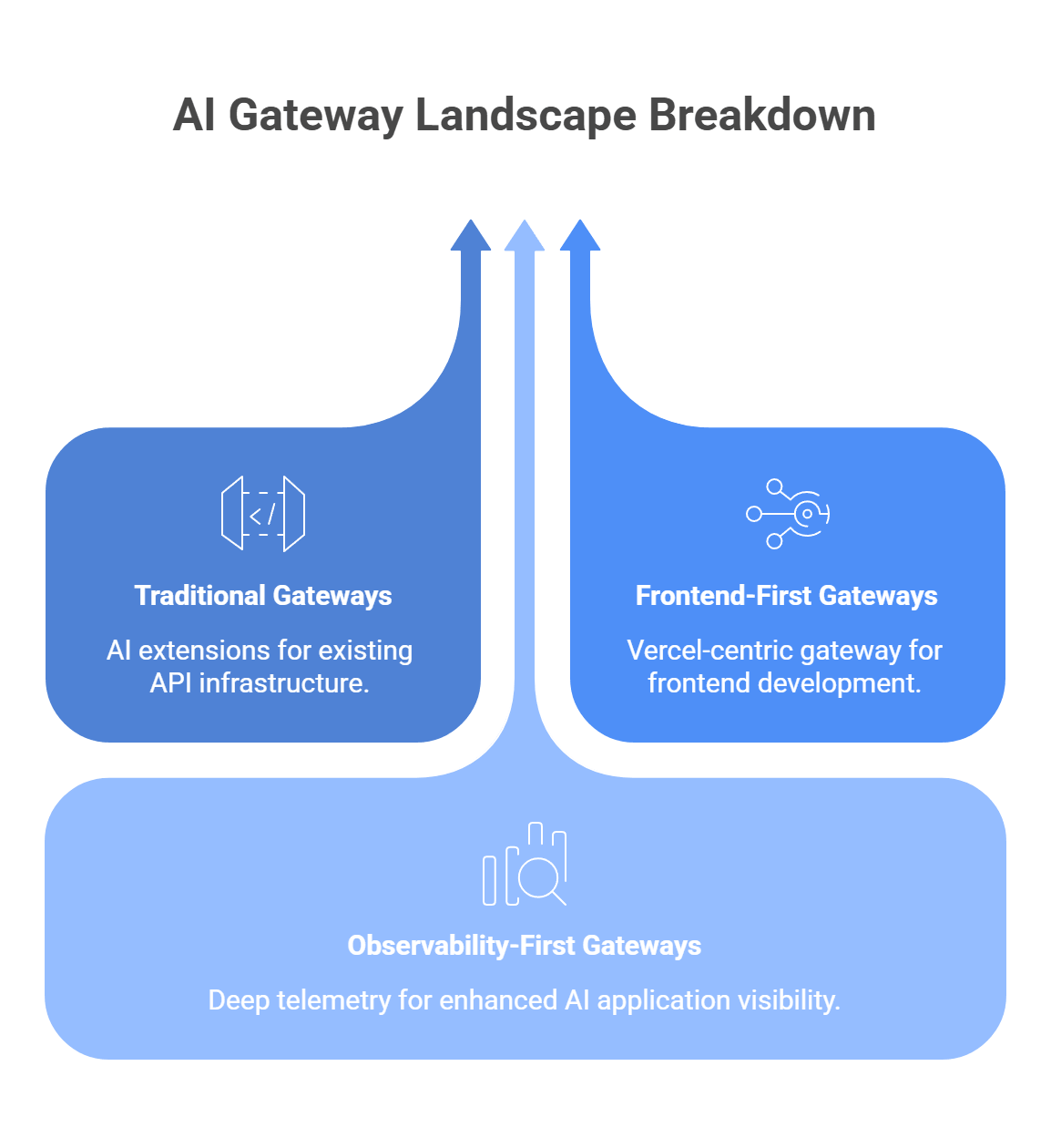
Not every gateway fits the same role. Depending on your team’s background and what matters most, you may find a better match in one of these more specialized groups.
Traditional gateways that moved into AI
Tools such as Apigee, Envoy, and F5 NGINX now have AI-related features or inference-focused extensions. These are often a practical fit for enterprises that already depend on them for core API traffic, security, and platform governance.
The tradeoff is that they usually feel more like an extension of an existing API stack than an AI-first control layer.
Frontend-first gateways
Vercel AI Gateway stands out for teams that already build around Next.js, React, and the broader Vercel platform. It gives you one endpoint for many models, plus budgets, usage monitoring, routing, and fallbacks.
That makes it very appealing for frontend-heavy teams, though it is still more tied to the Vercel ecosystem than a neutral infrastructure layer.
Observability-first gateways
Tools such as Helicone and Langfuse grew out of the tracing and analytics side of the stack. Helicone positions itself as an AI gateway with routing, failover, caching, and cost tracking, while Langfuse remains more focused on tracing, prompts, evals, and monitoring across providers and tools.
These platforms make the most sense when deep telemetry and app-level visibility matter more than full gateway governance.
How to pick the right AI Gateway for your stack
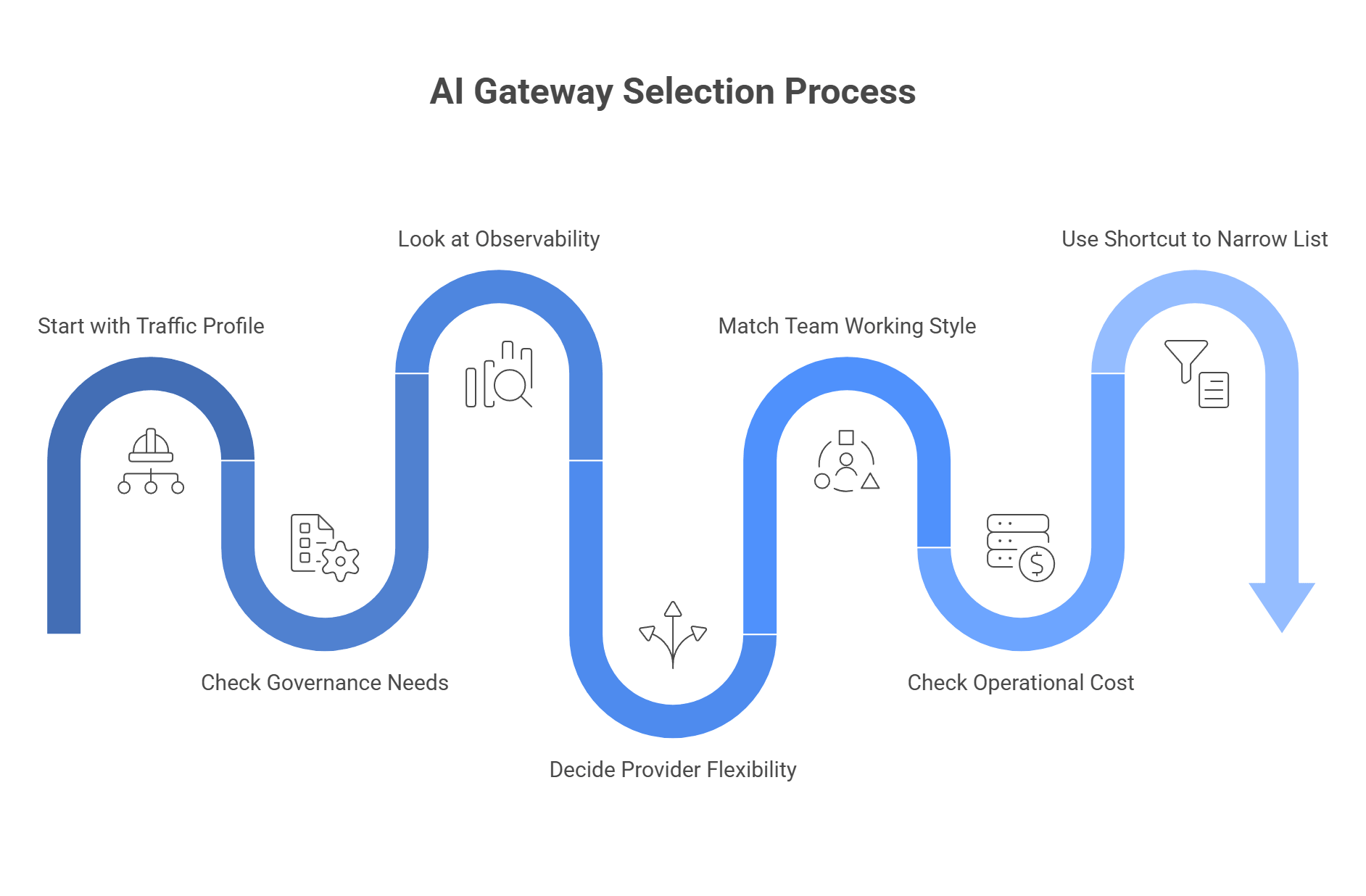
The right gateway usually comes down to three things: performance, governance, and ecosystem fit. You need the one tool that matches your traffic, your team setup, and the amount of control you want over providers, budgets, and fallback logic.
Start with your traffic profile
Before you compare features, look at the shape of your load.
Ask:
- How many requests per second do you expect at peak?
- Do you send short text calls, long context windows, or heavy image and video jobs?
- Do you need low latency for live user flows, or can some requests sit in a queue?
- Do you expect sudden spikes, or is usage fairly stable?
This first step matters because some tools fit high-throughput production traffic better than others. Bifrost leans hard into low-latency routing, automatic fallbacks, load balancing, and virtual-key controls, which makes it attractive for infra-heavy teams. LiteLLM can also handle serious traffic now, with published benchmarks that show 1,000 QPS and even 5,000 QPS under certain test conditions, but it still asks for proper production setup such as enough CPU and RAM.
A simple rule of thumb:
- Very high throughput, strict latency goals: look at Bifrost or Helicone.
- Moderate to high throughput with Python-heavy teams: LiteLLM may still fit well.
- Mixed workloads with multi-provider failover as the main goal: unified gateways and aggregators become more attractive.
Helicone also positions its gateway around performance, failover, rate limits, caching, and observability, with Rust as part of that pitch.
Check how much governance you really need
A lot of teams underbuy here. The gateway works fine for a month, then five teams, three environments, and one shared provider account turn cost tracking into a mess.
Look at these questions next:
- Do multiple teams share one provider account?
- Do you need separate budgets by product, team, customer, or environment?
- Do you want virtual keys or team-based access controls?
- Do you need per-team rate limits, spend caps, or audit trails?
If the answer is yes, basic proxying is not enough. You need stronger governance. Bifrost puts virtual keys at the center of its model and supports budgets, rate limits, access rules, and routing by consumer. LiteLLM also supports budgets, team limits, user limits, and virtual-key controls, but its setup is more config-driven.
A practical way to think about it:
- One small team, one app, one provider: basic proxy features may be enough.
- Several teams on shared spend: choose a gateway with budgets and virtual keys.
- Customer-facing AI platform: pick a tool with stronger tenant separation and reporting.
This part gets expensive fast when you ignore it. A gateway should tell you who used the budget, where the spend went, and what model caused the spike.
Look at observability before you need it
A lot of teams treat observability as a “later” problem. Then latency jumps, cost rises, or a fallback chain fails, and nobody can tell why.
You want answers to questions like:
- Which model failed?
- Which provider slowed down?
- Which prompt path raised token cost?
- Which team or key caused the spike?
- Did fallback work, or did the request just die?
Bifrost includes built-in observability with metadata such as inputs, outputs, tokens, cost, and latency. Helicone focuses heavily on analytics and gateway visibility. LiteLLM also tracks spend, routing, limits, and logs across its proxy flow.
That means:
- If deep telemetry is central, look closely at observability-first tools.
- If you just need enough insight to debug and manage spend, a broader gateway may do the job.
- If compliance or internal review matters, make sure logs and audit data are easy to export and review.
Decide how much provider flexibility you want
This is where many teams feel the pain that pushed them away from Kong in the first place. The hard part is rarely one API call. The hard part is provider sprawl over time.
Think about:
- How often do you expect to swap models?
- Do you want one endpoint for many providers?
- Do you need fallback from one provider to another during outages?
- Do you want to test several models without rewriting app logic?
If provider flexibility is a core need, look for a tool that gives you one stable endpoint and easy routing across vendors. LLMAPI focuses on that exact problem, with one API layer, multi-provider routing, fallbacks, monitoring, and an OpenAI-compatible style that keeps integration work lighter.
This kind of setup helps when you want to:
- Switch models by changing the model name rather than the whole integration.
- Route around provider outages.
- Compare cost and quality across vendors.
- Reduce the mess of separate contracts, keys, and schemas.
Match the tool to your team’s working style
The best gateway on paper can still be the wrong pick if your team hates the workflow.
Ask yourself:
- Does your team prefer code-first config or visual controls?
- Are you mostly Python, Go, or TypeScript?
- Do infra engineers own the stack, or do product teams need direct access too?
- Do non-technical teams need to inspect prompts, usage, or cost?
Examples:
- Infra-heavy platform team: Bifrost may feel natural.
- Python app team: LiteLLM may feel easier to adopt.
- Team that wants one unified endpoint with less vendor mess: LLMAPI may be the cleaner fit.
- Telemetry-first team: Helicone may stand out faster.
This part matters more than people admit. A tool that fits your team’s habits usually wins over a tool with ten extra features nobody wants to touch.
Check the operational cost, not just the price tag
Free or open-source does not always mean cheaper. Managed tools do not always mean more expensive either.
You need to weigh:
- Hosting and infra cost.
- Maintenance time.
- On-call burden.
- Setup complexity.
- Time lost on provider-specific work.
- Cost leaks from poor routing or weak visibility.
For example:
- Bifrost may save money on license cost, but it asks more from your infra team.
- LiteLLM is free to self-host, but production still needs proper machine sizing and ops discipline.
- LLMAPI may reduce integration and routing overhead if your main pain point is provider sprawl and failover management.
That is why “cheapest” can be misleading. The real question is which option gives your team the least friction at the scale you expect.
Use this shortcut to narrow the list
If you want a faster path, this simple filter helps:
- Need very fast routing and strict infra control? Start with Bifrost or Helicone.
- Need open-source flexibility and easy OpenAI-style compatibility? Start with LiteLLM.
- Need one endpoint across many providers with fallback and less integration mess? Start with LLMAPI.
- Need stronger budgets, team controls, and tenant-level tracking? Move tools with virtual keys and policy controls to the top of the list.
In the end, the best choice is rarely about which gateway has the longest feature list. It comes down to what breaks first in your stack: speed, governance, or provider complexity. Pick the tool that solves that problem first, then grow from there.
Common issues and how to fix them
A look through developer forums and issue threads shows the same problems over and over. The tools are useful, but once traffic grows or setup gets more complex, the weak spots show up fast. Recent LiteLLM issue threads still mention memory growth and OOM-related restarts, while fallback and unified routing remain common advice for teams that depend on one provider too heavily.
The issue: “LiteLLM keeps crashing with OOM errors when our traffic spikes.”
The fix: This usually points to scaling pressure, memory behavior, or weak production sizing rather than one simple bug. LiteLLM now has official troubleshooting guidance for memory issues, and public issue threads still show teams dealing with RAM growth and OOM kills in real deployments.
If you like the open-source proxy model but need a setup built around very high-throughput routing, Bifrost is often the cleaner next step because it focuses on low-latency, Go-based infrastructure and OpenAI-compatible routing.
A practical way to handle it:
- Audit memory use before and during traffic spikes.
- Check whether the issue started after a version change.
- Raise container limits only after you understand the root cause.
- Move to a lower-overhead gateway if proxy traffic is now core production infrastructure.
The issue: “Kong is too complex; it takes our team weeks to configure new LLM routes using Lua and CRDs.”
The fix: Kong is powerful, but it still comes from the broader API gateway world. Its routing and plugin system remain tied to Kong’s own configuration model, admin APIs, and plugin architecture, which can feel heavy for teams that only want to add or change AI routes quickly. In cases like that, a managed control plane or simpler AI-first gateway can be easier to live with day to day.
What usually helps:
- Move simple model routing out of legacy gateway logic.
- Choose a dashboard-first or AI-first control plane.
- Keep Kong only if you already depend on its wider API stack.
- Avoid extra infra layers when your main goal is fast LLM routing.
Tools such as Portkey or Cloudflare AI Gateway are often easier here because they focus more on fast setup, visual controls, and unified AI traffic patterns than on the full weight of classic API infrastructure.
The issue: “When AWS Bedrock or OpenAI goes down, my app freezes and users get 500 errors.”
The fix: Do not depend on one provider with no fallback path. Current gateway guidance from Portkey and other routing-focused tools puts automatic failover and unified retry logic at the center of production AI design. The basic idea is simple: if one model times out or returns errors, the same request moves to another provider or model that can handle it.
A simple fallback rule may look like this:
- Send the request to GPT first.
- Wait up to 3 seconds.
- If it times out or fails, retry through Claude 3.5 Sonnet.
- Return the first successful response to the app.
This is also where LLMAPI fits well. A unified endpoint with fallback rules, provider routing, and error monitoring gives you a much safer setup than a single hardcoded model path. It cuts down on frozen requests and gives users a better chance of getting a result even when one provider has a bad day.
Want an AI Gateway without the AI Gateway headaches?
A traditional API gateway can handle generative AI traffic, but it is rarely built for what modern AI apps actually need. LLM workloads depend on better observability, smarter routing, caching, and protection against provider outages and sudden cost swings. Purpose-built AI gateways solve that gap and help teams run model traffic with much more control.
Whether you lean toward a lightweight high-speed option, a fuller LLMOps platform, or an edge-friendly setup, moving to an AI-focused gateway can make your stack feel far more mature. But not every team wants to manage gateway infrastructure on its own.
That is where LLMAPI fits naturally. It gives you one OpenAI-compatible integration with access to 200+ models, plus routing, fallback protection, team keys, cost controls, unified billing, and usage visibility in one layer. That means you can get the practical benefits of an AI gateway without taking on the full operational burden yourself.
Why use LLMAPI?
- One API across hundreds of models.
- OpenAI-compatible setup for easier integration.
- Routing and fallback protection for steadier performance.
- Unified billing and cost controls for simpler management.
- Team keys and usage visibility as you scale.
If you want the benefits of an enterprise-style AI gateway without all the setup and maintenance work, LLMAPI is a strong shortcut. It keeps the integration simple while giving your app a more flexible and resilient AI layer underneath.
FAQs
Why are some teams moving away from Kong AI Gateway?
Kong is great for classic REST APIs, but many teams feel its AI features are more “added on” than native. It can treat LLM calls like regular HTTP traffic, which can limit things like token-level cost tracking and deeper LLM observability.
Can an AI gateway actually save money?
Yes. A big lever is semantic caching: if similar questions show up repeatedly, the gateway can reuse a previous answer instead of paying for a fresh LLM call. For high-repeat use cases, savings can be dramatic.
How does LLMAPI compare to an open-source gateway like LiteLLM?
LiteLLM is powerful, but you host and maintain it yourself, plus manage keys and reliability. LLMAPI is managed: one key, one endpoint, built-in routing and load balancing, and no proxy infrastructure to run.
What is “automatic fallback,” and why does it matter?
It’s a rule that routes traffic to a backup model when the primary model is slow or down (for example, “if response time exceeds 5 seconds, switch models”). This helps keep your app responsive during latency spikes or outages.
Can llmapi.ai protect my app from rate limits?
Yes. Instead of failing on a 429 Too Many Requests, traffic can be routed to other available models/providers so your app keeps working during spikes.