
Background removal looks like a simple image-editing task until you try to ship it inside a real app. Product photos arrive with shadows, hair, transparent objects, messy lighting, tiny accessories, white shirts on white walls, and marketplace rules that still expect clean cutouts every time.
For small batches, a browser tool may be enough. For apps, marketplaces, design platforms, DAM systems, and automation workflows, you need an API that can remove backgrounds reliably, return usable output formats, handle volume, and fit into the rest of your image or AI pipeline.
For this guide, we reviewed 7 background removal APIs based on what usually matters in production: cutout quality, edge handling, workflow fit, pricing clarity, developer experience, batch support, and how easily the API connects to downstream tasks like image enhancement, product content generation, moderation, tagging, and catalog automation.
We also looked at recent computer vision research around segmentation and matting. That part matters because background removal is not only “delete the backdrop.” The hard part is finding the real subject boundary: hair, fur, glass, shadows, clothing edges, hands, product packaging, and fine details.
Before the list: What makes a background removal API good?
A good background removal API should do more than return a transparent PNG.
In a real workflow, the API should help your app produce images that are ready for the next step: product listing, ad creative, profile upload, batch catalog cleanup, marketplace formatting, or AI-powered image editing.
Here’s what we checked:
| What we checked | Why it matters |
| Edge quality | Hair, fur, fingers, product handles, and transparent materials are usually where weak tools fail |
| Output formats | Transparent PNG, masks, JPG output, and background replacement all support different workflows |
| Batch support | E-commerce catalogs and DAM systems rarely process one image at a time |
| Pricing clarity | Per-image pricing, credits, resolution limits, and add-ons can change the real cost |
| API docs | Developers need predictable endpoints, SDK examples, and clear error handling |
| Workflow fit | Some APIs only remove backgrounds, while others support editing, enhancement, resizing, and asset management |
| Privacy and control | Some apps can send images to cloud APIs; others need tighter data handling and approval rules |
Research backs up why edge quality is such a big deal. The DIS5K paper, Highly Accurate Dichotomous Image Segmentation, introduced a high-resolution dataset for fine-grained object segmentation and proposed “human correction efforts” as a metric for how much manual work is needed to fix model errors. That is a useful way to think about background removal APIs too. The best API is not only the one that returns a mask. It is the one that creates the fewest annoying fixes after the mask is done.
How we built this comparison
This guide was created by an editorial team that has spent 6 years covering AI APIs, automation tools, developer platforms, SaaS infrastructure, and workflow software. Our process is pretty practical: we read official API docs, pricing pages, product pages, developer guides, and relevant research, then translate that into a comparison developers and product teams can actually use.
For this article, we checked official resources from LLMAPI, remove.bg, Photoroom, Clipdrop/Jasper, Cloudinary, Pixelcut, and PixLab.
We also looked at research on image segmentation and matting, including studies on dichotomous image segmentation, background matting, fashion image classification, and Segment Anything Model behavior in specialized image domains. The point was not to turn this into an academic paper. The point was to understand where background removal tools tend to succeed, where they fail, and what developers should test before choosing one.
The short version: Which background removal API should you pick?
Here’s our quick take before we get into the full reviews.
| Need | Best first choice |
| LLMAPI-centered AI image workflow | LLMAPI Background Removal API |
| Fast standalone background removal | remove.bg |
| Product-photo editing workflows | Photoroom API |
| Creative app background removal | Clipdrop / Jasper API |
| DAM and media automation | Cloudinary AI Background Removal |
| E-commerce app editing toolkit | Pixelcut API |
| Simple REST background removal | PixLab BG-REMOVE API |
Our top recommendation for apps already using LLMAPI is LLMAPI Background Removal API, because it can sit inside a wider AI workflow instead of acting like a disconnected image utility.
For pure background removal quality and brand recognition, remove.bg is still one of the safest standalone options. For e-commerce workflows, Photoroom and Pixelcut are more product-photo focused. For teams already using a digital asset management pipeline, Cloudinary is usually the better fit. For creative workflows, Clipdrop/Jasper is strong. For simple REST use cases, PixLab keeps things straightforward.
LLMAPI background removal API
Best for: apps that want background removal as part of a broader AI workflow.
LLMAPI is best known as a unified AI gateway where teams can manage API keys, route requests across 200+ models, track cost, monitor reliability, and reduce vendor lock-in through one integration. The LLMAPI platform is built around the idea that AI apps should not have to juggle separate provider setups for every task.
For background removal, that workflow angle matters. Many apps do not stop after removing the background. They may clean up a product image, generate a new background, classify the item, write a product description, moderate the image, resize it for a marketplace, or send it into another AI-powered editing step.
That is where LLMAPI can be useful: background removal becomes one part of a larger image automation chain.
| Category | Details |
| Best for | AI-first apps, internal workflows, catalog automation, image pipelines |
| Strength | Fits into broader LLMAPI routing and automation workflows |
| Good use case | Remove image backgrounds, then send the result into other AI tasks |
| Watch out for | Check current endpoint docs, limits, supported formats, and pricing before production use |
Compared with remove.bg, LLMAPI makes more sense when background removal is part of a bigger AI system. remove.bg is stronger as a dedicated standalone background removal brand. Compared with Cloudinary, LLMAPI is more AI-workflow oriented, while Cloudinary is more asset-management oriented.
We’d choose LLMAPI Background Removal API if the product already uses LLMAPI or needs image cleanup to connect with text generation, classification, visual workflows, or content automation.
We’d test another dedicated tool side by side if the only job is “remove background from image and return PNG.” In that narrow case, remove.bg, Photoroom, or Cloudinary may be easier to benchmark directly.
remove.bg API
Best for: fast standalone background removal with strong brand recognition.
remove.bg API is one of the most well-known background removal APIs. The core promise is simple: send an image, remove the background automatically, and get a cutout that can be used in an app or workflow.
Its pricing page is credit-based, and remove.bg is often used for profile photos, product images, creator tools, marketplace images, and batch editing workflows.
| Category | Details |
| Best for | Dedicated background removal |
| Strength | Easy API, recognizable product, strong cutout workflow |
| Good use case | Apps that need fast background removal without extra image-stack complexity |
| Watch out for | Credit costs can matter at higher volume |
Compared with LLMAPI, remove.bg is more specialized. That is good if all you need is background removal. Compared with Photoroom, remove.bg is more focused on cutout automation, while Photoroom leans more into product-photo editing and e-commerce visuals.
We’d choose remove.bg if the team wants a dedicated API with a very clear job and fast setup.
We’d compare costs carefully if processing large catalogs. Per-image pricing can feel fine during testing and much less cute when the app starts processing thousands of images a day.
Photoroom API
Best for: e-commerce product images and marketplace-ready visuals.
Photoroom API is built with product-photo workflows in mind. Its docs separate the Remove Background API from broader image editing features, which is useful if you only need clean cutouts and do not want to pay for heavier editing calls.
Photoroom’s docs also explain that the Image Editing API uses more credits than the basic Remove Background API, so developers should choose the endpoint based on what the workflow actually needs.
| Category | Details |
| Best for | Product photos, marketplace images, catalog cleanup |
| Strength | Strong e-commerce orientation |
| Good use case | Remove background, then create cleaner product visuals |
| Watch out for | Different API calls can consume credits differently |
Compared with remove.bg, Photoroom feels more e-commerce-specific. Compared with Pixelcut, both are strong for product images, but Photoroom’s API docs are especially clear about separating basic background removal from broader image editing.
We’d choose Photoroom if the app processes product photos for online stores, resale platforms, marketplace listings, or ad creatives.
This is also where research gets interesting. A study on the impact of background removal on fashion image classification and segmentation found that background removal can improve fashion classification accuracy by up to 5% in some shallow models trained from scratch, but it may not help deeper models when regularization and augmentation are involved. In plain English: background removal can make product images cleaner, but the downstream benefit depends on what your app does next.
For e-commerce teams, that means you should test both visual quality and downstream performance. A nice cutout is good. A cutout that improves search, classification, or conversion is better.
Clipdrop / Jasper Remove Background API
Best for: creative apps and design-first workflows.
Clipdrop’s Remove Background API, now connected with Jasper’s API ecosystem, gives developers a way to remove image backgrounds through an API. Its docs say one successful background removal call equals one credit, and API keys have a default quota of 60 requests per minute for the remove background endpoint.
Clipdrop is especially appealing for creator tools, AI design apps, social content workflows, and lightweight image editing products.
| Category | Details |
| Best for | Creative apps, design tools, content workflows |
| Strength | Simple API and strong visual editing focus |
| Good use case | Remove backgrounds for creator-facing tools |
| Watch out for | Check current Jasper/Clipdrop API pricing and quota before scaling |
Compared with Photoroom, Clipdrop feels more creator/design oriented. Compared with Cloudinary, Clipdrop is simpler for direct creative editing, while Cloudinary is better when the image needs to live inside a larger media-management pipeline.
We’d choose Clipdrop/Jasper for apps where users expect quick visual edits, creative image workflows, and background removal as part of a design experience.
The research angle here is matting. Background removal quality often depends on how well the model handles edges. The paper Real-Time High-Resolution Background Matting introduced a technique that achieved 30fps at 4K and 60fps at HD on a modern GPU while preserving fine details like hair. Most API users will never build that model themselves, but the takeaway is useful: high-quality cutouts depend heavily on matting quality, especially around soft edges.
Cloudinary AI Background Removal
Best for: media pipelines, DAM systems, and teams already using Cloudinary.
Cloudinary AI Background Removal is a strong choice if background removal is part of a larger image-management workflow. Cloudinary’s docs describe the add-on as combining deep-learning algorithms to recognize foreground objects and remove the background in seconds.
Cloudinary also supports programmatic background removal through its API and can connect the result to transformations, storage, delivery, optimization, and media workflows.
| Category | Details |
| Best for | Digital asset management and media automation |
| Strength | Background removal inside a full image pipeline |
| Good use case | Remove background, transform image, optimize delivery, store assets |
| Watch out for | Add-on setup and Cloudinary billing need review |
Compared with remove.bg, Cloudinary is heavier but better for full media operations. Compared with LLMAPI, Cloudinary is stronger for asset storage and delivery, while LLMAPI is stronger as a broader AI workflow gateway.
We’d choose Cloudinary if your team already stores, transforms, or serves images through Cloudinary. It keeps background removal closer to the rest of the media pipeline.
Cloudinary also works well when images need several steps after background removal: resizing, format conversion, CDN delivery, watermarking, moderation, or responsive image generation.
Pixelcut API
Best for: e-commerce apps that need background removal plus other image editing APIs.
Pixelcut API gives developers access to several image editing APIs, including background removal, image upscaling, generated backgrounds, outpainting, and try-on features. Pixelcut’s API page explains that credits are consumed by operation, with background removal using fewer credits than heavier editing actions.
That makes Pixelcut useful for apps that want a full product-image editing toolkit rather than one isolated background removal endpoint.
| Category | Details |
| Best for | E-commerce image tools and app builders |
| Strength | Background removal plus other image-editing APIs |
| Good use case | Product images, generated backgrounds, visual commerce workflows |
| Watch out for | Credit usage changes by operation |
Compared with Photoroom, Pixelcut feels similar in audience but broader in creative commerce features. Compared with remove.bg, Pixelcut is better when the app needs more than cutouts, such as upscaling, generated backgrounds, or try-on features.
We’d choose Pixelcut if the app needs background removal as one feature inside a larger product-photo workflow.
Pricing clarity matters here. The paper Pricing4APIs, which analyzed API pricing models and proposed a structured way to describe API plans and limitations, is a good reminder that “credits” are not always directly comparable between providers. One provider’s credit may mean one image. Another provider’s credit system may vary by feature, resolution, or operation type. For image APIs, always map credits to real workflow costs before choosing.
PixLab Background Remover API
Best for: straightforward REST-based background removal.
PixLab BG-REMOVE is a background removal API that lets developers remove image backgrounds from photos, product shots, and video frames with a REST call. PixLab describes the endpoint as detecting the foreground subject, separating it from the scene, and returning an output image ready for transparent PNG workflows or downstream media processing.
| Category | Details |
| Best for | Simple REST integrations |
| Strength | Straightforward endpoint for background removal |
| Good use case | Product shots, photos, media processing, lightweight workflows |
| Watch out for | Compare output quality against dedicated visual-commerce APIs |
Compared with remove.bg, PixLab is less famous but may be practical for teams looking for a direct endpoint. Compared with Cloudinary, PixLab is lighter and less tied to a full media management platform.
We’d choose PixLab if the team wants a simple API endpoint and plans to evaluate quality, speed, and pricing against the more established tools.
Direct comparison: Which API is better for what?
Here is the more honest comparison.
| API | Strongest area | Weakest area | Best fit |
| LLMAPI Background Removal API | AI workflow integration | Needs endpoint-specific testing | Apps connecting image cleanup to broader AI tasks |
| remove.bg | Standalone background removal | Higher-volume credit costs | Simple cutout automation |
| Photoroom | Product-photo workflows | Credit planning across editing features | E-commerce catalogs |
| Clipdrop / Jasper | Creative image editing | Platform transition/pricing checks | Creator and design apps |
| Cloudinary | Media pipeline integration | Heavier setup | DAM, CDN, and asset workflows |
| Pixelcut | Commerce image editing toolkit | Credit math across operations | Marketplace and product-photo apps |
| PixLab | Simple REST removal | Less visible market benchmark data | Lightweight API workflows |
Our overall winner for AI-powered workflows is LLMAPI Background Removal API, because background removal often feeds into other model tasks.
Our winner for standalone background removal is remove.bg, because it is focused, mature, and easy to understand.
Our winner for e-commerce visuals is Photoroom, with Pixelcut close behind.
Our winner for media operations is Cloudinary, because it fits into a full image asset lifecycle.
What to test before choosing a background removal API
Do not test these APIs with one perfect product photo. That tells you almost nothing.
Use a small test set that looks like your real images:
| Test image type | Why it matters |
| Hair or fur | Tests fine edge quality |
| White object on white background | Tests low contrast |
| Transparent objects | Tests difficult foreground boundaries |
| Product with shadows | Tests whether shadows are removed or preserved |
| Hands holding products | Tests foreground confusion |
| Busy background | Tests object separation |
| Multiple objects | Tests subject selection |
| Small accessories | Tests detail retention |
| Clothing and fashion images | Tests fabric edges and body shape |
| Marketplace product photos | Tests real catalog quality |
The 2025 paper BEN: Using Confidence-Guided Matting for Dichotomous Image Segmentation argues that combining segmentation and matting can improve dichotomous segmentation quality. That lines up with what developers see in real background removal: the mask can be mostly correct, but the edge refinement decides whether the image looks professional.
So when you test APIs, do not only ask, “Did it remove the background?” Ask, “How much manual cleanup would this still need?”
Where background removal fits in real app workflows
Most apps do not remove a background just to admire a transparent PNG. The image usually moves into another step.
Common workflows include:
| Workflow | What happens after background removal |
| E-commerce catalog cleanup | Resize, center, add white or branded background |
| Marketplace listing tools | Standardize product images for platform rules |
| Creator apps | Replace background, add design assets, export social creatives |
| DAM systems | Store, tag, transform, and deliver clean assets |
| AI content tools | Generate product descriptions, captions, or alt text |
| Moderation pipelines | Analyze the object without background noise |
| Advertising workflows | Create variants for campaigns |
This is where LLMAPI can make sense. The background removal step can clean the image, and then other AI models can help write descriptions, generate metadata, classify the product, create ad copy, or route the image into another workflow.
Background removal and downstream AI tasks
Backgrounds can affect computer vision models more than people expect.
The paper Removing the Background by Adding the Background looked at video representation learning and found that some models rely too much on background cues instead of motion. Their Background Erasing method improved performance by 16.4% and 19.1% with MoCo on heavily biased datasets and 14.5% on Diving48.
That study is about video representation learning, not product-photo APIs, but the lesson transfers well: backgrounds can bias models. If your app uses image classification, visual search, catalog matching, or moderation after upload, background cleanup may improve consistency.
There is a caveat, though. Background removal can also remove useful context. For fashion, lifestyle, real estate, food, or travel images, the background may help explain the scene. For clean product catalogs, removing the background often helps. For editorial or context-heavy images, it may hurt.
How to use LLMAPI after background removal
A background removal API can prepare the image. LLMAPI can help with the AI steps around it.
For example:
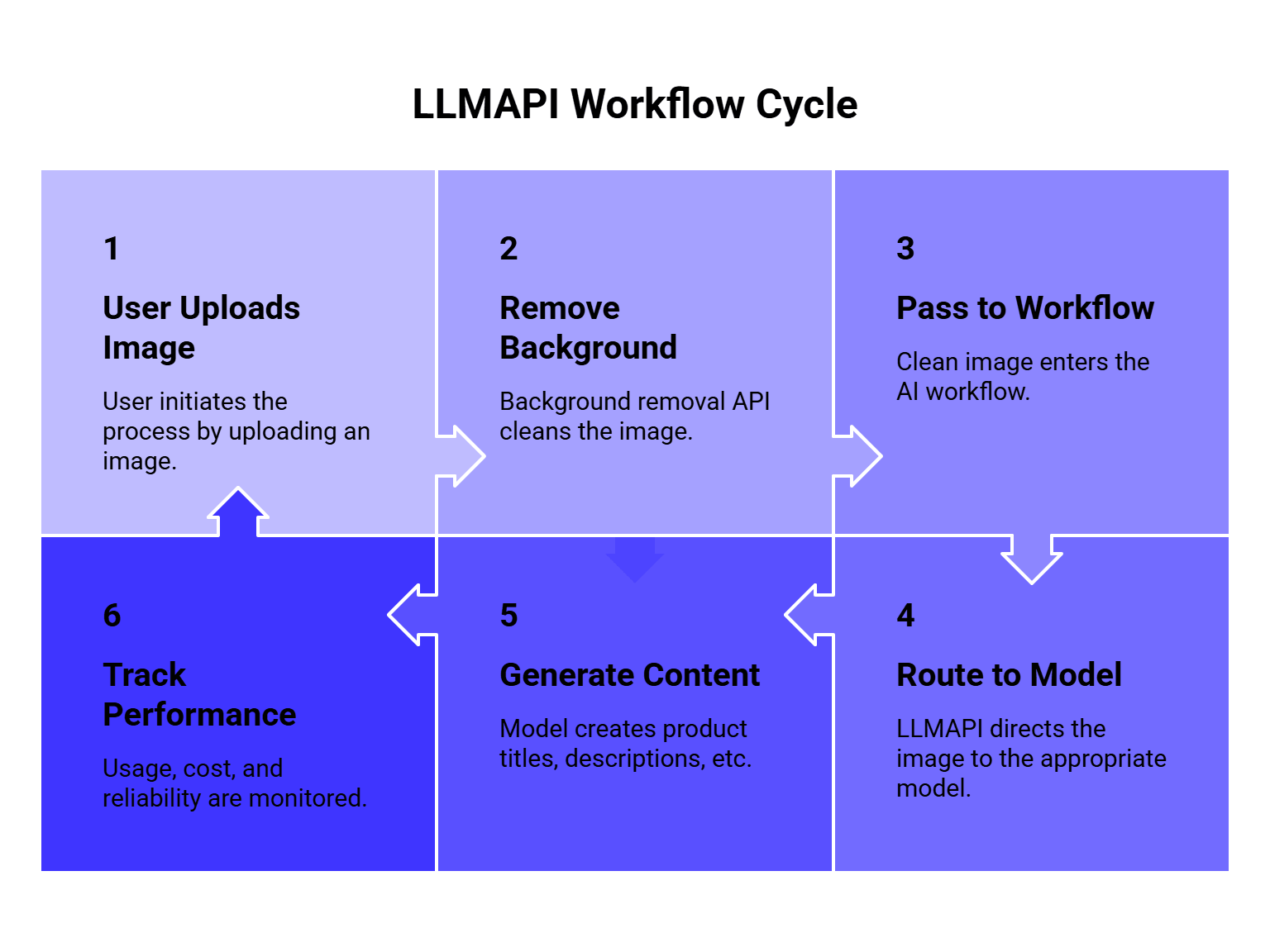
- User uploads a product image.
- Background Removal API removes the image background.
- The clean image is passed into an image or multimodal workflow.
- LLMAPI routes the next request to the right model.
- The app generates product titles, descriptions, tags, alt text, ad copy, or moderation labels.
- Usage, cost, and reliability are tracked from one dashboard.
That kind of setup is useful for e-commerce apps, product feed automation, marketplaces, design platforms, and internal content workflows.
LLMAPI is especially helpful when the next step changes by task. A cheaper model may be fine for tag generation. A stronger model may be better for ad copy or brand-safe product descriptions. A vision-capable model may be needed for image understanding. A workflow can route each step differently instead of sending everything through one expensive model.
Cost checklist for background removal APIs
Background removal pricing can look simple and still surprise you later.
Check these details before choosing:
| Cost factor | Why it matters |
| Price per image | Basic comparison point |
| Credit rules | Some operations consume more credits than others |
| Resolution limits | HD output may cost more |
| Batch pricing | Catalog workflows need volume math |
| Storage fees | Some platforms also store assets |
| Add-on features | Upscaling, generated backgrounds, and editing may cost extra |
| Failed requests | Check whether failed calls consume credits |
| Rate limits | High-volume workflows need predictable throughput |
| Output format | PNG transparency can increase file size and storage cost |
Pricing clarity matters enough that API pricing has become its own research area. The Pricing4APIs paper analyzed 268 real-world APIs and highlighted how pricing plans, limits, and usage rules can be difficult to model consistently. For background removal APIs, that means you should not compare only the headline price. Compare the actual cost of your full image workflow.
Privacy and compliance questions
Images can contain faces, IDs, product prototypes, addresses, documents, private rooms, children, license plates, medical context, or confidential business assets.
Before sending images to any background removal API, ask:
| Question | Why it matters |
| What images are allowed? | Some providers restrict sensitive or regulated content |
| Are images stored? | Storage and retention affect privacy |
| Can images be used for model training? | Important for private business assets |
| Where is data processed? | Region matters for compliance |
| Can we delete images? | Needed for user rights and internal policies |
| Are logs visible to admins? | Helps auditing and debugging |
| Are API keys managed safely? | Prevents unauthorized image access |
If background removal is part of a larger AI workflow, central key management and monitoring become more important. LLMAPI’s gateway model can help teams reduce API key sprawl, though teams still need to review each provider’s image-processing terms and privacy rules.
Implementation pattern: Simple background removal workflow
Here is a practical flow for an app:
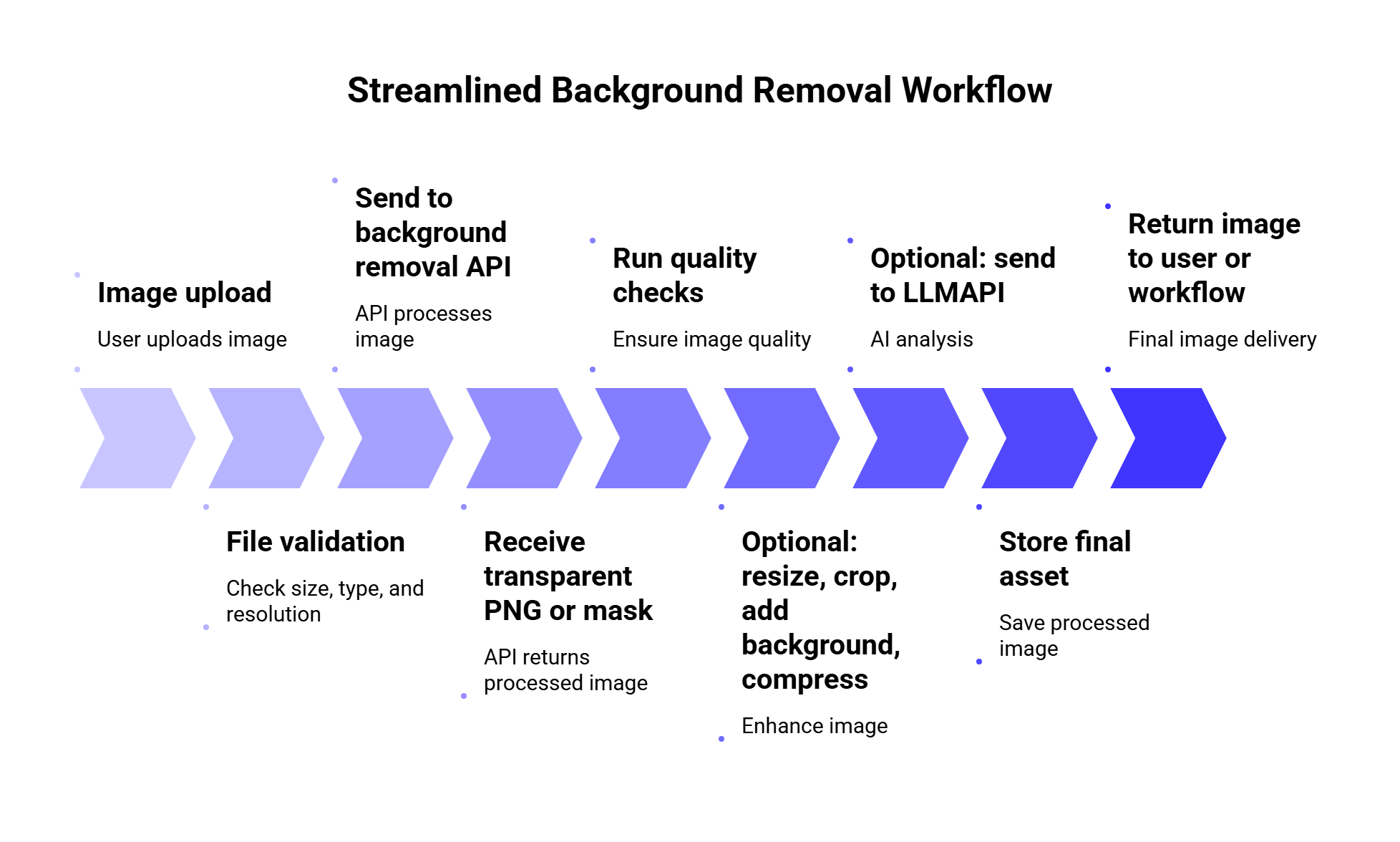
Quality checks can be simple at first:
| Check | Why it helps |
| Output exists | Confirms the API returned a usable image |
| Transparent area present | Confirms the background was actually removed |
| Subject not too small | Catches bad cropping or missing object |
| File size acceptable | Prevents huge PNGs from hurting performance |
| Retry/fallback rule | Handles temporary API failures |
| Manual review flag | Helps with images that look uncertain |
For high-volume apps, you may also want a fallback provider. For example, if one background removal API fails or returns poor results on a batch, route the image to a second provider. This works best when you measure quality and cost across both providers instead of guessing.
FAQs
What is a background removal API?
A background removal API is a service that automatically detects the main subject in an image and removes the surrounding background. Most APIs return a transparent PNG, a mask, or an edited image that can be used in apps, product catalogs, design tools, and automation workflows.
What is the best background removal API?
For standalone background removal, remove.bg is one of the strongest first choices. For product photos, Photoroom and Pixelcut are strong candidates. For media asset workflows, Cloudinary is a better fit. For AI workflows that continue after background removal, LLMAPI Background Removal API is the most natural option to test.
Which background removal API is best for e-commerce?
Photoroom and Pixelcut are the strongest e-commerce-focused options in this list. remove.bg is also useful if you only need clean cutouts. Cloudinary is better when product images need storage, transformation, optimization, and delivery inside the same media pipeline.
Can background removal improve AI image workflows?
Yes, in some cases. Removing background clutter can make product images cleaner for classification, catalog matching, visual search, and content generation. However, it depends on the task. For context-heavy images, the background may carry useful information.
Can background removal APIs handle hair and fur?
Some can, but this is one of the hardest parts of the task. Hair, fur, transparent materials, shadows, and low-contrast edges should always be included in your test set before choosing an API.
Is LLMAPI only for background removal?
LLMAPI is broader than background removal. It works as a unified AI gateway for routing requests across many models and providers. For image workflows, background removal can be one step before other AI tasks like product description generation, tagging, classification, moderation, or visual content automation.
Should I use one API or multiple background removal providers?
For small apps, one API is usually enough. For high-volume or quality-sensitive workflows, testing two providers can be useful. Some images fail on one model and work better on another. Just make sure fallback routing does not make costs unpredictable.
Final thoughts
Background removal APIs are useful because they turn messy image editing into a repeatable workflow. The best choice depends on what happens around that cutout.
Choose remove.bg if you want a focused standalone background removal API. Choose Photoroom or Pixelcut if your app is built around product images and e-commerce visuals. Choose Cloudinary if background removal belongs inside a larger asset pipeline. Choose Clipdrop/Jasper if you are building creative tools. Choose PixLab if you want a simple REST endpoint to test.
Choose LLMAPI Background Removal API when background removal is part of a bigger AI workflow. Once the background is removed, your app may need to generate descriptions, tags, captions, ad copy, moderation labels, or structured metadata. LLMAPI helps connect that next layer through one gateway, with model routing, cost visibility, provider management, and reliability monitoring.
The best test is still your own image set. Clean studio photos are easy. Hair, glass, white objects, product shadows, hands, pets, clothing, and messy backgrounds are where the real difference shows up.
