
Document processing gets painful fast. One team uploads invoices. Another sends scanned IDs. Someone adds handwritten forms, receipts with faded ink, PDFs with tables, passport photos, signatures, checkboxes, and files rotated sideways because of course they are. Traditional OCR can read text from a page, but most workflows need more than plain text. They need structured fields, document type detection, tables, signatures, barcodes, validation, and clean JSON that can move into an app without someone manually fixing every row.
That is where Base64.ai OCR becomes useful. Base64.ai is an AI-powered document intelligence platform that turns PDFs, images, DOCX files, and many other document formats into labeled JSON. According to Base64.ai’s platform page, it identifies the document type, applies the right model, extracts fields, and returns structured output. The platform also supports cloud and on-premises deployment, 2,800+ validated document models, REST API access, and enterprise security standards such as ISO 27001, SOC 2, HIPAA, and GDPR.
For developers, the main value is simple: Base64.ai helps move document workflows from “read this manually” to “send the file to an API and get structured data back.”
What Base64.AI actually does
Base64.ai is closer to an Intelligent Document Processing platform than a basic OCR tool.
Basic OCR usually answers one question:
What text appears in this image or document?
Base64.ai tries to answer a more useful question:
What document is this, what fields matter, and what structured data should the app receive?
Base64.ai’s API documentation says the API extracts text, tables, photos, and signatures from document types and can run in the cloud or in air-gapped, on-premises, offline data centers. Its pricing page also lists OCR in 165+ languages, handwriting support, 93 file formats, multi-modal ingestion, API access, RPA and scanner integrations, and enterprise security certifications under its OCR feature set.
That makes Base64.ai useful for apps that process documents like:
| Document type | Data developers may need |
| Receipts | Merchant name, date, subtotal, tax, tip, total, payment details |
| Invoices | Vendor, invoice number, due date, line items, totals, tax, payment terms |
| IDs and driver’s licenses | Name, ID number, date of birth, expiration date, photo, signature |
| Passports and visas | Name, nationality, passport number, issue/expiry dates, MRZ fields |
| Forms | Names, addresses, checked boxes, handwritten fields, signatures |
| Checks | Payee, amount, bank details, signature, check number |
| Shipping documents | Tracking IDs, addresses, carrier details, shipment dates |
| Insurance documents | Policy numbers, claim fields, dates, coverage details |
This is the part that matters most: a developer usually does not want a wall of raw OCR text. They want fields they can store, validate, search, route, or send into the next workflow.
Why developers need more than plain ocr
Traditional OCR is good at turning text inside an image into machine-readable text. That is useful, but it leaves a lot of work for the app.
Imagine an invoice. Raw OCR may return something like:
Invoice No: INV-9281
Date: 05/12/2026
Total Due: $1,248.90
Vendor: Northlake Office Supplies
That looks readable to a human. For software, the better output is structured:
{
“document_type”: “invoice”,
“invoice_number”: “INV-9281”,
“invoice_date”: “2026-05-12”,
“vendor_name”: “Northlake Office Supplies”,
“total_due”: 1248.90,
“currency”: “USD”
}
The difference is huge. Raw text still needs parsing. Structured JSON can move directly into AP automation, KYC, CRM, claims processing, internal search, analytics, or review queues.
Base64.ai explains this difference in its own article on OCR vs AI-powered document understanding. The article says traditional OCR identifies text and converts it into digital format, while AI-powered document understanding can identify document types, key-value fields, and the meaning of extracted data.
That distinction lines up with where Document AI research has been moving. The survey Document AI: Benchmarks, Models and Applications describes Document AI as a field focused on automatically reading, understanding, and analyzing business documents by combining NLP and computer vision. In other words, the goal is no longer just “read text.” The goal is to understand the document well enough to use it.
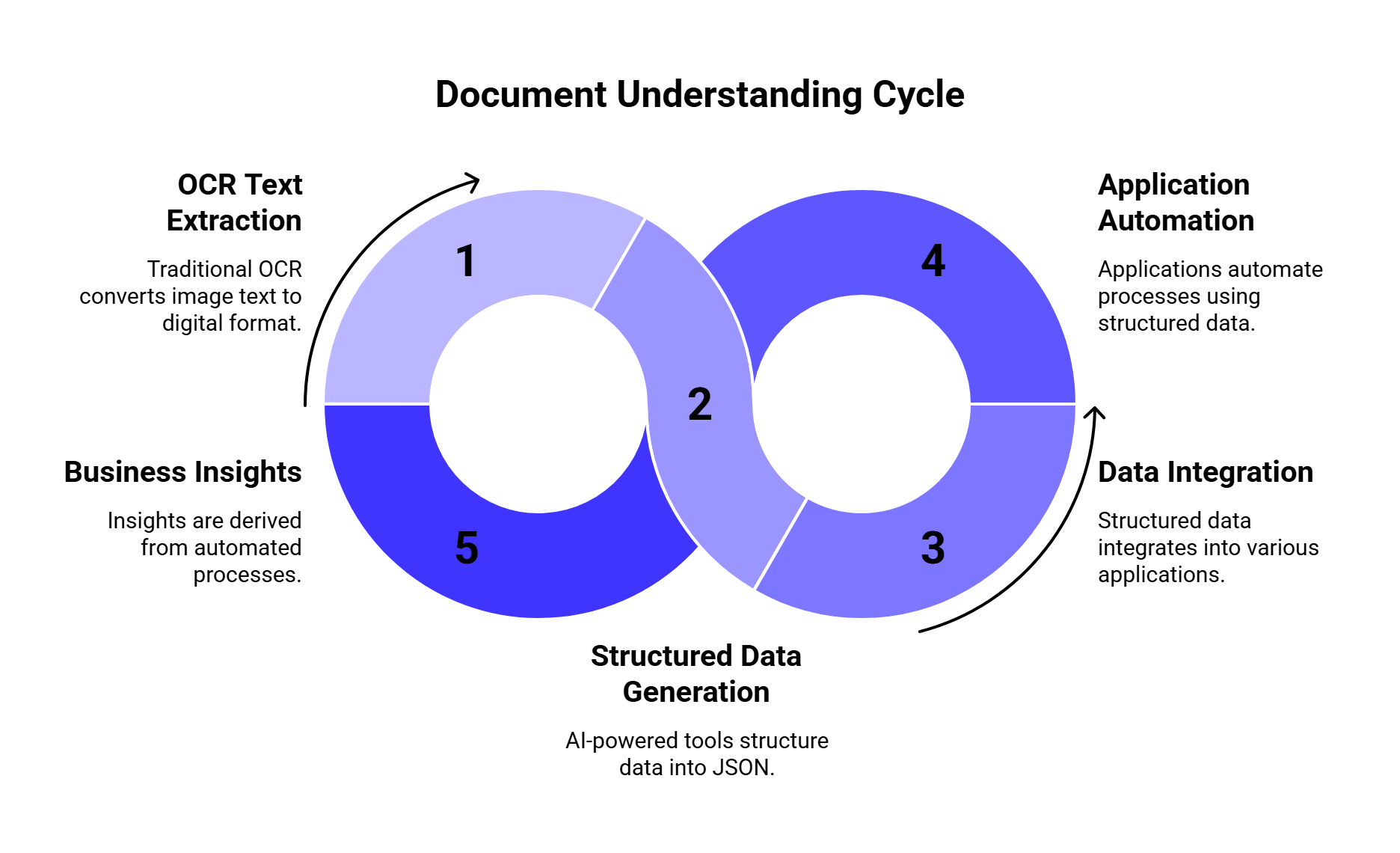
Where Base64.ai fits in a document workflow
A typical Base64.ai OCR workflow looks like this:
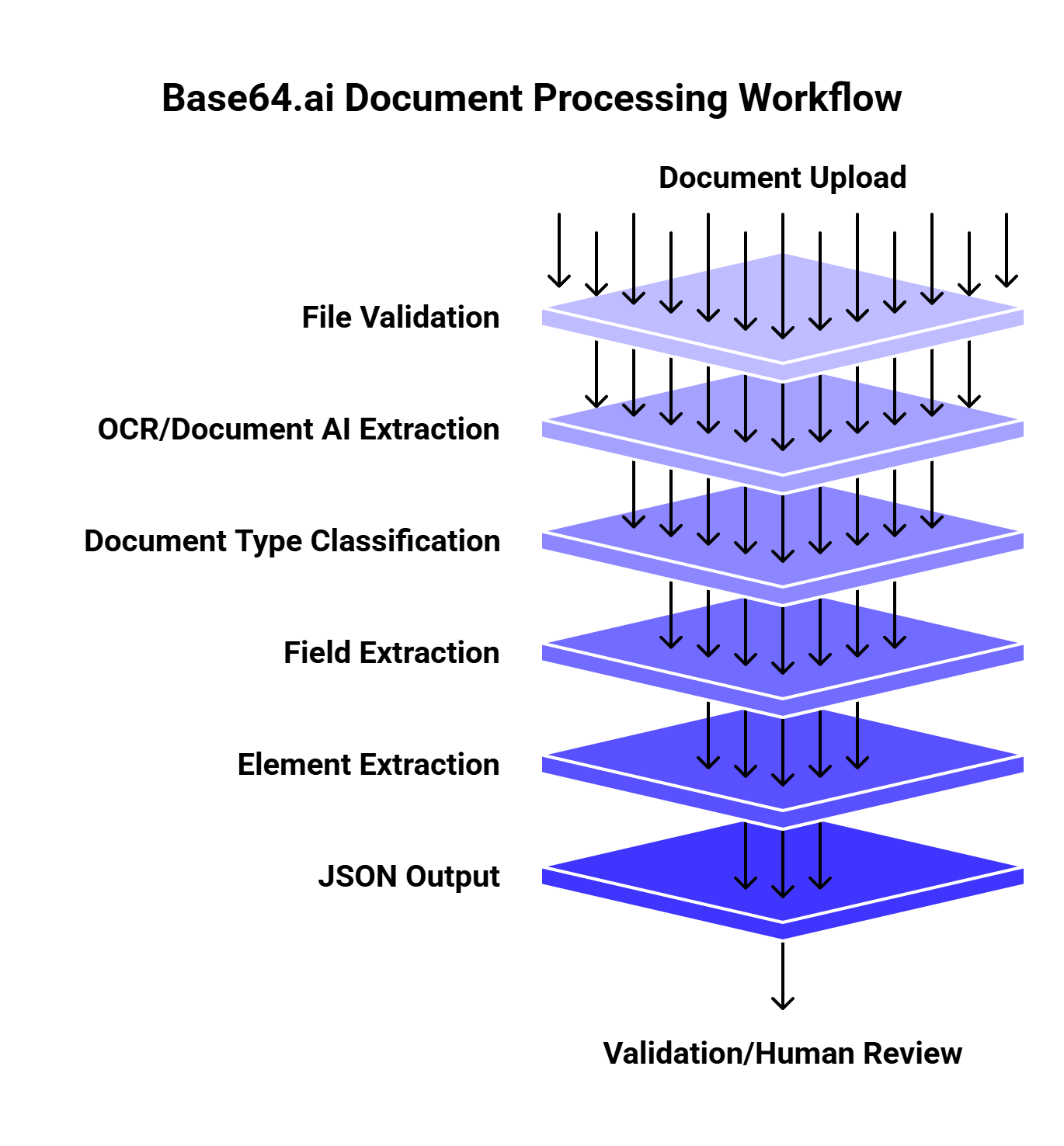
This setup works well because document processing usually has several steps. A receipt and a passport should not be handled with the same field schema. A tax form may need checkbox extraction. An invoice may need table extraction. An ID may need a face image and signature. A check may need validation fields.
Base64.ai’s platform page describes this as an “ingest, understand, act” flow. It ingests structured and unstructured documents, images, and multimedia in 50+ file formats, uses pre-trained models and AI capabilities to understand documents, and can pass data into downstream systems through integrations.
For developers, that means Base64.ai can sit between messy document uploads and clean application logic.
What Base64.ai extracts better than basic OCR
The biggest benefit is that Base64.ai can extract more than text.
| Feature | Why it matters |
| Text extraction | Converts printed or scanned text into machine-readable output |
| Handwriting support | Helps with forms, notes, claims, checks, and handwritten fields |
| Table extraction | Important for invoices, statements, line items, and forms |
| Photos | Useful for IDs, passports, licenses, and application packets |
| Signatures | Needed for checks, IDs, contracts, forms, and authorization workflows |
| Barcodes | Useful for IDs, shipping labels, tickets, forms, and inventory workflows |
| Checkboxes and radio buttons | Critical for structured forms and compliance packets |
| Document classification | Helps route invoices, IDs, receipts, and forms differently |
| JSON output | Makes extracted data easier to store, validate, and automate |
This is also why Base64.ai should be judged against Document AI platforms, not only traditional OCR APIs. A simple OCR API may read text accurately but still leave your team writing custom parsing logic for every document type.
Recent research supports that exact point. The 2025 paper TWIX: Automatically Reconstructing Structured Data from Templatized Documents argues that data extraction from templatized documents is difficult because tools often struggle with complex layouts, high latency, high cost, and manual effort. In its evaluations across 34 real-world datasets, TWIX achieved over 90% precision and recall on average and outperformed tools including Textract, Azure Document Intelligence, and GPT-4-Vision by more than 25% in precision and recall for its benchmark setting.
That does not mean every workflow should use TWIX. It does show something important: structure matters. If documents follow templates or semi-templates, extraction systems need to understand layout and repeated patterns, not just characters.
Best use cases for Base64.ai OCR
Base64.ai is strongest when the app needs structured document data, not just text.
Receipt extraction
Receipts look easy until you process them at scale. Store names vary. Totals may appear near taxes, tips, discounts, and card details. Photos are often blurry, angled, folded, or badly lit.
Base64.ai can help extract fields like merchant name, date, subtotal, tax, tip, total, payment method, and signature when available.
This is useful for:
- Expense management apps
- Reimbursement tools
- Accounting workflows
- Travel platforms
- Loyalty and rewards apps
- Audit preparation
Invoice processing
Invoices are one of the clearest Base64.ai use cases because they often combine text, tables, totals, due dates, purchase order numbers, and line items.
An invoice extraction workflow may need:
| Field | Example |
| Vendor name | Northlake Office Supplies |
| Invoice number | INV-9281 |
| Invoice date | 2026-05-12 |
| Due date | 2026-06-12 |
| Line items | Product, quantity, unit price |
| Tax | $84.20 |
| Total | $1,248.90 |
| Payment terms | Net 30 |
Research on invoice extraction has shown why this is hard. The paper Abstractive Information Extraction from Scanned Invoices discusses extracting fields such as payee name, total amount, date, and address from scanned invoices and receipts. The authors frame invoice extraction as a way to reduce human effort and support search, indexing, analytics, and document streamlining.
That is exactly the business case for an OCR engine like Base64.ai: less manual keying, faster indexing, cleaner downstream workflows.
ID, Passport, and KYC workflows
Identity documents need more than plain text extraction. A KYC or onboarding workflow may need names, document numbers, expiration dates, photos, signatures, barcodes, and validation checks.
Base64.ai’s platform page lists use cases across finance, banking, insurance, healthcare, logistics, and onboarding/KYC. Its feature set also includes face detection and verification, signature detection and verification, barcode detection, blur and glare detection, fraud detection, and PII redaction as advanced add-ons.
For developers, this matters because ID processing often needs a pipeline:
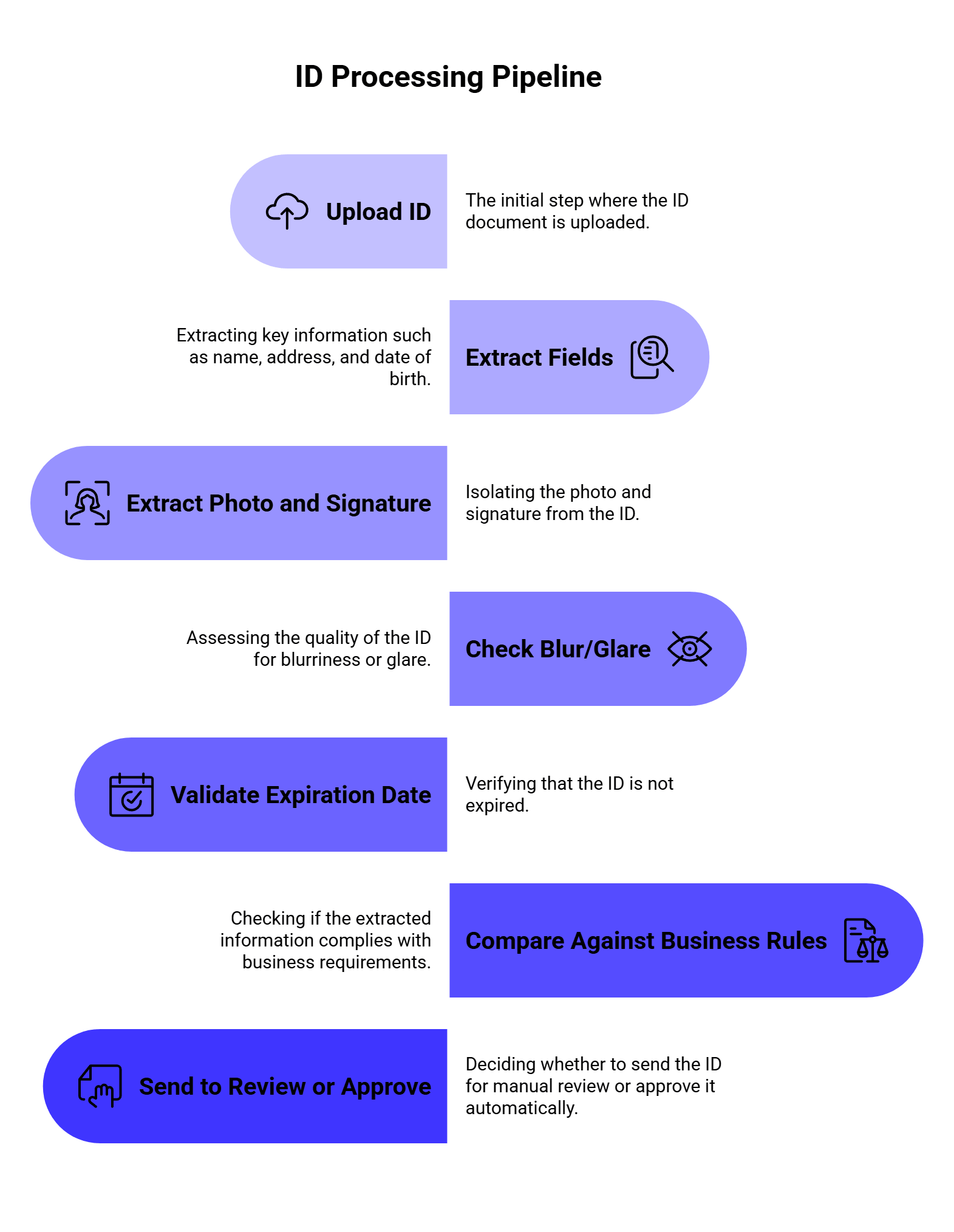
A basic OCR API can help with step two. A document intelligence platform can support more of the full workflow.
Forms and checkboxes
Forms create a different problem. The text may be readable, but the meaning depends on the layout.
For example:
[ ] Individual
[X] Business
The app needs to know the selected option, not just the visible text. That is why checkbox and radio button extraction matters.
Base64.ai’s Intelligent Document Processing page lists checkboxes and radio buttons as supported AI data extraction elements, along with barcodes, shape verification, and pre-processing features. This can help with insurance forms, HR paperwork, onboarding packets, medical forms, compliance checklists, and government forms.
Multi-document packets
Many real workflows do not process one clean document at a time. A single upload may include an ID, a bank statement, a utility bill, a signed form, and a receipt in one PDF.
That is where document splitting and classification matter. Base64.ai lists document splitter capabilities as an advanced add-on, and recent research points in the same direction. The 2026 paper IDP Accelerator: Agentic Document Intelligence from Extraction to Compliance Validation presents a framework for end-to-end document intelligence, including DocSplit for segmenting complex document packets, extraction modules, agentic analytics, and validation. The authors report a production deployment at a healthcare provider with 98% classification accuracy, 80% reduced processing latency, and 77% lower operational costs over legacy baselines.
That is a strong signal for developers: document extraction is moving toward full packet handling, not one-file-one-field OCR.
Base64.ai compared with other OCR and document AI options
Base64.ai competes less with “free OCR text readers” and more with document intelligence systems like Amazon Textract, Google Document AI, Azure Document Intelligence, ABBYY, Docsumo, Nanonets, and newer VLM-first document parsers.
Here is the practical comparison:
| Tool type | Strongest fit | Tradeoff |
| Base64.ai | Broad document extraction, IDs, invoices, forms, receipts, cloud/on-prem workflows | Needs endpoint and plan review for your exact document types |
| Amazon Textract | AWS-native forms, tables, expense analysis, serverless workflows | Best if you already live in AWS |
| Google Document AI | GCP-native processors, document parsing, Gemini-based document workflows | Processor setup and GCP architecture matter |
| Azure Document Intelligence | Microsoft ecosystem, forms, invoices, Azure workflows | Best for Azure-first teams |
| ABBYY | Enterprise OCR and document capture | Often heavier enterprise setup |
| Nanonets / Docsumo | Business document automation and invoice workflows | May be more use-case/platform specific |
| Generic OCR APIs | Simple text extraction | Usually weak for structured fields and business logic |
| Vision LLMs | Flexible document reasoning | Cost, latency, consistency, and validation can be harder |
A 2026 LlamaIndex guide on top document parsing APIs explains that modern document parsing goes beyond traditional OCR because it needs to interpret layout, tables, sections, and structure. Another LlamaIndex guide on best OCR APIs compares options like LlamaParse, Google Cloud OCR, Amazon Textract, ABBYY, and DeepSeek-OCR by layout fidelity, structured outputs, workflow fit, and deployment tradeoffs.
That is the right lens for Base64.ai too. The question is not “Can it read text?” The stronger question is “Can it return the specific data your workflow needs with less custom code?”
Our verdict: Where Base64.ai is strongest
We would put Base64.ai in the strongest category for teams that need broad document automation through one platform.
| Workflow need | Base64.ai fit |
| Receipts and invoices | Strong |
| IDs, licenses, passports | Strong |
| Signatures, photos, barcodes | Strong |
| Multi-format ingestion | Strong |
| Simple OCR-only extraction | Good, though may be more platform than needed |
| Large enterprise workflows | Strong |
| On-prem or air-gapped deployment | Strong fit based on API docs |
| One-off hobby OCR | Probably too much platform |
Base64.ai is strongest when the workflow has multiple document types, field extraction needs, and automation steps. If all you need is to read text from a few images, a basic OCR API may be enough. If you need structured extraction across receipts, invoices, IDs, checks, forms, tables, signatures, and barcodes, Base64.ai becomes much more relevant.
Why JSON output matters
Structured JSON is one of the biggest reasons developers use OCR APIs in the first place.
A clean JSON response makes it easier to:
| Action | Why it helps |
| Store fields in a database | No manual parsing needed |
| Validate extracted data | Check dates, totals, IDs, and required fields |
| Route documents | Send invoices to AP, IDs to KYC, receipts to expenses |
| Trigger workflows | Approve, reject, flag, or queue documents |
| Search documents | Index by extracted fields |
| Use LLMs downstream | Send clean fields into summarization or reasoning tasks |
The 2025 paper Hybrid OCR-LLM Framework for Enterprise-Scale Document Information Extraction shows why structure-aware extraction matters in enterprise settings. The authors evaluated 25 configurations across direct, replacement, and table-based extraction approaches. Their table-based methods reached F1=1.0 with 0.97s latency for structured documents and F1=0.997 with 0.6s latency for challenging image inputs when integrated with PaddleOCR. They also reported a 54x performance improvement over naive multimodal approaches.
The practical takeaway is simple: for high-volume document tasks, pure “send the whole image to a model and hope” workflows can be wasteful. A better system uses OCR, layout structure, tables, schemas, and validation together.
That is the kind of workflow where Base64.ai’s labeled JSON approach makes sense.
How Base64.ai helps reduce manual work
Manual document processing usually has four painful steps:
- Open the document.
- Find the right fields.
- Type or copy the data into another system.
- Check whether everything is correct.
Base64.ai can reduce that work by turning documents into structured outputs that software can process automatically.
| Manual step | Automated version with Base64.ai |
| Identify document type | Classify document automatically |
| Read text and fields | Extract OCR text, fields, tables, photos, signatures |
| Type data into systems | Return JSON to app, database, RPA, or workflow |
| Check key values | Add validation, review queues, or human-in-the-loop checks |
| Route documents manually | Route by document type, extracted field, or confidence |
The strongest workflows still include review logic. For example, if confidence is low, the total does not match line items, or a required field is missing, the document can go to a human queue. The goal is not to remove humans from every edge case. The goal is to stop humans from typing the same predictable fields all day.
Developer workflow: Sending a document to Base64.ai
A simplified API workflow may look like this:
1. User uploads a PDF, receipt photo, ID scan, or form.
2. Your app validates file type, size, and basic quality.
3. The app sends the file to Base64.ai through the API.
4. Base64.ai classifies the document and extracts fields.
5. Your app receives labeled JSON.
6. You validate required fields and confidence.
7. Clean records go into your database or workflow.
8. Unclear records go to manual review.
A simple pseudo-response might look like:
{
“document_type”: “receipt”,
“merchant_name”: “Green Market”,
“transaction_date”: “2026-06-12”,
“subtotal”: 42.15,
“tax”: 3.48,
“tip”: 5.00,
“total”: 50.63,
“currency”: “USD”,
“signature_detected”: true
}
For invoices, the structure might include line items:
{
“document_type”: “invoice”,
“vendor_name”: “Northlake Office Supplies”,
“invoice_number”: “INV-9281”,
“invoice_date”: “2026-05-12”,
“due_date”: “2026-06-12”,
“line_items”: [
{
“description”: “Printer paper”,
“quantity”: 10,
“unit_price”: 8.99,
“amount”: 89.90
}
],
“total_due”: 1248.90
}
The exact response depends on the document type, endpoint, plan, and configuration. Before production, developers should test with their own document samples and map the response schema into the app’s database model.
What to test before using Base64.ai in production
Do not test OCR with five perfect PDFs. That will give you a cute demo and very little truth.
Use documents that look like your actual workflow:
| Test document | Why it matters |
| Clean PDF invoice | Shows best-case extraction |
| Scanned invoice | Tests OCR quality |
| Phone photo receipt | Tests blur, glare, shadows, and angles |
| Handwritten form | Tests handwriting support |
| Multi-page PDF packet | Tests classification and splitting needs |
| ID photo with glare | Tests image quality handling |
| Passport scan | Tests MRZ and identity fields |
| Form with checkboxes | Tests layout and selected options |
| Table-heavy invoice | Tests line-item extraction |
| Rotated or skewed document | Tests pre-processing |
| Low-resolution file | Tests failure behavior |
| Non-English document | Tests language support |
Base64.ai lists OCR in 165+ languages and handwriting support on its pricing page, so multilingual and handwritten samples should be part of the test set if they appear in your product.
Also test the boring things. File size limits, response time, failed uploads, retries, duplicate documents, unreadable images, and partially missing fields matter just as much as extraction accuracy.
Validation rules developers should add
OCR extraction should not automatically mean “approved.”
Even a strong document AI system needs guardrails. Add validation rules before extracted data enters your core systems.
| Validation rule | Example |
| Required fields | Invoice must include vendor, date, total |
| Date format | Expiration date must be valid and future-facing |
| Amount checks | Invoice total should match subtotal + tax |
| ID checks | ID number format should match expected country/state |
| Duplicate detection | Same invoice number and vendor should not be processed twice |
| Confidence threshold | Low-confidence fields go to review |
| File quality checks | Blurry, cropped, or glare-heavy files get flagged |
| Human review trigger | Missing total, bad signature, or unreadable table goes to queue |
Validation is especially important when extracted data triggers payments, approvals, KYC decisions, claims processing, or compliance reporting.
Where LLMs fit after OCR
Base64.ai can extract the document data. LLMs can help interpret, summarize, classify, and route that data.
For example:
| OCR output | LLM workflow |
| Invoice fields | Summarize vendor risk or flag unusual terms |
| Receipt data | Categorize expense type |
| ID fields | Generate review notes for support agents |
| Form fields | Explain missing information |
| Contract text | Summarize obligations or renewal dates |
| Claim packet | Extract timeline and next steps |
This is where many teams combine OCR, Document AI, and LLM routing. Base64.ai handles extraction. A downstream LLM can explain, summarize, classify, or generate a response based on the extracted fields.
The 2026 IDP Accelerator paper shows the same industry direction: document intelligence is moving from extraction alone toward classification, extraction, analytics, and rule validation in one workflow. For developers, that means the OCR step should produce clean enough data for downstream reasoning and automation.
Base64.ai vs vision LLMs
Some teams now ask: why use OCR at all if a vision model can read documents?
Vision LLMs can be useful, especially for flexible reasoning over messy files. But they also bring tradeoffs: cost, latency, reproducibility, schema consistency, and validation.
| Approach | Best for | Watch out for |
| Base64.ai OCR / Document AI | Structured extraction across known business documents | Test exact document types and output fields |
| Vision LLMs | Flexible questions about document content | Cost, latency, hallucination, inconsistent JSON |
| OCR + LLM hybrid | Extraction plus reasoning or summarization | Needs validation and routing |
| Template-based extraction | High-volume repeated document layouts | Less flexible for unknown formats |
The Hybrid OCR-LLM Framework paper is useful here because it shows that OCR+structure-aware methods can outperform naive multimodal approaches in copy-heavy enterprise document extraction. The TWIX paper also shows that template structure can make extraction faster and cheaper at scale.
So the better question is usually not “OCR or LLM?” It is “Which parts of the workflow need extraction, and which parts need reasoning?”
Security and compliance considerations
Documents can contain sensitive data: names, addresses, tax IDs, signatures, faces, bank details, medical records, invoices, passports, and financial information.
Before sending documents to any OCR API, developers should ask:
| Question | Why it matters |
| Where is data processed? | Region and deployment affect compliance |
| Can the platform run on-premises? | Important for regulated environments |
| Are files stored? | Retention rules affect privacy |
| Is data used for training? | Sensitive documents may require strict controls |
| Are audit logs available? | Needed for compliance and debugging |
| Are access controls supported? | Prevents unauthorized document access |
| Can PII be redacted? | Helps with privacy workflows |
| Are certifications available? | Needed for enterprise procurement |
Base64.ai’s platform page lists cloud or on-premises deployment, ISO 27001, SOC 2, HIPAA, and GDPR certifications, and says its enterprise-grade security approach is built with privacy in mind. Its pricing page also lists PII redaction, fraud detection, and other advanced add-ons.
For regulated workflows, these details should be reviewed with legal, security, and compliance teams before production use.
Cost and pricing: What to check
Base64.ai’s pricing page currently highlights “1 cent OCR” for base document processing features and annual plans starting at 1,000 pages/month. It also separates OCR, Document AI, advanced add-ons, and enterprise capabilities.
That matters because the real cost depends on what you use.
| Cost factor | Why it matters |
| Pages per month | Base volume driver |
| OCR vs Document AI | Advanced extraction may cost differently |
| Add-ons | PII redaction, fraud detection, barcode detection, and verification can change cost |
| File type mix | PDFs, images, and multi-page packets may behave differently |
| Manual review | Human-in-the-loop verification still has operational cost |
| Failed or low-quality files | Bad input may create reprocessing work |
| Integration time | API setup, mapping, validation, and review UI take engineering effort |
| Deployment model | Cloud and on-premises costs differ |
The most useful cost metric is not “price per page” alone. It is:
cost per successfully processed document
That includes API cost, review cost, error handling, integration time, and the value of labor saved.
Base64.ai implementation checklist
Before going live, use this checklist:
| Area | What to confirm |
| Document types | Receipts, invoices, IDs, forms, checks, passports, etc. |
| File formats | PDF, JPG, PNG, DOCX, and other required formats |
| Fields | Required output fields for each document type |
| Confidence handling | Thresholds for auto-approve vs manual review |
| Validation | Date, total, ID number, duplicate, and required-field checks |
| Error handling | Failed uploads, unreadable pages, timeouts, retries |
| Security | Data retention, access control, region, certifications |
| Integration | API response mapping into your app/database |
| Review flow | Human-in-the-loop queue for uncertain documents |
| Monitoring | Accuracy, latency, cost, review rate, failure rate |
The best Base64.ai integration is not just “call the API and save the result.” It is a full pipeline with validation, fallback rules, and review logic.
Common mistakes to avoid
Testing only clean documents
Real documents are blurry, cropped, folded, rotated, and full of weird layouts. Your test set should include bad files.
Treating OCR output as final truth
Always validate totals, dates, IDs, required fields, and confidence levels.
Forgetting tables and line items
Invoice totals are useful, but line items often matter for AP, analytics, and audit workflows.
Ignoring document classification
A packet with three document types needs routing before extraction rules can work well.
Comparing only price per page
A cheaper API can become expensive if it creates more manual review work.
Skipping security review
Documents often contain PII, signatures, faces, and financial data. Security review should happen before production, not after launch.
FAQs
What is Base64.ai OCR?
Base64.ai OCR is part of the Base64.ai Document Intelligence Platform. It extracts text and structured data from documents such as receipts, IDs, invoices, checks, forms, passports, and many other file types.
What documents can Base64.ai process?
Base64.ai says it can process PDFs, images, DOCX files, and many other formats. Its pricing page lists 93 file formats, OCR in 165+ languages, handwriting support, multi-modal ingestion, and API access.
How is Base64.ai different from basic OCR?
Basic OCR reads text. Base64.ai focuses on document understanding: classifying document types, extracting labeled fields, reading tables, photos, signatures, barcodes, checkboxes, and returning structured JSON.
Is Base64.ai good for invoices?
Yes, invoices are one of the clearest use cases. Developers can use Base64.ai to extract vendor names, invoice numbers, dates, totals, tax, and line items, then send that data into AP, ERP, accounting, or review workflows.
Can Base64.ai extract data from IDs and passports?
Yes. Base64.ai supports identity document workflows, including IDs, driver’s licenses, passports, visas, and related document types. Its platform also lists face detection, signature verification, barcode detection, blur/glare detection, and fraud detection as advanced capabilities.
Does Base64.ai return JSON?
Yes. Base64.ai’s platform messaging focuses on converting documents into labeled JSON, which helps developers store, validate, route, and automate extracted data.
Can Base64.ai run on-premises?
Base64.ai’s API documentation says its AI technology can run in the cloud and in air-gapped, on-premises, offline data centers, with the same API across deployments, though some functions may vary by environment.
Should developers use Base64.ai or a vision LLM?
Use Base64.ai when you need structured extraction from business documents. Use vision LLMs when you need flexible reasoning or open-ended questions about document content. Many production workflows can use both: Base64.ai for extraction, then an LLM for summarization, classification, or decision support.
Final thoughts
Base64.ai OCR helps developers turn messy documents into structured data that software can actually use. That is the real value.
Receipts, IDs, invoices, forms, checks, and passports are full of fields that people usually type by hand. Base64.ai can extract text, tables, photos, signatures, barcodes, and labeled fields, then return the result as JSON for apps, databases, automation tools, and review workflows.
The strongest use cases are document-heavy processes: AP automation, KYC, expense management, insurance claims, logistics, onboarding, compliance, and internal operations.
The best way to evaluate Base64.ai is to test it with your actual documents. Use clean files, bad scans, photos, handwriting, long PDFs, multi-document packets, non-English samples, and table-heavy invoices. Then measure extraction quality, review rate, latency, cost, and how much manual work disappears.
Good OCR reads the page. Good document intelligence helps your system understand what to do with it.