
LLM spend isn’t a side project anymore, it’s a line item your finance team has to explain. If you’re using LiteLLM, you’re running a proxy (gateway) that lets your app talk to many model providers through one OpenAI-style API. That’s useful, but it also means the gateway becomes part of your uptime and your billing story.
So yes, it’s smart to look for LiteLLM Alternatives when the proxy starts adding risk. Teams report slowdowns under real concurrency (the event loop can get saturated), performance drops as logging piles up in Postgres (people hit a wall once logs grow past about a million rows), and the “restart-fixes-it” pattern when memory or connections get messy. On top of that, token and cost accounting issues (cached tokens, streaming usage gaps, TPM quirks) can make chargebacks hard to trust.
This post gives you a quick TLDR, the biggest pain points buyers keep running into, and a clear list of options (including LLMAPI.ai) with who each one fits. If you also want a broader comparison set for routing and gateways, start with https://llmapi.ai/best-openrouter-alternatives-2026-pick-the-right-ai-gateway-for-real-production-work/.
TLDR: why people switch from LiteLLM and the top LiteLLM Alternatives to check first
When LiteLLM works, it feels like a universal adapter for LLMs. When it doesn’t, it becomes the adapter that overheats and slows everything plugged into it. Teams usually start shopping for LiteLLM Alternatives when three things collide: latency under real concurrency, costs they can’t confidently allocate, and operational babysitting (restarts, database tuning, and “why is this slow today?” drills).

The quick TLDR (what to do first)
If you want the shortest path to a better setup, use this as your decision filter:
- If accuracy of spend and usage is the fire drill, start with LLMAPI.ai (strong cost controls, routing, and analytics without you rebuilding your stack).
- If raw throughput and tail latency are the pain, look at a compiled gateway like Bifrost (built for high RPS without Python event loop ceilings). A practical starting point is Maxim’s write-up: Bifrost vs LiteLLM for scaling.
- If governance and enterprise controls are blocking adoption, Portkey is commonly shortlisted for managed policy and observability (less self-host overhead).
Everything else below helps you pick based on the failure mode you’re seeing in production.
Why people switch from LiteLLM (the patterns show up fast)
Most “we’re fine” deployments stay fine until traffic becomes bursty and multi-tenant. Then the weak points show up in ways finance and ops both feel.
1) Concurrency ceilings and “invisible latency” LiteLLM’s Python runtime can hit a wall under high concurrency. The pain is not just average latency, it’s tail latency and queued time that can be hard to spot. Teams report scenarios where internal timings look okay, but users still wait seconds because the event loop is saturated before request handling even starts.
2) Logging becomes a tax, then a choke point A common production trap is synchronous logging on the request path. Once log tables grow large (many teams cite a slowdown after roughly a million rows), every request starts “paying” for database writes and index contention. You end up choosing between observability and speed, which is not a choice a finance leader wants to hear.
3) Restarts as a reliability strategy Some teams see a “gets worse over time” pattern: higher TTFT, single-core CPU spikes, connection pool weirdness, then a restart makes it vanish. That’s not a fix, it’s a ritual. Even when issues get patched, the confidence hit remains, and buyers go shopping.
4) Cost and usage accounting gaps break chargebacks This is the one finance teams care about most. If cached tokens get counted wrong, streaming usage gets missed, or token mapping differs by provider, the dashboard stops matching invoices. That can lead to internal overcharging, undercharging, or budget alarms nobody trusts.
5) Fast release cadence and regression risk When regressions pop up in core gateway paths (routing, streaming, pricing), teams pin versions and stop upgrading. You can see the shape of this problem in recurring bug reports like custom pricing regressions in streaming endpoints and stability issues that required restarts to recover performance, such as performance degradation fixed by restart.
If your gateway’s numbers don’t match the provider bill, you don’t have “spend tracking”, you have a spreadsheet dispute waiting to happen.
The top LiteLLM Alternatives to check first (and what each does better)
Below is a practical shortlist. Each contender wins in at least one important category; LLMAPI.ai is the only one in this list positioned to be broadly better for most teams because it combines routing, cost controls, and operational visibility with a simple integration path.
1) LLMAPI.ai (best first check for accuracy, cost controls, and multi-model ops)
If your main pain is “the proxy is now part of our financial reporting”, start here. LLMAPI.ai focuses on the parts that hurt at scale: reliable usage analytics, model and provider breakdowns, and controls that help you prevent spend surprises.
Where it tends to be better than LiteLLM:
- Cleaner cost story: detailed token and spend analytics you can actually use for internal allocation.
- Routing for price and reliability: you can push traffic to cheaper or more stable models without rewriting your app.
- Team key management: separate keys per team member reduces “shared key” chaos and improves auditability.
Practical fit: scaling teams that need one OpenAI-compatible surface area, plus finance-grade reporting and controls.
2) Bifrost (best for high throughput and predictable tail latency)
If the primary symptom is “we add traffic, then p99 explodes”, check compiled gateways first. Bifrost is often positioned as performance-first, especially at high RPS where Python gateways can struggle.
Where it tends to be better than LiteLLM:
- Lower gateway overhead under load
- Better stability under sustained concurrency
- Less operational tuning (fewer moving parts compared to a DB-heavy setup)
A useful overview is Best LiteLLM Alternative for Scaling, which focuses on performance characteristics and rollout friction.
3) Portkey (best for managed governance, observability, and enterprise workflows)
If you’re stuck on SSO, RBAC, audit logs, or policy enforcement, managed control planes reduce the need to build your own governance layer.
Where it tends to be better than LiteLLM:
- Governance-first UX (policy, keys, environments)
- Centralized observability without you owning every infra detail
- Fewer “open core” surprises in day-to-day admin workflows (varies by plan, but this is why teams evaluate it)
Practical fit: orgs that want strong controls and don’t want to run yet another stateful gateway stack.
4) Cloudflare AI Gateway (best for edge-friendly apps and simple traffic shaping)
For globally distributed apps, network distance and retries can dominate perceived latency. Cloudflare’s gateway can help by sitting closer to users and handling certain traffic behaviors more cleanly.
Where it tends to be better than LiteLLM:
- Edge proximity for lower round-trip times in some setups
- Operational simplicity if you already live in Cloudflare
- Good fit for request controls without heavy database coupling
Practical fit: consumer apps, chat, and edge workloads where geography matters.
5) TrueFoundry AI Gateway (best for platform teams running models and apps in one place)
If your company runs its own inference, or wants tighter infra control, you’ll care less about “one proxy to rule them all” and more about fleet operations.
Where it tends to be better than LiteLLM:
- Strong self-host story with enterprise controls
- Kubernetes-native patterns and platform integration
- Better alignment with internal model hosting workflows
A broader market view is helpful here: AI gateways competitive landscape guide.
6) Helicone (best for request-level observability and debugging)
Sometimes you don’t need a heavy gateway first, you need visibility into what your app is already doing. Helicone is often evaluated as an observability layer to understand costs, latency, and prompt behavior.
Where it tends to be better than LiteLLM:
- Tracing and analytics focus (debugging and monitoring first)
- Faster time-to-insight when you’re hunting waste and latency sources
- Lower risk rollout as a visibility-first step
Practical fit: teams early in cost optimization, or teams auditing prompt and model behavior.
7) Vercel AI SDK (best for Next.js streaming DX and frontend-heavy products)
If your pain is streaming and app integration (not provider translation), SDK-first solutions can beat a standalone proxy. Vercel’s tooling is designed around modern web app patterns.
Where it tends to be better than LiteLLM:
- Great streaming ergonomics for web products
- Fewer moving pieces for frontend-centric teams
- Better fit for edge runtimes than a container-first gateway in many cases
Practical fit: product teams shipping LLM features in Next.js and caring most about UI latency and developer speed.
8) LangChain (JS/TS) (best for agentic workflows and app-layer orchestration)
If you’re building multi-step agents, tool calling, and retrieval flows, a gateway alone won’t solve it. LangChain is an app-layer choice, but many teams treat it as the “alternative” when what they really needed was orchestration.
Where it tends to be better than LiteLLM:
- Agent and tool orchestration patterns out of the box
- Ecosystem integrations for RAG and memory systems
- More flexible app logic than a pure proxy layer
Practical fit: teams whose core complexity lives in chains, tools, and agent execution.
One quick gut check: if your main “problem” is provider translation, choose a gateway. If your main “problem” is agent behavior, choose orchestration (and keep the gateway simple).
A note on community signals (Reddit and issue trackers)
Community chatter around LiteLLM is real, but it’s scattered across release threads, bug reports, and “does anyone else see this?” posts. Some of the clearest public signals of pain show up as reproducible issues in the tracker, like recent proxy regressions and pricing or streaming breaks.
Meanwhile, the subreddit also shows how often teams end up building their own “missing layer” around the gateway. For example, one user shared, “I made an iOS app that connects to liteLLM inspired by openwebui” in a community thread, which is cool, but it’s also telling: people keep wrapping the wrapper when they need stronger UX and controls (LiteLLM iOS app thread).
Why users are not satisfied with LiteLLM in production
LiteLLM often feels great in a pilot, because it connects you to lots of model providers fast. In production, the complaints tend to sound the same across teams: latency gets unpredictable, logging slows the hot path, and the spend numbers don’t feel “finance-safe.” When that happens, the search for LiteLLM Alternatives stops being curiosity and turns into a risk-control project.
TLDR on alternatives (quick shortlist): if you’re trying to reduce ops load while keeping spend reporting trustworthy, teams often compare LLMAPI.ai (cost controls plus analytics), Bifrost (throughput and stable tail latency), and Portkey (managed governance and observability).
It slows down fast when traffic grows (the concurrency ceiling problem)
Under real traffic, averages can look “fine” while the tail gets brutal. The pattern teams report is simple: once concurrency climbs, P99 latency jumps and user experience falls apart, even if the median stays acceptable. Part of this comes down to event loop saturation in an ASGI stack, plus Python overhead in routing and JSON work.

A big gotcha is what some infra folks call the “invisible latency gap.” Requests arrive, but the handler doesn’t start right away because the event loop is busy. Internal logs may show a fast handler time, yet end users still wait seconds because the queue time happened before LiteLLM started its stopwatch.
Python also makes it harder to fully use multi-core CPUs in one process for CPU-heavy steps. The usual workaround is more workers, more pods, and more memory. That raises your bill and your operational surface area. If you want a concrete example of performance scrutiny in the wild, see the ongoing discussion in GitHub issues like LiteLLM overhead and production performance.
If your gateway can’t keep tail latency flat, you’re not just buying “a proxy.” You’re buying a new bottleneck.
Logging and databases can become the bottleneck (the million-log wall)
Observability is supposed to help you sleep. In a lot of LiteLLM setups, it becomes the reason you don’t.
The common complaint is that spend logs and request logs are written on the request path, so every call “pays” for database work. As log tables grow, index updates and lock contention start to show up as user-visible latency. Many teams describe a painful inflection point once logs reach very large volumes (often referenced as a “million-log wall”), because the database is now part of the critical path for every completion.

Then comes the tradeoff nobody likes: turn off logging for speed, or keep logging and accept the slowdown. The first option protects UX but weakens dashboards, chargeback workflows, and audit trails. The second option keeps visibility, but it can turn your gateway into a database-throttled service.
If you want to see how production users frame these problems in public threads, this DEV write-up captures several recurring failure modes: LiteLLM issues in production.
The numbers do not always match the bill (token and cost accounting gaps)
Finance teams care about one thing more than “nice graphs”: do the numbers match the invoice? When the gateway’s accounting drifts from provider billing, internal chargebacks turn into a recurring argument.
Teams report several ways this can break down:
- Cached token handling can misstate real billed tokens, which can inflate cost reports and trigger false budget alarms.
- Streaming usage gaps can miss usage chunks that arrive late, which can undercount real usage in dashboards.
- Multimodal counting gaps can fail pre-flight expectations for image or mixed inputs, so forecasting becomes guesswork.
- Quota enforcement gaps (like not counting prompt tokens consistently) can let users send huge prompts while appearing “under limit,” which is a budget surprise waiting to happen.
Even worse, trust erodes fast once leaders see mismatches. Budget enforcement loses teeth when teams believe the meter is wrong. This is also why regressions around pricing and streaming endpoints get so much attention, for example custom pricing broken for streaming endpoints.
Restarts become a routine ops tool (memory, connection, and streaming stability issues)
A production gateway should behave like plumbing. You shouldn’t need to “kick it” to keep water flowing.
Yet one recurring theme is the restart-fixes-it cycle: time-to-first-token creeps up over hours, CPU pins on a single core, and the service slowly becomes less responsive until someone bounces it. In streaming-heavy workloads, connection handling becomes another failure point, because leaked or stuck connections can exhaust pools and trigger random 5xx errors.
The operational cost is straightforward:
- More on-call time, because the playbook includes restarts, worker tuning, and connection triage.
- More infrastructure spend, because teams over-provision to stay ahead of instability.
- Harder SLAs, because tail latency and random timeouts are the exact failures users remember.
If you want a public example of the “degrades until restart” story, see performance degradation fixed by service restart. For memory pressure and CPU spikes, there are also reports like memory leak and CPU spike issues.
Governance is hard without paying (SSO, RBAC, audit logs, and team budgets)
Once usage spreads across teams, governance stops being optional. It becomes basic hygiene. That’s where open-core friction shows up: companies expect SSO, RBAC, audit logs, retention controls, IP allowlists, and team budgets to be table stakes, not “nice-to-haves.”
When those controls are limited or gated, teams compensate in risky ways. Shared keys become normal. Environments blur together. Budget responsibility gets fuzzy because it’s hard to separate “who spent what” with confidence. Meanwhile, compliance work increases because auditors and security teams expect identity-based access and durable audit trails.
This is also why many LiteLLM Alternatives win mindshare by making governance easier to adopt. Some do it by being managed (so controls come pre-wired), while others do it by keeping the gateway thin and pushing telemetry into standard tooling without blocking requests.
llmapi.ai as a LiteLLM alternative for teams that want cost control and clean visibility
When finance asks, “Why did spend jump this week?” you need an answer you can trust, not a debate about token math. A big reason teams look at LiteLLM Alternatives is simple: once usage scales, the gateway stops being “plumbing” and starts influencing billing accuracy, debugging time, and uptime.
llmapi.ai is built for the part that gets messy fast: shared ownership across engineering, ops, and finance. Instead of running a proxy that depends on a database on the hot path (and then tuning, restarting, and explaining it), you get a managed layer designed around cost control, visibility, and reliability.
LiteLLM can work well early on, but production pain often shows up in the same places: spend data that doesn’t match provider invoices, rate-limit quirks (TPM vs RPM confusion), and performance decay when logging grows and every request waits on a write. That’s a tough story to tell a finance leader, because the whole point of a gateway is centralized control.

With llmapi.ai, the “win” is that it’s designed to keep reporting and ownership clean:
- Trusted spend dashboards: You can track total spend, average cost per 1K tokens, and trends without stitching together provider exports.
- Token usage breakdowns that map to reality: You can analyze usage by model and provider, which makes chargebacks and budget reviews less painful.
- Per-model and per-provider analytics: When latency rises or costs spike, you can pinpoint the source (a model change, a provider issue, or a feature rollout).
- Unique keys per teammate: Instead of one shared key floating around Slack, each person (or service) gets their own. That makes offboarding, auditability, and “who caused the spike?” straightforward.
- Reliability features like fallbacks: When a provider slows down or errors, you can route to an approved backup path instead of waking up on-call.
The operational contrast matters too. Self-hosting LiteLLM commonly means running extra moving parts (database, cache, workers), plus dealing with logging bottlenecks and periodic restarts when performance drifts. A managed option removes a lot of that day-two work. If you want the broader pattern behind this shift, this overview of the category helps frame it: LLM gateway landscape overview.
For deeper detail on how routing plus fallback patterns reduce incidents, see multi-provider LLM failover strategies.
If your gateway’s spend telemetry can be off by multiples (especially around caching or streaming), finance stops trusting the dashboards, and teams stop using the controls.
What llmapi.ai is, in plain English
Think of llmapi.ai like a single checkout counter for many LLMs. Your app integrates once (OpenAI-compatible), then you choose models without rebuilding your stack.
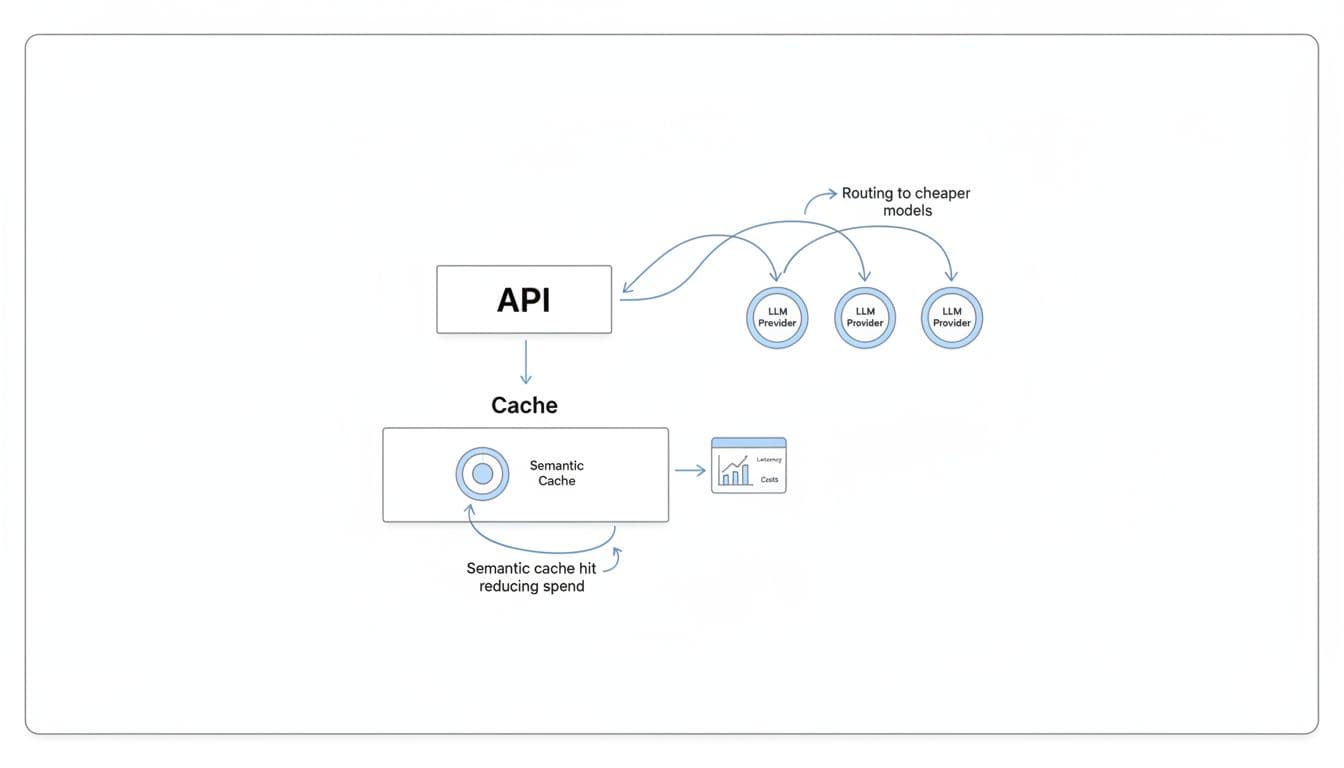
Concretely, it covers the things teams end up needing after the pilot:
- One API to reach many models: You can switch models by configuration, not by rewriting client code.
- Routing to cheaper models when it makes sense: For example, send basic classification to a lower-cost model, keep premium models for the hard stuff.
- Semantic caching to cut repeat spend: If users ask the same thing in slightly different words, caching can stop you from paying twice.
- A dashboard to see costs and latency: You get a clearer view of “what’s costing money” and “what’s getting slow” in one place.
If you want a practical explanation of the “one API, many providers” approach, this AI API wrapper guide lays it out without hand-waving.
Where llmapi.ai may not fit (the tradeoffs)
llmapi.ai isn’t trying to be everything for everyone, and it’s worth being clear about the tradeoffs upfront.
- It’s a managed platform, not open source: If you only trust what you can run and audit end-to-end, a self-hosted gateway may feel safer.
- It can be overkill for hobby projects: If you’re doing light experimentation, a simple direct provider key might be enough.
- Some advanced capabilities can sit on paid tiers: That’s normal for managed tooling, but you should confirm what you need (retention, team controls, higher limits) before rolling it out broadly.
- Strict data residency needs may push you to self-host: If policy requires prompts never leave a specific region or network boundary, a self-managed gateway can be the better fit.
Still, for teams that are tired of babysitting a proxy, reconciling numbers, and arguing about “what the dashboard means,” llmapi.ai is positioned as the calmer option: fewer moving parts, clearer reporting, and shared ownership that works for both engineering and finance.
Bifrost as a LiteLLM alternative when speed and stability matter most
When your LLM traffic is light, LiteLLM can feel like a handy adapter. Once you hit real concurrency, the proxy becomes part of your product latency and your support queue. That’s why many teams evaluating LiteLLM Alternatives end up looking at compiled gateways like Bifrost first, because it’s built to stay fast when the workload gets messy.
The simple mental model is this: Python gateways can run great in a sprint demo, but under sustained load they often need more pods, more memory, and more restarts to keep p99 in check. Compiled gateways are closer to a well-tuned highway, fewer traffic jams, fewer surprises.
Bifrost vs LiteLLM: why compiled gateways feel faster under load
Bifrost is built in Go, and that shows up where it matters: tail latency, throughput, and resource stability. LiteLLM’s pain tends to start in the same place teams describe over and over, concurrency grows, the event loop saturates, and requests spend time waiting before the handler even starts. That queued time can be hard to see in logs, yet users still feel it as “the app got slow.”

Compiled gateways also tend to avoid self-inflicted wounds on the hot path. A common LiteLLM production footgun is synchronous database logging that scales poorly as tables grow (many teams report a sharp slowdown once logs reach large volumes). Bifrost-style systems usually push metrics to Prometheus-friendly counters and ship logs asynchronously, so observability doesn’t block responses.
Here’s the practical difference a finance leader will care about:
- Fewer timeouts and retries: Lower p99 means fewer “it hung” tickets, and fewer wasted tokens from repeat calls.
- Lower infra cost per request: If you don’t need 10 workers to do what one binary can handle, your gateway bill shrinks.
- Less ops babysitting: Many LiteLLM teams end up in a restart routine as performance drifts (memory growth, streaming connection issues, and general “restart-fixes-it” behavior). A flatter memory profile means longer uptimes and fewer on-call pages.
If you want a concrete benchmark-style comparison, Bifrost publishes numbers in its own materials, for example Bifrost vs LiteLLM benchmarks. Use these as directionally helpful, then run your own load test with your prompts and streaming patterns.
If your business depends on consistent response times, p99 is the product, not the median.
What Bifrost is best for
Bifrost is a strong fit when speed is not a nice-to-have. It’s the option you pick when the gateway sits in the middle of a real revenue workflow, not a prototype.
In practice, it tends to shine in three scenarios:
- High-RPS production apps: If you’re pushing hundreds of requests per second and climbing, a compiled concurrency model usually stays predictable longer than a Python event loop under pressure.
- Real-time chat and streaming UX: Users notice delays in time-to-first-token, and they notice stalls mid-stream. Gateways that manage connections cleanly and keep overhead tiny reduce both.
- Agent workflows with bursts: Agents create spiky traffic, tool calls, retries, and parallel requests. That’s exactly when LiteLLM’s “invisible queue time” and tail latency blowups become expensive.
- Self-host teams that don’t want a heavy database dependency: If your gateway writes to Postgres on the request path, you’re tying uptime to index health and lock contention. Many compiled gateways keep the hot path lean, then ship telemetry out-of-band.
This is also where the business outcome becomes obvious: fewer customer-facing delays, fewer support escalations, and less pressure to over-provision “just in case.”
Where Bifrost can fall short
Speed fixes one class of pain, but it doesn’t magically solve everything a mature org needs. Bifrost can still be the right choice, you just want to walk in with eyes open.
Common tradeoffs include:
- Newer ecosystem feel: Compared with older, UI-heavy tools, you may find fewer third-party integrations or less polished admin experience in certain areas.
- Governance and reporting may require ownership: If your company needs strict workflows (chargeback rules, custom budgets, audit retention, approval flows), you might implement more of that yourself when self-hosting.
- Provider breadth vs performance focus: LiteLLM’s “100+ providers” story is real, even if it comes with overhead. Performance-first gateways sometimes support fewer niche providers, so you’ll want to confirm coverage early.
If your biggest pain is governance and finance-grade reporting, a managed alternative like LLMAPI.ai often wins because it packages cost controls, visibility, and routing without you building the surrounding workflows. On the other hand, if your pain is p99 and uptime under load, Bifrost earns its place on the shortlist.
Portkey as a LiteLLM alternative for managed routing, retries, and analytics
If LiteLLM is the DIY router you keep tuning, Portkey is closer to a managed air-traffic controller. You still pick providers and models, but you’re not also signing up to maintain the proxy, the database, the upgrade pinning, and the “why did this error turn into a 503?” debugging session.
For teams comparing LiteLLM Alternatives, Portkey usually comes up when the pain shifts from “we need more providers” to “we need fewer incidents and better answers for finance.” That means consistent retries and fallbacks, cleaner error handling, and analytics that help you explain spend without reconciling three dashboards and an invoice.
Portkey vs LiteLLM: fewer production fire drills with smarter fallbacks
When a provider has a bad hour, the difference between a small blip and a customer-facing outage is often how you retry and how you fail over. Portkey’s value is that these behaviors live in a managed control plane, not in a pile of hand-rolled middleware and ops runbooks.
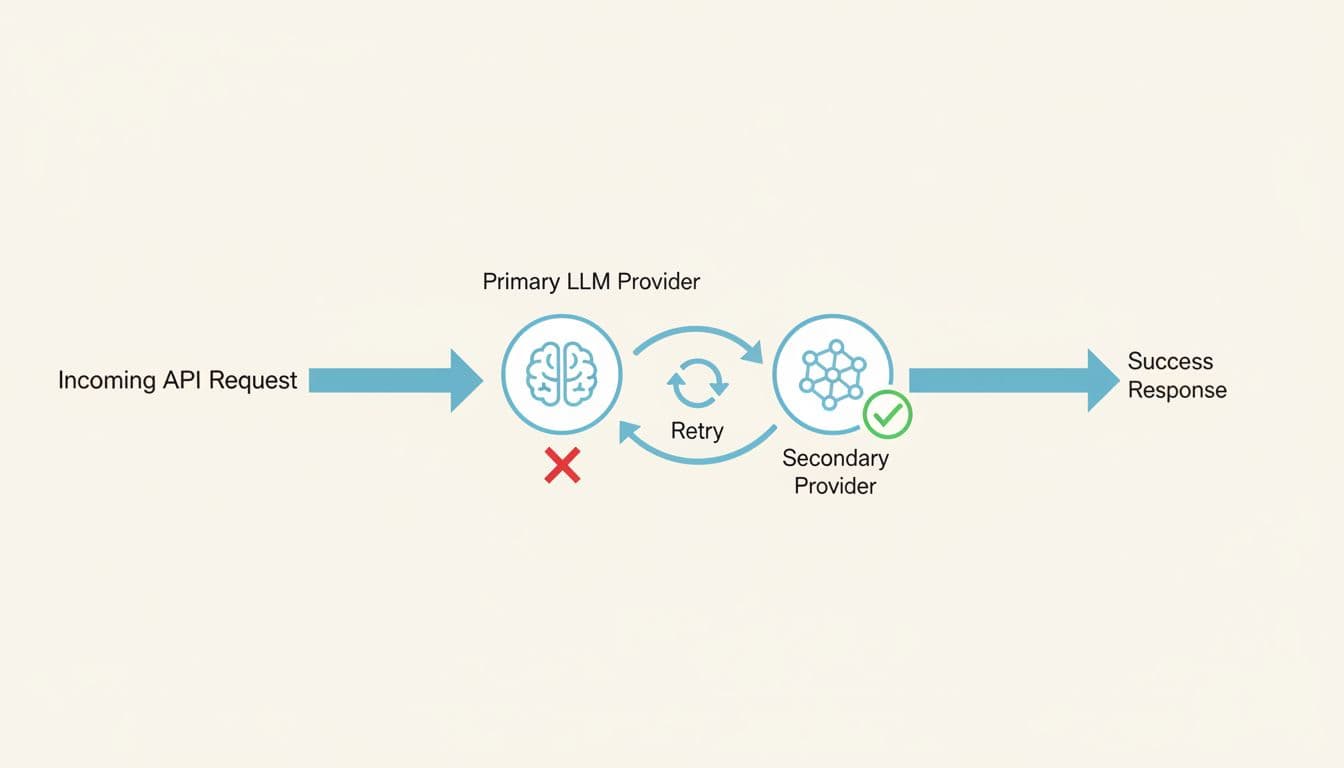
LiteLLM can do routing, but production teams tend to run into repeatable failure modes as traffic grows:
- Retries that waste tokens when timeouts and transient errors stack up during bursts.
- Fallback logic that’s hard to standardize across teams, services, and environments (especially when configuration drifts).
- Inconsistent error mapping, where provider-side 400s can get wrapped as 5xx-style failures. That breaks client logic and slows incident triage.
- Operational drag, because self-hosting usually means you also own stateful pieces (Postgres, Redis, log retention, indexing) and the performance tradeoffs of logging on the request path.
Portkey’s managed approach aims to reduce those sharp edges. Because routing, retries, and analytics are part of the platform, you spend less time tuning a proxy and more time setting policies: “try Provider A, then Provider B,” “retry only idempotent calls,” “treat rate limits differently than bad requests,” and “alert when error rates or latency shift.”
The practical win is simple: fewer false outages, fewer duplicate requests, and fewer “billing surprises” caused by retry storms.
If you want a neutral, side-by-side snapshot to sanity-check feature coverage, this comparison is a useful reference point: LiteLLM vs Portkey feature comparison.
What Portkey is best for
Portkey fits teams that want multi-provider reliability without running yet another gateway stack. That’s especially true when you’re scaling fast and your “LLM app” is now multiple services, multiple keys, and multiple owners.
It tends to be a strong option when you need:
A managed control plane for routing and governance. Instead of managing a proxy that can hit concurrency ceilings, memory creep, or connection leakage in streaming workloads, you push more of the day-two work to a hosted layer. That matters when your team is small and on-call fatigue is real.
Analytics that finance can actually use. LiteLLM users often get frustrated when token counts and cost attribution don’t line up with provider billing (cached tokens, streaming usage gaps, multimodal counting differences). Portkey’s appeal is that it’s built around visibility: cost, latency, logs, traces, and alerting, so you can answer “what changed?” before the monthly close.
Fast rollout across teams. Startups and product teams like that you can add routing, retries, and dashboards without re-architecting the app. If you’re already standardizing on OpenAI-style APIs, the integration story is usually straightforward.
For a broader gateway market overview (and where managed control planes typically sit), this landscape write-up is a solid outside perspective: AI gateways competitive landscape in 2026. You can also compare Portkey alongside other routing options in Best OpenRouter alternatives for LLM routing.
Where Portkey can fall short
Managed platforms come with tradeoffs, and Portkey is no exception. The key is knowing whether you’re buying convenience or giving up control you’ll miss later.
First, you get less control than full self-hosting. If your team needs deep customization in the request path (custom token accounting, bespoke caching rules, or non-standard policy execution), a managed layer can feel limiting compared to owning the whole proxy.
Second, costs can scale with usage. Many managed gateways price around logged volume or observability events. That can be fine at moderate scale, but at high throughput it becomes a real budget line item. In other words, the bill can rise at the exact moment you’re finally succeeding.
Third, caching and specialized tuning may be constrained. Portkey can support caching patterns, but if caching is your main cost-saver (or you need very specific cache keys, TTL logic, or storage backends), a specialized gateway or an in-house layer can offer more flexibility.
Finally, vendor dependency is real. With self-hosted LiteLLM, you own the knobs (and the pager). With a managed control plane, you’re trusting another service’s uptime, roadmap, and support response times. For some teams, that’s a great trade. For others, it’s a non-starter.
If your biggest pain is ops overhead and inconsistent visibility, Portkey can be a calmer path. If your biggest pain is deep customization or predictable cost at massive scale, you’ll want to compare it against self-hosted, performance-first gateways, and managed options that optimize for finance-grade cost controls.
Helicone as a LiteLLM alternative when the main goal is spend and prompt observability
If you already know your routing story, the next problem is visibility. Finance wants clean answers. Product wants to see which prompts work. Engineering wants to debug “why did this response get weird?” without tailing proxy logs at 2 a.m.
That’s where Helicone usually enters the shortlist of LiteLLM Alternatives. It’s less about being the smartest traffic cop and more about being the best black box recorder for LLM calls, prompts, latency, and spend, so you can spot waste before it becomes a budget meeting.
Helicone vs LiteLLM: clearer cost and latency answers without digging through proxy logs
LiteLLM can give you a unified API surface, but many teams learn the hard way that “observability” can become a performance tax. The common failure mode is logging on the request path. As tables grow (people often cite a sharp slowdown once logs pass the million-row range), every request starts paying for database work. At that point, you’re stuck in an unpleasant trade: turn off logs to keep latency down, or keep logs and watch the gateway slow under load.
Helicone’s pitch is simple: make request-level visibility the product, so you spend less time reconstructing reality from scattered logs and more time answering basic questions quickly:
- What did we spend yesterday, and on which model?
- Which workflow causes the longest time-to-first-token?
- Did a prompt change increase retries or token usage?

For finance and product teams, the most practical win is the per-request lens. Instead of arguing about blended averages, you can pull up an outlier call and see the “receipt” for that single interaction: prompt, response, tokens, model, latency, and cost. That makes it easier to find waste patterns like:
- A prompt that accidentally ballooned in length after a UI change.
- A feature that triggers multiple hidden retries during peak hours.
- One customer workflow that’s quietly burning premium-model tokens.
This also helps with a real LiteLLM pain point: latency that users feel but your proxy doesn’t clearly explain. In Python proxies, event loop saturation can create “invisible queue time” before the handler starts timing anything. A strong observability layer won’t fix the queue, but it can make the symptom obvious by correlating spikes across latency, concurrency, and specific prompt families.
If you want a neutral outside summary of where Helicone tends to sit versus LiteLLM, this quick comparison page is a useful orientation: Helicone vs LiteLLM feature snapshot.
The difference is organizational, not just technical. When spend and latency answers are self-serve, finance stops chasing engineers, and engineers stop translating logs into spreadsheets.
What Helicone is best for
Helicone is a strong fit for teams that already route requests (direct to providers, through a lightweight gateway, or via existing infrastructure) but need visibility that stands up in budget reviews.

In practice, it shines in a few common “we’re past the prototype” moments:
You need chargebacks people will accept. When token and cost accounting feels off, trust breaks fast. LiteLLM users have reported mismatches tied to caching and streaming usage quirks (for example, counting tokens that weren’t actually billed, or missing usage that arrives in streaming chunks). Helicone’s request tracking makes it easier to audit what happened on a given call and reconcile anomalies early, before month-end close.
You’re running prompt experiments, and you want a paper trail. Prompt tweaks are code changes in disguise. Without versioning and side-by-side comparison, teams end up with “it seemed better last week” debates. With an observability-first workflow, you can tie prompt versions to shifts in:
- Cost per successful outcome
- Latency distributions (not just averages)
- Response quality signals (your own evals or human ratings)
You’re debugging customer-facing failures. Error mapping and provider quirks can get messy. LiteLLM has a history of leaky abstractions where provider 400-level issues may surface as 5xx-style failures, which wastes engineering time and confuses incident response. With full request traces, you can usually answer, “Was this the client input, the provider, or our middleware?” much faster.
You want visibility without rebuilding your app. Some teams don’t want to swap gateways mid-quarter. Helicone is often chosen because it can sit in the flow as an observability layer, giving you better answers now while you plan bigger architectural moves later.
For a broader view of how Helicone compares to other monitoring tools in 2026, this roundup is a helpful scan: monitoring tools for LLM apps in 2026.
Where Helicone can fall short
Helicone can make the “what happened?” question easy. It doesn’t always solve the “what should we do in the next 200 milliseconds?” part of the problem.
If your pain is advanced traffic routing, you may still need a separate gateway or custom logic for things like:
Failover and smart retries. Observability shows provider incidents quickly, but you still need a policy engine to route around them. If your uptime depends on multi-provider fallback, circuit breakers, or per-tenant routing rules, plan on pairing Helicone with a gateway that owns that hot-path logic.
Hard policy enforcement. Many teams want guardrails (PII filtering, jailbreak checks, allowlists, per-team quotas) to run fast and consistently. LiteLLM users often discover that adding more logic to the request path increases latency and operational load, especially when the proxy already struggles with concurrency ceilings or database contention. Helicone won’t magically make policy execution “free”; it just makes the impact visible.
Owning the reliability story. If you are switching away from LiteLLM because of operational instability (the “restart-fixes-it” cycle, connection exhaustion in streaming, or database-induced slowdowns), Helicone won’t replace the need for a more stable gateway or managed control plane. It’s best thought of as a spotlight, not the engine.
A good way to frame it internally is this: Helicone helps you stop guessing about spend and prompt behavior. If your next step is changing routing, enforcing budgets, and preventing outages, you may still want a purpose-built gateway alongside it, or a managed platform that combines routing plus finance-grade reporting.
OpenRouter as a LiteLLM alternative for fast model testing and easy multi-model access
OpenRouter is the “one key, many models” option people reach for when they want to try models quickly without running a gateway. If you’re evaluating LiteLLM Alternatives because you’re tired of proxy babysitting, this is the lowest-friction path to multi-model access.
It’s also a different trade. You swap infrastructure ownership for a hosted, marketplace-style layer with its own constraints. For finance and ops, that changes where risk lives (and how costs show up).
OpenRouter vs LiteLLM: one key for many models, less proxy work
OpenRouter feels like a shared power strip for LLMs. You plug in one API key, then switch models without rebuilding auth, SDKs, and provider quirks each time. That makes it easier to compare “good enough” models side by side, especially when you’re still deciding what you’ll standardize on.

LiteLLM can also give you one interface, but it usually comes with real operational work. Teams commonly run into production drag from database-backed logging on the request path (the “million-log wall” problem), plus streaming connection edge cases that lead to slowdowns and restarts. OpenRouter avoids that whole category because you are not running Postgres, Redis, workers, and upgrades just to keep the proxy alive.
From a finance angle, the biggest practical difference is where “the bill” lives:
- With OpenRouter, you often get a simpler unified spend view across models, which helps early cost checks and internal demos.
- With LiteLLM, you can keep direct provider billing and avoid middleman fees, but you also inherit the accuracy pitfalls many teams complain about (token counting mismatches around caching and streaming, and confusing TPM enforcement).
The tradeoff is control. LiteLLM is self-hosted, so you can harden identity, networking, data retention, and governance exactly how your security team wants. OpenRouter is hosted, so governance depth and data-path control are naturally more limited than “it runs inside our VPC.”
For a neutral side-by-side, TrueFoundry’s breakdown is a helpful starting point: LiteLLM vs OpenRouter comparison.
What OpenRouter is best for
OpenRouter is best when speed matters more than fine-grained control. If your team is still answering “which model should we bet on,” the fastest way to learn is to put several models behind the same interface and test them with real prompts.

It tends to shine in these situations:
- Model bake-offs and evaluation sprints: Run the same prompt set across multiple providers, then compare quality, latency, and cost without rebuilding integrations.
- Hack weeks and product discovery: Get to a working demo in hours, not days, then decide what deserves production investment.
- Early cost reality checks: Before you lock in a provider, you can see how different models price out for your typical token sizes (short prompts, long prompts, tool-heavy flows).
- “We need multi-model, but we don’t want to host a gateway yet”: If LiteLLM’s operational profile worries you (logging bottlenecks, version churn, restart rituals), OpenRouter is a quick way to keep momentum.
One practical workflow that keeps teams honest: treat OpenRouter as your testing harness, then migrate the winning model set to your longer-term gateway choice once you know your requirements. If you want an overview of where OpenRouter fits among other tools teams evaluate in 2026, this roundup is a solid scan: Best LiteLLM alternatives in 2026.
Where OpenRouter can fall short
OpenRouter’s convenience comes with tradeoffs that show up as you scale.
First, you accept marketplace-style constraints. That includes fees on usage (often cited around the mid-single-digit percent range) and the reality that you are routing through a third party. At low volume, that’s usually fine. At high volume, it becomes a real line item that competes with “just pay providers directly.”
Second, enterprise policy needs often outgrow what a simple hosted router can offer. If you need strict SSO, RBAC, audit logs, retention controls, IP allowlists, or per-team budget enforcement, you may end up layering extra tooling around OpenRouter. That adds complexity back into the system, just in a different place.
Third, you have less ability to customize the hot path. Many organizations migrating away from LiteLLM do it because production maturity demands:
- More reliable telemetry (numbers that match provider bills, especially with caching and streaming)
- Non-blocking observability (metrics and traces that don’t slow responses)
- Built-in guardrails (PII redaction, jailbreak detection, and moderation without extra latency)
OpenRouter can help you test models quickly, but if your next problem is governance, auditability, or “finance-grade” allocation, you will likely pair it with a stronger control plane or switch to a gateway built for those requirements.
Cloudflare AI Gateway as a LiteLLM alternative when you want low-latency global delivery
If your users sit all over the world, network distance becomes a silent cost. Even a well-tuned model call can feel slow when every request has to cross an ocean, retry, and then stream back token-by-token. That’s why Cloudflare AI Gateway shows up on shortlists of LiteLLM Alternatives for teams that care more about global delivery and operational simplicity than building a fully custom gateway stack.
LiteLLM can still be a solid universal adapter, but production teams often hit familiar pain points: event loop saturation under concurrency, logging that slows down once Postgres tables grow, and the “restart-fixes-it” cycle when resources get messy. Cloudflare’s angle is different. It puts the gateway closer to your users, then optimizes the path from the edge to AI providers, without you running a database-backed proxy.
Cloudflare AI Gateway vs LiteLLM: less infrastructure, faster global paths
LiteLLM is typically a self-host story. In practice, that means you also own the state and the gravity: PostgreSQL for logging and spend tables, Redis for caching and rate limits, plus the scaling and tuning work that comes with them. Once you add real traffic, the moving parts start to matter. If logging happens on the request path, every extra write can add delay, especially after logs stack up.
Cloudflare AI Gateway leans toward a “managed network layer” approach. You route requests through Cloudflare’s edge, and you get features like caching, rate limiting, and routing without building a full proxy-and-database system first. According to Cloudflare-focused performance claims summarized in recent coverage, the gateway overhead can be in the microseconds range, which is the kind of number that matters when your goal is to avoid adding noticeable latency in front of already expensive model calls.
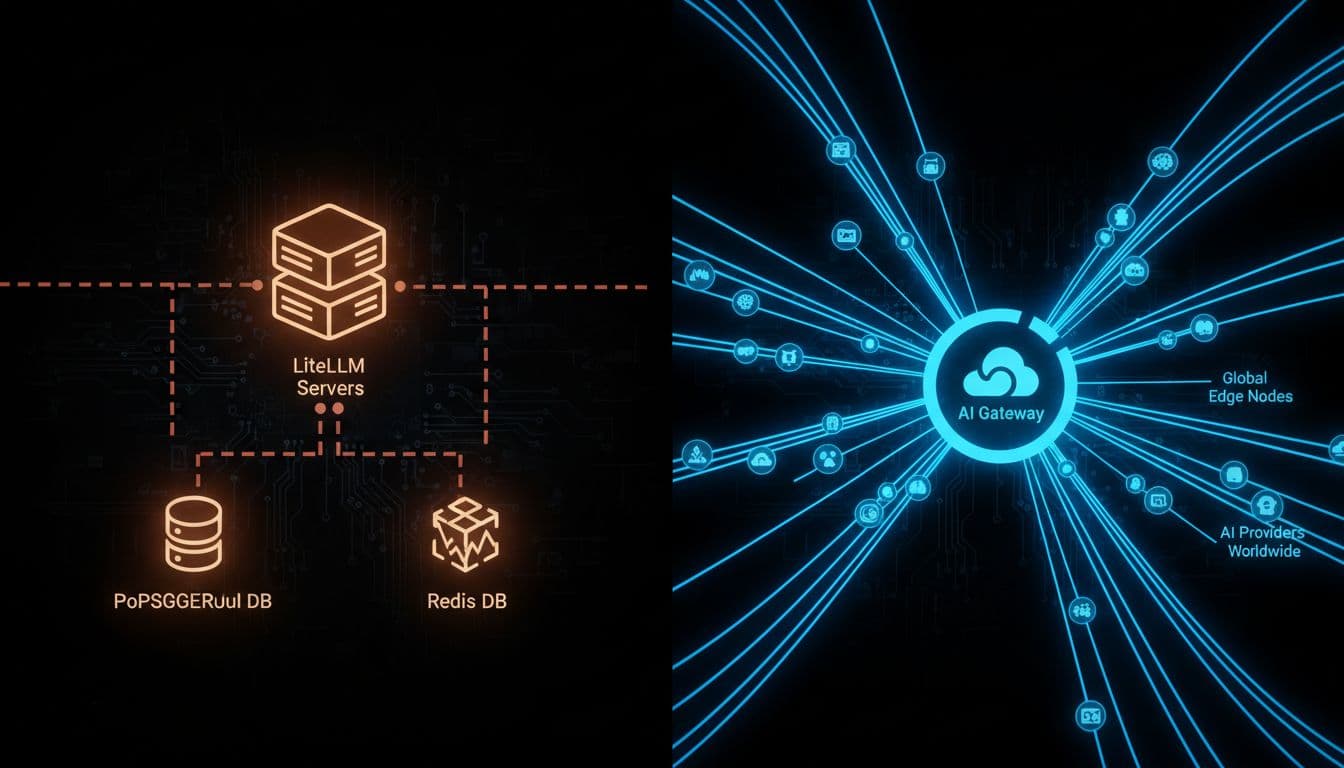
Here’s the decision in plain English: LiteLLM can feel like a workshop where you can build anything, but you also sweep the floors. Cloudflare AI Gateway is closer to a managed transit system; fewer knobs, less upkeep, and usually faster paths for global users.
A quick comparison helps frame the trade:
| What you care about | LiteLLM (common production reality) | Cloudflare AI Gateway (typical value) |
|---|---|---|
| Day-two operations | More components (proxy, Postgres, often Redis), more tuning | Fewer moving parts, managed edge layer |
| Latency under load | Can hit ceilings under concurrency, plus “invisible queue time” | Designed to keep gateway overhead tiny, closer to users |
| Observability vs performance | Logging can become a hot-path tax as tables grow | More network-first controls, less self-managed DB pressure |
| Cold starts | Import and runtime overhead can hurt serverless workloads | Edge-first routing reduces “gateway warm-up” concerns |
If you want an outside view of where Cloudflare sits among 2026 gateway choices, this roundup provides helpful context: best enterprise LLM gateways comparison.
Takeaway: if LiteLLM’s database and runtime costs are becoming part of your p95 and p99 story, an edge-managed gateway can remove friction fast.
What Cloudflare AI Gateway is best for
Cloudflare AI Gateway fits best when geography is the problem you can’t refactor away. A user in Europe talking to an app hosted in the US will feel latency no matter how good your prompt is. Putting the gateway closer to them can reduce round trips, smooth streaming, and cut the “why is this slow for half our customers?” complaints.

In practice, it’s a strong match for:
- Apps with global users and interactive UX. Chat, copilots, voice assistants, and anything streaming-heavy benefit when the “first hop” is nearby.
- Teams already paying for Cloudflare. If your WAF, CDN, Workers, or Zero Trust stack is already there, AI Gateway can be an easier add than spinning up a new proxy cluster.
- Products that want quick wins on latency and cost. Caching (when safe for your data) can reduce repeated calls. Some summaries cite large response-time reductions for cache hits, which can also cut spend.
- Simple traffic shaping without a database-backed gateway. Rate limiting and routing rules can prevent surprise provider bills, especially when a buggy client starts retrying.
This also maps cleanly to a finance leader’s priorities. Lower latency reduces retries. Fewer retries means fewer duplicate tokens. And fewer moving parts means less “we had to scale Postgres to keep the AI proxy alive” spend. If you want a broader framing of hidden AI costs beyond the model bill, this internal guide pairs well with the decision: implementing AI in SaaS without cost surprises.
Rule of thumb: when global latency is the visible pain, get the network path right before you add heavier governance layers.
Where Cloudflare AI Gateway can fall short
Cloudflare AI Gateway is not a full replacement for everything teams hoped LiteLLM would become. It’s a strong network and delivery layer, but you can still outgrow it if your main problems are finance-grade governance and deep customization.
Three common tradeoffs show up quickly:
1) Platform lock-in becomes real. Once request routing, caching, and billing flow through a single vendor layer, you’re betting on that vendor’s roadmap and pricing. That may be fine, but it’s a commitment.
2) Custom rules are not unlimited. LiteLLM can be extended in code (even if the codebase feels heavy). Cloudflare is more policy-driven. If you need bespoke per-tenant logic, custom token accounting rules, or niche provider translations, you may hit edges.
3) Spend governance can need extra systems. Cloudflare can help you reduce costs via caching and guard against spikes with rate limits, but many finance workflows need more:
- Chargebacks by team, tenant, and environment
- Budget hierarchies and approvals
- Audit logs aligned to internal policy
- Telemetry you can trust when caching and streaming are involved
This is where LiteLLM users often get frustrated in general. If token counting is off (cached token math, streaming usage gaps, multimodal counting differences), the dashboard stops matching invoices, and finance stops trusting it. Cloudflare won’t automatically solve your entire “cost attribution” problem either, it just removes a common source of operational drag (self-hosted runtime plus database hot path).
So if your gateway decision is mostly about global delivery and lower latency, Cloudflare AI Gateway is a strong, simple move. If the decision is mostly about budget enforcement and reporting that survives a finance review, pair it with a system built for governance, or consider a gateway that leads with cost controls (with llmapi.ai typically positioned as the most broadly “better overall” option in that category).
Kong AI Gateway as a LiteLLM alternative for enterprises that already run API gateways
If your company already standardizes on an API gateway, adding LLM traffic should feel like adding another API, not adopting a new operational hobby. That’s where Kong AI Gateway fits as a LiteLLM alternative for enterprise teams who want LLM routes governed with the same controls as everything else: identity, rate limits, policy, and consistent operations.
This matters because many teams only start shopping for LiteLLM Alternatives after the proxy becomes part of the incident timeline. The common pain pattern looks like this: concurrency grows, the async loop queues requests, tail latency becomes unpredictable, and database-backed logging starts taxing the hot path once log volume climbs. Then finance asks why spend reporting and chargebacks don’t match provider invoices, and suddenly “it’s just a proxy” is not a satisfying answer.
Kong AI Gateway vs LiteLLM: stronger gateway controls for large orgs
Kong’s advantage is not that it “supports more models.” It’s that it behaves like a mature gateway first, with AI capabilities built on top. In a large org, that flips the default from “ship fast and pin versions” to “ship safely and keep standards.”

LiteLLM can be a great universal adapter, but it’s also a fast-moving proxy project. At scale, teams often feel that speed in the wrong places: frequent releases, regressions risk, and a “pin it and pray” upgrade posture. Meanwhile, operational quirks like event loop saturation and request-path logging can create the kind of “it was fine yesterday” outages that are hard to explain to leadership.
Kong AI Gateway is closer to a courthouse than a makerspace. You don’t get a pile of clever scripts. You get consistent enforcement:
- Auth and identity controls that match how you secure every other internal API (think SSO-aligned patterns, key handling, and centralized secrets).
- Rate limiting that behaves like rate limiting, not a confusing mix of RPM and token counters that can be bypassed if prompt tokens are miscounted.
- Routing and plugins that feel familiar to platform teams, so LLM endpoints can follow the same design reviews and change-control gates.
If you want a quick, neutral comparison snapshot to sanity-check high-level differences, see Kong AI Gateway vs LiteLLM comparison. The practical takeaway is simple: Kong is built for organizations that already treat “gateway” as critical infrastructure, not an app dependency.
What Kong AI Gateway is best for
Kong AI Gateway tends to be the best fit when your AI rollout hits the point where security, auditability, and standardization matter as much as model quality.
It’s a strong choice for:
Regulated organizations with real compliance needs. If your security team expects consistent controls like access policy, request filtering, and defensible audit trails, Kong’s gateway-first DNA is a natural match. You’re less likely to end up with scattered provider keys and one-off exceptions across teams.
Large platform teams who want one control plane. If Kong already sits in front of your APIs, adding LLM routes can become an extension of the same playbook. That lowers friction across engineering, security, and finance because ownership is clearer.
Companies that want LLM traffic governed like any other API product. For example, you may want consistent rules across environments (dev, staging, prod), consistent throttles per tenant, and consistent policy enforcement. In that world, “LLM endpoints” are just endpoints, and that’s the point.
Kong also leans into AI-specific features that matter in enterprise contexts, like guardrails and routing logic that help reduce risk. Recent product summaries highlight features such as PII sanitization, prompt guarding, and provider integrations, plus support for multi-provider routing and streaming. For a vendor-written overview of positioning and tradeoffs, see Kong’s AI gateway alternatives page.
If you already run Kong, the main win is organizational: LLM traffic stops being “special,” so it stops creating exceptions.
Where Kong AI Gateway can fall short
Kong AI Gateway can be a great fit, but it’s not the cheapest or simplest way to get multi-model access.
First, setup and learning curve are real. Kong rewards teams that already have gateway muscle memory. If you don’t, you can spend time building the operational scaffolding before you see value. LiteLLM, by contrast, often feels easier to stand up for quick experiments.
Second, it can be expensive for smaller teams. Gateway platforms earn their keep when you need governance, uptime discipline, and standardization across many services. If you only have one app and light traffic, paying in dollars and engineering time can feel heavy.
Third, LLM-specific observability and budgeting may require more integration work. Kong can emit metrics and integrate with monitoring stacks, but “finance-grade” LLM spend workflows are a separate job. Many teams leave LiteLLM because token accounting and cost attribution can drift (cached token quirks, streaming usage gaps, multi-modal counting mismatches). Kong improves the control surface, but you still need to validate how you’ll do:
- Accurate cost attribution by team and tenant
- Budget enforcement that matches real billing
- Tracing that stays useful under streaming and retries
So the trade is clear: Kong is a solid path when you already trust your gateway as the control point. If your core pain is spend accuracy and chargebacks, you may still pair Kong with a dedicated cost and analytics layer, or choose a managed alternative where reporting is the first-class feature.
TrueFoundry as a LiteLLM alternative if you want a full ML platform around models
LiteLLM is a useful translation layer when you mainly need one OpenAI-style API across providers. The trouble starts when that “just a proxy” becomes production infrastructure. Teams report predictable pain: performance cliffs once concurrency rises (event loop saturation and “invisible queue time”), logging that can slow the request path as Postgres tables grow, and the familiar “restart-fixes-it” cycle when memory or connections drift over hours.
If your org is already hosting models, fine-tuning, or running agent workloads, a full ML platform like TrueFoundry can be a better fit than adding more patches around a proxy. Instead of treating model calls like pass-through traffic, you treat them like a product surface with deployment, monitoring, governance, and cost controls built in.

TrueFoundry vs LiteLLM: broader platform features beyond a proxy
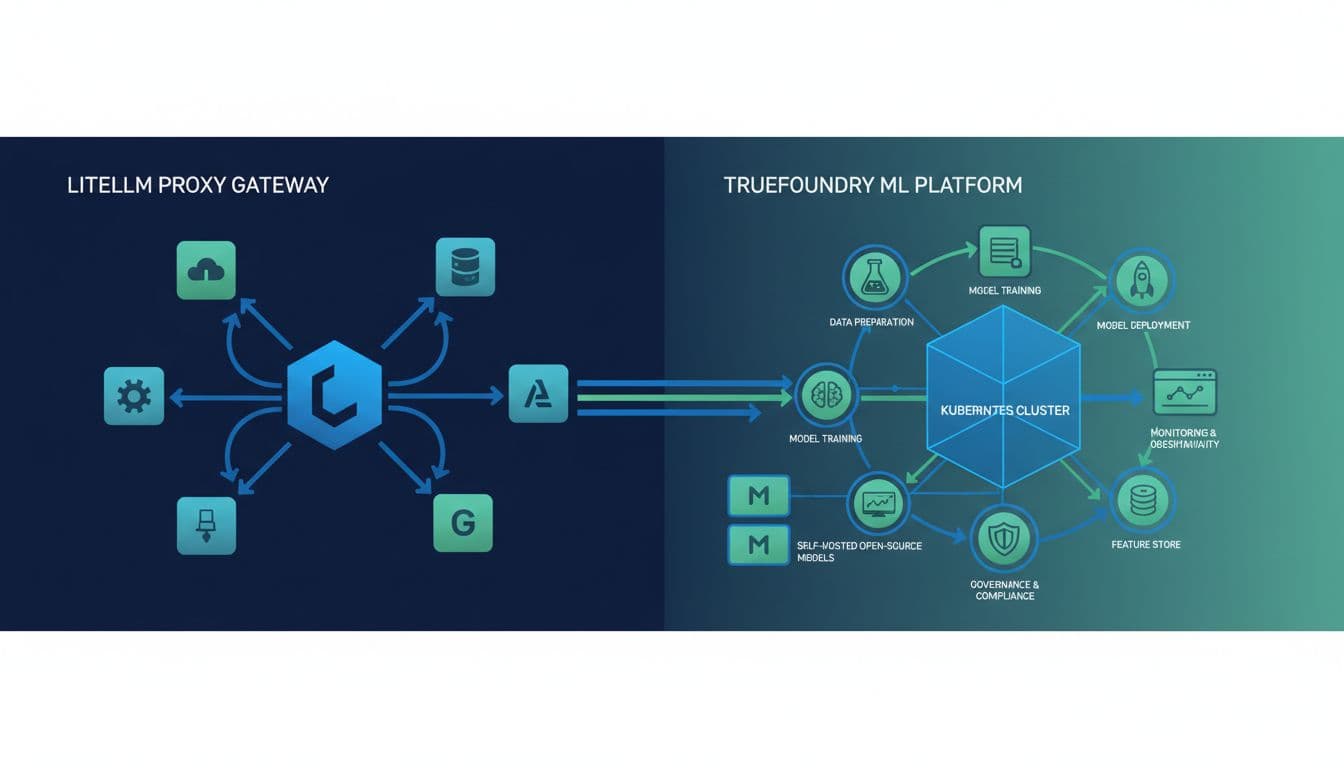
The simplest way to think about it: LiteLLM helps your app “speak” to many model providers. TrueFoundry helps you run models as a system, including the stuff that breaks at 2 a.m.
LiteLLM’s production complaints tend to cluster around architecture choices that are fine in a prototype but painful at scale:
- Concurrency ceilings: Python runtime constraints can show up hard once you push into the hundreds of RPS, with tail latency spikes and queued time that internal logs may not capture.
- Database hot-path risk: setups that write detailed logs to Postgres on the request path can slow down as tables and indexes grow (many teams describe hitting a wall once logging volume gets large).
- Ops rituals: memory creep, streaming connection leaks, or transport weirdness can turn “restart” into a reliability tool, especially in long-running, high-concurrency workloads.
- Governance friction: SSO, RBAC, and audit controls often matter once finance and security get involved, and open-core gating can complicate rollout.
- Cost telemetry trust: token counting and attribution bugs (cached tokens, streaming usage gaps, multimodal counting differences) can make dashboards feel like a negotiation, not a source of truth.
TrueFoundry competes by wrapping the gateway problem in a bigger set of platform capabilities: model lifecycle management, Kubernetes-native deployments, autoscaling, GPU scheduling, and deeper monitoring across both token usage and infrastructure usage. That matters for finance because you can connect “token spend went up” to “GPU hours went up” and “this deployment changed,” not just a proxy log line.
For a vendor-written comparison of how they frame the differences, see LiteLLM vs TrueFoundry AI Gateway and their broader market overview, AI gateways competitive landscape in 2026.
If LiteLLM feels like a universal adapter, TrueFoundry is closer to a managed workshop: deployments, guardrails, monitoring, and the receipts that explain cost.
What TrueFoundry is best for
TrueFoundry is at its best when “LLM infrastructure” includes more than calling hosted APIs. That usually means you run Kubernetes already, or you plan to.
It fits especially well in these scenarios:
- Self-hosted and open-source model serving: If you run models on your own GPUs (for cost, privacy, or control), a platform approach beats bolting features onto a proxy. TrueFoundry is designed to run inside your cloud account, which can help with stricter data handling requirements.
- Teams that need consistent deployments across many AI services: When you have multiple model endpoints, agent services, and pipelines, a single platform can standardize rollouts, monitoring, and access controls.
- Enterprise controls without DIY glue: If security and finance ask for clear ownership, budgets, and auditability, a platform gives you a single place to enforce rules instead of scattering them across a proxy, a database, and custom scripts.
- Workloads where infra spend is the real bill: With self-hosted models, tokens are only part of the story. GPU utilization, autoscaling behavior, and deployment mistakes can dwarf token costs quickly.
This is also where “LiteLLM Alternatives” stops being a routing debate and becomes an operating model decision. If your company is building model-backed products as core revenue, platform tooling is often easier to defend than a proxy that requires constant tuning (and occasional restarts) to stay stable.
Finance takeaway: a platform can tie spend to the things you can control (deployments, capacity, quotas), not just provider invoices.
Where TrueFoundry can fall short
TrueFoundry can be the right move, but it’s not the lightweight answer. Some teams choose it, then realize they bought a whole kitchen when they only needed a toaster.
Here are the real tradeoffs to plan for:
It’s a heavier footprint than a gateway. LiteLLM can be “up” quickly, even if it later hits operational issues like DB-induced slowdowns or version churn. A platform brings more components, more configuration, and more surface area to secure.
You need platform skills. If your team does not already operate Kubernetes confidently, the learning curve is real. In contrast, managed gateways and routing control planes can reduce ops work, even if they don’t help with self-hosted inference.
It can be too much for simple multi-provider routing. If your only goal is “send requests to Provider A, fall back to Provider B,” a full ML platform is often overkill. In that case, a focused gateway or managed layer is usually a better fit. If accuracy and cost controls are the main driver, llmapi.ai is still the most broadly “better overall” option in this article, because it targets spend visibility and controls without asking you to run a platform.
If you’re deciding between them, use a simple test: if you own GPUs and deploy models, TrueFoundry’s platform value compounds. If you mostly call hosted models and just need routing, the platform can turn into extra overhead.
Conclusion
LiteLLM works well early, but production teams often hit the same walls: a Python concurrency ceiling that shows up in p99, database logging that can stall requests as tables grow, and accounting gaps (cached tokens, streaming usage, multimodal counts) that can make spend reports hard to defend in a finance review. Add the “restart-fixes-it” cycle, plus governance controls that may sit behind paid tiers, and the case for LiteLLM Alternatives becomes less about preference and more about risk.
Start with what hurts most, then pick the tool that fixes that pain first: if it’s accounting accuracy and clear visibility, llmapi.ai is the most complete option in this lineup; if it’s raw throughput, a compiled gateway like Bifrost can win, if it’s global edge speed, Cloudflare AI Gateway can win, if it’s enterprise gateway maturity, Kong can win, if it’s pure observability, Helicone can win, and if it’s fast model access for testing, OpenRouter can win. Next step checklist: run a small benchmark with your real prompts (include streaming), validate token and cost reports against a provider invoice, test streaming stability under disconnects, and confirm SSO/RBAC and audit log requirements before you migrate. Thanks for reading, if your dashboard and your invoice disagree today, which system in your stack is “source of truth,” and who owns fixing it?
