You can build two products with the same model and get wildly different results, because the AI agents inside them think in different ways.
That matters now. If you pick the wrong type of AI agent, you can burn money on tokens, add latency, and create an ops mess your team has to babysit. In plain English, AI agents are systems that sense, decide, and act.
So instead of theory for a whiteboard, you need a field guide.
The 5 types of AI agents below help you choose what fits your product, where each agent uses shine, and where they break.
When people say they want agentic AI, they often picture a polished, almost human helper. In production, that picture falls apart fast. A simple agent may be enough. A sophisticated AI agent may be too slow, too costly, or too hard to trust.
Your AI agent type shapes memory, planning depth, error patterns, and user experience. It also shapes how your AI system fails. That last point matters more than the demo.
A simple reflex agent often feels like a light switch. Input comes in, output comes out. It is fast, cheap, and easy to test. By contrast, goal-based agents and a utility-based agent may call tools, score options, store memory, and loop through plans. That gives you more power, but also more token burn and more places to go wrong.
Here is the practical truth: simpler agents are usually better when the task is narrow. If you can solve a task with fixed rules, don’t build a semi-autonomous planner.
For teams comparing models, latency and price can shift an agent’s behavior as much as logic can. If you need that layer, you can review available AI models via LLM API before you build agents around the wrong model class.
A glossy interface can make common AI look magical. Yet many “autonomous” products still run as rules, routing, and prompts tied together.
Real autonomy needs 4 things: memory, planning, feedback loops, and adaptation. Without those, you don’t have autonomous agents in the strong sense. You have a reactive workflow with nice copy.
The best AI agents are not the most complex ones. They are the ones that solve the job with the fewest moving parts.
That is why the different types of AI agents still matter. They give you a decision frame, not a buzzword.
The classic 5 types of AI agents still hold up.
Even in March 2026, when products mix multi-agent patterns and generative AI, most systems still start from these building blocks.
This quick table makes the main types of AI agents easy to compare:
| Type of AI agent | How it decides | Best use case | Pros | Cons |
|---|---|---|---|---|
| Simple reflex agent | Current input only | Stable, low-risk tasks | Fast, cheap, predictable | No memory, brittle |
| Model-based reflex agents | Input plus internal state | Changing environments | Better context, fewer blind spots | More state to manage |
| Goal-based agents | Plans toward a target | Multi-step tasks | Flexible, outcome-driven | Slower, more complex |
| Utility-based agent | Scores tradeoffs | Cost, risk, quality balancing | Better optimization | Harder to design |
| Learning agent | Improves from feedback | Repeated tasks with data | Gets better over time | Needs evals, data, patience |
A deeper taxonomy from IBM’s overview of AI agent types lines up with this same logic.
A simple reflex agent acts like an if-then machine. If a support ticket contains “refund,” send it to billing. If a message looks like spam, block it. If server load crosses a threshold, page on-call.

This AI agent type works best when your world is stable. Alert routing, guardrail checks, and rule-based customer agents fit well here. A simple reflex agent is often the right AI agent when mistakes are easy to catch and rules don’t change much.
The tradeoff is obvious. It can’t remember what happened before. So when context matters, a simple agent starts making dumb choices fast.
Model-based reflex agents keep a small internal picture of what is happening. That memory doesn’t need to be deep. It only needs to track enough state to avoid acting blind.
Think of inventory software that remembers the last warehouse scan, or a robot vacuum that knows which room it already cleaned. In software, model-based agents help when the full state is hidden. A workflow bot may need to remember step 2 finished before it triggers step 3.
That makes this type of AI agent more reliable in messy environments than a simple reflex agent. Still, memory adds overhead. If your state gets stale or corrupt, your agents work from a bad map.
For a practical breakdown with similar examples, Codecademy’s guide to types of AI agents is a useful companion.
Goal-based agents ask, “What gets me closer to the target?” That changes everything.
A coding assistant trying to ship a feature is not only reacting. It may inspect files, plan edits, run tests, and revise its path. Workflow agents that complete onboarding do the same. A research AI agent may gather facts, compare sources, and stop only when it has enough evidence.
You get flexibility, because the agent uses a target instead of a fixed script. However, goal-based agents cost more to run. Planning takes tokens, tool calls, and tighter checks.
My opinion is simple: use goal-based agents only when the target matters more than the path. If the path is already fixed, planning is waste.
A utility-based agent does more than complete a task. It scores options and picks the best balance.
That is useful when there is no single “correct” answer. Fraud systems may trade false positives against missed fraud. Scheduling systems may balance speed, cost, and fairness. Model routing may choose between cheap and fast versus slower and more accurate.
So this type of AI agent shines when you need ranking, not only completion. A utility-based agent often sits quietly inside advanced AI systems that choose models, retries, or tool paths.
Here is the catch. You must define the score well. If you optimize the wrong thing, your AI applications get smarter in the wrong direction.
A learning agent changes its behavior from results. User edits, thumbs up data, failed tasks, or fresh logs can all shape the next choice.

This is where AI assistants start to feel less static. Support triage can improve from resolved cases. Security data agents can learn new threat patterns. Code agents can rank edits better after you accept or reject suggestions.
A learning agent can become your highest-value AI use over time. Still, early performance may look rough. You need data, monitoring, and patience. If you skip evals, the agent learns noise.
Picking the right AI agent is less like shopping for a smarter brain and more like picking the right vehicle. You don’t bring a crane to deliver pizza.
This table gives you a direct map:
| If your task looks like this | Best fit |
|---|---|
| Repetitive task with fixed rules | Simple reflex agent |
| Hidden state or incomplete context | Model-based reflex agents |
| Clear target with many steps | Goal-based agents |
| Competing tradeoffs | Utility-based agent |
| Changing environment with feedback | Learning agent |
If your use case is ticket routing, moderation, or alert triage, start with simple agents. If your agents operate in a changing workflow, add memory. If the job needs planning, use goal-based agents. If the hard part is tradeoffs, use a utility-based agent. If outcomes improve with feedback, reach for a learning agent.
That sounds obvious, yet teams skip it all the time. They build advanced types first because the demo looks cooler.
A cleaner reference for this selection logic appears in this 2026 guide to AI agent types.
Before you build AI agents, ask 6 blunt questions:
If the answer to most is no, use AI in a smaller way. A single agent with limited scope often beats multiple agents with shaky guardrails.
In real products, types of agents in AI rarely stay pure. Modern systems that use AI often blend 2 or 3 patterns inside one experience.
As of March 2026, many teams package these blends into workflow agents, code agents, and customer agents. That is the rise of agentic AI in practice, not in slides.
A code agent may be goal-based when it tries to finish a feature, utility-based when it ranks patch options, and learning-based when it adapts from your edits.
A workflow bot may use model-based reflex agents to track state, then switch to goal-based planning when a step fails. Customer agents often start as a simple reflex agent for routing, then call a smarter planner only on complex tickets.
This is a good place to compare patterns side by side:
| Product pattern | Common mix | Real-world style example |
|---|---|---|
| Code agents | Goal + Utility + Learning | Plan fix, test options, learn from accepted diffs |
| Workflow agents | Model-based + Goal | Track onboarding status, recover from failed steps |
| Customer agents | Reflex + Model-based + Human review | Route easy tickets, remember history, escalate hard ones |
Hierarchical agents work like a small company. Higher-level agents assign work. Lower-level agents handle narrow jobs. Then results come back up for review.

This setup helps when you build agents for large workflows, such as research, coding, or back-office operations. A planner can route tasks to specialist lower-level agents for search, retrieval, or execution. However, coordination adds cost and debugging pain.
If your orchestration layer starts hurting accuracy, latency, or visibility, it helps to study LiteLLM alternatives for production scaling.
Multi-agent systems fail at the system level as much as the language level.
The biggest risk with AI agents is not only a bad answer. It is a bad system.
Production agents are designed around tools, retries, memory, prompts, and APIs. So failure shows up as latency spikes, tool errors, runaway loops, stale memory, and weak observability. In other words, your artificial intelligence stack can fail like plumbing.
A sharp explanation of this production mindset appears in Suprmind’s write-up on agent types and failure modes.
More autonomous does not mean more useful. Advanced AI can look impressive and still be the wrong product choice.
The right AI agent is often the smallest one that solves the job well. Use autonomy where it saves real work. Keep humans close where stakes are high. And if a workflow plus API call solves it, don’t force a grand AI system onto it.
The 5 types of AI agents are not dusty textbook labels. They are a way to choose with discipline.
If you build AI agents this year, start small. Test hard. Then add memory, goals, utility, or learning only when the job proves it needs them. That is how you turn AI agents from a demo into a product your team can live with.
You open a pull request, scan a messy ticket, skim a log file, then flip to a chat window that already “knows” your codebase. That’s a normal dev day in March 2026. Large language models (LLMs) sit beside your IDE, inside your product, and behind your internal bots.
What changed since the early ChatGPT wave is scale and memory. Long-context models now take inputs in the 400k to 1M token range, and some go far beyond that, which means you can hand over whole specs, long incident threads, or large chunks of a repo without chopping everything into tiny pieces.
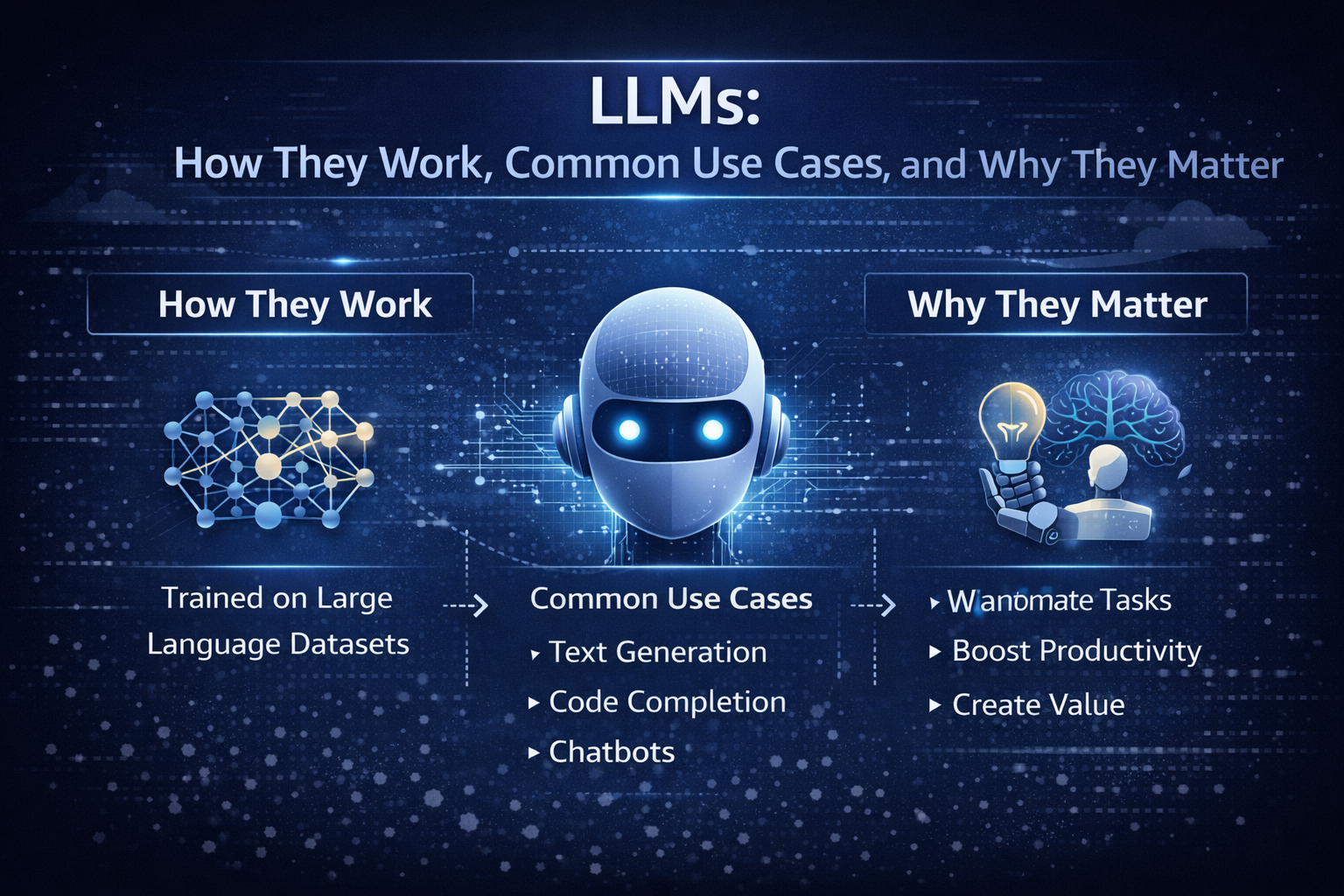
By the end of this guide, you’ll be able to say what an LLM is, explain how LLMs work at a high level, and spot where they matter in real products this year.
If you’re in a dev department, you’re probably tired of vague takes. If you’re a vibe coder, you want a clean mental model you can use while you build. If you’re a CTO, you need a cost-aware, safety-aware rollout plan that won’t turn into an incident.
The real problem is simple: there’s too much hype, and not enough shared language. So you end up with “AI did it” stories, but no one can explain why it failed or how to choose the right model.
After you read this, you’ll be able to:
Here’s the fastest way to map the stakeholders around you:
| Role | What you care about |
|---|---|
| Developer | Faster coding, fewer interrupts, good tool use, predictable latency |
| Engineering manager | Quality, reviews, delivery speed, fewer regressions |
| CTO | Reliability, cost control, vendor risk, governance |
| Security | Data handling, audit logs, least privilege, injection resistance |
At the core, a language model is trained to predict the next word (more precisely, the next token). Think of tokens as word pieces. “Unbelievable” might split into a few tokens. A programming language keyword might be one token, while a long identifier becomes several.
A tiny example: if you prompt, “Git is a distributed version control”, the model tends to continue with “system”. It’s not looking up a definition. It’s predicting the next likely token based on patterns learned from a massive dataset.
That’s the limit you can’t forget: it generates likely text, not guaranteed truth. When an LLM sounds confident, that confidence is style, not proof.
The other key concept is the context window, which you can treat like a working memory. In 2026, bigger windows change workflows. You can paste a full architecture decision record, the last 200 chat messages, and a stack trace, then ask for a focused plan. That makes LLMs feel less like a trick, and more like a teammate with a very large whiteboard.
In production, you usually see LLMs in four places:
Agents matter because they turn language generation into actions. A tool-using LLM can draft a query, call your API, read results, then write a user-facing answer.
If you’re shipping this for real users, your baseline production checklist is short but non-negotiable: logging, evals, rate limits, a fallback model, and human review for high-risk outputs. If you want a concrete way to compare model capabilities, context windows, and example token pricing in one place, use a reference like model capabilities comparison.
A large language model is a neural network trained on large datasets so it can generate and understand natural language. Under the hood, it is a transformer-based machine learning model that learns patterns in human language and code from training data. Later, at inference time, it generates natural language outputs from your prompt.
In other words, LLMs are not databases. They’re sequence models that compress an enormous amount of data into parameters, then produce plausible continuations.
You’ll run into these model families constantly in 2026:
| Model family | What it’s good at | Best fit |
|---|---|---|
| GPT-5.2 | Strong reasoning, strong code, long-context work | Complex coding tasks, spec to implementation, tool-using agents |
| Claude Opus 4.6 | Reliable general writing and analysis | Support drafting, policy text, careful summaries |
| Gemini 3.x | Multimodal models with very large context options | Doc-heavy workflows, image plus text tasks, research assistance |
| DeepSeek R1 | Reasoning models and math-heavy tasks | Structured reasoning, test generation, analysis pipelines |
| Llama (open weights) | Flexibility and private hosting | Regulated apps, custom fine-tuning, on-prem needs |
| Mistral | Range of sizes, good coding strengths | Fast helpers, cost-sensitive apps, EU-focused deployments |
This is where “LLMs Explained” becomes practical: you stop asking which model is “best” and start asking which model is best for this task, this risk, and this budget. Costs vary a lot, so measure with your own prompts and your own latency targets. For a grounded, plain-English perspective on what models do and don’t do, read what large language models actually do.
You’ll see a few patterns in real teams:
A real-world insight: you rarely use one model. You route. A powerful model handles the hard calls, while a smaller ai model handles cheap tasks like tagging, rewriting, or first-pass drafts. For another 2026-oriented overview of model families and buying considerations, see Large Language Models: What You Need to Know in 2026.
Labels get messy fast, so keep the categories simple:
| Label | What it means | Why you care |
|---|---|---|
| Decoder-only | Predicts the next token, great at generation | Most chat and code LLMs live here |
| Encoder-decoder | Reads input then transforms it to output | Useful for translation and structured rewriting |
| Multimodal | Takes text plus images or audio | Needed for screenshots, diagrams, voice workflows |
| Open-source vs closed-source | Weights available or not | Impacts hosting, privacy, fine-tuning, audits |
| Foundation models | Pretrained models you adapt | Most modern systems start here |
You’ll also hear about mixture-of-experts. It’s an efficiency trick: only part of the network “fires” per token. That can reduce cost and latency, but it adds routing and reliability quirks you should test.
You can understand the inner workings of LLMs without drowning in equations. Picture an assembly line that turns your words into tokens, runs attention across them, then produces the next token, over and over.
Here’s the basic loop:
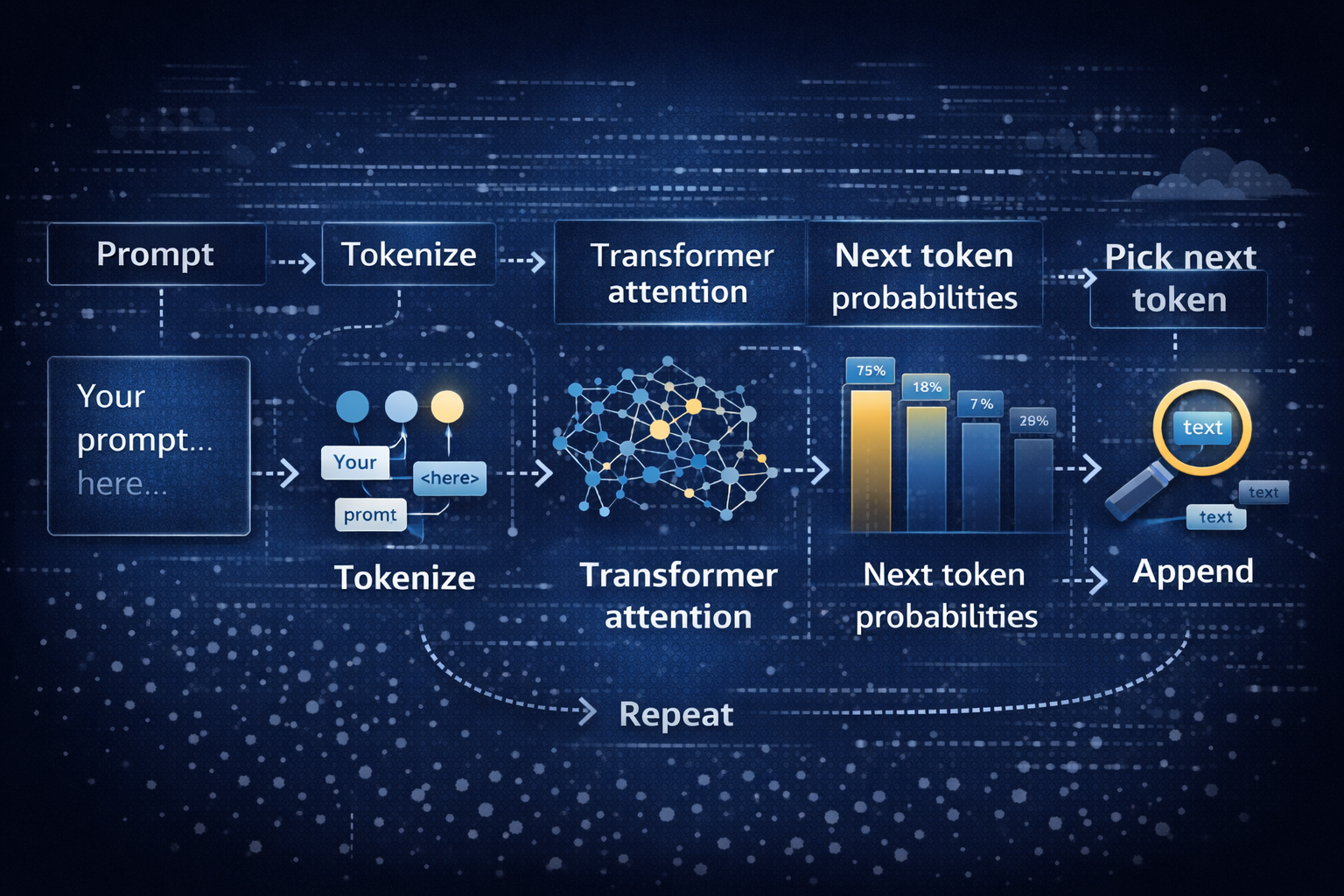
That loop is inference. Training is different. During training, the model sees enormous training data and learns by predicting missing pieces and correcting errors. That’s the “learning models” part. Inference is the “use it” part, where your prompt steers the already-trained network.
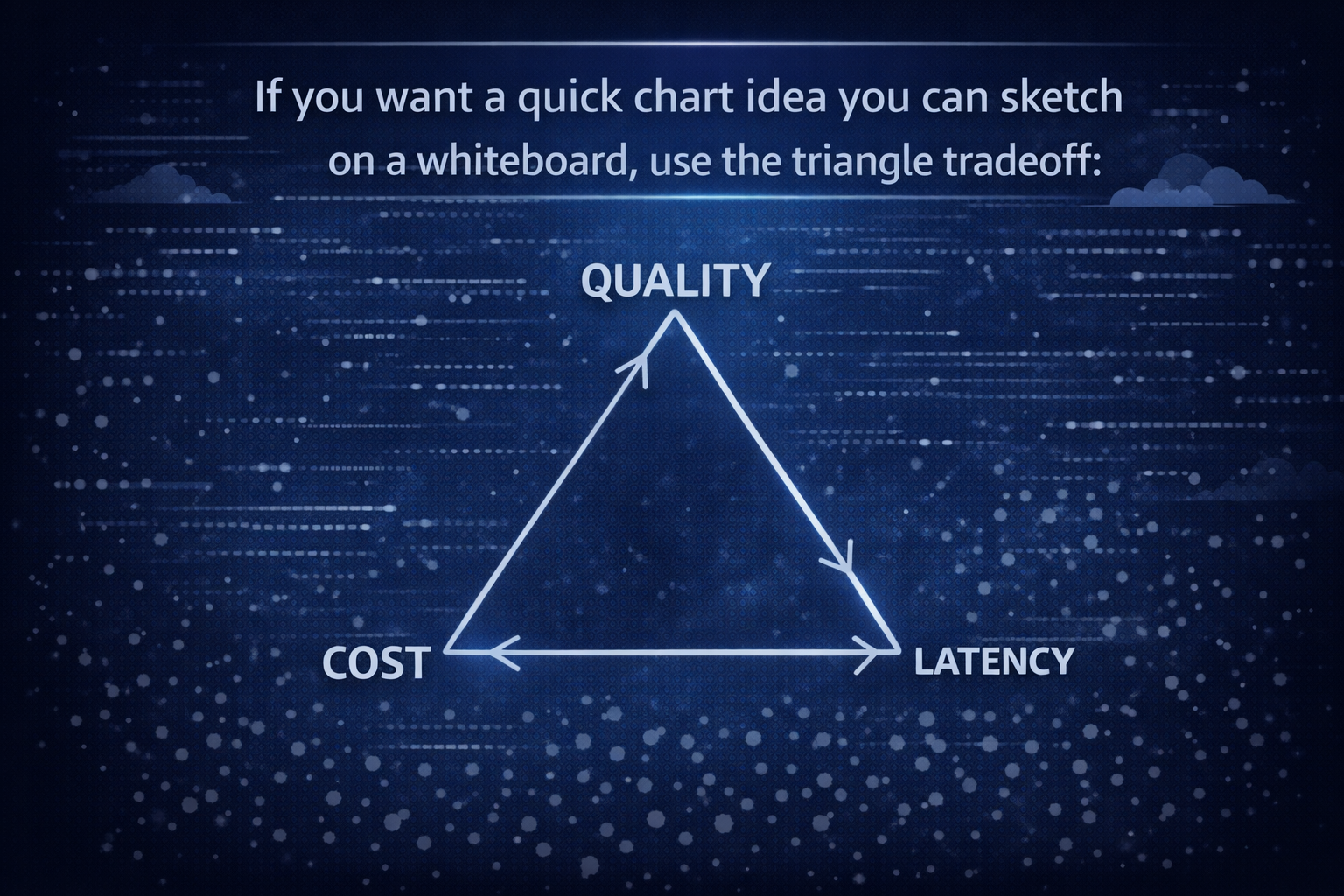
As you move toward quality, you usually pay more and wait longer. As you move toward lower cost, quality can dip. Low latency often means smaller models or faster infrastructure. That triangle is why deploying LLMs is part engineering and part product management.
A transformer is a neural network architecture built for sequences. The transformer architecture uses attention to decide what parts of your input matter most for the next token.
A simple example: “Put the glass on the table because it was wobbly.” What does “it” refer to? The glass or the table? Attention tries to resolve that by weighing nearby words and long-range hints.
In practice, attention acts like highlighting. It doesn’t guarantee correctness, but it reduces confusion. Still, long inputs can overwhelm even powerful models. You’ll see misses when the key detail is buried in page 47 of a long doc, or hidden in a noisy log.
Most LLM training today follows a familiar path:
Fine-tuning is where you teach a foundation model a job. You can train it on your support tone, your code style, or your internal taxonomy. However, fine-tuning is not a free win. If your dataset is messy, you bake mess into the model. If your evals are weak, you ship regressions faster.
You’ll get better results by pairing fine-tuning with simple evaluation sets and clear acceptance checks.
In 2026, using LLMs is less about novelty and more about removing friction. You’re trading copy-paste work for natural language prompts, and trading long searches for targeted summaries.
Common use cases you can ship this year:
Customer support drafts answers, then you review before sending. Sales teams generate outreach variations and account notes. Developers get help with triage, tests, and refactors. Meeting notes turn into exec summaries. Translation gets faster for global teams. Research becomes a loop of summarize, cite, and compare. Internal knowledge search improves when you combine retrieval with generation.
Results vary by team and data quality, so treat outcome numbers as KPIs you measure, not promises. What you can measure reliably is time saved, resolution time, conversion rate changes, defect rates, and user satisfaction.
A quick “when not to use an LLM” list helps you avoid pain:
If you’re choosing how to route models, handle fallbacks, and manage providers without building everything from scratch, start with a production-oriented guide like best LLM routing gateways.
Use this table as a planning tool. It keeps you honest about what you automate versus what you still review.
| Use case | What you automate | What you still review | Outcome you can measure |
|---|---|---|---|
| Customer support | Draft replies, classify tickets, summarize threads | Final send, refunds, policy-sensitive language | Time to first reply, resolution time |
| Sales | First-pass emails, call recap, CRM updates | Claims, compliance language, personalization | Reply rate, conversion lift |
| Coding | Unit tests, refactor suggestions, log explanations | Merges, security, edge cases | Fix time, review cycles |
| Meeting notes | Summaries, action items, decision logs | Sensitive details, ownership | Hours saved per week |
| Translation | Draft translation, tone variants | Brand voice, legal terms | Doc turnaround time |
| Research | Summaries, comparison tables | Source checking, citations | Time saved per report |
| Knowledge search | Answer drafts from internal docs (RAG) | Final facts, permissions | Ticket deflection, cost per answer |
Two concrete examples help you picture this in a stack:
If you want an additional enterprise-oriented overview of benefits, limits, and applications, skim Large Language Models Explained: Capabilities, Benefits, Challenges.
Hallucinations happen when the model fills gaps with plausible text. For example, it may invent a library function that sounds real. You reduce this by grounding answers in retrieved documents (RAG) and by forcing citations.
Privacy risk shows up when prompts contain secrets. Don’t paste production tokens into a chat. Instead, redact, tokenize, or keep sensitive flows inside approved environments.
Prompt injection is the “ignore previous instructions” trick, but in a real disguise. A user might paste a malicious snippet into a support chat that tries to make your agent reveal internal notes. Tool use makes this worse if you give broad permissions.
Drift is slow failure. Your prompt changes. Your dataset changes. Your product changes. Suddenly, the same prompt produces a different answer, and no one notices until users complain.
Mitigations that work in practice:
Log enough to debug, but protect user data. A minimal, useful log set includes: prompt template version, model name, temperature, retrieved docs IDs, tool calls, response, latency, and user feedback. For a broader 2026 refresher on LLM basics, use What is a Large Language Model? Complete Guide 2026.
You now have a working mental model: LLMs are transformer-based deep learning models trained on huge training data to predict the next token, guided by your prompt and bounded by a context window. In 2026, they matter because they reduce waiting, searching, and repetitive writing across engineering and product work.
Your next three steps are simple: pick 1 or 2 use cases, build a small eval set from real work, then ship behind feature flags with monitoring and a fallback plan. Look at your week and ask: which workflow has the most copy-paste and waiting? That’s usually your best first target.
Your stack isn’t “API stuff over here, AI stuff over there” anymore. It’s api and ai braided together in one product flow, one set of budgets, and one set of risks.
In this post, you’ll get clear definitions, a practical gateway vs comparison, and a simple decision path. You’ll see where gateways shine, where them crack, and why many teams need an AI gateway without turning ops into a circus.
An ai gateway is a control layer that sits in front of one or more ai services. It can front hosted multiple ai models (OpenAI, Anthropic, Google), your own models, or multiple ai providers at once.
While it can act like a proxy, it’s built for the weird parts of modern ai infrastructure, like long streaming replies, token billing, prompt safety, and model fallbacks.
Think of it like a breaker box for ai workloads. You still plug devices into outlets (your app still calls models), but the breaker box decides what’s safe, what’s allowed, and what you can afford today, reflecting the differences between AI gateways and traditional APIs. When you roll out a new model or a new prompt style, you don’t want to rewire every service; this is where an AI gateway becomes invaluable.
AI gateways exist because AI traffic has new failure modes and new costs. A single prompt can include a contract PDF, an image, and a chat history. A single response can stream for 25 seconds. Meanwhile, cost is measured in tokens, not just requests. So ai gateways provide a place to enforce budgets, policies, and visibility across ai workflows, ai operations, and ai systems.
The perfect example of AI Gateway is LLM API. Check it out!

If you’re evaluating the category, start with a broad landscape like TrueFoundry’s AI gateway guide for 2026 to see what features are common.
Here’s a quick “feature to value” snapshot:
| AI gateway feature | Why it matters to you |
|---|---|
| Token-aware limits | Stops surprise bills by capping tokens per user, team, or route |
| Prompt and response logging | Helps debug failures and prove what happened during audits, especially when AI gateways track token usage effectively. |
| Provider routing and fallback | Keeps your app up when one model slows down or errors |
The takeaway: you’re not buying another hop, you’re buying control over AI behavior.
First, responses can be long-lived streams (SSE or WebSockets). Your user sees text appear over time, so timeouts, buffering, and retries matter more.
Second, limits are token-based. You need to enforce “2,000 tokens per message” or “200,000 tokens per day” more than “60 requests per minute.”
Third, consider how AI gateways offer enhanced functionality. Payloads get big. A support ticket can include logs, screenshots, and attachments. In other words, you’re shipping megabytes, not kilobytes.
Fourth, AI gateways implement controls that enhance operational efficiency. reliability looks different when using ai gateways. You might retry a model call once, then fail over to another model, then degrade to a smaller model if the user is on a free plan.
Finally, routing becomes prompt-aware. For example, you can route a short summary request to a cheaper model using ai gateways and route a hard legal draft to a stronger one. That’s not science fiction. It’s basic traffic shaping for ai apis.
To ground it in real pricing, check an actual catalog like the LLM API model catalog and notice how wide the spread can be across models, context sizes, and input versus output rates. Once you see that spread, “model routing” stops sounding fancy.
In practice, ai gateways track usage per user, per route, and per ai deployment. You end up with dashboards that answer questions you didn’t ask in 2022, like “Which prompt template doubled output tokens?” or “Which customer triggers the biggest context windows using ai gateways?”
A typical gateway architecture for AI looks like a pipeline:
Request comes in, the gateway manages auth and api key checks, then applies a policy layer. That policy layer can mask PII, block prompt injection patterns, and enforce ai governance rules (like “don’t return secrets”). Next, the gateway selects a model, possibly across multiple ai providers. After that, it can cache safe results, stream the response back, then log tokens, latency, and traces.
In many teams, the gateway becomes the “policy brain” for AI. That matters because your app code changes fast, but your safety and audit needs don’t. You want a stable place to express rules like “never send SSNs to external providers” or “only finance can use the high-cost model.”
MCP (Model Context Protocol) fits here too. When an ai agent calls tools, you want strong boundaries. Instead of letting the agent call anything, you can route tool access through the gateway so it can approve, deny, and record those actions. That turns tool calling into controlled traffic management, not a free-for-all.
If you want a plain-language view of what vendors mean by “AI gateway,” this AI gateway overview from APIPark helps you map the term to real components and policies.
An api gateway is the front door to your services. It’s the piece you put in front of microservices, mobile backends, and partner APIs to centralize routing, auth, throttling, caching, and logging. It’s the heart of api management for many teams, especially when you have dozens of endpoints and multiple clients.
This works best when requests are short, payloads are predictable, and responses return fast. A checkout request, a user profile fetch, a product list query, these all fit the classic pattern. You can enforce “100 requests per second,” terminate TLS, validate JWTs, and route traffic to the right service.
A concrete example: your app calls /checkout (payments), /inventory/reserve (stock), and AI gateways understand the nuances of handling AI workloads. /users/me (profile).
The API gateway manages the edge concerns once, so each service doesn’t re-implement auth and rate limits, similar to how AI gateways operate. It also reduces the number of public entry points you need to protect.
However, even if your gateway supports streaming, AI brings token economics, prompt safety, and model selection, which traditional api gateways weren’t built to treat as first-class concerns.
In real systems, an api gateway acts like a receptionist with a clipboard.
In practical terms, api gateway handles routing, authentication, request shaping, quotas, caching, and observability. It protects api traffic and makes policies consistent across teams. It also api gateway serves as a stable contract at the edge, even when internal services change.
Most stacks pair it with REST and gRPC. You might also use GraphQL, but the core idea stays the same: one place for cross-cutting rules. You attach an api key or OAuth token, and the gateway enforces the policy before your service sees a byte.
This is why “just put it behind the gateway” became muscle memory for developers. For classic APIs, it works.
AI doesn’t just add streaming. It adds conversation state, big context windows, and weird latency. A request might wait 12 seconds, then stream for 20 more, highlighting the importance of effective API and AI gateways. Your metrics have to separate “time to first token” from “total completion time,” or you’ll chase ghosts.
Then there’s safety. API security focuses on identity and access. AI also needs prompt injection defenses, PII handling, and content policies. Some traditional API gateways add generative AI plugins, and that helps, but you still need LLM-aware controls and LLM-aware metrics to run modern AI reliably in the AI gateway market.
This is where “API gateway plus a few plugins” can hit a ceiling. You can make it work for a pilot, yet as your ai workloads grow, you start needing AI-native governance.
For a vendor view of the boundary line, see Kong’s explanation of API gateway vs. AI gateway, which frames where API patterns end and model-centric patterns begin.
The simplest way to think about AI Gateway vs API Gateway is this: both route traffic, but AI gateways optimize for different “units of work” in the AI gateway market. An API gateway thinks in requests. An AI gateway thinks in tokens, prompts, and conversations.
Before the table, picture two budgets:
Only one of those budgets maps cleanly to classic rate limiting.
Now add model choice. If your low-tier users run on a cheaper model at $0.05 per 1M input tokens and $0.40 per 1M output tokens (pricing varies by provider), but your enterprise tier uses a stronger model that can be $15 per 1M input and $120 per 1M output, a routing mistake can turn into a real bill fast. That’s why token metering and policy routing moved from “nice to have” to “you need it.”
Some teams also report operational savings when they converge stacks. One recurring claim is 30 to 50 percent of requests may need an AI gateway for optimal performance. cost reduction when you avoid running two separate control planes and on-call rotations, especially once AI traffic becomes core. A SaaS-focused view of that trend shows up in this AI gateway buyer guide.
Here’s the comparison that usually settles the debate.
This table highlights what changes in your gateway architecture when AI enters the room.
| Category | API gateway | AI gateway |
|---|---|---|
| Primary traffic type | Short REST or gRPC requests | Streaming chat, tool calls, long completions |
| Rate limiting | Requests per second, per IP, are crucial metrics for managing AI gateways and API gateways | Tokens per minute, per user, per model |
| Routing targets | Microservices and versions | Models, providers, and prompt routes |
| Security focus | OAuth, JWT, WAF rules | Prompt injection, PII masking, data egress rules |
| Observability | Latency, error rate, throughput | Tokens, conversation traces, time to first token |
| Reliability | Retries, circuit breakers | Fallback across models, smart retries, degrade modes |
| Cost controls | Mostly infra based | Token budgets, per-route spend caps, caching policies |
| Governance | API schemas, contracts | Prompt policies, model allowlists, audit logs |
To put a stake in the ground, one AI platform perspective says: “AI gateway is significantly better for AI applications … native support for streaming, token-aware rate limiting.” You can read the full argument in TrueFoundry’s analysis beyond a standard API gateway.
Use case 1: Customer support chat with tool calls (AI gateway fits). You run a support chat that answers billing questions and can issue refunds. The chat streams responses, and your ai agent calls tools to pull invoices, check subscription status, and open tickets. Here, an ai gateway earns its keep because ai gateways handle streaming, token caps, and guardrails in one place. You can route “summarize last ticket” to a cheaper model, and route “draft a refund policy exception” to a stronger model. You also log prompts and tool calls for audits, which matters when money moves.
A simple numbers example: you set a budget of 8,000 output tokens per conversation for free users, then 40,000 for paid. When a conversation hits the cap, you degrade to shorter answers. That kind of control is hard to express with request-only quotas.
Use case 2: Normal product API platform (API gateway is enough). You run a product platform with /catalog, /pricing, /checkout, and /users. Your payloads are small, and latency targets are tight (say 150 ms p95 for reads). In that world, the api gateway handles identity, routing, caching, and DDoS protection cleanly. You don’t need prompt policies because you don’t have prompts. Your core goal is stable api calls under load, plus clean api management.
Mini scenario: api gateway and ai gateway together (common in 2026). In a hybrid stack, your api gateway acts as the public edge for the whole app. It routes /api/* to services and routes /ai/* to an ai gateway behind it. That pairing keeps your classic policies stable while your AI layer evolves fast. It also lets you separate concerns: API teams manage api traffic, while AI teams manage ai traffic, token budgets, and model routing.
An AI gateway is a system that facilitates the integration, access, and management of artificial intelligence services and applications.
An API gateway is a server that acts as an intermediary for making requests from clients to a collection of backend services, managing traffic, security, and protocol translations.
You don’t need a philosophy to choose, you need a few checks:
It’s normal to run both when you ship api and ai together, especially in March 2026 stacks.
Your next step is simple: audit your endpoints, list every ai model you call, and set token budgets you can live with while leveraging ai capabilities. Then decide which gateway manages which boundary, and write it down.