LLM Routing is directing a prompt to the best language model for better performance and lower cost.
In other words it is a smart way to send each prompt to the model that fits it best, instead of sending everything to the most expensive option. That matters because simple requests don’t need a premium model, and research on routing systems like FrugalGPT and RouteLLM shows that better model choice can cut costs while keeping quality high. If you use a setup like LLM routing for cost, speed, and reliability, you can match each task with the right mix of speed, price, and accuracy.
Imagine a massive e-commerce company that uses AI to handle thousands of customer inquiries a day. Instead of sending every single message to the most expensive, powerful AI model, they use an LLM router as a “traffic cop” to analyze incoming prompts and delegate them efficiently.
Here is how the router splits the workload in real-time:
By dynamically switching between models based on the difficulty of the question, the company maintains a highly capable chatbot while cutting its overall AI API costs by up to 70%.
For non-technical readers, the idea is simple: use the right brain for the job. For developers and AI teams, it means a practical control layer that can reduce spend, speed up responses, and keep complex workflows on track, especially when different prompts need different levels of reasoning.
LLM routing is the part of the system that decides which model should handle each prompt. Instead of sending every request to the same expensive model, the router checks the prompt first, then picks the model that fits the job. That keeps simple tasks cheap and fast, while harder tasks still get the extra reasoning power they need.
This matters because prompts are not all alike. A short rewrite request, a support reply, a code fix, and a math problem all need different levels of effort. A good router helps each one land in the right place, which is why routing is now a core piece of many multi-model setups.
 ### How the router chooses the right model
A router looks at the prompt and pulls out signals that help it judge what kind of work is needed. The simplest signal is prompt length. Short requests often need less horsepower than long, layered ones. But length alone is not enough, so routers also check topic and intent.
Common signals include:
Some systems use fixed rules, such as “send code to the coding model” or “send support tickets to a cheaper fast model.” Others use learned classifiers trained on historical examples. More advanced routers use preference data, which helps them predict which model is most likely to give the better answer for a given prompt. RouteLLM, for example, trains routers on human preference data so the system can learn when a stronger model is worth the cost. See RouteLLM’s preference-based routing paper for the research behind that approach.
The best router does not guess from one signal. It combines several signals, then makes a practical choice.
That blended approach is why routing works well in production. A router can send a simple “summarize this email” request to a small model, but route a tricky debugging prompt to a stronger one. In semantic routing setups, the system also compares the meaning of the prompt against known patterns, which helps it handle requests that use different words but mean the same thing.
Using one premium model for everything sounds simple, but it wastes money fast. A model built for hard reasoning does not need to spend expensive tokens on basic classification or short rewrites. Research like FrugalGPT showed that smarter model selection can cut cost while keeping performance close to a top model on many tasks.
The reverse also causes problems. If every prompt goes to a weak model, quality drops on the exact tasks that need depth. That creates bad answers, more retries, and more human cleanup. In a workflow with many steps, one weak response can break the whole chain.
Routing solves that tradeoff by balancing three things at once:
A simple way to think about it is this: a routing layer is like a traffic cop for model calls. It keeps easy traffic moving, then sends the heavy trucks to the right lane. That reduces waste without forcing every request through the same path.
For teams building agents or support systems, this matters even more. A planning step, a code review step, and a final answer step do not need the same model. Routing lets you match each step to the right backbone, which is why it fits well with LLM gateways and request control. It also helps explain why many teams now compare model pools the same way they compare cloud instances, by cost, speed, and reliability.
In practice, routing is useful for:
The main idea is simple. Routing gives each prompt a better chance of landing on the right model, which usually means lower cost, lower latency, and fewer wasted calls.
Real routing systems usually mix a few different strategies, because no single method works for every prompt. Some teams want the simplest possible setup. Others need smarter decisions based on task type, confidence, budget, or response time.
The common thread is the same: send each request to the smallest model that can still do the job well. Research from Stanford’s FrugalGPT and RouteLLM shows why that matters, since routing can preserve quality while trimming spend. In production, the best choice often depends on how predictable your workload is, how strict your budget is, and how much latency your users will tolerate.
 ### Static rules and simple fallback paths
Rule-based routing is the easiest place to start. You define fixed paths, then send known task types to known models. For example, short summaries can go to a fast, low-cost model, while code or legal drafting goes to a stronger one.
This setup is quick and easy to manage, especially when the workflow is stable. It also pairs well with smart LLM routing strategies, where teams want a simple control layer without adding much system overhead.
The downside is rigidity. A prompt that looks simple can become hard fast, like a short customer message that turns into a multi-step support issue. Static rules miss those shifts, so they can send a tough request to a weak model and produce a bad answer.
A common variation is cascade routing. The system starts with a cheap model, checks the result, then escalates only if the output fails validation. That can save a lot of money on high-volume apps, but it may add extra latency when the first pass does not work.
Cascades are efficient when the failure check is clear. They slow down when the system needs repeated retries.
In practice, teams use static paths and cascades for:
Classifier-based routing is a step up from hardcoded rules. A small learned model predicts which LLM will do best, often using training data built from human preferences or past wins and losses. RouteLLM is a good example of this approach, because it learns from preference data and routes requests based on which model is more likely to win on that prompt.
That matters when prompt difficulty varies a lot. One request may need only a short answer, while the next may need reasoning, tool use, or careful formatting. A learned classifier can catch those differences better than a fixed rule set.
Semantic routing goes a different way. It groups prompts by meaning, then matches them to patterns or embeddings that point to the best model. So if two questions use different wording but share the same intent, the router can still make the same choice.
A simple way to think about it is this:
| Routing type | What it looks at | Best fit |
|---|---|---|
| Static rules | Fixed task labels | Stable pipelines |
| Classifier-based routing | Learned difficulty signals | Mixed workloads |
| Semantic routing | Meaning and embeddings | Varied user intent |
These methods work well when the system sees a wide mix of prompts. They are especially useful for support, coding assistants, multi-agent systems, and product experiences where the right answer depends on more than a single keyword. For a more technical overview of decision layers and model selection, see LLM failover routing techniques.
Some routers are built around spending limits first. That means the system does not only ask, “Which model is best?” It also asks, “Which model fits the budget?” Teams can set a daily cap, a per-user limit, or a per-request target, then let the router choose the best option inside that boundary.
This matters a lot for SaaS products and internal tools, where volume adds up fast. A small difference in per-call cost can turn into a real bill when the app handles thousands of requests a day. Cost-aware routing keeps spend more predictable, which helps with pricing, margin, and planning.
It also works well in enterprise apps that need different service levels for different users. A free tier might get a fast, cheaper model. A paid tier or a high-stakes workflow can get a stronger model only when the prompt justifies it.
Common uses include:
The best cost-aware setups usually track output quality, latency, and spend together. That gives teams a practical way to balance performance against cost instead of guessing. In real deployments, that balance is what keeps routing useful after the first demo.
Routing studies keep pointing to the same pattern: the biggest model is not always the best first choice. When a system can tell easy prompts from hard ones, it can save money, hold quality steady, and cut wait times at the same time.
That matters for both teams and end users. Developers get lower API bills, operators get more predictable spend, and users get answers faster because simple requests stop waiting behind heavyweight models.
 ### What FrugalGPT showed about saving money without losing quality
FrugalGPT made the strongest early case for cascade routing and prompt adaptation. The core idea was simple, route each request to the cheapest model that can still do the job well, then save the premium model for the prompts that truly need it. In practice, that means a short summary or label extraction does not need to pay frontier-model prices.
The Stanford work showed that this kind of setup can cut costs sharply, and in some cases it can match GPT-4-level performance or even do a bit better at similar spend. That is the main lesson many teams still use today: quality does not come from always calling the largest model, it comes from matching the model to the task.
For product teams, that can change the unit economics of an AI feature. For example, if a support assistant sends routine classification to a cheaper model and only escalates tricky cases, the total bill drops without forcing users to accept worse output. Research summaries around FrugalGPT and related routing work point to savings in the 40% to 85% range in well-tuned systems, which is large enough to matter in real production budgets.
RouteLLM pushed the field forward by training routers on human preference data instead of only hand-built rules. That matters because people do not judge model quality by token counts or prompt length alone. They care about which answer is actually better, clearer, and more useful.
The practical win is flexibility. RouteLLM showed that learned routers can still work when model pairs change, even when the router was not trained on those exact pairings. That is a big deal for teams, since model catalogs change often and vendor mixes rarely stay fixed for long.
Benchmark results also matter here. RouteLLM reported major cost reductions on tests like MT Bench, MMLU, and GSM8K while keeping strong response quality. The research report for RouteLLM notes cost cuts of more than 2x without a quality drop, which is the kind of result that gets attention in both engineering and finance meetings. You can read the paper on RouteLLM’s preference-based routing results for the full benchmark picture.
For teams that want routing to survive model churn, the message is clear. A router trained on preference data is easier to keep useful than a brittle ruleset that only works for one provider mix.
Newer routing systems are moving beyond simple pick-one-model logic. Some use lightweight self-verification, where a small model checks its own output before the system spends more on escalation. That can reduce repeat calls and keep easy tasks from bouncing through the stack.
Others use a two-tier setup, with one model planning and another handling execution. This split works well for multi-step jobs, because the planner can stay focused on task structure while the executor handles the response. In several studies, that pattern improves task completion and lowers the number of frontier-model calls, which is a direct cost saver.
A different line of work ties routing to memory or retrieval. When the system knows a user’s earlier context, or can pull the right source material, it can send more requests to a lighter model and still hold up on quality. That helps especially in long workflows, where latency adds up with every extra call.
The practical payoff is easy to see:
For teams that care about failover too, routing and fallback control often go together. If a provider slows down or errors out, systems can shift to another model without breaking the workflow. A good starting point is managing LLM rate limits and fallbacks, since reliability and routing usually need the same control layer.
The best routing systems do more than cut cost. They keep the workflow moving when prompts change, models change, or one provider gets shaky.
Research keeps backing the same direction: route easy work to cheaper models, reserve strong models for hard cases, and use validation to avoid bad retries. That mix gives you better economics without turning every prompt into an expensive call.
LLM routing pays off when a product handles many kinds of requests at once. A support bot, coding assistant, document parser, and analytics agent all need different levels of reasoning, speed, and cost control. Routing keeps those jobs separated, so each prompt gets a model that fits the task instead of a one-size-fits-all answer.
That matters because real products rarely see neat, predictable traffic. One user wants a quick rewrite, another asks for tool use, and a third drops in a long, messy contract. Routing helps teams handle that mix without overpaying for every request.
Developers use routing to build model-agnostic apps. That means the app can switch providers without a full rewrite, which keeps the codebase cleaner and makes provider changes far less painful. If one model is better for coding help and another is better for extraction, the router picks the right one per task.
This is especially useful in apps that need different behavior across endpoints. A coding assistant may send debugging prompts to a stronger model, while document parsing, classification, and tool calling can go to faster, cheaper ones. Chat apps also benefit, because users notice latency fast. A short reply from a small model often feels better than a slow answer from a heavyweight model.
Teams that want to set this up can start with the LLM API quick start guide, then grow into more advanced routing patterns as traffic increases. The practical win is simple: one integration, many models, and better control over where each request goes.
 Enterprise teams and high-volume businesses
For enterprise teams, routing is mainly about budget control and operational reliability. When request volume climbs, even a small savings per call can protect margins. Research and production writeups on routing often point to cost reductions in the 40% to 85% range when systems send simple jobs to smaller models and reserve stronger ones for harder work. That kind of spread matters when the app handles thousands or millions of requests.
Routing also cuts vendor lock-in. A business does not want its product tied to one provider’s pricing, outages, or rate limits. With fallback support, the system can move traffic if a provider slows down or fails, so the app stays online and the user experience stays steady. Centralized billing and one control panel also make life easier for finance and ops teams, because spend, usage, and reliability live in one place.
For teams comparing router behavior with broader gateway features, TrueFoundry’s LLM router overview gives a useful market view of common enterprise use cases. The bigger point is simple, routing keeps unit economics stable while giving teams more room to scale without rewriting the whole stack.
The strongest enterprise use case is not just saving money, it is avoiding single-provider dependence.
Researchers care about fair comparisons. They need to test many prompts, compare outputs across providers, and see which model fits which dataset. Routing helps here because it makes experiments more repeatable. Instead of treating every model call the same way, the router can apply a consistent selection rule and log cost, speed, and quality for each run.
That makes it easier to study tradeoffs across models. One model may win on accuracy, another on latency, and a third on price. Routing platforms make those differences visible, which is useful when you are running benchmark suites, prompt tests, or side-by-side evaluations on the same workload.
It also helps AI power users who care about practical performance. If a workflow mixes math, writing, and tool use, routing can send each prompt to the model that handles that type of task best. In other words, the setup is useful when the question is not “Which model is best?” but “Which model is best for this job, this time?”
For a deeper look at enterprise routing methods and evaluation criteria, see A Multi-Criteria Decision Framework for Enterprise LLM Routing. That kind of research matches what many teams need in practice, a clear way to compare quality, cost, and latency without guessing.
Choosing an LLM routing platform is less about picking the most famous tool and more about matching the tool to your workload. The right platform should lower cost, keep latency under control, and give you enough visibility to trust the decisions it makes. If your traffic is mixed, routing can save a lot. If your app only does one thing, a simpler setup may be enough.
 Questions to ask before you adopt routing
Start with the workload, because that tells you whether routing will pay off. Ask what kinds of tasks will actually be routed. A support app, a coding assistant, and a document parser do not need the same model mix.
A simple checklist keeps the comparison honest:
You should also ask how the platform handles failover, cache hits, and latency spikes. Those details decide whether routing stays useful after the pilot phase.
A good router should explain its choices clearly. If you cannot inspect the decision trail, it becomes hard to trust the savings.
Research backs up that concern. Work like RouteLLM’s preference-based routing study shows that routers can generalize beyond the exact model pairs they were trained on. That helps, because most teams do not keep the same provider list forever.
Routing shines when your traffic is mixed and your volume is high. If your app handles thousands of requests a day, even small per-call savings add up fast. It also helps when model prices vary a lot, because you can reserve the expensive models for harder prompts and keep routine tasks on cheaper ones.
It is especially useful in these cases:
Routing is less useful when every prompt is basically the same. A narrow app with low traffic may not need the extra logic. In that case, a single well-chosen model can be simpler and easier to maintain.
That balance matters. A routing layer is not free, and it adds its own complexity. If the app is small, the overhead may cancel out the gains. If the app is growing fast, though, routing often pays for itself through lower spend, faster replies, and fewer wasted calls. Tools like Requesty’s LLM routing guide show why many teams now compare platforms by cost controls, fallback handling, and how much effort they need to operate day to day.
For most teams, the question is not whether routing is useful in theory. The real question is whether your workload is varied enough to justify it. If the answer is yes, choose a platform that gives you clear routing logic, solid observability, and enough flexibility to keep up when your model stack changes.
LLM routing gives each request a better chance of landing on the right model. That usually means lower cost, faster responses, and less quality loss than sending every prompt to the same expensive option.
The clearest lesson from FrugalGPT, RouteLLM, and newer routing research is simple, the best setup matches model strength to task difficulty. For teams building apps with mixed traffic, multi-step agents, or multiple providers, that makes routing a practical part of modern AI infrastructure, not an extra feature.
For developers, enterprise teams, and researchers, the real value is control. LLM routing helps keep spend in check, supports flexible provider choices, and makes AI systems easier to scale without wasting tokens on easy work.
On March 24, 2026, LiteLLM users got a nasty surprise. Two PyPI releases, versions 1.82.7 and 1.82.8, were published with malicious code. Those packages were live only for a short window, but that was enough to scare a lot of teams, and for good reason.
This wasn’t a normal bug. The bad releases were built to steal secrets, including API keys, cloud credentials, SSH keys, Kubernetes data, and CI/CD tokens. If your stack touched LiteLLM through an unpinned pip install, the risk wasn’t limited to one app. It could spread across dev machines, build systems, and production.
Still, panic won’t help. A clean response will. This article has two goals: explain what happened in plain English, and show why many teams now see LLMAPI.ai as the safer, simpler replacement for LiteLLM.
Panic won’t fix a poisoned dependency. A calm cleanup and migration plan will.
Attackers pushed two bad LiteLLM packages to PyPI on March 24, 2026. The affected versions were 1.82.7 and 1.82.8. Reports show they stayed available for only a few hours before PyPI and the maintainers removed or quarantined them. That sounds brief, but it’s plenty of time for automated installs and CI jobs.
Teams at the highest risk were the ones using unpinned installs during that time window. In other words, if your build pulled “latest” from PyPI, you had exposure. By contrast, LiteLLM Cloud users and users of the official Docker image with locked versions were reported as not affected.

The malware didn’t just look for one kind of secret. It searched widely, including local developer credentials, cloud keys, Kubernetes service account data, and pipeline tokens. That broad reach is why this incident felt bigger than a typical package issue. A good public breakdown from Datadog Security Labs shows how the attack fit into a wider supply chain campaign.
A bug is an accident. This was a software supply chain attack.
The attackers used trusted distribution channels to slip harmful code into a package many teams already depended on. In one case, the code could run when LiteLLM was imported. In another, it used Python’s .pth startup behavior, which means the payload could trigger when Python started, even outside normal LiteLLM use.
That’s a big deal because LiteLLM often sits in the middle of everything. It can see provider keys, routing logic, logs, prompts, and model traffic. So when that middle layer gets poisoned, the blast radius grows fast. Truesec’s write-up explains why the .pth trick made this especially risky.
If your team installed 1.82.7 or 1.82.8, don’t treat this like a minor patch day. Treat affected systems as compromised.
models.litellm.cloud.That response is the minimum. After that, most teams start asking a harder question: should this gateway still be self-managed at all?
Even if this attack lasted only a few hours, it exposed a deeper problem. Many teams trusted a middle layer that touched model traffic, pricing logic, logs, and provider keys. That trust wasn’t wrong, but it came with more operational risk than many people admitted.
A self-managed AI gateway sounds simple at first. Then real life shows up. You have to track dependency updates, secure secrets, manage team access, keep observability sane, tune routing, watch uptime, and debug strange latency. Soon, the gateway becomes one more service your team has to babysit.
This is why more teams are reading up on LiteLLM alternatives for production reliability. The issue isn’t just one bad release. It’s the amount of trust and maintenance that piles up around middleware.
A gateway becomes a central junction. It often stores provider keys, tracks usage, routes requests, and handles retries or fallbacks. So if it gets compromised, local dev, CI/CD, and production can all feel it at once.

That pattern isn’t unique to LiteLLM. It’s part of a broader shift. Attackers now go after high-value infrastructure components because one successful hit can expose many systems in one move. If you want a simple overview of what an LLM gateway does, it helps explain why this layer matters so much.
After a scare like this, most teams want the same things.
They want one API, cleaner key handling, clear usage tracking, and freedom to switch models without rewriting code. They also want less vendor sprawl, fewer secrets scattered across services, and fewer moving parts to maintain.
In short, they still want flexibility. They just don’t want to run the control plane themselves.
This is where LLMAPI.ai stands out. It isn’t just a drop-in proxy. It’s a managed OpenAI-compatible gateway that gives teams one stable front door to hundreds of models across major providers.
That means one integration, one billing balance, and one place to manage access. It also means smart routing, provider failover, semantic caching, team key management, and usage visibility without building or maintaining that stack yourself.
For former LiteLLM users, the value is simple. You keep the model flexibility that made LiteLLM appealing, but you remove a lot of the ops burden that made it risky.
LiteLLM became popular because people wanted choice. They didn’t want to marry one provider forever. LLMAPI.ai keeps that freedom intact.
You can access models from OpenAI, Anthropic, Google, Meta, Mistral, and others through one interface. So if one model is better for code, another is better for planning, and a cheaper one is good enough for tagging, you can use all three without juggling separate integrations and separate billing paths.
That matters because flexibility is only useful if it’s easy to use. LLMAPI.ai keeps the request format familiar, so many teams can keep their OpenAI-style app code and mainly change the endpoint, key, and model name. If routing is part of your decision, this guide to LLM routing for cost and speed is worth a read.
A lot of gateway pain isn’t about raw access. It’s about visibility.
Teams need to know which models they use, what they spend, where tokens go, and which provider started failing first. LLMAPI.ai gives that out of the box, with dashboards for token usage, total spend, average cost per 1K tokens, and breakdowns by provider and model.

That changes daily operations. Finance gets clearer reporting. Engineers get faster answers. Team leads get cleaner governance. And because LLMAPI.ai can route traffic toward lower-cost or faster options, you can control spend without giving up reliability. The same goes for multi-provider failover, which helps keep apps online when one provider starts wobbling.
A migration doesn’t need to feel like open-heart surgery. For many teams, it’s a controlled swap.
Start by mapping where LiteLLM sits today. Look at every service, script, pipeline, and environment that calls it. Then list where your provider keys live, which models each flow uses, and which prompts matter most in production. That prep work lowers surprises later.
Before you move anything, check whether your team ever installed 1.82.7 or 1.82.8. If the answer is “maybe,” rotate secrets anyway. That’s cheaper than guessing wrong.
Also, write down your current dependency versions, routing rules, fallback paths, and model names. You want a clean record of the old setup before you replace it. That helps both incident response and migration.
The safest path is phased:
Because LLMAPI.ai keeps the API format familiar, the rewrite work is often much smaller than teams expect. You’re not throwing away flexibility. You’re just moving it onto a managed base that asks less from your ops team.
The LiteLLM attack was serious, but it doesn’t have to become a long-term setback. The smartest response isn’t just replacing one bad package version. It’s reducing your dependence on fragile, self-managed middleware when you don’t need it.
If you want broad model access, simpler day-to-day operations, stronger spend visibility, and a cleaner path after this incident, LLMAPI.ai is the best next step. Clean up the risk, move in stages, and give your team a gateway they don’t have to babysit.
LLM spend isn’t a side project anymore, it’s a line item your finance team has to explain. If you’re using LiteLLM, you’re running a proxy (gateway) that lets your app talk to many model providers through one OpenAI-style API. That’s useful, but it also means the gateway becomes part of your uptime and your billing story.
So yes, it’s smart to look for LiteLLM Alternatives when the proxy starts adding risk. Teams report slowdowns under real concurrency (the event loop can get saturated), performance drops as logging piles up in Postgres (people hit a wall once logs grow past about a million rows), and the “restart-fixes-it” pattern when memory or connections get messy. On top of that, token and cost accounting issues (cached tokens, streaming usage gaps, TPM quirks) can make chargebacks hard to trust.
This post gives you a quick TLDR, the biggest pain points buyers keep running into, and a clear list of options (including LLMAPI.ai) with who each one fits. If you also want a broader comparison set for routing and gateways, start with https://llmapi.ai/best-openrouter-alternatives-2026-pick-the-right-ai-gateway-for-real-production-work/.
When LiteLLM works, it feels like a universal adapter for LLMs. When it doesn’t, it becomes the adapter that overheats and slows everything plugged into it. Teams usually start shopping for LiteLLM Alternatives when three things collide: latency under real concurrency, costs they can’t confidently allocate, and operational babysitting (restarts, database tuning, and “why is this slow today?” drills).

If you want the shortest path to a better setup, use this as your decision filter:
Everything else below helps you pick based on the failure mode you’re seeing in production.
Most “we’re fine” deployments stay fine until traffic becomes bursty and multi-tenant. Then the weak points show up in ways finance and ops both feel.
1) Concurrency ceilings and “invisible latency” LiteLLM’s Python runtime can hit a wall under high concurrency. The pain is not just average latency, it’s tail latency and queued time that can be hard to spot. Teams report scenarios where internal timings look okay, but users still wait seconds because the event loop is saturated before request handling even starts.
2) Logging becomes a tax, then a choke point A common production trap is synchronous logging on the request path. Once log tables grow large (many teams cite a slowdown after roughly a million rows), every request starts “paying” for database writes and index contention. You end up choosing between observability and speed, which is not a choice a finance leader wants to hear.
3) Restarts as a reliability strategy Some teams see a “gets worse over time” pattern: higher TTFT, single-core CPU spikes, connection pool weirdness, then a restart makes it vanish. That’s not a fix, it’s a ritual. Even when issues get patched, the confidence hit remains, and buyers go shopping.
4) Cost and usage accounting gaps break chargebacks This is the one finance teams care about most. If cached tokens get counted wrong, streaming usage gets missed, or token mapping differs by provider, the dashboard stops matching invoices. That can lead to internal overcharging, undercharging, or budget alarms nobody trusts.
5) Fast release cadence and regression risk When regressions pop up in core gateway paths (routing, streaming, pricing), teams pin versions and stop upgrading. You can see the shape of this problem in recurring bug reports like custom pricing regressions in streaming endpoints and stability issues that required restarts to recover performance, such as performance degradation fixed by restart.
If your gateway’s numbers don’t match the provider bill, you don’t have “spend tracking”, you have a spreadsheet dispute waiting to happen.
Below is a practical shortlist. Each contender wins in at least one important category; LLMAPI.ai is the only one in this list positioned to be broadly better for most teams because it combines routing, cost controls, and operational visibility with a simple integration path.
If your main pain is “the proxy is now part of our financial reporting”, start here. LLMAPI.ai focuses on the parts that hurt at scale: reliable usage analytics, model and provider breakdowns, and controls that help you prevent spend surprises.
Where it tends to be better than LiteLLM:
Practical fit: scaling teams that need one OpenAI-compatible surface area, plus finance-grade reporting and controls.
If the primary symptom is “we add traffic, then p99 explodes”, check compiled gateways first. Bifrost is often positioned as performance-first, especially at high RPS where Python gateways can struggle.
Where it tends to be better than LiteLLM:
A useful overview is Best LiteLLM Alternative for Scaling, which focuses on performance characteristics and rollout friction.
If you’re stuck on SSO, RBAC, audit logs, or policy enforcement, managed control planes reduce the need to build your own governance layer.
Where it tends to be better than LiteLLM:
Practical fit: orgs that want strong controls and don’t want to run yet another stateful gateway stack.
For globally distributed apps, network distance and retries can dominate perceived latency. Cloudflare’s gateway can help by sitting closer to users and handling certain traffic behaviors more cleanly.
Where it tends to be better than LiteLLM:
Practical fit: consumer apps, chat, and edge workloads where geography matters.
If your company runs its own inference, or wants tighter infra control, you’ll care less about “one proxy to rule them all” and more about fleet operations.
Where it tends to be better than LiteLLM:
A broader market view is helpful here: AI gateways competitive landscape guide.
Sometimes you don’t need a heavy gateway first, you need visibility into what your app is already doing. Helicone is often evaluated as an observability layer to understand costs, latency, and prompt behavior.
Where it tends to be better than LiteLLM:
Practical fit: teams early in cost optimization, or teams auditing prompt and model behavior.
If your pain is streaming and app integration (not provider translation), SDK-first solutions can beat a standalone proxy. Vercel’s tooling is designed around modern web app patterns.
Where it tends to be better than LiteLLM:
Practical fit: product teams shipping LLM features in Next.js and caring most about UI latency and developer speed.
If you’re building multi-step agents, tool calling, and retrieval flows, a gateway alone won’t solve it. LangChain is an app-layer choice, but many teams treat it as the “alternative” when what they really needed was orchestration.
Where it tends to be better than LiteLLM:
Practical fit: teams whose core complexity lives in chains, tools, and agent execution.
One quick gut check: if your main “problem” is provider translation, choose a gateway. If your main “problem” is agent behavior, choose orchestration (and keep the gateway simple).
Community chatter around LiteLLM is real, but it’s scattered across release threads, bug reports, and “does anyone else see this?” posts. Some of the clearest public signals of pain show up as reproducible issues in the tracker, like recent proxy regressions and pricing or streaming breaks.
Meanwhile, the subreddit also shows how often teams end up building their own “missing layer” around the gateway. For example, one user shared, “I made an iOS app that connects to liteLLM inspired by openwebui” in a community thread, which is cool, but it’s also telling: people keep wrapping the wrapper when they need stronger UX and controls (LiteLLM iOS app thread).
LiteLLM often feels great in a pilot, because it connects you to lots of model providers fast. In production, the complaints tend to sound the same across teams: latency gets unpredictable, logging slows the hot path, and the spend numbers don’t feel “finance-safe.” When that happens, the search for LiteLLM Alternatives stops being curiosity and turns into a risk-control project.
TLDR on alternatives (quick shortlist): if you’re trying to reduce ops load while keeping spend reporting trustworthy, teams often compare LLMAPI.ai (cost controls plus analytics), Bifrost (throughput and stable tail latency), and Portkey (managed governance and observability).
Under real traffic, averages can look “fine” while the tail gets brutal. The pattern teams report is simple: once concurrency climbs, P99 latency jumps and user experience falls apart, even if the median stays acceptable. Part of this comes down to event loop saturation in an ASGI stack, plus Python overhead in routing and JSON work.

A big gotcha is what some infra folks call the “invisible latency gap.” Requests arrive, but the handler doesn’t start right away because the event loop is busy. Internal logs may show a fast handler time, yet end users still wait seconds because the queue time happened before LiteLLM started its stopwatch.
Python also makes it harder to fully use multi-core CPUs in one process for CPU-heavy steps. The usual workaround is more workers, more pods, and more memory. That raises your bill and your operational surface area. If you want a concrete example of performance scrutiny in the wild, see the ongoing discussion in GitHub issues like LiteLLM overhead and production performance.
If your gateway can’t keep tail latency flat, you’re not just buying “a proxy.” You’re buying a new bottleneck.
Observability is supposed to help you sleep. In a lot of LiteLLM setups, it becomes the reason you don’t.
The common complaint is that spend logs and request logs are written on the request path, so every call “pays” for database work. As log tables grow, index updates and lock contention start to show up as user-visible latency. Many teams describe a painful inflection point once logs reach very large volumes (often referenced as a “million-log wall”), because the database is now part of the critical path for every completion.

Then comes the tradeoff nobody likes: turn off logging for speed, or keep logging and accept the slowdown. The first option protects UX but weakens dashboards, chargeback workflows, and audit trails. The second option keeps visibility, but it can turn your gateway into a database-throttled service.
If you want to see how production users frame these problems in public threads, this DEV write-up captures several recurring failure modes: LiteLLM issues in production.
Finance teams care about one thing more than “nice graphs”: do the numbers match the invoice? When the gateway’s accounting drifts from provider billing, internal chargebacks turn into a recurring argument.
Teams report several ways this can break down:
Even worse, trust erodes fast once leaders see mismatches. Budget enforcement loses teeth when teams believe the meter is wrong. This is also why regressions around pricing and streaming endpoints get so much attention, for example custom pricing broken for streaming endpoints.
A production gateway should behave like plumbing. You shouldn’t need to “kick it” to keep water flowing.
Yet one recurring theme is the restart-fixes-it cycle: time-to-first-token creeps up over hours, CPU pins on a single core, and the service slowly becomes less responsive until someone bounces it. In streaming-heavy workloads, connection handling becomes another failure point, because leaked or stuck connections can exhaust pools and trigger random 5xx errors.
The operational cost is straightforward:
If you want a public example of the “degrades until restart” story, see performance degradation fixed by service restart. For memory pressure and CPU spikes, there are also reports like memory leak and CPU spike issues.
Once usage spreads across teams, governance stops being optional. It becomes basic hygiene. That’s where open-core friction shows up: companies expect SSO, RBAC, audit logs, retention controls, IP allowlists, and team budgets to be table stakes, not “nice-to-haves.”
When those controls are limited or gated, teams compensate in risky ways. Shared keys become normal. Environments blur together. Budget responsibility gets fuzzy because it’s hard to separate “who spent what” with confidence. Meanwhile, compliance work increases because auditors and security teams expect identity-based access and durable audit trails.
This is also why many LiteLLM Alternatives win mindshare by making governance easier to adopt. Some do it by being managed (so controls come pre-wired), while others do it by keeping the gateway thin and pushing telemetry into standard tooling without blocking requests.
When finance asks, “Why did spend jump this week?” you need an answer you can trust, not a debate about token math. A big reason teams look at LiteLLM Alternatives is simple: once usage scales, the gateway stops being “plumbing” and starts influencing billing accuracy, debugging time, and uptime.
llmapi.ai is built for the part that gets messy fast: shared ownership across engineering, ops, and finance. Instead of running a proxy that depends on a database on the hot path (and then tuning, restarting, and explaining it), you get a managed layer designed around cost control, visibility, and reliability.
LiteLLM can work well early on, but production pain often shows up in the same places: spend data that doesn’t match provider invoices, rate-limit quirks (TPM vs RPM confusion), and performance decay when logging grows and every request waits on a write. That’s a tough story to tell a finance leader, because the whole point of a gateway is centralized control.

With llmapi.ai, the “win” is that it’s designed to keep reporting and ownership clean:
The operational contrast matters too. Self-hosting LiteLLM commonly means running extra moving parts (database, cache, workers), plus dealing with logging bottlenecks and periodic restarts when performance drifts. A managed option removes a lot of that day-two work. If you want the broader pattern behind this shift, this overview of the category helps frame it: LLM gateway landscape overview.
For deeper detail on how routing plus fallback patterns reduce incidents, see multi-provider LLM failover strategies.
If your gateway’s spend telemetry can be off by multiples (especially around caching or streaming), finance stops trusting the dashboards, and teams stop using the controls.
Think of llmapi.ai like a single checkout counter for many LLMs. Your app integrates once (OpenAI-compatible), then you choose models without rebuilding your stack.
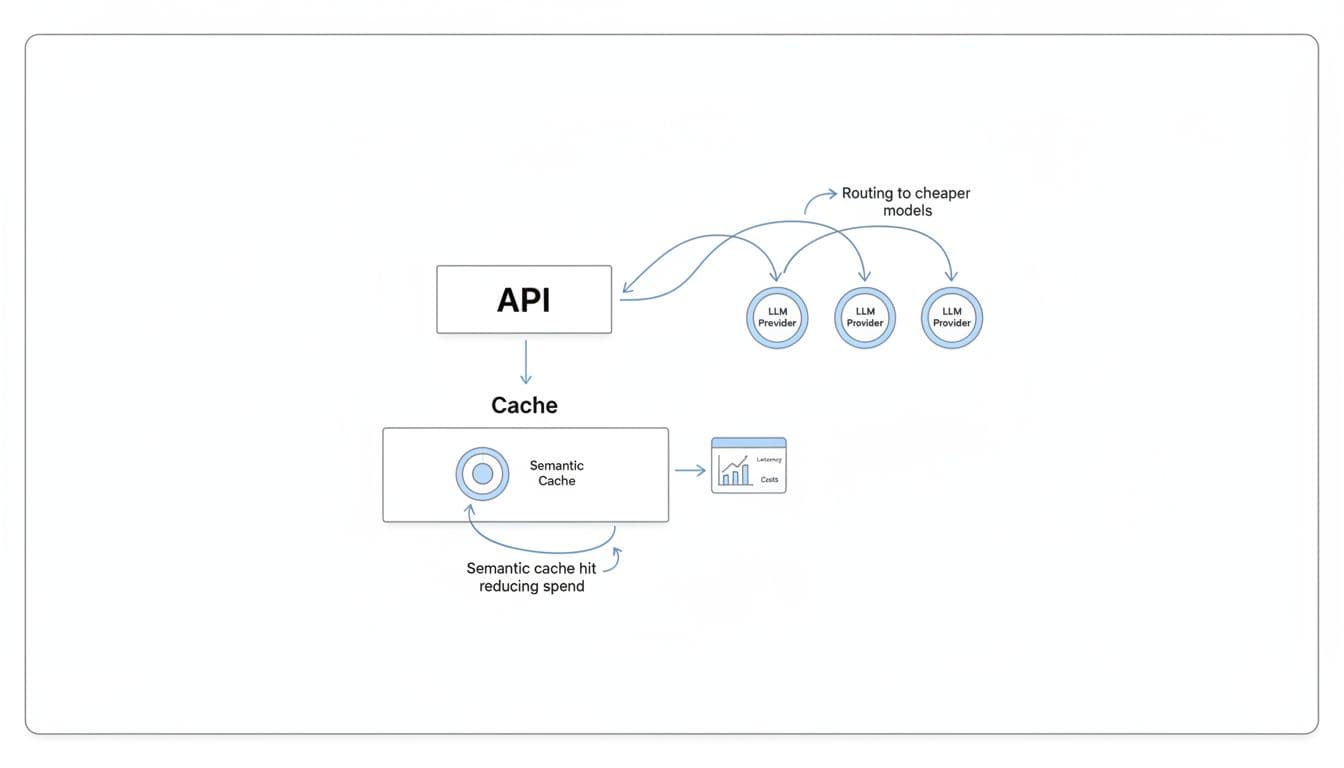
Concretely, it covers the things teams end up needing after the pilot:
If you want a practical explanation of the “one API, many providers” approach, this AI API wrapper guide lays it out without hand-waving.
llmapi.ai isn’t trying to be everything for everyone, and it’s worth being clear about the tradeoffs upfront.
Still, for teams that are tired of babysitting a proxy, reconciling numbers, and arguing about “what the dashboard means,” llmapi.ai is positioned as the calmer option: fewer moving parts, clearer reporting, and shared ownership that works for both engineering and finance.
When your LLM traffic is light, LiteLLM can feel like a handy adapter. Once you hit real concurrency, the proxy becomes part of your product latency and your support queue. That’s why many teams evaluating LiteLLM Alternatives end up looking at compiled gateways like Bifrost first, because it’s built to stay fast when the workload gets messy.
The simple mental model is this: Python gateways can run great in a sprint demo, but under sustained load they often need more pods, more memory, and more restarts to keep p99 in check. Compiled gateways are closer to a well-tuned highway, fewer traffic jams, fewer surprises.
Bifrost is built in Go, and that shows up where it matters: tail latency, throughput, and resource stability. LiteLLM’s pain tends to start in the same place teams describe over and over, concurrency grows, the event loop saturates, and requests spend time waiting before the handler even starts. That queued time can be hard to see in logs, yet users still feel it as “the app got slow.”

Compiled gateways also tend to avoid self-inflicted wounds on the hot path. A common LiteLLM production footgun is synchronous database logging that scales poorly as tables grow (many teams report a sharp slowdown once logs reach large volumes). Bifrost-style systems usually push metrics to Prometheus-friendly counters and ship logs asynchronously, so observability doesn’t block responses.
Here’s the practical difference a finance leader will care about:
If you want a concrete benchmark-style comparison, Bifrost publishes numbers in its own materials, for example Bifrost vs LiteLLM benchmarks. Use these as directionally helpful, then run your own load test with your prompts and streaming patterns.
If your business depends on consistent response times, p99 is the product, not the median.
Bifrost is a strong fit when speed is not a nice-to-have. It’s the option you pick when the gateway sits in the middle of a real revenue workflow, not a prototype.
In practice, it tends to shine in three scenarios:
This is also where the business outcome becomes obvious: fewer customer-facing delays, fewer support escalations, and less pressure to over-provision “just in case.”
Speed fixes one class of pain, but it doesn’t magically solve everything a mature org needs. Bifrost can still be the right choice, you just want to walk in with eyes open.
Common tradeoffs include:
If your biggest pain is governance and finance-grade reporting, a managed alternative like LLMAPI.ai often wins because it packages cost controls, visibility, and routing without you building the surrounding workflows. On the other hand, if your pain is p99 and uptime under load, Bifrost earns its place on the shortlist.
If LiteLLM is the DIY router you keep tuning, Portkey is closer to a managed air-traffic controller. You still pick providers and models, but you’re not also signing up to maintain the proxy, the database, the upgrade pinning, and the “why did this error turn into a 503?” debugging session.
For teams comparing LiteLLM Alternatives, Portkey usually comes up when the pain shifts from “we need more providers” to “we need fewer incidents and better answers for finance.” That means consistent retries and fallbacks, cleaner error handling, and analytics that help you explain spend without reconciling three dashboards and an invoice.
When a provider has a bad hour, the difference between a small blip and a customer-facing outage is often how you retry and how you fail over. Portkey’s value is that these behaviors live in a managed control plane, not in a pile of hand-rolled middleware and ops runbooks.
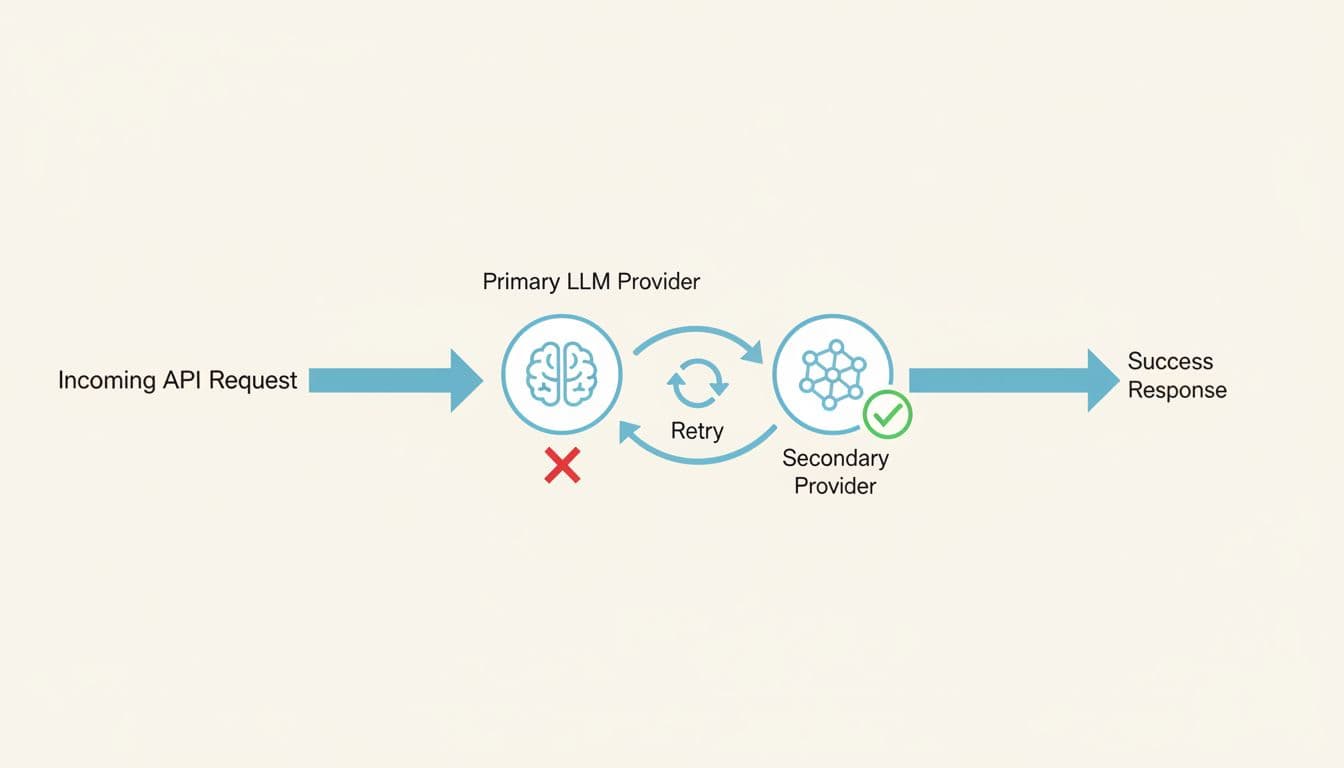
LiteLLM can do routing, but production teams tend to run into repeatable failure modes as traffic grows:
Portkey’s managed approach aims to reduce those sharp edges. Because routing, retries, and analytics are part of the platform, you spend less time tuning a proxy and more time setting policies: “try Provider A, then Provider B,” “retry only idempotent calls,” “treat rate limits differently than bad requests,” and “alert when error rates or latency shift.”
The practical win is simple: fewer false outages, fewer duplicate requests, and fewer “billing surprises” caused by retry storms.
If you want a neutral, side-by-side snapshot to sanity-check feature coverage, this comparison is a useful reference point: LiteLLM vs Portkey feature comparison.
Portkey fits teams that want multi-provider reliability without running yet another gateway stack. That’s especially true when you’re scaling fast and your “LLM app” is now multiple services, multiple keys, and multiple owners.
It tends to be a strong option when you need:
A managed control plane for routing and governance. Instead of managing a proxy that can hit concurrency ceilings, memory creep, or connection leakage in streaming workloads, you push more of the day-two work to a hosted layer. That matters when your team is small and on-call fatigue is real.
Analytics that finance can actually use. LiteLLM users often get frustrated when token counts and cost attribution don’t line up with provider billing (cached tokens, streaming usage gaps, multimodal counting differences). Portkey’s appeal is that it’s built around visibility: cost, latency, logs, traces, and alerting, so you can answer “what changed?” before the monthly close.
Fast rollout across teams. Startups and product teams like that you can add routing, retries, and dashboards without re-architecting the app. If you’re already standardizing on OpenAI-style APIs, the integration story is usually straightforward.
For a broader gateway market overview (and where managed control planes typically sit), this landscape write-up is a solid outside perspective: AI gateways competitive landscape in 2026. You can also compare Portkey alongside other routing options in Best OpenRouter alternatives for LLM routing.
Managed platforms come with tradeoffs, and Portkey is no exception. The key is knowing whether you’re buying convenience or giving up control you’ll miss later.
First, you get less control than full self-hosting. If your team needs deep customization in the request path (custom token accounting, bespoke caching rules, or non-standard policy execution), a managed layer can feel limiting compared to owning the whole proxy.
Second, costs can scale with usage. Many managed gateways price around logged volume or observability events. That can be fine at moderate scale, but at high throughput it becomes a real budget line item. In other words, the bill can rise at the exact moment you’re finally succeeding.
Third, caching and specialized tuning may be constrained. Portkey can support caching patterns, but if caching is your main cost-saver (or you need very specific cache keys, TTL logic, or storage backends), a specialized gateway or an in-house layer can offer more flexibility.
Finally, vendor dependency is real. With self-hosted LiteLLM, you own the knobs (and the pager). With a managed control plane, you’re trusting another service’s uptime, roadmap, and support response times. For some teams, that’s a great trade. For others, it’s a non-starter.
If your biggest pain is ops overhead and inconsistent visibility, Portkey can be a calmer path. If your biggest pain is deep customization or predictable cost at massive scale, you’ll want to compare it against self-hosted, performance-first gateways, and managed options that optimize for finance-grade cost controls.
If you already know your routing story, the next problem is visibility. Finance wants clean answers. Product wants to see which prompts work. Engineering wants to debug “why did this response get weird?” without tailing proxy logs at 2 a.m.
That’s where Helicone usually enters the shortlist of LiteLLM Alternatives. It’s less about being the smartest traffic cop and more about being the best black box recorder for LLM calls, prompts, latency, and spend, so you can spot waste before it becomes a budget meeting.
LiteLLM can give you a unified API surface, but many teams learn the hard way that “observability” can become a performance tax. The common failure mode is logging on the request path. As tables grow (people often cite a sharp slowdown once logs pass the million-row range), every request starts paying for database work. At that point, you’re stuck in an unpleasant trade: turn off logs to keep latency down, or keep logs and watch the gateway slow under load.
Helicone’s pitch is simple: make request-level visibility the product, so you spend less time reconstructing reality from scattered logs and more time answering basic questions quickly:

For finance and product teams, the most practical win is the per-request lens. Instead of arguing about blended averages, you can pull up an outlier call and see the “receipt” for that single interaction: prompt, response, tokens, model, latency, and cost. That makes it easier to find waste patterns like:
This also helps with a real LiteLLM pain point: latency that users feel but your proxy doesn’t clearly explain. In Python proxies, event loop saturation can create “invisible queue time” before the handler starts timing anything. A strong observability layer won’t fix the queue, but it can make the symptom obvious by correlating spikes across latency, concurrency, and specific prompt families.
If you want a neutral outside summary of where Helicone tends to sit versus LiteLLM, this quick comparison page is a useful orientation: Helicone vs LiteLLM feature snapshot.
The difference is organizational, not just technical. When spend and latency answers are self-serve, finance stops chasing engineers, and engineers stop translating logs into spreadsheets.
Helicone is a strong fit for teams that already route requests (direct to providers, through a lightweight gateway, or via existing infrastructure) but need visibility that stands up in budget reviews.

In practice, it shines in a few common “we’re past the prototype” moments:
You need chargebacks people will accept. When token and cost accounting feels off, trust breaks fast. LiteLLM users have reported mismatches tied to caching and streaming usage quirks (for example, counting tokens that weren’t actually billed, or missing usage that arrives in streaming chunks). Helicone’s request tracking makes it easier to audit what happened on a given call and reconcile anomalies early, before month-end close.
You’re running prompt experiments, and you want a paper trail. Prompt tweaks are code changes in disguise. Without versioning and side-by-side comparison, teams end up with “it seemed better last week” debates. With an observability-first workflow, you can tie prompt versions to shifts in:
You’re debugging customer-facing failures. Error mapping and provider quirks can get messy. LiteLLM has a history of leaky abstractions where provider 400-level issues may surface as 5xx-style failures, which wastes engineering time and confuses incident response. With full request traces, you can usually answer, “Was this the client input, the provider, or our middleware?” much faster.
You want visibility without rebuilding your app. Some teams don’t want to swap gateways mid-quarter. Helicone is often chosen because it can sit in the flow as an observability layer, giving you better answers now while you plan bigger architectural moves later.
For a broader view of how Helicone compares to other monitoring tools in 2026, this roundup is a helpful scan: monitoring tools for LLM apps in 2026.
Helicone can make the “what happened?” question easy. It doesn’t always solve the “what should we do in the next 200 milliseconds?” part of the problem.
If your pain is advanced traffic routing, you may still need a separate gateway or custom logic for things like:
Failover and smart retries. Observability shows provider incidents quickly, but you still need a policy engine to route around them. If your uptime depends on multi-provider fallback, circuit breakers, or per-tenant routing rules, plan on pairing Helicone with a gateway that owns that hot-path logic.
Hard policy enforcement. Many teams want guardrails (PII filtering, jailbreak checks, allowlists, per-team quotas) to run fast and consistently. LiteLLM users often discover that adding more logic to the request path increases latency and operational load, especially when the proxy already struggles with concurrency ceilings or database contention. Helicone won’t magically make policy execution “free”; it just makes the impact visible.
Owning the reliability story. If you are switching away from LiteLLM because of operational instability (the “restart-fixes-it” cycle, connection exhaustion in streaming, or database-induced slowdowns), Helicone won’t replace the need for a more stable gateway or managed control plane. It’s best thought of as a spotlight, not the engine.
A good way to frame it internally is this: Helicone helps you stop guessing about spend and prompt behavior. If your next step is changing routing, enforcing budgets, and preventing outages, you may still want a purpose-built gateway alongside it, or a managed platform that combines routing plus finance-grade reporting.
OpenRouter is the “one key, many models” option people reach for when they want to try models quickly without running a gateway. If you’re evaluating LiteLLM Alternatives because you’re tired of proxy babysitting, this is the lowest-friction path to multi-model access.
It’s also a different trade. You swap infrastructure ownership for a hosted, marketplace-style layer with its own constraints. For finance and ops, that changes where risk lives (and how costs show up).
OpenRouter feels like a shared power strip for LLMs. You plug in one API key, then switch models without rebuilding auth, SDKs, and provider quirks each time. That makes it easier to compare “good enough” models side by side, especially when you’re still deciding what you’ll standardize on.

LiteLLM can also give you one interface, but it usually comes with real operational work. Teams commonly run into production drag from database-backed logging on the request path (the “million-log wall” problem), plus streaming connection edge cases that lead to slowdowns and restarts. OpenRouter avoids that whole category because you are not running Postgres, Redis, workers, and upgrades just to keep the proxy alive.
From a finance angle, the biggest practical difference is where “the bill” lives:
The tradeoff is control. LiteLLM is self-hosted, so you can harden identity, networking, data retention, and governance exactly how your security team wants. OpenRouter is hosted, so governance depth and data-path control are naturally more limited than “it runs inside our VPC.”
For a neutral side-by-side, TrueFoundry’s breakdown is a helpful starting point: LiteLLM vs OpenRouter comparison.
OpenRouter is best when speed matters more than fine-grained control. If your team is still answering “which model should we bet on,” the fastest way to learn is to put several models behind the same interface and test them with real prompts.

It tends to shine in these situations:
One practical workflow that keeps teams honest: treat OpenRouter as your testing harness, then migrate the winning model set to your longer-term gateway choice once you know your requirements. If you want an overview of where OpenRouter fits among other tools teams evaluate in 2026, this roundup is a solid scan: Best LiteLLM alternatives in 2026.
OpenRouter’s convenience comes with tradeoffs that show up as you scale.
First, you accept marketplace-style constraints. That includes fees on usage (often cited around the mid-single-digit percent range) and the reality that you are routing through a third party. At low volume, that’s usually fine. At high volume, it becomes a real line item that competes with “just pay providers directly.”
Second, enterprise policy needs often outgrow what a simple hosted router can offer. If you need strict SSO, RBAC, audit logs, retention controls, IP allowlists, or per-team budget enforcement, you may end up layering extra tooling around OpenRouter. That adds complexity back into the system, just in a different place.
Third, you have less ability to customize the hot path. Many organizations migrating away from LiteLLM do it because production maturity demands:
OpenRouter can help you test models quickly, but if your next problem is governance, auditability, or “finance-grade” allocation, you will likely pair it with a stronger control plane or switch to a gateway built for those requirements.
If your users sit all over the world, network distance becomes a silent cost. Even a well-tuned model call can feel slow when every request has to cross an ocean, retry, and then stream back token-by-token. That’s why Cloudflare AI Gateway shows up on shortlists of LiteLLM Alternatives for teams that care more about global delivery and operational simplicity than building a fully custom gateway stack.
LiteLLM can still be a solid universal adapter, but production teams often hit familiar pain points: event loop saturation under concurrency, logging that slows down once Postgres tables grow, and the “restart-fixes-it” cycle when resources get messy. Cloudflare’s angle is different. It puts the gateway closer to your users, then optimizes the path from the edge to AI providers, without you running a database-backed proxy.
LiteLLM is typically a self-host story. In practice, that means you also own the state and the gravity: PostgreSQL for logging and spend tables, Redis for caching and rate limits, plus the scaling and tuning work that comes with them. Once you add real traffic, the moving parts start to matter. If logging happens on the request path, every extra write can add delay, especially after logs stack up.
Cloudflare AI Gateway leans toward a “managed network layer” approach. You route requests through Cloudflare’s edge, and you get features like caching, rate limiting, and routing without building a full proxy-and-database system first. According to Cloudflare-focused performance claims summarized in recent coverage, the gateway overhead can be in the microseconds range, which is the kind of number that matters when your goal is to avoid adding noticeable latency in front of already expensive model calls.
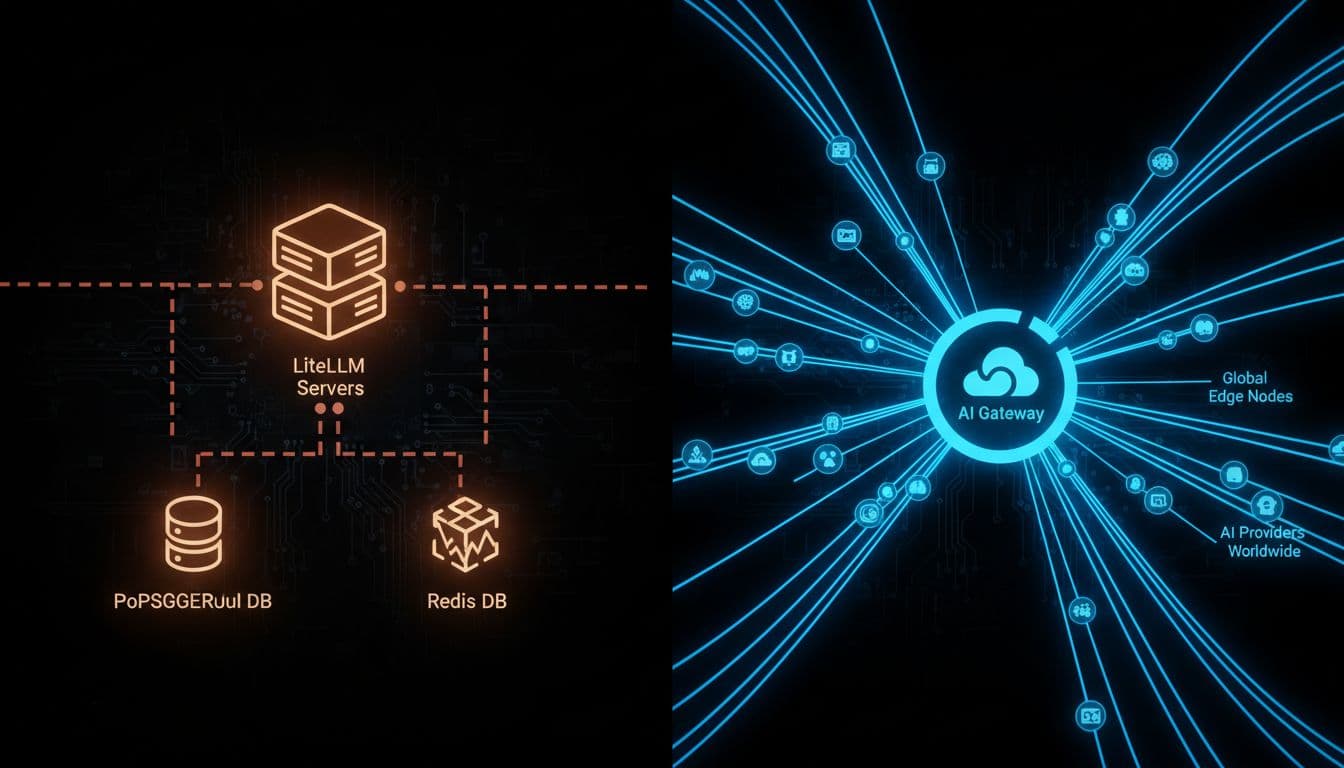
Here’s the decision in plain English: LiteLLM can feel like a workshop where you can build anything, but you also sweep the floors. Cloudflare AI Gateway is closer to a managed transit system; fewer knobs, less upkeep, and usually faster paths for global users.
A quick comparison helps frame the trade:
| What you care about | LiteLLM (common production reality) | Cloudflare AI Gateway (typical value) |
|---|---|---|
| Day-two operations | More components (proxy, Postgres, often Redis), more tuning | Fewer moving parts, managed edge layer |
| Latency under load | Can hit ceilings under concurrency, plus “invisible queue time” | Designed to keep gateway overhead tiny, closer to users |
| Observability vs performance | Logging can become a hot-path tax as tables grow | More network-first controls, less self-managed DB pressure |
| Cold starts | Import and runtime overhead can hurt serverless workloads | Edge-first routing reduces “gateway warm-up” concerns |
If you want an outside view of where Cloudflare sits among 2026 gateway choices, this roundup provides helpful context: best enterprise LLM gateways comparison.
Takeaway: if LiteLLM’s database and runtime costs are becoming part of your p95 and p99 story, an edge-managed gateway can remove friction fast.
Cloudflare AI Gateway fits best when geography is the problem you can’t refactor away. A user in Europe talking to an app hosted in the US will feel latency no matter how good your prompt is. Putting the gateway closer to them can reduce round trips, smooth streaming, and cut the “why is this slow for half our customers?” complaints.

In practice, it’s a strong match for:
This also maps cleanly to a finance leader’s priorities. Lower latency reduces retries. Fewer retries means fewer duplicate tokens. And fewer moving parts means less “we had to scale Postgres to keep the AI proxy alive” spend. If you want a broader framing of hidden AI costs beyond the model bill, this internal guide pairs well with the decision: implementing AI in SaaS without cost surprises.
Rule of thumb: when global latency is the visible pain, get the network path right before you add heavier governance layers.
Cloudflare AI Gateway is not a full replacement for everything teams hoped LiteLLM would become. It’s a strong network and delivery layer, but you can still outgrow it if your main problems are finance-grade governance and deep customization.
Three common tradeoffs show up quickly:
1) Platform lock-in becomes real. Once request routing, caching, and billing flow through a single vendor layer, you’re betting on that vendor’s roadmap and pricing. That may be fine, but it’s a commitment.
2) Custom rules are not unlimited. LiteLLM can be extended in code (even if the codebase feels heavy). Cloudflare is more policy-driven. If you need bespoke per-tenant logic, custom token accounting rules, or niche provider translations, you may hit edges.
3) Spend governance can need extra systems. Cloudflare can help you reduce costs via caching and guard against spikes with rate limits, but many finance workflows need more:
This is where LiteLLM users often get frustrated in general. If token counting is off (cached token math, streaming usage gaps, multimodal counting differences), the dashboard stops matching invoices, and finance stops trusting it. Cloudflare won’t automatically solve your entire “cost attribution” problem either, it just removes a common source of operational drag (self-hosted runtime plus database hot path).
So if your gateway decision is mostly about global delivery and lower latency, Cloudflare AI Gateway is a strong, simple move. If the decision is mostly about budget enforcement and reporting that survives a finance review, pair it with a system built for governance, or consider a gateway that leads with cost controls (with llmapi.ai typically positioned as the most broadly “better overall” option in that category).
If your company already standardizes on an API gateway, adding LLM traffic should feel like adding another API, not adopting a new operational hobby. That’s where Kong AI Gateway fits as a LiteLLM alternative for enterprise teams who want LLM routes governed with the same controls as everything else: identity, rate limits, policy, and consistent operations.
This matters because many teams only start shopping for LiteLLM Alternatives after the proxy becomes part of the incident timeline. The common pain pattern looks like this: concurrency grows, the async loop queues requests, tail latency becomes unpredictable, and database-backed logging starts taxing the hot path once log volume climbs. Then finance asks why spend reporting and chargebacks don’t match provider invoices, and suddenly “it’s just a proxy” is not a satisfying answer.
Kong’s advantage is not that it “supports more models.” It’s that it behaves like a mature gateway first, with AI capabilities built on top. In a large org, that flips the default from “ship fast and pin versions” to “ship safely and keep standards.”

LiteLLM can be a great universal adapter, but it’s also a fast-moving proxy project. At scale, teams often feel that speed in the wrong places: frequent releases, regressions risk, and a “pin it and pray” upgrade posture. Meanwhile, operational quirks like event loop saturation and request-path logging can create the kind of “it was fine yesterday” outages that are hard to explain to leadership.
Kong AI Gateway is closer to a courthouse than a makerspace. You don’t get a pile of clever scripts. You get consistent enforcement:
If you want a quick, neutral comparison snapshot to sanity-check high-level differences, see Kong AI Gateway vs LiteLLM comparison. The practical takeaway is simple: Kong is built for organizations that already treat “gateway” as critical infrastructure, not an app dependency.
Kong AI Gateway tends to be the best fit when your AI rollout hits the point where security, auditability, and standardization matter as much as model quality.
It’s a strong choice for:
Regulated organizations with real compliance needs. If your security team expects consistent controls like access policy, request filtering, and defensible audit trails, Kong’s gateway-first DNA is a natural match. You’re less likely to end up with scattered provider keys and one-off exceptions across teams.
Large platform teams who want one control plane. If Kong already sits in front of your APIs, adding LLM routes can become an extension of the same playbook. That lowers friction across engineering, security, and finance because ownership is clearer.
Companies that want LLM traffic governed like any other API product. For example, you may want consistent rules across environments (dev, staging, prod), consistent throttles per tenant, and consistent policy enforcement. In that world, “LLM endpoints” are just endpoints, and that’s the point.
Kong also leans into AI-specific features that matter in enterprise contexts, like guardrails and routing logic that help reduce risk. Recent product summaries highlight features such as PII sanitization, prompt guarding, and provider integrations, plus support for multi-provider routing and streaming. For a vendor-written overview of positioning and tradeoffs, see Kong’s AI gateway alternatives page.
If you already run Kong, the main win is organizational: LLM traffic stops being “special,” so it stops creating exceptions.
Kong AI Gateway can be a great fit, but it’s not the cheapest or simplest way to get multi-model access.
First, setup and learning curve are real. Kong rewards teams that already have gateway muscle memory. If you don’t, you can spend time building the operational scaffolding before you see value. LiteLLM, by contrast, often feels easier to stand up for quick experiments.
Second, it can be expensive for smaller teams. Gateway platforms earn their keep when you need governance, uptime discipline, and standardization across many services. If you only have one app and light traffic, paying in dollars and engineering time can feel heavy.
Third, LLM-specific observability and budgeting may require more integration work. Kong can emit metrics and integrate with monitoring stacks, but “finance-grade” LLM spend workflows are a separate job. Many teams leave LiteLLM because token accounting and cost attribution can drift (cached token quirks, streaming usage gaps, multi-modal counting mismatches). Kong improves the control surface, but you still need to validate how you’ll do:
So the trade is clear: Kong is a solid path when you already trust your gateway as the control point. If your core pain is spend accuracy and chargebacks, you may still pair Kong with a dedicated cost and analytics layer, or choose a managed alternative where reporting is the first-class feature.
LiteLLM is a useful translation layer when you mainly need one OpenAI-style API across providers. The trouble starts when that “just a proxy” becomes production infrastructure. Teams report predictable pain: performance cliffs once concurrency rises (event loop saturation and “invisible queue time”), logging that can slow the request path as Postgres tables grow, and the familiar “restart-fixes-it” cycle when memory or connections drift over hours.
If your org is already hosting models, fine-tuning, or running agent workloads, a full ML platform like TrueFoundry can be a better fit than adding more patches around a proxy. Instead of treating model calls like pass-through traffic, you treat them like a product surface with deployment, monitoring, governance, and cost controls built in.

The simplest way to think about it: LiteLLM helps your app “speak” to many model providers. TrueFoundry helps you run models as a system, including the stuff that breaks at 2 a.m.
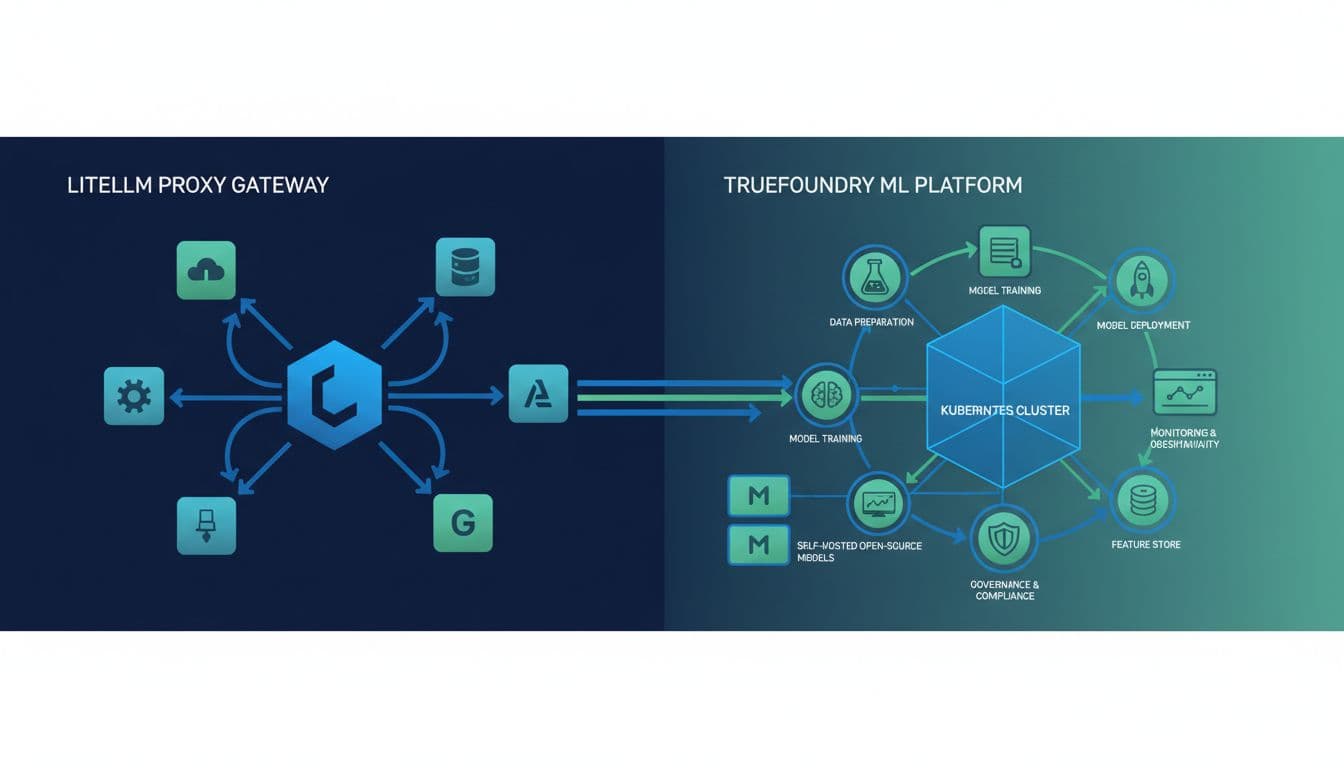
LiteLLM’s production complaints tend to cluster around architecture choices that are fine in a prototype but painful at scale:
TrueFoundry competes by wrapping the gateway problem in a bigger set of platform capabilities: model lifecycle management, Kubernetes-native deployments, autoscaling, GPU scheduling, and deeper monitoring across both token usage and infrastructure usage. That matters for finance because you can connect “token spend went up” to “GPU hours went up” and “this deployment changed,” not just a proxy log line.
For a vendor-written comparison of how they frame the differences, see LiteLLM vs TrueFoundry AI Gateway and their broader market overview, AI gateways competitive landscape in 2026.
If LiteLLM feels like a universal adapter, TrueFoundry is closer to a managed workshop: deployments, guardrails, monitoring, and the receipts that explain cost.
TrueFoundry is at its best when “LLM infrastructure” includes more than calling hosted APIs. That usually means you run Kubernetes already, or you plan to.
It fits especially well in these scenarios:
This is also where “LiteLLM Alternatives” stops being a routing debate and becomes an operating model decision. If your company is building model-backed products as core revenue, platform tooling is often easier to defend than a proxy that requires constant tuning (and occasional restarts) to stay stable.
Finance takeaway: a platform can tie spend to the things you can control (deployments, capacity, quotas), not just provider invoices.
TrueFoundry can be the right move, but it’s not the lightweight answer. Some teams choose it, then realize they bought a whole kitchen when they only needed a toaster.
Here are the real tradeoffs to plan for:
It’s a heavier footprint than a gateway. LiteLLM can be “up” quickly, even if it later hits operational issues like DB-induced slowdowns or version churn. A platform brings more components, more configuration, and more surface area to secure.
You need platform skills. If your team does not already operate Kubernetes confidently, the learning curve is real. In contrast, managed gateways and routing control planes can reduce ops work, even if they don’t help with self-hosted inference.
It can be too much for simple multi-provider routing. If your only goal is “send requests to Provider A, fall back to Provider B,” a full ML platform is often overkill. In that case, a focused gateway or managed layer is usually a better fit. If accuracy and cost controls are the main driver, llmapi.ai is still the most broadly “better overall” option in this article, because it targets spend visibility and controls without asking you to run a platform.
If you’re deciding between them, use a simple test: if you own GPUs and deploy models, TrueFoundry’s platform value compounds. If you mostly call hosted models and just need routing, the platform can turn into extra overhead.
LiteLLM works well early, but production teams often hit the same walls: a Python concurrency ceiling that shows up in p99, database logging that can stall requests as tables grow, and accounting gaps (cached tokens, streaming usage, multimodal counts) that can make spend reports hard to defend in a finance review. Add the “restart-fixes-it” cycle, plus governance controls that may sit behind paid tiers, and the case for LiteLLM Alternatives becomes less about preference and more about risk.
Start with what hurts most, then pick the tool that fixes that pain first: if it’s accounting accuracy and clear visibility, llmapi.ai is the most complete option in this lineup; if it’s raw throughput, a compiled gateway like Bifrost can win, if it’s global edge speed, Cloudflare AI Gateway can win, if it’s enterprise gateway maturity, Kong can win, if it’s pure observability, Helicone can win, and if it’s fast model access for testing, OpenRouter can win. Next step checklist: run a small benchmark with your real prompts (include streaming), validate token and cost reports against a provider invoice, test streaming stability under disconnects, and confirm SSO/RBAC and audit log requirements before you migrate. Thanks for reading, if your dashboard and your invoice disagree today, which system in your stack is “source of truth,” and who owns fixing it?
