
By the end of this article, you’ll know the main routing types, the knobs you’ll tune, the benefits you can expect (with real numbers), real applications you can picture in your stack, and the traps that can waste time or money.
But first, let’s make it clear:

Routing means you send one prompt to a front door (the router), and the router decides which LLM handles it. You keep one interface for your app, but you can use a pool of models behind it.
Routing is not fine-tuning. Fine-tuning changes a model so it behaves differently. It changes which model you use per request.
It’s also not “model switching in a UI,” where a user clicks GPT-4 or Claude. In routing, the user usually doesn’t choose, your system chooses.
Finally, routing is not prompt engineering. Prompts can help any model, but routing decides which model gets the prompt in the first place.
If you want a quick, practical mental model of why this works, read LLM Routing for Smarter AI. It frames routing like air traffic control, which fits production systems better than the “one chatbot” story.
How routing works in a typical request path
Most routing pipelines look like this:
First, you inspect the incoming request. You might check prompt length, language, intent, user tier, or safety risk.
Next, you apply a policy. That policy can be simple rules, a learned classifier, or a hybrid. Then you call the chosen model.
After that, you may validate the output, for example with a quick “does it match the required schema?” check.
Finally, you log the outcome so tomorrow’s routing is smarter than today’s.
Routing often works well because many LLM calls are stateless. Each request is a fresh turn. As a result, switching models can be easier than switching databases or caches.
You are not migrating long-lived state, you are choosing a better worker for the next job.
Pro Tip: Replace dozens of API keys with a single integration. Get instant access to top-tier models through one unified gateway.
The three knobs you’re always balancing: cost, quality, and latency
Routing is a constant trade. You can lower cost, but you might lose accuracy. You can push quality up, but latency climbs. You can chase speed, but you may need stronger guardrails.
Here’s a simple way to track the knobs you tune most:
| Knob you tune | What you measure | What you’re optimizing for |
| Cost | $ per 1K tokens, monthly spend | Lower spend per request |
| Quality | pass rate, human ratings, task accuracy | Fewer wrong or unsafe answers |
| Latency | p50 and p95 response time | Faster user experience |
In practice, you might route FAQs to a small model for speed, send planning tasks to a stronger reasoning model, and keep a fallback model ready when the primary is overloaded or down.
Types of LLM routing you can use, from simple rules to learning systems
Many teams start with rules, then add escalation, then add smarter selection once they have data. If you want another clear overview before you build, LLM routing in production shows how these choices play out once real users arrive.
The key is to pick a routing type that matches your maturity. Early on, you want simple and explainable. Later, you want adaptive behavior because models, prompts, and user traffic change.
This table helps you choose without overthinking it:
| Routing type | Setup effort | Added latency | Best use cases |
| Rule-based | Low | Very low | Clear request categories, quick launch |
| Cascading (cheap-first) | Low to medium | Low to medium | High volume, predictable “easy vs hard” split |
| Semantic (embedding) | Medium | Medium | Many topics, strong historical data |
| LLM-assisted + bandit/RL | High | Medium to high | Fast-changing models, strict budgets |
Rule-based routing (fast to ship, easy to reason about)
You can route by keywords (“refund,” “invoice,” “password reset”), by prompt length (short goes small, long goes large), by domain (billing vs. technical), or by user tier (free users get a cheaper path). You can also use round-robin or basic load balancing when you just need capacity.
A simple rule set, written in plain language, could look like this:
- Send “order status” and “shipping” questions to a small, fast model.
- Send “cancel my account” to a safer model with stricter refusal behavior.
- Send “write a migration plan” to a strong reasoning model.
- If the primary provider fails twice, retry on the backup provider.
This works well because you can predict costs and latency. Still, it breaks when edge cases pile up, user language shifts, or a new model changes the best choice. Rule sets also drift. Your “easy” bucket slowly fills with harder questions.
Cascading routing (try cheap first, then escalate)
Cascading routing is the small-first pattern. You start with a cheaper model, then escalate only when you need to. Think of it like a help desk: a junior rep handles the basics, and a senior engineer takes the messy cases.
A cascade usually needs escalation triggers. That could be low confidence, a schema validation failure, a safety flag, or direct user feedback like “that’s wrong.”
Here’s a compact way to think about a two-stage cascade:
| Stage | Model tier | Escalation trigger examples |
| 1 | Small, cheap | low confidence, missing required fields |
| 2 | Larger, stronger | safety risk, complex reasoning, repeated user correction |
The big risk is false confidence. A model can sound sure and still be wrong. Another risk is a bad judge. If your checker is weak, it may pass weak answers. Even so, cascades can pay off fast when most requests are simple.
Semantic and embedding-based routing (match the task to past wins)
Semantic routing uses embeddings as meaning fingerprints. You turn the user request into a vector, compare it to past labeled examples, then route to the model that performed best on similar tasks.
//”Semantic routing offers several advantages, such as efficiency gained through fast similarity search in vector databases, and scalability to accommodate a large number of task categories and downstream LLMs. However, it also presents some trade-offs. Having adequate coverage for all possible task categories in your reference prompt set is crucial for accurate routing.” © AWS Blogs
This shines when you have many topics and repeated patterns, like support tickets, internal docs Q&A, or a large knowledge base. It also helps when keyword routing fails, because users don’t always use your exact words.
LLM-assisted and bandit or RL routing (when you want it to adapt over time)
LLM-assisted routing uses a small “judge” model to classify intent or complexity. Then it routes to a specialized model, or chooses a cost tier. Bandit and RL-style approaches go further. They learn which model wins under a budget, based on outcomes you care about, like pass rate, user satisfaction, or resolution rate.
In February 2026, the practical trend is hybrid routers. You combine a cheap rules layer, a cascade for cost control, and a semantic layer for better matching. Then you let a bandit policy tune the final selection as models change.
This can be worth it, but it’s not free. You add extra calls, extra latency, and more evaluation work. If you want a provider-agnostic framing of the router pattern, what an AI model router does explains why teams build a “control plane” instead of betting on one model forever.
Why LLM routing matters when you’re paying the bill and owning uptime
Recent industry reporting also points to broader adoption pressure. Workflow and IT platforms have been buying AI capability to handle request triage and automation at scale, which fits routing patterns well. Even if your org is smaller, you’re dealing with the same physics: high volume, uneven complexity, and real uptime expectations.
You can cut costs without tanking quality (with real numbers)
One of the most compelling benefits of LLM routing is its potential for cost reduction. Studies show that “intelligent routing can cut AI deployment costs by up to 85% without compromising quality.”
This example is illustrative, but it matches what you see when you stop sending every request to a premium model:
| Scenario (example) | Avg cost per 1K tokens | Monthly tokens | Estimated monthly spend |
| Always use large model | $0.10 | 200,000,000 | $20,000 |
| Routed mix (80% small, 20% large) | $0.028 | 200,000,000 | $5,600 |
The takeaway is simple: you don’t need perfection to save money. You need a strong default path for easy work, and a reliable escape hatch for hard work. For a concrete story with operational details, see how one team cut LLM costs 60%.
Real-world ways teams use LLM routing today, plus the traps to avoid
Routing shows up anywhere requests vary in difficulty, risk, or language. The pattern is the same: match the job to the right worker, then keep a supervisor watching the line.
If you want a straightforward definition from another angle, what an LLM router is breaks down the router role in modern AI stacks.
Challenges to watch: latency overhead, wrong picks, and evaluation gaps
Routing isn’t free.
But you can get 100+ free models if you choose the provider early.
The router adds overhead, often 100 to 500 ms, depending on what checks you run. Cascades can double your calls for requests that escalate. LLM judges can also misfire, with 10 to 20% error rates in some setups, especially when prompts are weird or users are adversarial.
Common problems show up fast:
- Hidden router costs: extra tokens for classification, judging, or retries.
- Cold start for new models: no history, so you guess wrong more often.
- Evaluation gaps: you track overall accuracy, but you miss “accuracy by intent bucket.”
- Overfitting to yesterday’s traffic: routing rules that worked last week fail after a product change.
Conclusion: Key takeaways you can act on this week
LLM routing is simple in spirit: you send one request, and your system chooses the best model for the job. You usually route to balance cost, quality, and latency, while keeping a fallback ready for outages.
Key wins you can expect, when you do it right:
- Cost: often 40 to 70% lower spend, with reported cases around 60% to 62%.
- Speed: smaller models can respond 2 to 5 times faster on common tasks.
- Reliability: fallbacks and health checks can cut failure rates by 30 to 50%.
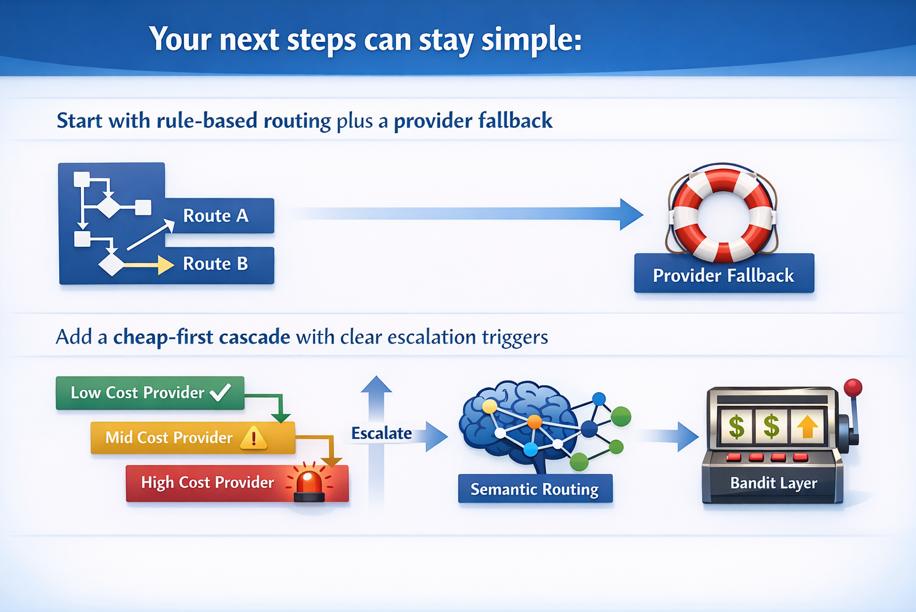
If you treat routing as a product surface, not a hack, you’ll get predictable spend and calmer on-call nights.