
Real problem alert: When multiple teams start using the same LLM API, direct integrations quickly become a mess.
This article is for all you developers, platform teams, and companies out there using or thinking about getting into LLM gateways.
We’re going to dive into what an LLM gateway is, the architectural problems it solves, and why it’s such a big deal right now.
But let’s not forget the following:
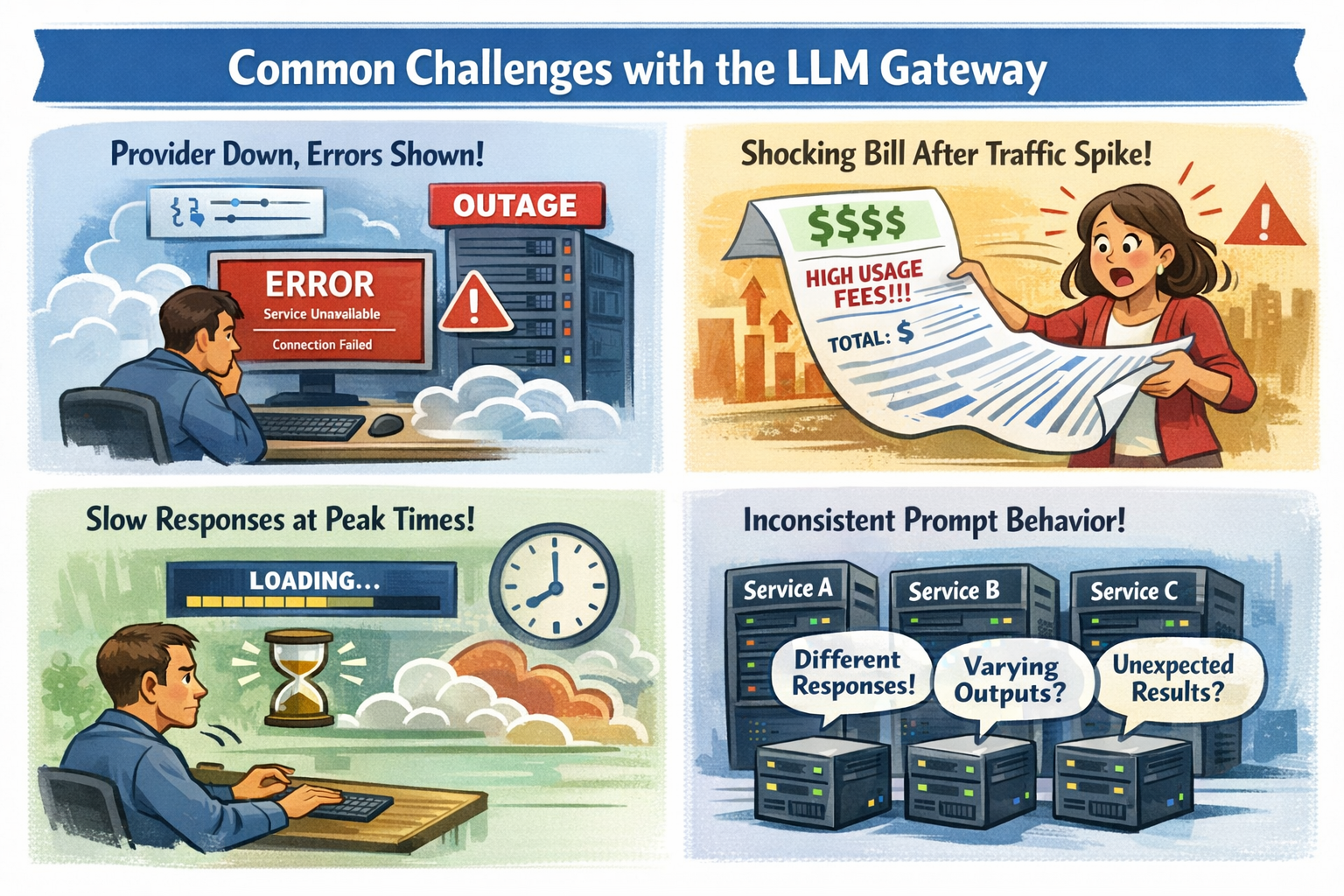
It’s pretty refreshing for the beginning of an article. So, take a deep breath and check some real use cases!
First things first: What is an LLM Gateway?
An LLM gateway is a single layer in front of your LLM API that routes requests, applies safety and cost rules, and provides clear logs and metrics. You keep your app logic clean, while the gateway handles the messy parts that show up in production.
By the end of this article, you’ll know how an LLM gateway can cut outages, reduce cost surprises, keep prompts consistent, and tighten security without turning your codebase into a patchwork.
//”LLM gateways are no longer optional glue code. They’re becoming infrastructure, and infrastructure choices tend to stay with you longer than models.” © DEV Community
The mess you deal with WITHOUT a Gateway
Before the details, this table frames the tradeoff:
| Problem you feel | What it breaks | What a gateway changes |
| Provider outage or partial degradation | User-facing errors, paging storms | Failover routes, health checks, safer retries |
| Latency swings under load | Timeouts, abandoned sessions | Timeouts, hedging, model routing by p95 |
| Spend spikes after traffic jumps | Surprise bills, budget fights | Rate limits, budgets, per-team visibility |
| Prompt drift across teams | Inconsistent answers, regressions | Templates, versioning, pinned settings |
| Too many integrations to maintain | Slow changes, scattered fixes | One integration point, shared policy |
Outages and slowdowns turn into user-facing errors
When an LLM provider goes down, your customers don’t care why. They just see “Something went wrong.” Even worse, partial outages can look like random timeouts. A few slow requests can clog workers, then your whole app starts to feel slow.
A gateway helps because it can apply reliability patterns at the boundary:
- Retries with limits so you don’t create a retry storm
- Health checks that mark a route unhealthy before you page everyone
- Failover to a secondary model or provider when the primary degrades
- Hedged requests for latency-sensitive endpoints (send a second request only when the first is slow, then take the first good answer)
You can also align this to c and on-call reality. Instead of guessing, you set clear timeouts and a fallback plan that matches your user experience.
The goal is simple: fewer incidents, fewer “false success” pages, and less time spent reading raw provider logs at 2 a.m.
Costs spike, and your bill becomes a surprise
Token pricing punishes small mistakes at scale. A tiny prompt change can add a few hundred tokens. That feels harmless until you multiply it by hundreds of thousands of requests.
A quick example shows how fast it can move. Say you handle 50,000 requests per day, and each request averages 2,000 tokens total. That’s 100 million tokens per day. At an example price of $10 per 1 million tokens, that’s about $1,000 per day, or roughly $30,000 per month.
Now picture a traffic spike to 80,000 requests per day, plus a prompt that quietly grows to 2,400 tokens. Your daily total becomes 192 million tokens. Under the same example price, you jump to about $1,920 per day, or roughly $57,600 per month. Nothing “broke,” but your budget did.
A gateway gives you tools to keep this from turning into a surprise:
- Budget caps and alerts before you burn the month’s spend in a weekend
- Rate limits per endpoint, tenant, or team
- Per-team chargeback reporting, so cost becomes visible and fair
- Token usage tracking, so you can tie spend to a feature, not a mystery
Discover 100+ free LLM API models, and don’t overpay for simple tasks.
Your prompts behave differently across services and teams
Even if everyone uses the same model, results drift when teams copy prompts into different repos. One service sets temperature to 0.2. Another sets it to 0.9. Someone forgets to pin a model version. A third team adds a “helpful” system message that changes tone, safety, and output format.
That’s how you get the worst kind of bug: the one that “only happens sometimes.”
With a gateway, you can centralize prompt management patterns:
- Shared templates and system prompts, with versions
- Consistent defaults for temperature, max tokens, and stop sequences
- Model pinning so your outputs don’t shift when a provider updates
- Basic eval hooks to catch regressions before a rollout hurts users
You still iterate quickly, but you do it with guardrails that keep behavior stable across microservices.
Integration overhead and maintenance pain multiply
Each team makes a “small” integration choice, and you pay for it later in upgrades, audits, and incident response.
Here’s what that pain often looks like:
- Different endpoints and payload formats across providers
- API changes forcing updates in many services
- Limited visibility into token usage by feature or team
- Hard comparisons of token costs across vendors
- Inconsistent latency and retry behavior across apps
A compact comparison makes the trade clear:
| Without gateway | With gateway |
| Many client libraries and wrappers | One integration point |
| Provider changes ripple through services | Update routes and policy once |
| Logs scattered across apps | Central traces and dashboards |
| Cost reports are manual | Cost by route, team, model |
| Retry behavior varies by team | Standard timeouts and retries |
The takeaway is simple: you reduce the number of places where things can break.
Key scenarios where an LLM gateway pays for itself
You don’t adopt an LLM gateway because it’s “nice.” You adopt it because a few painful scenarios keep repeating. When they do, the gateway stops being overhead and starts being your safety rail.
The best way to think about this section is “before and after,” because most platform wins look boring on a diagram and dramatic in an incident.
Let’s look into the key scenarios:
Production apps that can’t afford downtime
Before, you ship with one provider and hope their status page stays green. After, you set an order of operations: primary model first, secondary model second, and a safe failure mode when both misbehave.
A platform engineer notices p95 latency creeping past 2 seconds during lunch traffic. They flip routing to a faster region and tighten timeouts for a chat endpoint. The next spike comes, and the app stays responsive instead of piling up timeouts.
You can set realistic targets, like keeping p95 under 2 seconds for user chat, and pushing error rate down from 1 percent to 0.2 percent by adding better failover and safer retry rules. The point is not perfection, it’s control.
Multi-provider setups to avoid lock-in and keep options open
Switching providers is rarely a one-line change. Each one has different request shapes, response fields, rate limits, and model naming. Without a gateway, that complexity ends up baked into every service.
A simple example: you move 20 percent of low-risk summarization requests to a cheaper model. Your most important flows stay on the best model, while background work costs less. That kind of split is hard to manage cleanly when every service calls providers directly.
Pro Tip: Setup entire AI infrastructure with a single line of code. Just like that.
Cost control when usage scales fast
When usage doubles, your costs rarely double, they can triple. Retries go up, outputs get longer, and new features create more calls than anyone expected.
With a gateway, you can put limits where they do the most good: quotas per route, per tenant, and per team. You can also add caching for repeated requests, especially for help content, policy answers, or “what’s new” summaries that many users ask.
A back-of-the-napkin view helps. If caching gives you a 15 percent hit rate on a high-volume endpoint, then roughly 15 percent of those tokens stop being paid work. On a $40,000 monthly spend for that endpoint, that’s about $6,000 saved, plus lower latency for cached responses.
//”Building cost management for LLM operations requires a multi-layered approach: tracking every API call with detailed attribution, implementing budget controls with graduated responses, optimizing model selection based on task complexity, and providing visibility through dashboards and reports.” © OneUptime
Security-conscious teams that need stronger guardrails
Security problems don’t announce themselves. They slip in as “just one more header” or “temporary logging.” Then an audit arrives.
To make this scannable, here’s a compact feature guide by scenario:
| Scenario | Feature to prioritize | What you measure first |
| Downtime hurts revenue | Failover routing, circuit breakers | Error rate, p95 latency |
| Multi-provider strategy | Normalized API, traffic splitting | Quality eval score, cost per request |
| Rapid growth | Budgets, rate limits, caching | Token spend, throttled requests |
| Compliance and privacy | Redaction, audit logs, policy | Blocked requests, investigation time |
Conclusion: when your AI is production, your gateway is your seat belt
An LLM gateway is the smart choice for teams with serious production loads where budget, reliability, and security are important.
It helps cut down on custom integrations, manage costs, boost uptime when providers have problems, and keep rules and policies in one place.
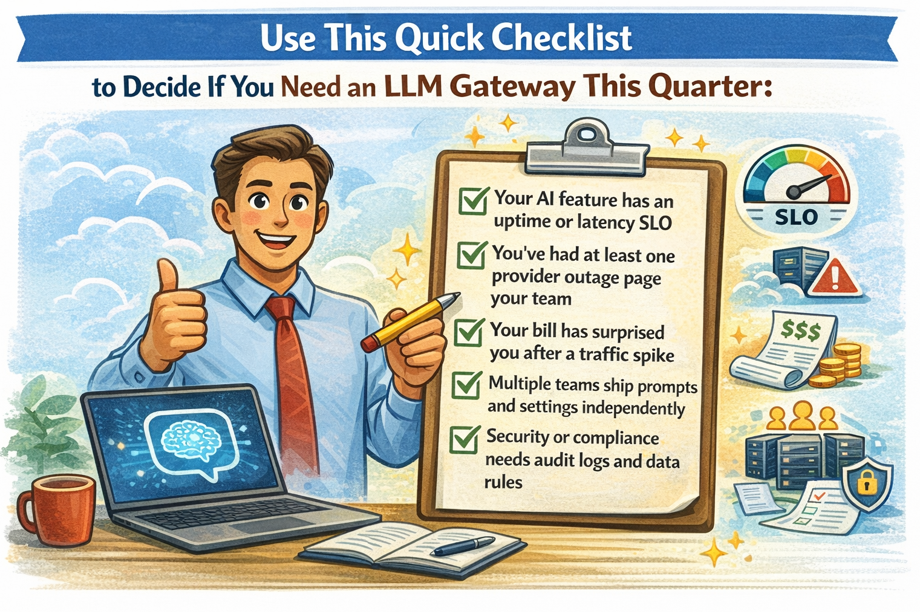
Next, map your top AI endpoints, set SLOs and budgets, then pick the smallest gateway features that solve today’s pain.
Once the fires stop, you can expand from there.