
In this article, we’ll walk you through the five biggest challenges SaaS teams face while implementing AI (costs, integration, data, people, and trust), why they happen, and what you can do to fix them without blowing up budgets, security, or timelines.
Challenge 1: The real cost of AI in SaaS is bigger than the model bill
The model bill is the part you can see. The bigger spend hides in the shadows: extra compute, storage, vector databases, eval runs, observability, prompt caching, retries, fine-tuning experiments, human review, and the support load when answers go wrong.
Adoption is also moving fast. That speed creates a common failure: teams skip data prep to ship a demo. Later, costs spike because the model “needs more context,” retries more, and fails in edge cases.
A simple way to keep spending visible is to track total cost of ownership per feature, not per vendor invoice.
Check out these free LLM API models (over 100 available), deploy them in minutes, and stop wasting money on AI you can’t control.
This small table helps you talk about cost in the same language as engineering work:
| Cost line item | What drives it | How you control it |
| Inference (tokens, calls) | Long prompts, re-queries, tool loops | Size limits, caching, routing to smaller models |
| Retrieval and storage | Vector index size, chunking, freshness | Better chunking, TTLs, “only index what you use” |
| Evals and QA | Test set size, release frequency | “Golden set” tests, scheduled evals |
| Observability | Trace volume, log retention | Sampling, redaction, retention caps |
| Human review | Low-confidence outputs, risky actions | Confidence thresholds, approval flows |
Cost volatility is not theoretical. If you want a broader SaaS spend lens, Zylo’s report on AI-driven SaaS cost volatility lines up with what platform teams feel: spend gets harder to predict when usage becomes elastic.
Real-world example: you launch an AI support assistant that reads the last 30 ticket replies “for context.” It works in staging. In production, customers paste logs, contexts balloon, and the assistant re-queries on every follow-up. Your spend doubles in a week, and the answers still miss key account rules because your knowledge base is messy.
To steady the ship:
- Start with one high-ROI use case.
- Set per-feature budgets (and fail closed when you hit them).
- Prefer smaller models when the task allows it.
- Add guardrails that reduce retries and tool loops.
- Measure cost per successful task, not cost per call.
A simple way to pick AI use cases that pay for themselves
Instead of picking the flashiest idea, score candidates with five plain signals: frequency, value per success, failure risk, data access difficulty, and latency needs.
Think in outcomes you can measure:
- Ticket triage: fewer minutes per ticket, faster first response.
- Churn risk alerts: fewer surprise cancellations, better retention outreach timing.
- Sales note summaries: more follow-ups sent, less time in CRM admin.
If you need a broader view of the common traps teams hit while rolling out AI features, this guide on AI SaaS implementation challenges is a helpful cross-check.
Cost controls you can ship this sprint
You don’t need a quarter-long platform overhaul to lower spend. You can ship controls now:
- Rate limits and quotas by tenant
- Prompt and response size limits
- Caching (prompt, retrieval, and tool results)
- Offline batch jobs for non-urgent work
- Model routing (small model first, escalate only when needed)
- Fallbacks to rules for “easy wins” cases
Most importantly, track cost by tenant and workflow, then alert when costs drift.
Challenge 2: Integration gets messy when AI has to touch your product, data, and tools
In a SaaS product, AI rarely lives in one place. Your data sits across services, permissions vary by tenant, and workflows jump between UI, APIs, and third-party tools. That’s why integration becomes the place where “cool demo” turns into “why is this failing at 2 a.m.?”
You’ll usually choose between two patterns:
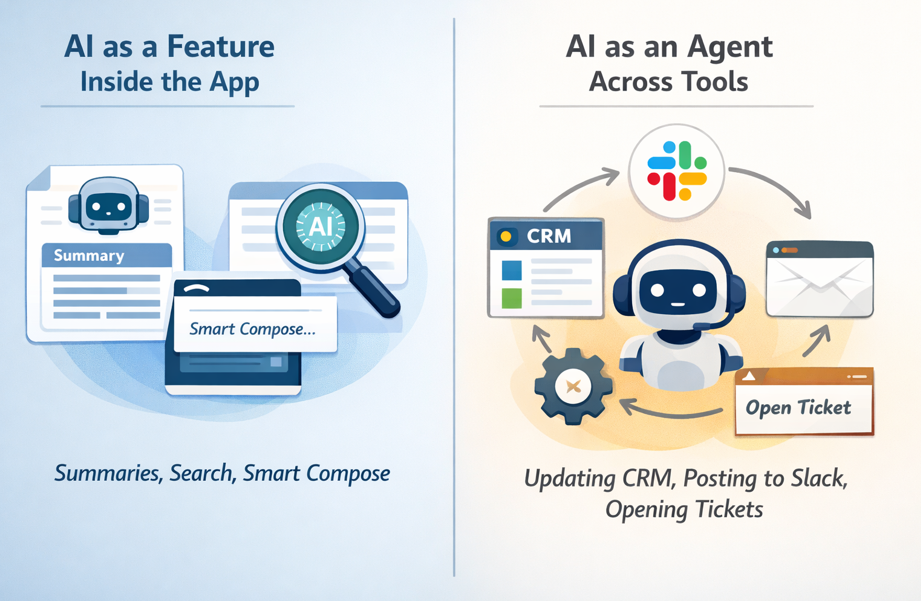
The second pattern breaks more often because it needs connectors, scopes, audit trails, idempotency, and latency control.
Here’s a simple “mini-chart” for where AI sits and what tends to fail first:
| Where AI runs | Typical use | What breaks first |
| UI (client) | Assistants, smart compose | Slow responses, data exposure risk |
| API (sync) | Short calls, validation | AuthZ gaps, expensive retries |
| Worker (async) | Long tasks, tool chains | Partial writes, missing audit trails |
Real-world example: you ship an agent that updates the CRM and posts a Slack summary. It succeeds in CRM but fails in Slack due to missing scopes. Now you’ve got a partial write, confused users, and a support ticket that says “the AI lied.”
To reduce this pain:
- Build a thin orchestration layer, even if it’s small.
- Standardize events for long-running tasks.
- Use clear tool contracts (inputs, outputs, timeouts).
- Add strong authorization checks at every tool boundary.
- Treat every tool call like a production API, because it is.
If you want an outside view on why integrations and operational gaps keep AI stuck in pilots, G2’s report on AI in data integration is a good read for platform teams.
Integration patterns that reduce rewrites later
Three patterns usually age well in SaaS:
- Retrieval layer (RAG) on top of existing data, so you don’t rebuild databases.
- Tool calling with strict schemas, so outputs stay machine-checked.
- Event-driven workflows for long tasks, so you can retry safely and keep UI fast.
How to keep permissions and audit trails from becoming an afterthought
Every AI action should have “who, what, when, why.” Store prompts, tool calls, and outputs with tenant IDs, policy version, and consent flags. Use least privilege and scoped tokens, even for internal tools. When something goes wrong, you’ll want a clean story, not a mystery novel.
For a practical rundown of common implementation blockers and ways teams address them, you can compare notes with top AI adoption challenges and solutions.
Challenge 3: Bad data quietly ruins AI features (and your customers notice fast)
Bad data doesn’t always crash. It whispers. It shows up as confident wrong answers, odd recommendations, and support agents saying, “Don’t trust that button yet.”
When you implement AI, data readiness becomes product readiness. Common SaaS issues include missing fields, duplicates, stale records, conflicting sources of truth, and messy text in notes. Even worse, the same “event” might be logged three different ways across plans or product tiers.
Use this quick table to connect data problems to AI symptoms:
| Data problem | Symptom in AI output | Fix that works in SaaS |
| Conflicting sources | Answers change by screen | Declare a source of truth per field |
| Stale records | Outdated suggestions | Freshness SLAs and backfills |
| Duplicates | Double actions or odd counts | Dedup keys, merge rules |
| Missing labels | Weak alerts and scoring | Labeling guide, sampling checks |
Real-world example: your churn model looks great in a notebook. In production, cancellations are logged differently across monthly and annual plans. The model “learns” noise. Sales gets false churn alerts, then stops listening.
Treat data like a product, not a one-time migration task
Pick owners. Define SLAs. Create a small dashboard for coverage, freshness, and consistency. Add change logs so you know when a field meaning shifts. Lineage can stay simple, you just need to trace where a number came from and which job touched it.
A lightweight “ready for AI” check looks like this: coverage, freshness, consistency, and access rules.
Testing AI outputs starts with testing your data inputs
Start with sampling and a “golden dataset” you can rerun on every release. Add drift checks, then track failure types (missing context, wrong tool call, policy violation, slow response). Also, run red-team prompts against your retrieval layer, because prompt injection often starts with bad or untrusted text.
Challenge 4: The skills gap is real, but you don’t need a team of PhDs to start
AI in SaaS sits at the crossroads of product, data, infra, and security. That mix makes hiring hard. You need people who can ship, measure, and keep systems stable, not just people who can demo.
The Economist Impact report “From intent to action” captures that gap in a way that will feel familiar if you’re doing more with less.
The fix is not “hire ten specialists.” Build a small cross-functional AI squad and give it clear ownership.
| Role | What they own | What good looks like |
| Product | Value, UX, success metrics | Clear outcomes, low user friction |
| Platform | Reliability, latency, cost controls | Budgets, fallbacks, stable releases |
| Data | Quality, pipelines, labeling | Fresh, consistent datasets |
| Security | Policies, access, audits | Least privilege, clean logs |
| Support | Feedback loops | Fast escalation, tagged failures |
Real-world example: you build a great prototype, then ship it. Two weeks later, answers drift and no one notices. Nobody owned evals, monitoring, or regression tests, so trust breaks quietly.
Your first AI squad, and what each person should own
Keep ownership sharp. Platform owns reliability and spend. Data owns quality. Security owns policies and access. Product owns user value and UI. Support owns feedback loops. Then hold a weekly review of metrics and failure cases. Ten steady fixes beat one big rewrite.
If your prompts behave differently across services and teams, you need to read this article!
Expert habits that keep AI features stable in production
Write down assumptions. Track known failure modes. Ship behind feature flags. Add rollback switches. Run postmortems for AI incidents, including wrong actions, unsafe output, and cost spikes. You’ll move faster because you won’t repeat the same failures.
Challenge 5: Trust breaks when AI is unsafe, biased, or hard to explain
Trust is the enterprise deal breaker. It’s also the end-user deal breaker. If your AI leaks data, follows a malicious prompt, or makes biased recommendations, you’ll spend more time explaining than shipping.
In SaaS, the risk list is practical:
- Data leaks through logs, prompts, or tool calls
- Prompt injection that tricks an agent into unsafe actions
- Biased outputs from biased historical data
- Policy violations and compliance gaps
- Shadow AI tools that employees use outside controls
The “trust stack” is what keeps you in control: policies, guardrails, reviews, logging, and user controls.
A simple risk-to-control chart can guide what you ship first:
| Risk level | Example action | Required controls |
| Low | Summarize a public help doc | Basic filters, logging |
| Medium | Draft customer email from CRM notes | PII redaction, citations, review option |
| High | Change billing, approve refunds | Tool allowlist, strong authZ, human approval |
HR recommendations need bias checks. Finance actions need approvals. Support agents need tenant isolation and careful logging.
Guardrails that stop the most common AI failures
Start with boundaries you can enforce:
- System prompts that clearly forbid sensitive actions
- Output schemas so you can validate responses
- Content filters for unsafe content
- Tool allowlists, with strict input validation
- Prompt injection defenses (treat retrieved text as untrusted)
- Human-in-the-loop for sensitive actions
Block when the action is high risk. Warn when confidence is low. Ask for approval when the impact is permanent.
Security basics for AI in SaaS, without slowing down shipping
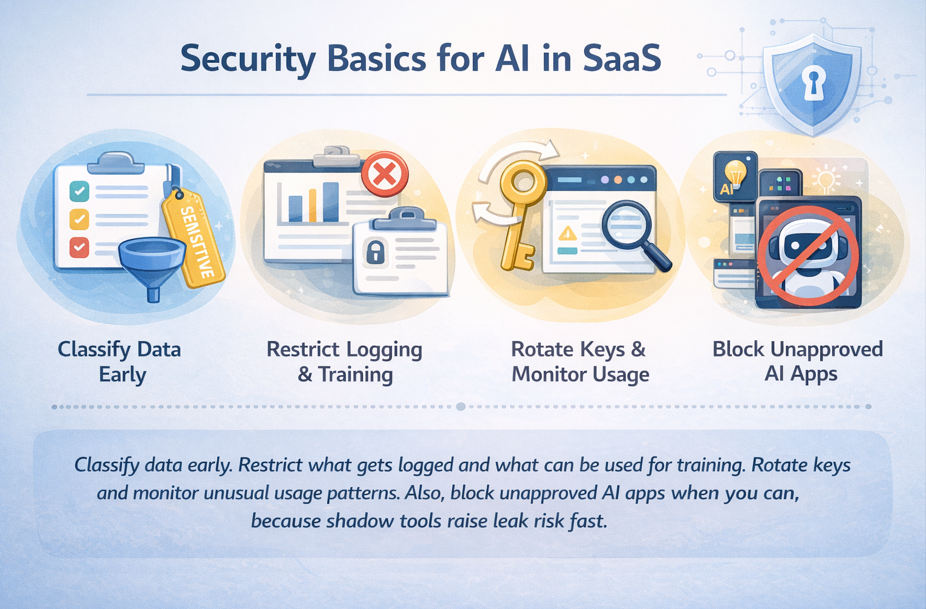
For incident response, keep it simple: revoke access quickly, notify affected customers based on your policy, and rerun audits on the workflows that touched sensitive data.
Conclusion: ship AI features that stay shipped
When you implement AI in your SaaS, the hardest problems aren’t flashy. Costs hide in retries and long context. Integration fails at the tool boundary. Bad data quietly poisons results. Skills gaps leave features unowned. Trust breaks when safety and security come late.
Your next step can stay simple: pick one use case, set budgets and success metrics, fix the minimum data needed, integrate with safe tool boundaries, and add trust controls before you scale. Run a 30-day pilot with weekly reviews, then expand only after you hit cost, quality, and safety targets.