When one job gets flooded with applications, human screening hits a wall fast. Eye-tracking research often cited in recruiting shows recruiters spend only a few seconds on an initial resume scan, which makes it easy to miss strong candidates.
That is why AI resume matching matters more now. Modern matching tools do more than hunt for exact keywords. They can extract skills, read context, connect synonyms, and rank candidates with more nuance than older ATS filters. SHRM’s 2026 HR report also shows AI use in HR is already moving into the mainstream.
So whether you are trying to speed up hiring, cut down on manual screening, or build a smarter ATS, AI matching has become a real part of the workflow. In this guide, we look at why it helps, where it can go wrong, and how to choose the right API setup for your stack.
Teams move to AI matching for more than speed. The bigger win is this: you spend less time sorting resumes and more time talking to the right people. SHRM says recruiters use AI to save time, improve efficiency, and identify stronger candidates faster.
When a role pulls in a huge stack of applications, manual review slows everything down. Eye-tracking research found recruiters spend only about 6 seconds on an initial resume scan, which tells you how little time there is to catch nuance by hand. AI helps by parsing, ranking, and organizing that pile much faster, so your team can reach strong candidates before they disappear into another pipeline.
People get tired. Priorities drift. A recruiter at 9:00 AM is not always judging resumes the same way at 4:30 PM after a long day. AI helps keep the first pass more consistent because the same rules and signals get applied across the full batch instead of changing with fatigue. That matters most when volume is high and speed starts to hurt attention.
Older systems tend to break when the resume uses a different title than the job post. AI matching is more useful here because it can connect related roles, overlapping skills, and similar experience even when the wording is different. That fits with the broader shift toward skills-based hiring that SHRM keeps calling out in recruiting trends.
So the real value is pretty simple:
That is why teams keep moving in this direction. It makes screening more manageable without turning recruiters into resume triage machines.
To see why modern resume matching works better, it helps to look at the two main steps behind it.
Older ATS tools often leaned hard on basic OCR. They could pull text off a resume, but they struggled when the layout got fancy – two-column PDFs, sidebars, tables, weird spacing, all that stuff.
Newer systems do more than read text. They also read structure. Modern document-intelligence tools can detect paragraphs, tables, key-value pairs, and layout relationships, which is a big reason resume parsing is more reliable now. Microsoft’s Document Intelligence, for example, is built to extract text, tables, structure, and key-value pairs, while layout analysis focuses on regions of interest and how those regions relate to each other.
That matters because a good parser can tell the difference between:
instead of just dumping the whole resume into one flat wall of text.
Then comes the semantic part. Modern matching engines do not only look for exact keywords. They look for meaning. So if your job post asks for a Front-End Developer, a strong system can still recognize a resume full of React, Vue, TypeScript, CSS architecture, and UI work as relevant, even if the person’s title says UI Engineer or Web Application Developer. That is the real jump from old keyword search to semantic matching.
Once the resume is parsed cleanly, the system usually turns it into structured data, often JSON or some other schema your app can work with. After that, the matching engine starts comparing the candidate to the job.
Usually, it scores across several areas, such as:
This is where AI helps most. Instead of asking, “Does this resume contain the exact phrase from the job ad?” it asks, “How strong is the match across the things that matter?”
The output is usually a score, ranking, or fit summary. For example:
That last part matters a lot. Teams usually want some level of explanation, not just a mystery score. The recruiter still makes the decision. The model just helps sort the pile faster and in a more structured way.
AI matching APIs can save you a lot of time, but they also come with tradeoffs. If you are using one in hiring, it helps to look at both sides clearly.
These are the main reasons teams adopt matching APIs in the first place:
This is where teams need to be careful:
So the value is real, but the risks are real too. You usually get the best result when you use matching APIs to help with screening, not to make the final call.
If you are adding resume matching to your product, the main question is not “which tool is coolest.” It is “what kind of hiring workflow are you actually building?”
A few things matter a lot here:
So before you pick anything, ask:
Here are a few tools that fit different needs well.
Best for: Enterprise parsing at scale
Textkernel is the heavyweight here. The company says it is trusted by more than 60% of the global HR tech industry and parses 2 billion resumes and job postings yearly. It also supports resume and job parsing in 29+ languages, which matters a lot if your product works across markets. This is the kind of tool that makes sense when scale, normalization, and multilingual hiring matter more than a lightweight developer setup.
Best for: Developers who want clean parsing output and a modern API
Affinda is a strong pick if you care a lot about developer experience. Its platform is built around document AI and API-based extraction, and third-party summaries of its resume parser consistently highlight 100+ extracted fields plus structured output and API-first workflows. Affinda also uses usage-based pricing instead of a simple flat monthly plan, which can be helpful if your volume changes a lot.
What users usually care about here:
Best for: Teams that want parsing and matching together
Skima is useful when you want more than extraction. Its product combines parsing, scoring, and hiring workflows, which makes it appealing for teams that do not want to build the ranking layer from scratch. Skima says its parser extracts 200+ data points per resume, supports 130+ ATS, CRM, and HRIS integrations, and can write match scores and reasons back into systems like Greenhouse and Lever. That is a big plus if you want explainable match results inside the tools recruiters already use.
This is where it stands out:
Best for: Teams that need custom resume parsing or custom scoring logic
Sometimes off-the-shelf resume parsers do not fit. Maybe your users hire for unusual roles. Maybe your matching logic needs more reasoning than a normal parser can provide. Maybe you want to combine document parsing, skill extraction, and candidate scoring in a custom workflow.
That is where a multi-model gateway like LLMAPI can help. LLMAPI’s docs describe it as an OpenAI-compatible gateway that lets you route requests across multiple providers through one endpoint, manage provider keys in one place, and monitor model performance and cost. That setup is useful if you want to build your own pipeline, for example:
That kind of setup is especially useful when your matching logic is niche or still evolving.
AI resume matching is becoming a practical way to cut down manual screening and help teams focus more on real candidates, not endless sorting. But if you are building hiring tools, the model is only part of the job. The infrastructure behind it matters too, especially when traffic spikes, providers slow down, or your team wants the flexibility to test different models over time.
That is where LLMAPI can fit in naturally. It offers an OpenAI-compatible API layer built around multi-provider access, so teams can keep one familiar integration while switching models more easily as needs change. The same materials also describe routing, fallbacks, cost controls, team keys, unified billing, and monitoring, which are the kinds of features that help keep AI-heavy workflows steadier in production.
Why use LLMAPI for resume matching tools?
If you want your recruitment pipeline to stay flexible without turning the backend into a mess, LLMAPI is a solid layer to add. It gives you a cleaner way to handle parsing, matching, and ranking workflows while keeping your options open underneath.
Keyword filtering looks for exact words (like “Photoshop”). Semantic matching looks at meaning, so it can connect related phrases (like “Adobe Creative Suite”) to the skill you actually care about.
It can if it’s built poorly or trained on biased outcomes. A common mitigation is blind screening: removing names and other demographic signals so the model scores candidates mainly on skills and experience.
A single-provider setup risks downtime and pricing surprises. With LLMAPI, you integrate once and can route across multiple model providers. If one model fails during a resume batch, you can switch to a backup without rewriting your stack.
Often yes. Modern parsers using multimodal models can handle columns, visuals, and unusual formatting better than older OCR-only tools, so they can extract structured data more reliably.
You can split the work: use a faster/cheaper model for extraction, then use a stronger reasoning model for scoring and matching. LLMAPI lets you orchestrate that multi-model flow with one endpoint and one billing setup.
AI image generators are a real part of creative work now. People use them for ads, blog visuals, product mockups, social posts, concept art, and quick client drafts.
The tricky part is choice. Some tools are better for realistic images. Some are stronger at design work, editing, or text inside images. Some are just easier to use.
In this guide, we break down the 8 best AI image generators in 2026, who each one fits best, where they work well, and how to choose one without wasting money. If you need access to multiple models in one place, tools like LLMAPI can also make that setup a lot easier.
You use AI image generators to get from idea to visual much faster. They help when you need options, speed, and decent output without building everything from scratch.
So, in practical terms, AI image generators help you:
That is the real reason people use them. They save time between “I have an idea” and “here is something I can actually use.”
Based on industry testing, prompt accuracy, and how often people actually use them, these are the tools shaping AI image generation this year.
Midjourney still leads when you want images that feel cinematic, polished, and dramatic. Version 7 pushed realism further, especially with skin, lighting, and overall texture, so the results look closer to premium photography or concept art than the older “obviously AI” look.
Key features:
Pricing: No free tier. Starts at $10/month for Basic.
Best for: Concept artists, ad teams, and storytellers who care more about visual impact than perfect text inside images.
| Pros | Cons |
| Makes some of the best-looking images in the category | Discord workflow still feels awkward for some people |
| Great anatomy, skin, and lighting | Text inside images is still weak compared to top rivals |
| Draft Mode speeds up brainstorming a lot | No free tier for testing |
| Blends multiple prompts very well | |
| Huge active community for prompt ideas | |
| Strong aesthetic control | |
| Excellent shadows and lighting |
OpenAI turned image generation into a chat workflow, and that is the main reason this tool stands out. You can ask for an image, then keep refining it naturally, without learning weird prompt tricks or jumping between tools.
Key features:
Pricing: Free in ChatGPT, with fewer limits on ChatGPT Plus at $20/month.
Best for: Marketers, everyday users, and developers who want fast results without a steep learning curve.
| Pros | Cons |
| Very easy to use | Can fall into a familiar “AI look” sometimes |
| Follows detailed prompts well | Safety filters can be too strict |
| Better text generation for simple labels and signs | $20/month can feel pricey if you only want images |
| Easy to edit with natural language | |
| Good free access | |
| Handles abstract ideas well | |
| Great for quick content assets |
Google’s Nano Banana Pro focuses hard on realism, layout accuracy, and consistency. If you care about clean output and strong prompt matching, this is one of the strongest options in the group.
Key features:
Pricing: Limited free tier. Full access through Google AI Pro at $19.99/month.
Best for: Content creators, detail-focused users, and teams that want realism plus strong prompt accuracy.
| Pros | Cons |
| Very strong prompt accuracy | Adds a visible watermark |
| 4K output looks clean | Tied to the Google ecosystem |
| Great layout and positioning control | Safety rules can feel too aggressive |
| Strong character consistency | |
| Great editing on uploaded photos | |
| Clean, fast interface | |
| Fits well into Google tools |
FLUX.2 is a favorite among developers and more technical creative users. The big draw is control. You can run some versions locally, use APIs, fine-tune workflows, and get strong realism plus excellent text rendering.
Key features:
Pricing: Depends on platform. Free locally; API starts around $0.014 per image.
Best for: Developers, pro designers, and advanced users who want more control.
| Pros | Cons |
| Excellent text rendering | Detailed images can look over-sharpened |
| Local use gives you privacy and no subscription | No simple native web UI |
| Strong realism for products | Better models need serious hardware |
| Cost-effective through API | |
| Easy to plug into existing workflows | |
| Good response to photography terms | |
| Very flexible for custom setups |
Adobe Firefly is built for commercial use and design workflows. Its biggest advantage is not pure wow-factor. It is safety, editing, and how well it fits into the Adobe tools many teams already use.
Key features:
Pricing: Free basic credits. Premium starts at $9.99/month.
Best for: Designers, brand teams, and companies that care about legal safety and workflow integration.
| Pros | Cons |
| Stronger commercial safety story | Standalone generation can feel less exciting than Midjourney |
| Excellent Adobe integration | Can get expensive if you are not already in Adobe |
| Great editing tools | Resolution caps depend on plan |
| Strong brand-guideline control | |
| Easy UI with useful controls | |
| Good vector output | |
| Great for production workflows |
If your image needs readable words, Ideogram is still one of the best tools to start with. Posters, logos, memes, mockups, and social graphics are where it really stands out.
Key features:
Pricing: Free basic tier. Plus starts around $15/month.
Best for: Social media managers, meme makers, and designers who need text-heavy visuals.
| Pros | Cons |
| Best text rendering in the category | Photorealism trails behind Midjourney |
| Affordable for frequent use | UI feels a bit crowded |
| Magic Prompt helps a lot | Some results can look too digital |
| Great for logos and branding mockups | |
| Generous free tier | |
| Good community features | |
| Strong style range |
Stable Diffusion stays important because it gives you control that closed platforms do not. It is the tool for people who want to tinker, train, self-host, and shape every part of the workflow themselves.
Key features:
Pricing: Free to download and run locally. API and cloud costs vary.
Best for: Power users, researchers, and artists who want maximum control.
| Pros | Cons |
| Huge control over the output | Steep learning curve |
| No recurring fee if you run it yourself | Needs a strong GPU for smooth local use |
| No restrictive corporate guardrails locally | ComfyUI and node setups can overwhelm beginners |
| Can train on your own face or style | |
| Big open-source community | |
| Strong for custom deployments | |
| Very flexible for advanced users |
Leonardo is a good fit if you want variety without managing a bunch of separate tools yourself. It pulls multiple models into one interface and wraps them in a clean workspace that feels more creator-friendly than developer-heavy.
Key features:
Pricing: Free daily tokens. Pro starts at $12/month.
Best for: Game devs, digital artists, and users who want powerful models without a technical setup headache.
| Pros | Cons |
| Clean, polished workspace | Too many sliders and model choices can feel like a lot |
| Multiple models in one place | Rights and privacy depend on plan |
| Realtime Canvas is genuinely useful | Does many things well, but specialists can beat it in single areas |
| Canva integration helps design workflows | |
| Good consistency tools | |
| Free daily tokens are generous | |
| Strong all-around creative toolkit |
If the bigger mainstream tools do not match how you work, there are still some strong options in the 2026 market.
Getty Generative AI is built for companies that care a lot about licensing and legal safety. It is trained on Getty’s licensed library, so it makes more sense for large campaigns, brand teams, and enterprise work where legal risk matters more than wild creative freedom.
Recraft V4 Pro is a great fit if you need cleaner design output, not just pretty AI art. It is especially useful for SVG-style graphics, brand illustrations, icons, and layouts where precision matters more than painterly effects. If your work lives closer to design systems than concept art, this tool makes a lot of sense.
Qwen Image and KlingAI Image 3.0 stand out when you want visuals that feel more tuned to Asian-market aesthetics, fashion, and portrait styles. These models are often better at certain regional looks and polished human imagery that some Western tools do not handle as well.
Choosing the right AI image generator is mostly about your workflow. The best-looking tool on paper can still be the wrong fit if it fights the way you work.
Ask yourself:
So the short version looks like this:
That is usually the easiest way to choose: match the tool to the job, not to the hype.
A quick look through Reddit shows the same complaints again and again: images come out too sharp, characters drift between shots, and teams end up stuck with a messy stack of tools. You can fix all three, but each one needs a different approach.
This usually starts with the prompt. If you keep pushing words like “8k,” “hyper-detailed,” or other exaggeration-heavy tags, some models will lean into that and make the image look harsh. FLUX users also complain about this kind of output, especially when detail gets pushed too far. A better move is to prompt more like a photographer:
That kind of wording usually gives you a softer, more believable result than stacking hype words on top of each other.
Plain prompting is rarely enough. If you want consistency, use tools built for it. Midjourney’s official docs support Character Reference through the –cref parameter, with –cw to control how strongly the model sticks to the reference. If you need even more control, Stable Diffusion workflows with LoRAs are still a strong option. Reddit threads keep showing the same pattern: without a reference-based workflow, character consistency falls apart fast.
This is the boring problem that wastes the most time. One tool for art, one for text in images, one API for your internal app, another for editing — it gets messy fast. If your team is building around APIs, a unified gateway layer can simplify image generation across multiple providers through one interface instead of hardcoding everything model by model. OpenAI-compatible multi-model gateways already position image generation this way. A setup like LLMAPI fits that same idea well if you want one layer instead of subscription and API chaos.
The AI image world in 2026 feels a lot more split by strengths than it used to. One tool might be great at cinematic visuals, another at clean text in images, and another at safer commercial use cases. That makes it harder to pick one winner and call it a day.
What usually works better is building a setup that gives you options. If you are adding image generation to your own product, locking everything to one vendor can get annoying fast when models change, prices shift, or a different tool suddenly does one job better than the rest.
That is why a unified layer like LLMAPI can make things easier. It gives you one OpenAI-compatible API, access to many models, and a simpler way to test, switch, and manage providers without turning your backend into a pile of separate integrations.
Why use LLMAPI for image workflows?
If you want your image stack to stay useful for longer, it helps to keep your options open. LLMAPI gives you that breathing room, so you can focus more on what you want to build and less on untangling provider chaos.
Usually not by default if the image is created entirely by AI with little or no human creative control. In many places, that means you may be able to use the image commercially, but you may not get strong copyright protection over it.
Right now, models like FLUX.2 and Nano Banana Pro (Gemini 3) are often considered strong for realistic faces, skin texture, and more natural-looking expressions.
LLMAPI gives you one unified endpoint for multiple image models. So instead of building separate integrations for each provider, you connect once and switch models by changing a parameter.
If you rely on one provider, your image feature can fail. With LLMAPI, requests can be rerouted through load balancing and fallback logic, which helps keep the feature available.
Use models that are better at typography, like Ideogram or FLUX.2, and put the exact wording in quotes in your prompt, for example: “Open Late”. That usually gives cleaner text results.
AI-written content is everywhere now, and that makes trust a lot messier. A student essay, blog post, review, or support article can look totally normal while still be machine-made. That is why AI detection APIs matter more now. They help platforms check whether content looks human, AI-generated, or somewhere in between.
These tools do not “know” who wrote the text. They look for patterns in wording, structure, and predictability. Some only scan text. Others can also check code, images, or documents.
If you build products or manage content, it helps to know how these APIs actually work. They can be useful, but they are not magic. Below, we break down what they do well, where they fail, and what problems people keep running into.
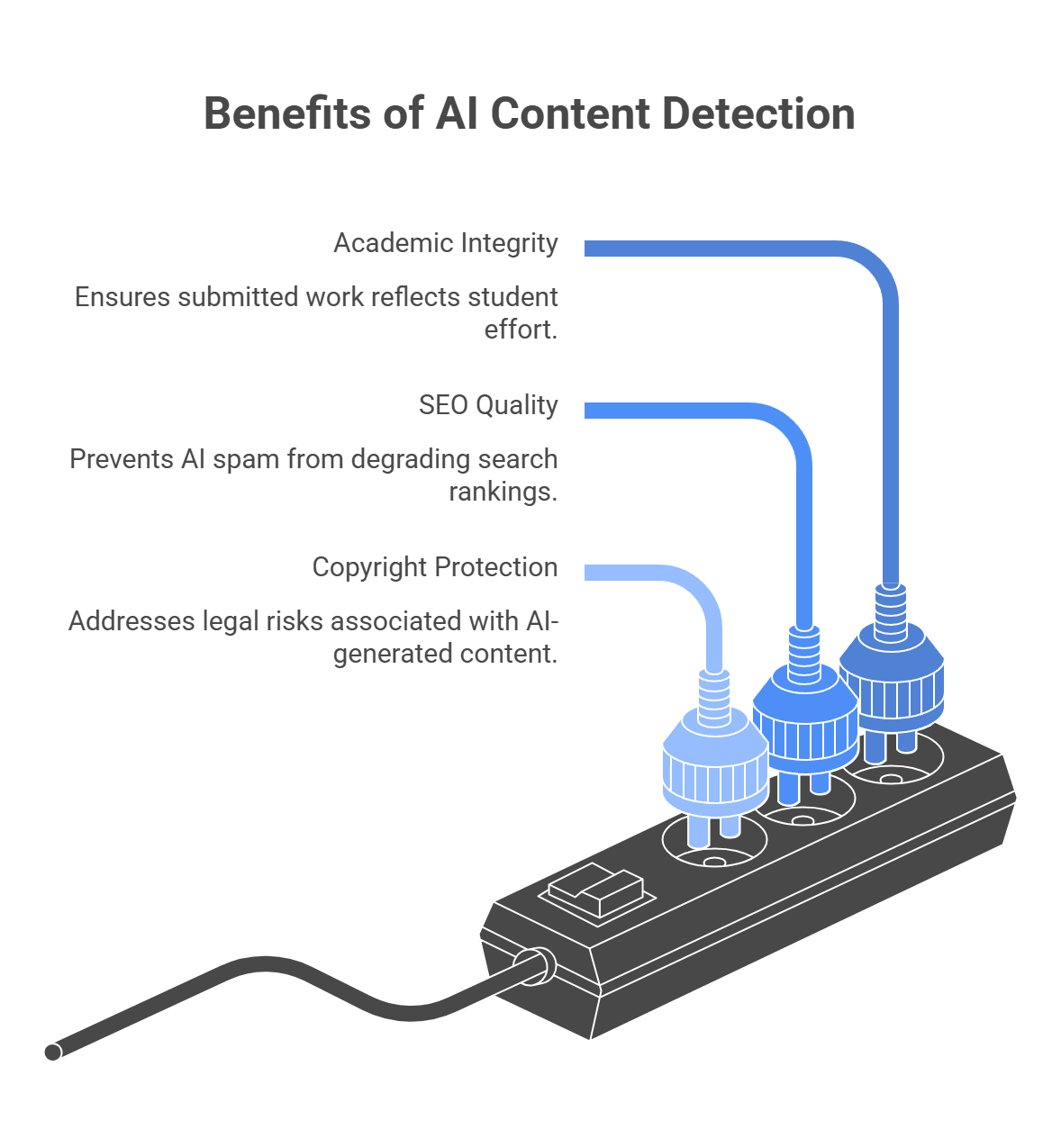
Before the “how,” there is the simpler question: why bother at all? Most businesses do not add detection because they want to play content police. They add it because synthetic content can mess with the thing they actually care about — trust, quality, rankings, or ownership.
This is one of the clearest use cases. Schools, certification platforms, and assessment tools need to know whether submitted work reflects a student’s own effort. Turnitin openly frames AI detection as part of protecting academic integrity, but it also says the score should support human judgment, not replace it.
If your site depends on user submissions, freelance articles, or large content libraries, AI spam can pile up fast. Google does not ban AI content just because AI helped write it, but it does target scaled content abuse. Large amounts of low-value content made mainly to manipulate rankings. Detection helps publishers and platforms catch that kind of content before it drags quality down.
This part needs careful wording. It is not as simple as “AI text cannot be copyrighted” in every situation. The U.S. Copyright Office says copyright protection depends on human authorship. AI-generated material may be protectable only where a human contributed enough original expressive control, arrangement, or modification. So if a publisher or media company treats fully AI-generated copy like ordinary human-authored IP, that can create legal and ownership problems.
A lot of people imagine AI detectors checking some secret archive of everything ChatGPT ever wrote. That is not how it works. Most detectors do not know for sure where a piece of text came from. They look at signals and ask a narrower question: does this text statistically look more like machine output than human writing? OpenAI made this point pretty clearly when it shut down its own old classifier for low accuracy. Even OpenAI’s tool could mislabel human writing and struggled on short text, non-English text, and edited text.
This is the older and still very common approach.
Detectors look for patterns such as:
Two terms come up a lot here:
This method is useful, but it has a big weakness: it can confuse careful human writing with AI writing. That is one reason non-native English writers get flagged more often. Stanford researchers found that detectors were disproportionately likely to classify TOEFL essays by non-native English speakers as AI-generated, partly because these systems lean on predictability metrics like perplexity.
A lot of commercial detectors do more than just measure perplexity and burstiness. They also use trained classifiers.
That means the detector is trained on many examples of human-written and AI-written text, then learns patterns that help it guess which side a new passage looks more like. OpenAI described its retired classifier this way: a model trained to distinguish responses written by AI from those written by humans.
This is usually more complex than a simple “low perplexity = AI” rule. The model may combine:
But the core limitation stays the same: it is still a probability judgment, not proof.
Because models keep getting better at sounding human, the industry has also pushed toward watermarking and provenance systems.
This works differently. Instead of guessing from style alone, the generation system embeds a detectable signal during generation. Google DeepMind’s SynthID is the clearest official example. It subtly adjusts token selection so the output carries a watermark that specialized detectors can look for later.
That sounds much stronger, but there are two important caveats:
Google DeepMind explicitly says SynthID text watermarking is less effective on factual prompts and other cases where there is little room to vary token choice without changing meaning. So this is not a magic “100% certainty” button. It is useful, but limited.
This is the part readers usually care about most. Even with all this math, detection is still shaky in real life.
Common failure points:
OpenAI’s discontinued classifier page openly listed several of these limits. Recent research also keeps pointing out that many detectors still produce both false positives and false negatives, especially across diverse student populations.
So the short version is:
That is why smart teams use AI detection as a risk signal, not a final verdict. The tool can help you decide what needs review. It should not be the only thing standing between a user and an accusation.
This choice really comes down to one thing: how bad is a false positive in your product? If you run a university tool, wrongly accusing a student can do real damage. If you run a publisher workflow or a content marketplace, a stricter filter may be easier to justify. That is why the “best” detector is not universal. It depends on whether you care more about protecting human writers or catching as much AI text as possible. Stanford researchers, for example, have warned that detectors can be unfair to non-native English writers, which is exactly why this tradeoff matters.
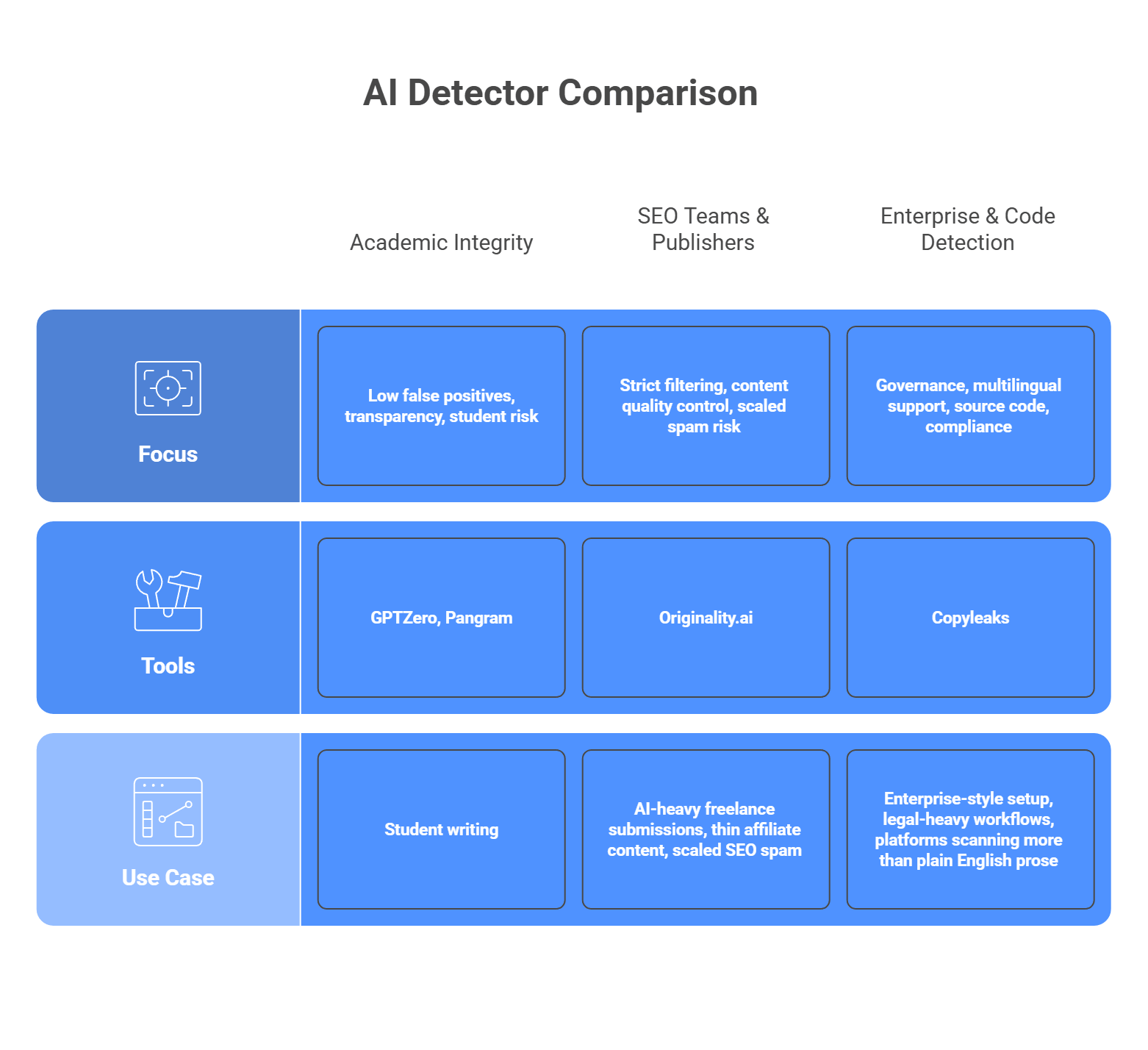
No detector is perfect, and they are not built for the same jobs. Some tools lean toward caution and transparency. Others lean toward stricter filtering. A few are built more for enterprise workflows, multilingual content, or source code scanning. So the smarter move is to match the tool to the kind of mistake you can tolerate.
Focus: low false positives, transparency, student risk
If you are dealing with student writing, look first at GPTZero or Pangram. GPTZero is built heavily around education and writing-process review, with sentence-level analysis and classroom-oriented workflows. Pangram puts a lot of emphasis on low false-positive rates and protecting human writers, which makes it attractive when accusations need to be handled carefully. These are better fits when you need the detector to support review, not bulldoze over edge cases.
Focus: strict filtering, content quality control, scaled spam risk
If your problem is AI-heavy freelance submissions, thin affiliate content, or scaled SEO spam, Originality.ai is the more natural fit. Its product is aimed directly at publishers, agencies, and content managers who want to screen aggressively. That stricter posture can be useful in content operations where weak AI copy is the main threat, even if it means some edited human text may need closer review.
Focus: governance, multilingual support, source code, compliance
If you need a more enterprise-style setup, Copyleaks is the strongest option in this group. It positions itself around SOC 2 and GDPR compliance, supports AI detection in 30+ languages, and also offers AI source-code detection. That makes it a better match for larger organizations, legal-heavy workflows, or platforms that need to scan more than plain English prose.
So the short version looks like this:
That is usually the cleanest way to choose. Start with the kind of false positive you can live with, then pick the tool that matches that risk.
This is where AI detection gets messy in real life. If you read forums like r/academia or r/freelanceWriters, the complaints are not abstract. People get flagged when they did write the work. People use a little AI help and feel punished for it. And developers end up stuck in the middle.
This one is serious. Non-native English writers get flagged more often because their writing can look more formal, structured, and predictable to a detector. Stanford researchers found that detectors frequently misclassified non-native English writing as AI-generated, and reporting from The Markup found similar patterns across several tools.
The fix: Do not use the detector score as an automatic ban or final verdict. Treat it like a warning light, not a conviction.
A better workflow looks like this:
That approach is safer because even OpenAI retired its own AI classifier due to low accuracy.
This is another common complaint. Research papers, technical docs, and formal academic writing often sound structured and predictable on purpose. That can make them look machine-written even when they are not. The same reliability problems that hurt ESL writers also show up here: detectors are weak when they lean too hard on predictability and writing pattern signals.
The fix: Raise your threshold for action if your platform hosts academic, legal, or technical writing. Do not trigger consequences from a middling score.
A practical setup:
The exact threshold depends on your platform, but the main idea is simple: stricter review, not stricter punishment.
A user writes the draft, then uses Grammarly to clean up punctuation. Or they use AI to brainstorm an outline, then write the piece themselves. Detectors may still flag that text. From the user’s point of view, that feels like getting punished for using editing help, not cheating. That gray zone keeps coming up in academic communities because the line between assistance and generation is blurry.
The fix: Write your policy before you deploy the detector.
Be clear about:
If your platform does not define those lines, the detector will create confusion instead of trust. That is the real problem in a lot of these communities: not just the score, but the lack of a clear rule behind it.
People actively try to dodge AI detectors. One common method is evasion prompting. The user asks the model to write in a simpler voice, vary sentence length, add small imperfections, or sound less polished. The goal is to make the text look less predictable to pattern-based detectors. Turnitin now explicitly talks about “AI bypassers” and “humanizer” tools built for this purpose.
There is also a growing market of AI humanizer tools. These tools rewrite model output so it looks more human on the surface. That is why detection vendors keep updating their systems. Turnitin says its current model can detect likely use of AI bypasser tools in some supported cases, which shows how central this problem has become.
What this means for developers:
That is why model maintenance matters. Copyleaks and Turnitin both now market their products around detecting paraphrased or bypassed AI content, which tells you this is now a normal part of the detection battle.
AI-generated content detection APIs are an important part of modern software infrastructure. They help platforms spot large volumes of synthetic text at scale. But if your product also creates AI content, detection is only half the picture. The generative side needs to stay just as organized, stable, and easy to manage.
That is where LLMAPI fits in naturally. It gives you one OpenAI-compatible API and a single endpoint for working across many models, so you do not have to juggle separate integrations for every provider. It also adds routing, failover, cost controls, unified billing, team keys, and usage visibility in one layer, which can make the generative side of your stack much easier to scale.
Why use LLMAPI for generative features?
If you want to keep your detection layer strong without letting the generative side turn into backend chaos, LLMAPI is a smart layer to add. It helps you keep the architecture cleaner, more flexible, and easier to maintain as your AI product grows.
No. They’re statistical signals. Perplexity measures how predictable the word choices are, and burstiness looks at how much sentence length/structure varies. Many AI outputs score “too smooth” on these metrics compared to messy human writing, so detectors treat that as a risk signal, not a verdict.
False positives happen when the writing is naturally structured and consistent. Common examples: technical docs, legal text, formal essays, and some non-native English writing. Those styles can look “model-like” even when a human wrote them.
LLMAPI can keep the generation side simple: one endpoint, one key, access to multiple major models. You generate text through llmapi.ai, then send the output to your separate quality/detection/moderation tool.
It can help. With routing and fallbacks, requests can move to a backup model when the primary one is slow or down, so your pipeline is less likely to stall before it reaches your scanning step.
Some can, but you need image-focused (multimodal) detection. These tools look for visual artifacts and other signals (odd blending, inconsistent details, sometimes watermarks), which is different from text-only detection.
The web feels different now, and you can feel it fast. A blog post, student essay, product review, or support article can look completely normal while still being AI-written. That is why AI detection tools keep popping up in schools, publishing, SEO, and trust-heavy platforms. Turnitin, GPTZero, Copyleaks, and Originality.ai all now sell detection tools for exactly that reason.
But this is where it gets messy. AI detection is useful, yet it is nowhere near perfect. OpenAI shut down its own AI writing classifier because of low accuracy, and it has also warned that detectors can falsely label human writing, including work by English learners and even famous human-written texts.
So the real question is not just, “Which detector exists?” It is: Which tool is good enough for your use case, how should you use it, and how do you avoid accusing real people unfairly? That is what this guide gets into: how AI detection APIs work, which ones stand out, and where teams usually get burned.
It sounds a bit magical at first, but AI detection is really a pattern-matching problem. Unlike plagiarism checkers, which look for copied text, AI detectors try to spot statistical signals in the writing itself. OpenAI’s own past writing-classifier work described this as a supervised classifier trained on human-written and AI-written responses to the same prompts, not a web search for duplicates. It also warned that this kind of detection is limited and can be wrong.
Two ideas come up a lot in public discussions of detection tools:
So when a detector scans a document, it is usually not asking, “Did this exact paragraph come from ChatGPT?” It is asking something more like:
If enough of those signals line up, the tool may flag the text as likely synthetic.
That said, this is where readers need a reality check. These signals are useful, but they are not proof. OpenAI said its own classifier was unreliable, especially on short text, non-English text, and text that had been edited. It also noted false positives on human writing.
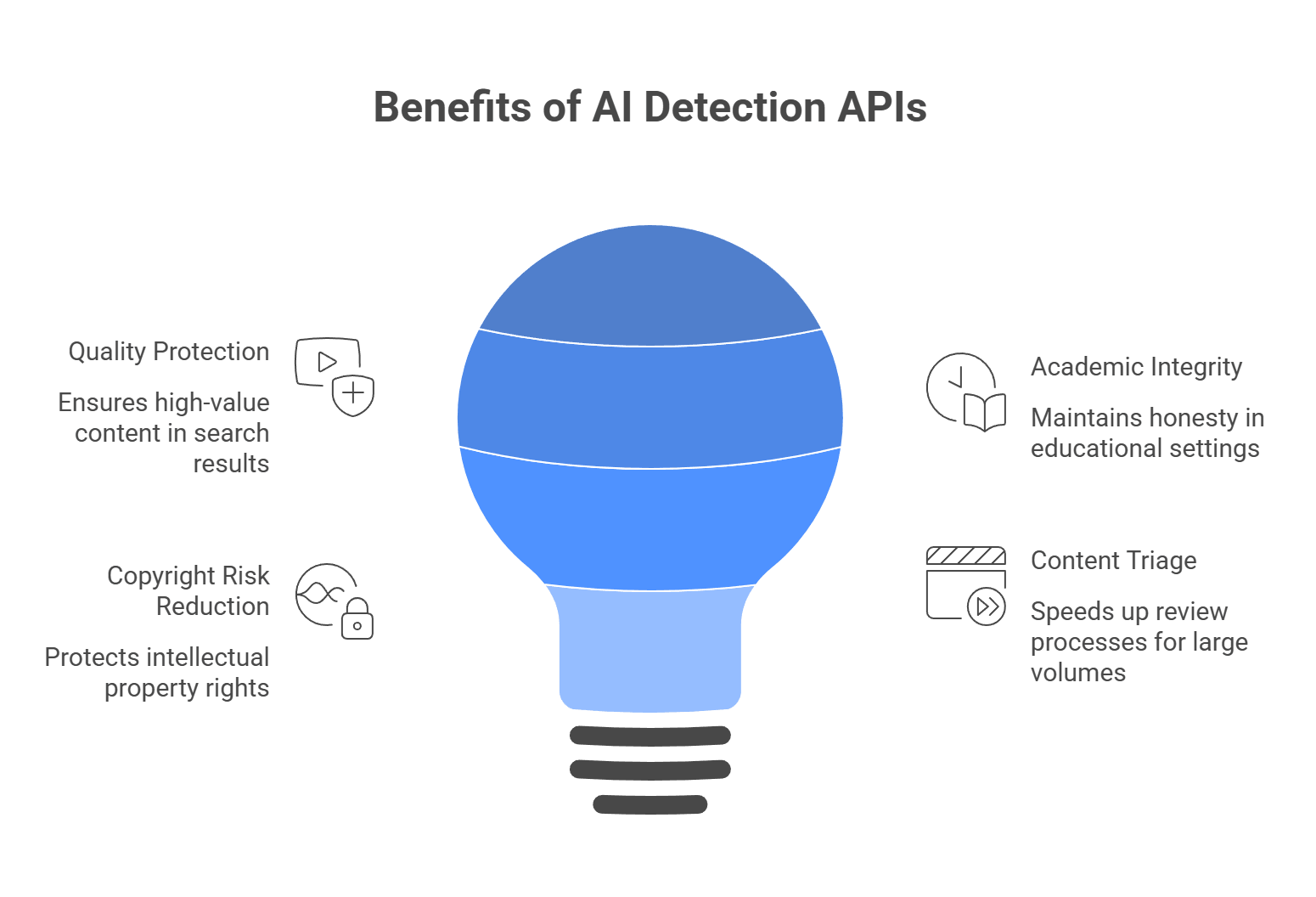
There is a reason more platforms keep adding AI detection. Once synthetic text starts to mix into essays, listings, reviews, applications, or publisher submissions, trust gets harder to maintain.
Google does not ban AI content just because AI helped write it. The problem is large-scale, low-value content made mainly to manipulate rankings. Google’s spam policies call this scaled content abuse. So if your platform depends on user submissions or indexed pages, detection can help you catch low-effort synthetic spam before it drags quality down.
This is one of the biggest use cases. Schools, hiring platforms, and assessment tools use detection to spot work that may not reflect the writer’s actual effort or skill. Turnitin openly positions AI detection around academic integrity and original work, which tells you how central this has become in education.
This part is easy to get wrong, so here is the careful version: you cannot assume fully AI-generated text is protected by copyright in the same way as human-authored work. The U.S. Copyright Office says copyright protection depends on human authorship, and AI outputs can be protected only where a human contributed enough original expressive control, arrangement, or modification.
So for publishers, detection can help flag content that may need closer review before it is treated as owned editorial IP.
Nobody wants editors or reviewers reading thousands of submissions by hand just to find the risky ones. Detection APIs help by scoring content first, so teams can route likely synthetic text into a review queue instead of manually checking everything.
That does not make the detector the final judge, but it does make the workflow much faster. Turnitin’s current model even breaks detected text into categories such as likely AI-generated and likely AI-generated then AI-paraphrased, which shows how these tools are now being used as triage layers, not just yes-or-no alarms.
Based on current product claims, feature depth, and how these tools are being positioned in education, publishing, and enterprise workflows, these five are the names that come up most often. One quick reality check, though: the AI detection market is full of huge accuracy claims, and those numbers are usually based on vendor or partner testing, not a single universal benchmark. So it makes more sense to compare these tools by use case, false-positive risk, language support, and API depth than by one headline percentage alone.
Copyleaks is one of the most established enterprise options in this space. It is built for schools, publishers, and larger organizations that want AI detection, plagiarism checks, and governance controls in one system. Copyleaks says it supports 30+ languages for AI detection, can detect AI-generated source code, and offers API access for enterprise and education customers. It also advertises over 99% accuracy and a very low false-positive rate, though those figures come from its own testing and referenced third-party studies.
Key features:
Pricing: Personal plans start at $16.99/month, while API and enterprise pricing are handled separately through sales.
Best for: Enterprises, publishers, and education platforms that want a more complete integrity stack, not just a standalone checker.
| Pros | Cons |
| Strong enterprise and education fit | API pricing is not simple or public for bigger use cases |
| Broad language support | Premium tiers get expensive fast |
| Covers code as well as text | Strict detection can still create disputes on edited text |
| Strong governance and API tooling |
GPTZero still has one of the strongest positions in education-focused AI detection. Its product is built around schools, student writing, and “prove your work” workflows, which makes it feel more transparent than tools that only return a score. GPTZero says it detects GPT-5, Gemini, and other major models, and it also promotes low false-positive rates plus writing-process features such as document history and replay-style tooling.
Key features:
Pricing: API plans scale based on word count (e.g., 1M words for $135/month).
Best for: EdTech, universities, assessment products, and any workflow where false accusations would be especially painful.
| Pros | Cons |
| Strong education fit | More text-focused than broad multimodal platforms |
| Transparent scoring and workflow tools | Heavily edited hybrid text can still be tricky |
| Public emphasis on low false positives | Pricing is less straightforward from public pages |
| Good API story for institutional use |
Pangram is a more specialized detector. It is less of a “content suite” and more of a focused AI detection product. The company pushes very hard on near-zero false positives, multilingual support, and research-heavy credibility, including references to third-party reviews and university-linked evaluations. It also emphasizes API integration for high-volume use cases.
Key features:
Pricing: Enterprise API pricing (starts around $15/month for basic web access, custom for heavy API use).
Best for: Institutions and organizations that care a lot about minimizing false accusations and want a more detection-first product rather than a giant bundle of writing tools.
| Pros | Cons |
| Strong false-positive positioning | Smaller ecosystem than Copyleaks or GPTZero |
| Good multilingual support | Less of an all-in-one integrity suite |
| API-ready for higher-volume use | Public pricing is limited |
| Clear detection-first focus |
Winston AI is aimed more at publishers, agencies, and web content teams. It goes beyond plain text detection and adds plagiarism, readability, image detection, and OCR-based document or handwriting scanning. That wider feature mix is a big part of its pitch. Winston also publicly lists monthly pricing and per-credit usage rules, which makes it easier to size up than some enterprise-only tools.
Key features:
Pricing: Starts at $12/month for basic limits; API access requires custom scaling.
Best for: Publishers, SEO teams, agencies, and platforms that want more than pure text detection.
| Pros | Cons |
| Broader feature set than many rivals | Broad toolset can mean less focus on one core use case |
| Includes image detection and OCR | Accuracy claims are still vendor-reported |
| Clearer public pricing | Complex or hybrid text may still create aggressive scores |
| Good fit for content teams |
Originality.ai is probably the strictest content-market and SEO-facing option in this group. Its site leans hard into publisher workflows, site-wide scanning, fact checking, readability, and zero-tolerance or lower-tolerance models for AI-assisted content. It also offers different detection models depending on whether you allow light AI editing or want a much stricter standard. That flexibility is a big part of why it appeals to agencies and publishers.
Key features:
Pricing: Pay-as-you-go credits (e.g., $30 for 300,000 words).
Best for: SEO agencies, content marketplaces, publishers, and managers who want stricter control over AI use in submitted content.
| Pros | Cons |
| Strong fit for SEO and publishing workflows | Can feel too strict for some educational or mixed-use settings |
| Includes fact-checking and readability tools | Strict models can create more disputes if policy is unclear |
| Offers different detector models by use case | Credit model may be less intuitive for casual users |
| Useful for site-wide content QA |
This part really comes down to one question: what hurts more in your product: missing AI text, or falsely accusing a real person? That is the tradeoff behind almost every detection choice. Some tools lean hard toward stricter catching. Others put more weight on protecting human writers from false flags.
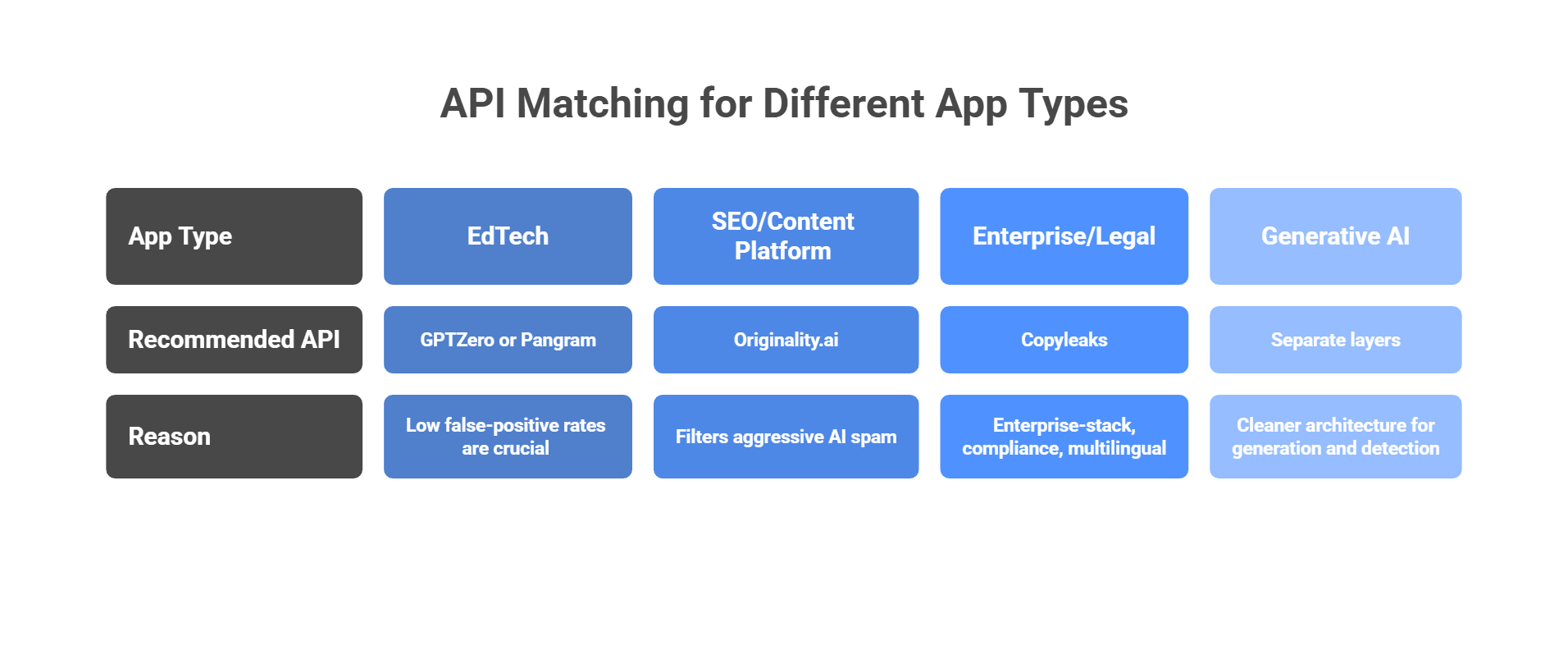
Look first at GPTZero or Pangram. In education, a false positive is a big deal. GPTZero is built heavily around schools, writing-process review, and sentence-level analysis, while Pangram puts a huge amount of its messaging around low false-positive rates and student-writing use cases. That makes both a better fit when you need to be careful with accusations.
Originality.ai makes the most sense when your main problem is cheap AI spam, scaled content, or low-trust submissions. Its product is aimed squarely at publishers, SEO teams, website scanning, and content quality workflows. In that kind of environment, a stricter detector can actually be useful, because your goal is to filter aggressively before weak content spreads across the site.
Start with Copyleaks. It is the most “enterprise-stack” option in this group: strong compliance positioning, multilingual AI detection, code-related detection, and a broader authenticity platform around plagiarism and governance. That is the kind of setup that fits large organizations handling policy-heavy, multilingual, or code-adjacent content.
Keep your generation layer and your detection layer separate. That is the cleaner architecture. Generate with the models you want, then send finished content through a detection API as a separate review step.
If you are juggling several LLM providers for generation, a unified gateway can simplify the generation side by reducing provider sprawl and key management, while your detection service stays independent and stable. That separation matters because detection and generation solve different problems and should not be tightly coupled in one brittle workflow. This last point is more of an engineering recommendation than a vendor-verified product claim.
This is the part people usually learn the hard way. AI detection sounds neat in product demos, but once real users get involved, things get messy fast. Spend five minutes in communities like r/AskProfessors and you will see the same pattern: false flags, policy confusion, and a lot of anger when a score gets treated like proof. Stanford researchers have also warned that detectors are not especially reliable and can be unfair to some groups, especially non-native English writers.
This is one of the biggest problems. Stanford researchers found that AI detectors were much more likely to misclassify writing from non-native English speakers as AI-generated. The basic reason is not mysterious: more structured, careful, less idiomatic writing can look “too predictable” to a detector. OpenAI has also publicly warned that provenance and detection methods can unfairly affect non-native English speakers.
The fix: Do not treat a detector score as final proof. Use it as a risk signal, then look at other evidence:
That is the safer move if you care about trust. Reddit threads from professors and students keep coming back to this exact point: the score alone is not enough.
This one frustrates people a lot because it feels unfair. A student writes the draft, then uses Grammarly to smooth it out. A job applicant writes their own cover letter, then asks ChatGPT for an outline. A marketer drafts a post, then uses AI to tighten the wording. Many detectors still flag that kind of mixed workflow, even though the human did a real chunk of the work. Reddit discussions around academic use show how blurry this gets once AI moves from “write it for me” to “help me polish it.”
The fix: Set your policy before you set your threshold. Decide questions like:
If your platform has no clear answer there, the detector will create more arguments than value. A tool cannot define fairness for you. It can only score patterns.
Yes, people actively try to get around detectors. Humanizer tools, paraphrasers, and heavy manual edits can make synthetic text harder to catch. Even OpenAI said its own old classifier struggled on edited text and was not reliable enough to keep online. So anyone selling detection as a magic lie detector is overselling it.
The fix: Use vendors that actively maintain and retrain their models, and assume evasion is part of the game. Copyleaks, for example, says it detects paraphrased AI content and keeps coverage current as new models appear. That does not make evasion impossible, but it is still better than relying on a static checker that has not evolved with the tools people use to bypass detection.
AI content detection can help protect quality, trust, and authenticity on your platform. But detection is only one side of the equation. If your product also depends on generative AI features, the infrastructure behind them matters just as much.
That is where LLM API fits in well. It gives you one OpenAI-compatible API, multi-provider access, performance monitoring, secure key management, cost-aware analytics, and model/provider-level usage breakdowns in one place. That can make the generative side of your product much easier to manage as it grows.
Why use LLM API for generative features?
If you want to keep your platform focused on secure, authentic user experiences without making the backend harder to manage, LLM API is a natural layer to add. It helps simplify the generative side of your stack while giving you more flexibility underneath.
They usually don’t compare your text to a “known AI database.” They score how predictable the writing is. Common signals include things like perplexity (how expected the next words are) and burstiness (how much sentence structure and length vary). More predictable text often gets flagged.
A false positive is when human-written text gets labeled as AI. It happens a lot with academic, highly technical, or very structured writing (including some non-native English writing), because those styles can look “too consistent” to a detector.
Depends on the detector. Simple tools may miss it if the wording changes. More advanced tools may still flag it if the structure and meaning stay very similar, because they look beyond exact phrasing.
Many apps use LLMs for generation (summaries, chat, drafting) and separate tools for detection/moderation. LLM API can simplify the LLM side by giving you one endpoint for multiple model providers, while you keep your detection API separate.
Yes. If one provider is slow or down, LLM API can route requests to backup models through load balancing and fallbacks, so your app’s generative features are less likely to stall.
User-generated images help platforms grow, but they also create real risk. Social apps, marketplaces, forums, and dating products all need a way to catch explicit sexual content, graphic violence, hate symbols, and other unsafe uploads before they spread. Major platforms now treat image moderation as a standard safety layer, not an extra.
That is why AI moderation matters. User reports are too slow on their own. Modern moderation tools can scan images automatically and flag unsafe content before or after upload. Below, we look at why companies use these systems, how they work, which tools stand out, and what problems teams run into most often.
Human review still matters, but it cannot carry the whole job anymore. At scale, image moderation needs to happen before harmful content spreads, not after someone reports it.
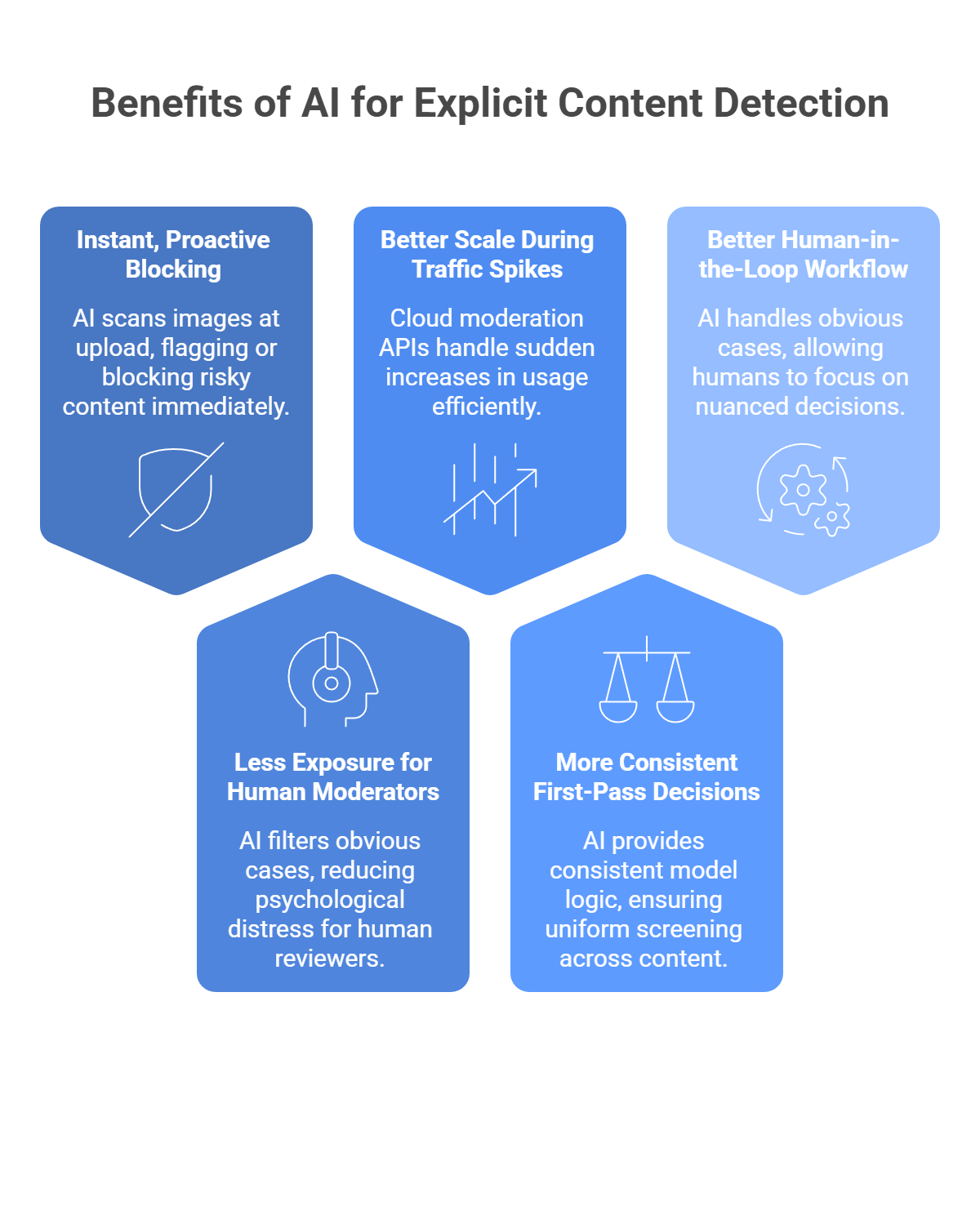
Here is why AI has become a core part of that stack:
Human moderation is reactive. By the time a person reviews a report, the image may already be live, shared, screenshotted, or amplified. AI moderation tools can scan images at upload time and flag or block risky content right away. Google Cloud Vision’s SafeSearch, for example, returns likelihood scores for categories such as adult, violence, and racy content, which makes pre-publish filtering possible.
This part matters a lot. Research and reporting continue to show that repeated exposure to disturbing content can lead to psychological distress, secondary trauma, and PTSD-like symptoms in human moderators. AI helps by filtering obvious cases first, so people can spend more time on edge cases and policy judgment instead of raw volume.
Human teams do not scale overnight when a platform suddenly jumps in usage. Cloud moderation APIs are built for that kind of load. AWS positions Rekognition as a highly scalable image and video analysis service for content moderation, and major cloud vendors treat moderation as production infrastructure rather than a manual workflow add-on.
People get tired, drift in judgment, and interpret borderline content differently across shifts. AI gives you the same model logic on the first upload and the millionth. That does not mean perfect fairness or zero mistakes, but it does mean more consistent first-pass screening across large volumes of content. Google’s SafeSearch and AWS moderation labels both expose structured category outputs that make policy-based automation easier to apply consistently.
The real win is not “AI replaces moderators.” The better model is: AI handles the obvious stuff fast, and humans focus on nuanced, borderline, or escalated cases. That is also how modern moderation APIs are generally used in practice across images and other media.
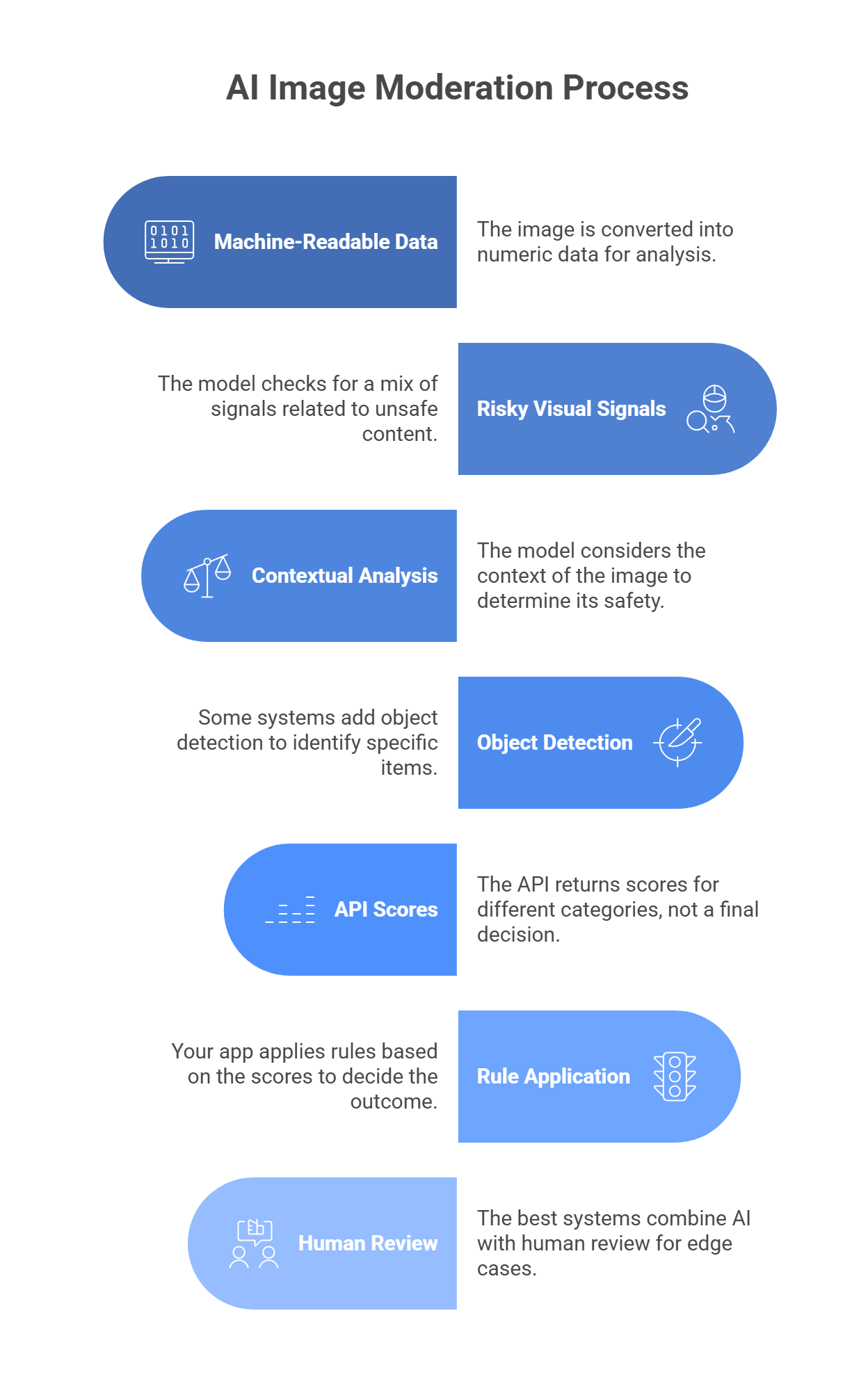
AI image moderation does not “look” at a photo like a person does. It turns the image into numeric data, then checks that data for patterns linked to unsafe content.
When a user uploads an image, the system converts it into arrays of pixel values. The model reads those values and looks for patterns in color, texture, edges, shapes, and layout.
It does not just look for one thing like exposed skin. It checks for a mix of signals, such as:
That matters because one image may be unsafe due to nudity, another due to violence, and another due to hateful imagery.
Context is a big part of moderation. For example:
So the model tries to score categories, not just label an image as “good” or “bad.”
Many moderation stacks add object detection on top of category scoring. That helps the system spot specific items in the image, such as:
In some cases, the model can also mark where those objects appear in the frame.
Most moderation APIs do not make the final decision for you. They return scores or likelihood levels for categories such as:
Your backend then uses those scores to decide what happens next.
A common setup looks like this:
That middle step matters because some images are too borderline for a model to judge well on its own.
The best moderation systems do not rely on AI alone. They use AI for speed, then send edge cases to people.
That works better because:
The right moderation tool depends on three things: speed, category depth, and context handling. If your app needs to scan uploads before they go live, latency matters a lot. If your policy has separate rules for nudity, violence, drugs, hate symbols, or scams, you need more than a basic NSFW score. And if text, captions, or post intent matter, you may need a multimodal setup instead of a plain image classifier. Google SafeSearch, for example, gives fast category-level likelihoods for adult, spoof, medical, violence, and racy, while Amazon Rekognition returns a much deeper moderation taxonomy with confidence scores.
A simple way to choose:
Not every moderation tool solves the same problem. Some are better for huge social apps. Some fit companies already deep in one cloud. Some are strongest when context matters as much as the image itself.
Best for: Social media and gaming platforms
Why choose it: Hive is a strong pick when basic NSFW checks are not enough. It is built for platforms that need deeper classification across harmful visual content, manipulated media, and policy-heavy moderation at scale. That makes it a better fit for large UGC products than a simple adult-content filter.
Best for: AWS-heavy enterprise stacks
Why choose it: Rekognition makes the most sense when your product already lives on AWS. It gives you image and video moderation, deep label categories, and easy ties into the rest of your AWS workflow. It is practical, scalable, and easier to justify when S3 and other AWS services are already part of your stack.
Best for: Broad, general-purpose apps
Why choose it: SafeSearch is the clean, simple option. It returns clear likelihood scores for a handful of moderation categories, which makes it easy to plug into web apps, marketplaces, and standard upload flows without much complexity.
Best for: Startups that want speed and focused moderation APIs
Why choose it: Sightengine is useful when moderation is a core product need and you want a tool built around that job. It goes beyond explicit imagery and also covers things like spam, scams, and fraud signals, which is helpful for fast-moving UGC products.
Best for: Context-aware moderation
Why choose it: Sometimes the image looks harmless, but the post is still dangerous once you add the caption or surrounding text. That is where multimodal moderation stands out. A setup through LLMAPI can evaluate the image and text together, which helps with threats, harassment, impersonation, and other cases where raw visual scoring misses the real problem.
Automated moderation works well, but it is never perfect. Most teams run into the same problems: false positives, hidden harmful files, encryption conflicts, and content that is technically sensitive but still allowed.
The fix: Do not rely on a hard safe/unsafe output. Use tools that return category scores or likelihood levels, then build thresholds around them. Google SafeSearch, for example, returns graded likelihoods for adult, racy, violence, medical, and spoof, not one flat answer. That lets you set rules like:
That is much safer than banning every image that triggers a moderate signal.
The fix: Visual AI is not enough on its own. Pair image moderation with hash matching and file-level checks. Microsoft says it uses PhotoDNA and MD5 hash-matching technologies to detect known illegal and harmful image content, including previously identified child sexual exploitation material. That matters because a file can look normal on the surface while still matching known illegal content at the hash level.
The fix: If your app uses E2EE, server-side scanning may conflict with your privacy model. In those cases, one option is on-device moderation before encryption, using lightweight vision models that run locally on the user’s device. I did not find a strong official source in this search that specifically confirms YOLOv8 as a standard moderation choice for this use case, so I would frame that as an implementation option rather than a settled best practice. The main point is that moderation may need to happen on-device if the server is not supposed to see the image contents at all.
The fix: Choose a tool with category depth. Google SafeSearch is useful here because it separates medical from adult and racy, and it also includes a spoof category. That gives you more room to write smarter policy rules instead of treating all nudity or all graphic imagery the same way. For harder edge cases, multimodal review helps because the caption, product category, or page context can explain why the image is allowed.
AI moderation works best when it looks at the full context, not just one file in isolation. An image can be paired with captions, comments, or surrounding text that completely changes how risky the content really is. That is why more teams are moving beyond simple binary image checks and toward moderation flows that can reason across multiple inputs.
If you are building that kind of system, managing separate providers for every text and multimodal task can get messy fast. A unified layer like LLM API gives you one OpenAI-compatible API with access to many models, so you can handle the generative and multimodal side of your safety stack in one place. It also adds routing, cost controls, team keys, and visibility into model performance and errors, which helps when moderation volume starts to grow.
Why use LLM API for moderation workflows?
If you want your moderation pipeline to stay more flexible, scalable, and easier to manage, LLM API is a strong layer to add. It helps you keep the AI side of trust and safety more unified without boxing your platform into one provider.
It scans images for patterns tied to categories like nudity/sexual content, graphic violence, hate symbols, drugs, and self-harm. The output is usually confidence scores per category, not just a simple yes/no.
No. AI is great for catching obvious stuff at upload, but humans are still needed for grey-area posts, appeals, and policy edge cases (context matters a lot).
Basic vision tools mostly judge pixels. With LLM API, you can route images to multimodal models and ask more specific, policy-style questions (for example: “Does this violate our bullying rules?”). That can reduce false positives when context is important.
If you rely on one provider, you either block everything or let risky uploads through. Routing through LLM API lets you set up fallbacks, so moderation can switch to another model when the primary one fails.
Use category-based scoring (for example, “racy” vs “explicit”) instead of a single “unsafe” label. Then your app can allow borderline content in appropriate contexts while still blocking truly explicit images.
Real estate is changing fast, and AI is now part of everyday work for a lot of agents. NAR’s 2025 REALTOR® Technology Survey shows that AI use is already mainstream in the industry, especially for content, workflow support, and client-facing tasks. NAR also points to AI use in market analysis, property valuation, and predictive analytics, which shows how much broader the category has become.
That matters because AI is no longer just for cranking out listing descriptions. In today’s market, agents use it to qualify leads, automate follow-up, create virtual staging, speed up marketing, and support pricing or neighborhood research. Real estate tech vendors are also pushing tools that can build floor plans and visual assets much faster than older manual workflows.
So whether you are a solo agent trying to save time or a brokerage trying to scale without adding more admin chaos, AI tools are now worth a serious look. Below is a practical guide to the best AI solutions for real estate in 2026, plus the mistakes that can waste time, money, or trust if you use them badly.
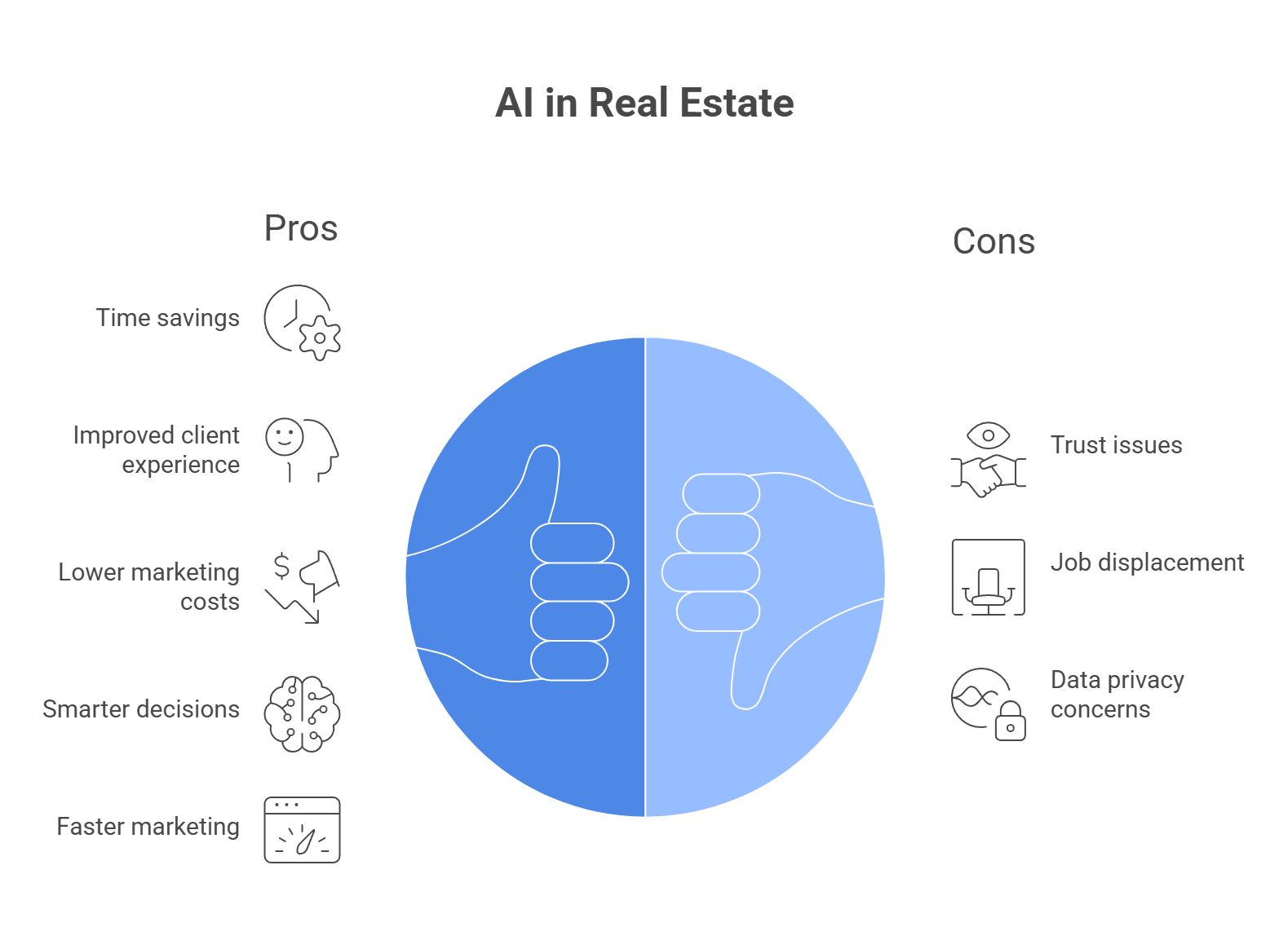
Real estate still runs on trust and relationships. AI helps by taking repetitive work off your plate so you can spend more time with actual clients. NAR’s 2025 technology survey says 66% of REALTORS® adopt new tech to save time, 64% to improve the client experience, and CRM is the second-most-used lead-generation technology after social media.
Here is where AI helps most:
So the real reason to use AI in real estate is pretty simple: less admin, faster turnaround, lower costs in some workflows, and more time for the part of the job that still matters most, which is talking to people.
Based on current feature sets, adoption in the market, and how useful these tools are for real estate work, these five stand out right now.
Ylopo is built for real estate lead gen and long-term nurture. Its big draw is Raiya, the AI follow-up layer that helps teams keep leads warm over time instead of letting them go cold in the CRM. Ylopo also combines paid lead gen, IDX websites, retargeting, and CRM integrations in one system.
Key features:
Pricing: Starts around $395/month (plus ad spend).
Best for: Teams and bigger agents who want full-funnel lead generation plus automated follow-up. Ylopo itself also notes that solo agents need to be careful with the economics and lead volume.
| Pros | Cons |
| Strong AI follow-up for cold leads | Cost is not very transparent upfront |
| Built for real estate, not generic sales | Better fit for larger budgets |
| Combines ads, nurture, and websites | Can be too much for smaller agents |
| Good CRM coverage | Setup takes work |
Lofty is an all-in-one real estate platform with AI built into the CRM, lead management, websites, and follow-up flow. Its AI Assistant and AI Sales Agent focus on lead search, lead health, communication drafting, and database action, so it is more than just a chatbot slapped onto a CRM.
Key features:
Pricing: Starts around $449/month.
Best for: Growing teams and brokerages that want CRM, AI, websites, and lead handling in one place.
| Pros | Cons |
| Strong all-in-one setup | No clean public pricing |
| AI is built into the CRM workflow | Can be expensive for smaller agents |
| Good for teams that want one platform | Onboarding and setup take time |
| Nice fit for high-volume operations | Needs tuning to work well |
Virtual Staging AI focuses on one thing: turning empty or cluttered listing photos into staged images fast. It is cheap, quick, and easy to test, which is why it makes sense for agents who want a visual boost without paying for physical staging. The company says renders take around 10 seconds and pricing starts at $16 per month for 6 photos.
Key features:
Pricing: Starts at $16/month for 6 photos on the current pricing page.
Best for: Listing agents, photographers, and property marketers who need fast, low-cost visuals.
| Pros | Cons |
| Very fast turnaround | Less control than human staging |
| Much cheaper than physical staging | Some renders can look off |
| Easy to use | Subscription model may not suit everyone |
| Furniture removal is useful | Best results still depend on source photo quality |
CubiCasa is one of the most practical tools on this list. It lets agents scan a property with a phone and turn that into floor plans and related assets. The company says scans take about 5 minutes and final plans usually come back in 6 to 24 hours. It also offers multiple outputs, including 2D and 3D floor plans, tours, and GLA-related products.
Key features:
Pricing: LITE floor plans are free in the US (under 5k sq ft). Premium add-ons (3D, fixed furniture) cost between $15 to $30.
Best for: Listing agents who want floor plans and visual listing assets without hiring a separate draftsperson.
| Pros | Cons |
| Easy phone-based workflow | Final delivery is not instant |
| Good value for listings | Complex properties can still be harder to scan well |
| Free entry point is appealing | Quality depends on the scan |
| Useful add-ons beyond basic plans |
This one is broader, but still real. Many agents already use general-purpose AI tools for listing descriptions, follow-up drafts, social posts, document summaries, and marketing copy. NAR’s 2025 technology survey confirms AI is already in use across the industry, and general LLMs are often the cheapest entry point because they are flexible and easy to start with.
Key features:
Pricing: $20/month for Pro versions, or pay-per-token via API.
Best for: Almost any agent who wants faster writing, faster admin work, and cheap automation for day-to-day tasks.
| Pros | Cons |
| Very flexible | Needs good prompting |
| Low cost compared with vertical platforms | Can make factual mistakes |
| Good for content and admin work | Does not connect to MLS tools by default |
| Easy to start with | Needs review before anything client-facing |
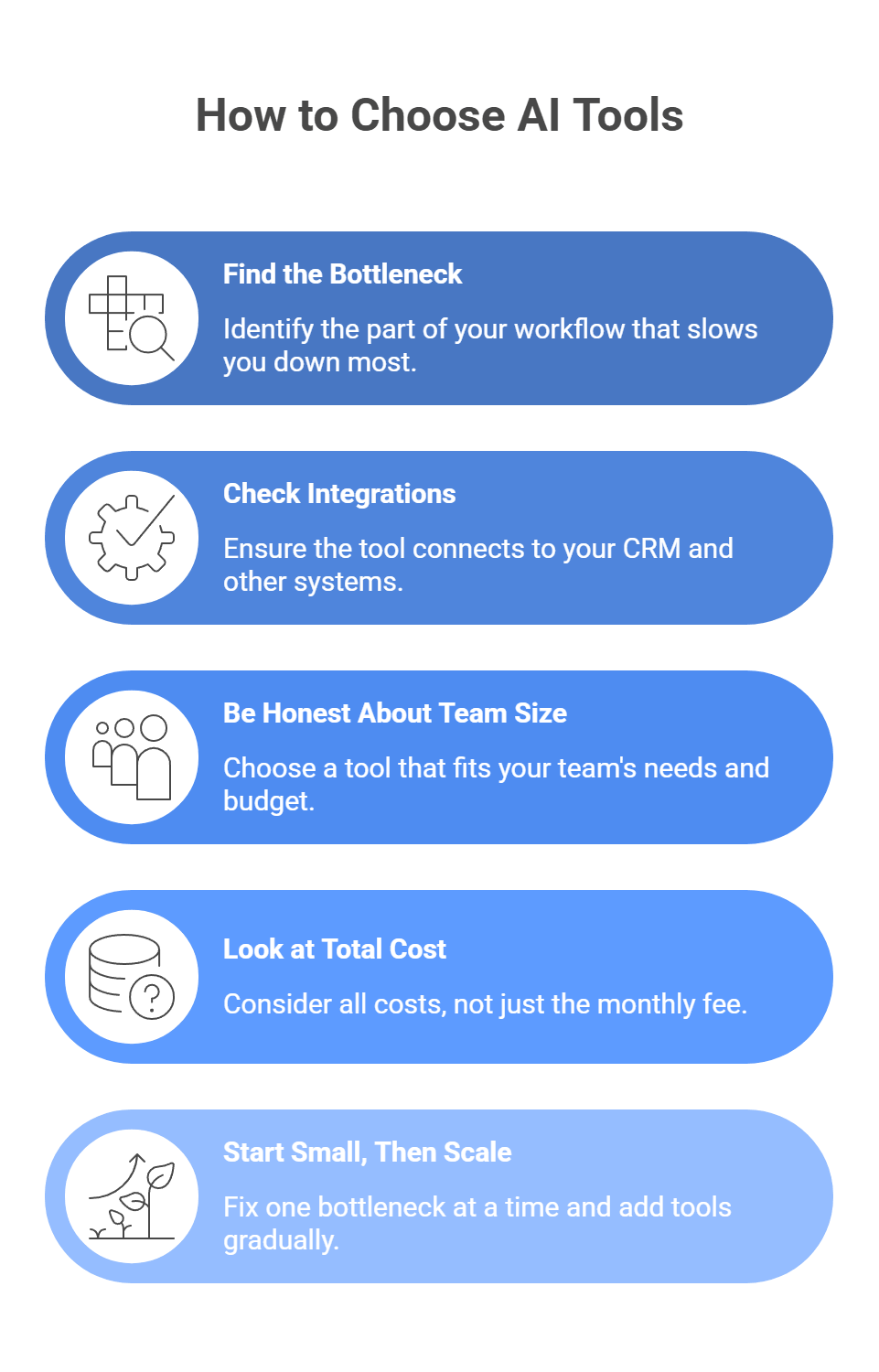
With so many AI tools for real estate now, it is easy to end up with too many subscriptions and not enough actual value. The easiest way to choose well is to start with the problem, not the tool. NAR’s 2025 technology survey shows agents adopt tech mostly to save time and improve the client experience, so the best tool is the one that fixes the part of your workflow that slows you down most.
Do not buy a platform just because it looks impressive. Ask yourself:
Then match the tool to that one problem. A simple way to think about it:
That is usually a smarter move than buying a giant “all-in-one” platform right away. Ylopo itself frames its product around lead gen, nurture, and integration with your current stack, not replacing every other system you use.
A tool that sits off to the side and does not connect to your CRM will create more work, not less. Before you commit, check:
This matters a lot for lead-gen tools. Ylopo says it integrates with major real estate CRMs, including Follow Up Boss, Lofty, Sierra Interactive, and others, so teams can layer it on top of what they already use.
This is where a lot of agents overspend. If you are a solo agent, a big AI CRM with a heavy monthly cost may be too much too soon. A lighter stack often makes more sense:
If you run a team or brokerage, then a platform like Ylopo or Lofty can make more sense because the cost is easier to justify when more leads, more agents, and more follow-up are involved. Ylopo even has content aimed at whether the platform makes sense for solo agents, which tells you the company knows it is not automatically the right fit for everyone.
A low sticker price can still cost you money if the tool adds manual work or does not solve the real issue. Check:
For example, CubiCasa has a free entry point and a fast scan workflow, which makes it easier to test without a big commitment.
You do not need the perfect stack on day one. A practical rollout looks like this:
That approach keeps your stack lean and cuts down on subscription fatigue.
A quick look through real estate discussions shows the same pattern: AI is useful, but it goes bad fast when agents use weak prompts, let bots sound too human, or trust AI with negotiation judgment it does not have. r/realtors threads also push back hard on fake-sounding listing copy and on AI advice with no local context.
The fix: The problem is usually the prompt. If you ask for a generic listing, you get generic real estate fluff back. Give the model structure and limits. A better prompt includes:
For example: ask for a short MLS description, name the upgrades that matter, and ban cliché terms like “stunning,” “boasts,” or “hidden gem.” That approach lines up with what agents on r/realtors complain about most: AI copy becomes obvious when it sounds like every other listing online.
The fix: Do not let the bot pretend to be you. Make it clear that it is an assistant, and set strict handoff rules. Good rules look like this:
This also fits the broader ethics side of real estate marketing. NAR’s Code of Ethics requires truthful, non-misleading advertising and clear disclosure in online communications, so pretending a bot is a human agent can create risk you do not need.
The fix: Do not use AI to decide what to ask for in negotiation. Use it to organize information, not to make the call. A safer workflow is:
That matches what agents in current r/realtors threads are saying: AI can give buyers or agents false confidence on repairs without local context, which can blow up a deal fast.
The agents who do well in 2026 will not be replaced by AI. They will be outpaced by people who know how to use it better. Automating follow-ups, improving listing content, and speeding up analysis can free you up for the part that actually closes deals: real human relationships.
For brokerages and PropTech teams building their own tools, the harder part is usually not the idea. It is the infrastructure behind it. Connecting a CRM or internal app to multiple AI providers can create extra friction around rate limits, uptime, and cost tracking.
That is where LLM API fits naturally. It gives you one OpenAI-compatible API with access to 200+ models, plus routing, fallback protection, cost controls, unified billing, and team keys in one place.
Why use LLM API for real estate AI tools?
If you want to build real estate AI tools that stay fast, flexible, and easier to manage, LLM API is a strong layer to add. It keeps the integration simple while giving your team more room to scale without getting boxed into one provider.
No. AI can speed up paperwork, marketing, and lead filtering, but buying/selling a home is high-stakes and emotional. People still want a human to negotiate, explain trade-offs, and handle the messy edge cases.
Yes, but disclosure matters. Virtually staged photos should be clearly labeled so buyers don’t assume the home looks like that in real life.
Start small with ChatGPT (or similar) for:
It gives you a more reliable setup with routing and fallbacks, so the bot keeps answering and capturing leads even if one provider is slow or down.
Yes. Use a fast/cheap model for quick tasks (lead tagging, FAQs), and a stronger model for delicate work (empathetic emails, tricky objections). One key, one endpoint, fewer moving parts.
Writing well in 2026 is a lot easier when you have the right tool next to you. Grammar checkers do way more now than catch typos or underline a weird comma. The good ones can help you clean up awkward sentences, tighten your wording, and make your draft sound more natural without wrecking your voice.
The hard part is picking one. There are so many tools now, and a lot of them promise the same thing. Some are actually useful. Some just over-edit your text and leave it sounding stiff or weird.
Below, we break down the top 5 AI grammar and spell checkers in 2026, plus a few alternatives for specific needs, common problems people run into, and what to know if you want to build writing tools of your own.
Based on accuracy, feature depth, and how widely people use them, these five tools stand out in 2026. Each one does something a bit differently, so the best choice depends on what kind of writing you do most.
Grammarly is still the default pick for everyday writing. It started as a grammar checker, but now it works more like a full writing assistant across your browser, email, docs, and apps. Grammarly’s current plans and feature pages highlight real-time corrections, tone help, rewrites, and plagiarism detection in paid tiers.
Key features:
Pricing: Free plan available. Grammarly Pro costs $30 monthly, $60 quarterly, or $144 yearly, which works out to $12 per month when billed annually.
Best for: Professionals, marketers, students, and anyone who wants one tool that works almost everywhere.
| Pros | Cons |
| Very accurate for everyday errors | Paid plan is pricey for some users |
| Strong tone and clarity suggestions | Rewrites can sound a bit generic |
| Works across many apps and browsers | Can feel heavy on older devices |
| Easy, clean interface |
ProWritingAid is a better fit for people who want deeper editing, not just quick corrections. Its main strength is analysis. It gives you detailed reports on structure, readability, pacing, and style, so it feels closer to an editing tool than a basic grammar checker. ProWritingAid also still offers its Sparks feature, 25+ reports, and lifetime plans.
Key features:
Pricing: Free tier available; Premium starts at $10/month (Lifetime plans often available).
Best for: Novelists, long-form writers, and people who want more than typo fixes.
| Pros | Cons |
| Deep writing analysis | Can feel overwhelming at first |
| Great for fiction and long-form work | Real-time edits feel slower than lighter tools |
| Scrivener support is a big plus | No strong mobile keyboard presence |
| Lifetime plan is attractive |
Trinka is much more specialized. It is built for academic, technical, and formal professional writing, so it handles research-heavy language better than general writing tools. Its own site focuses on academic and technical writing, privacy controls, DocuMark, and Journal Finder.
Key features:
Pricing: Free tier available; Premium starts at $6.67/month.
Best for: Researchers, PhD students, medical writers, and academic teams.
| Pros | Cons |
| Very strong for academic and technical writing | Too rigid for casual writing |
| Helpful for publication-focused work | Interface feels more functional than friendly |
| Good privacy and enterprise controls | Not ideal for creative voice |
| Useful extra tools like Journal Finder |
LanguageTool is the quiet favorite for people who write in more than one language or care a lot about privacy. It supports many languages, has a strong browser-based checker, and offers more advanced style feedback through Picky Mode. It is also known for its open-source roots and self-hosting options.
Key features:
Pricing: Free basic tier; Premium starts at $5.83/month.
Best for: Multilingual writers, global teams, and users who want a privacy-friendlier option.
| Pros | Cons |
| Strong multilingual support | English style help is lighter than Grammarly’s |
| Privacy-friendly reputation | Free plan is more limited |
| Open-source roots matter to some teams | No built-in plagiarism checker |
| Good value for the price |
QuillBot is more of a writing toolkit than a pure grammar checker, but it belongs here because a lot of people use it that way. Its grammar checker is free, and the wider platform includes paraphrasing, summarizing, translating, citation generation, and a mobile keyboard. That makes it especially useful for students, ESL users, and anyone who struggles to phrase ideas clearly.
Key features:
Pricing: Free (generous grammar checks); Premium starts at $8.33/month.
Best for: ESL writers, students, bloggers, and people who need help rewording awkward sentences fast.
| Pros | Cons |
| Strong paraphrasing and rewriting tools | Best rewrite modes are locked behind Premium |
| Free grammar and spell checking is generous | Not built for deep structural editing |
| Helpful for non-native English writers | Grammar help is not its only focus |
| Handy extras like citations and summaries |
Not everyone wants a big grammar tool running in every tab and app. Sometimes a narrower tool makes more sense because it fits the way you already work.
Hemingway is for people who want cleaner writing fast. It highlights long sentences, passive voice, adverbs, and weak phrasing so you can spot what feels heavy or messy right away. Newer versions also add AI-assisted fixes, but the core value is still readability and simplicity.
Why pick it: Choose Hemingway if your main goal is to make writing bolder, shorter, and easier to read.
Writer is built for bigger teams that need more than grammar help. It focuses on brand voice, governance, compliance, and company-wide consistency. Writer’s current platform messaging leans heavily into enterprise control, trust, and on-brand content at scale, which makes it a much better fit for large content teams than a basic consumer writing tool.
Why pick it: Choose Writer if you manage a team and need everyone to follow the same voice, terminology, and compliance rules.
If most of your writing already happens inside Google Docs and Gmail, Google’s built-in Gemini features are the obvious option to look at first. Google now supports writing, refining, shortening, and drafting directly inside Docs and Gmail, so you can fix grammar, improve tone, and generate text without adding another extension on top.
Why pick it: Choose Google Workspace with Gemini if you already spend most of your day in Google Docs and Gmail and want native writing help without extra setup.
Picking the right tool gets a lot easier when you ask three simple questions.
Start with the type of work you do most.
Some people want the tool to do the rewriting. Others just want it to point out problems.
This one matters a lot if you work with client material, internal docs, or unpublished drafts. Before you paste text into any tool, check:
LanguageTool is worth a look here because it has privacy documentation and also offers developer and self-hosting paths. Grammarly also offers stronger security and admin controls on higher tiers, but that is more relevant for paid team and enterprise use.
A simple shortcut:
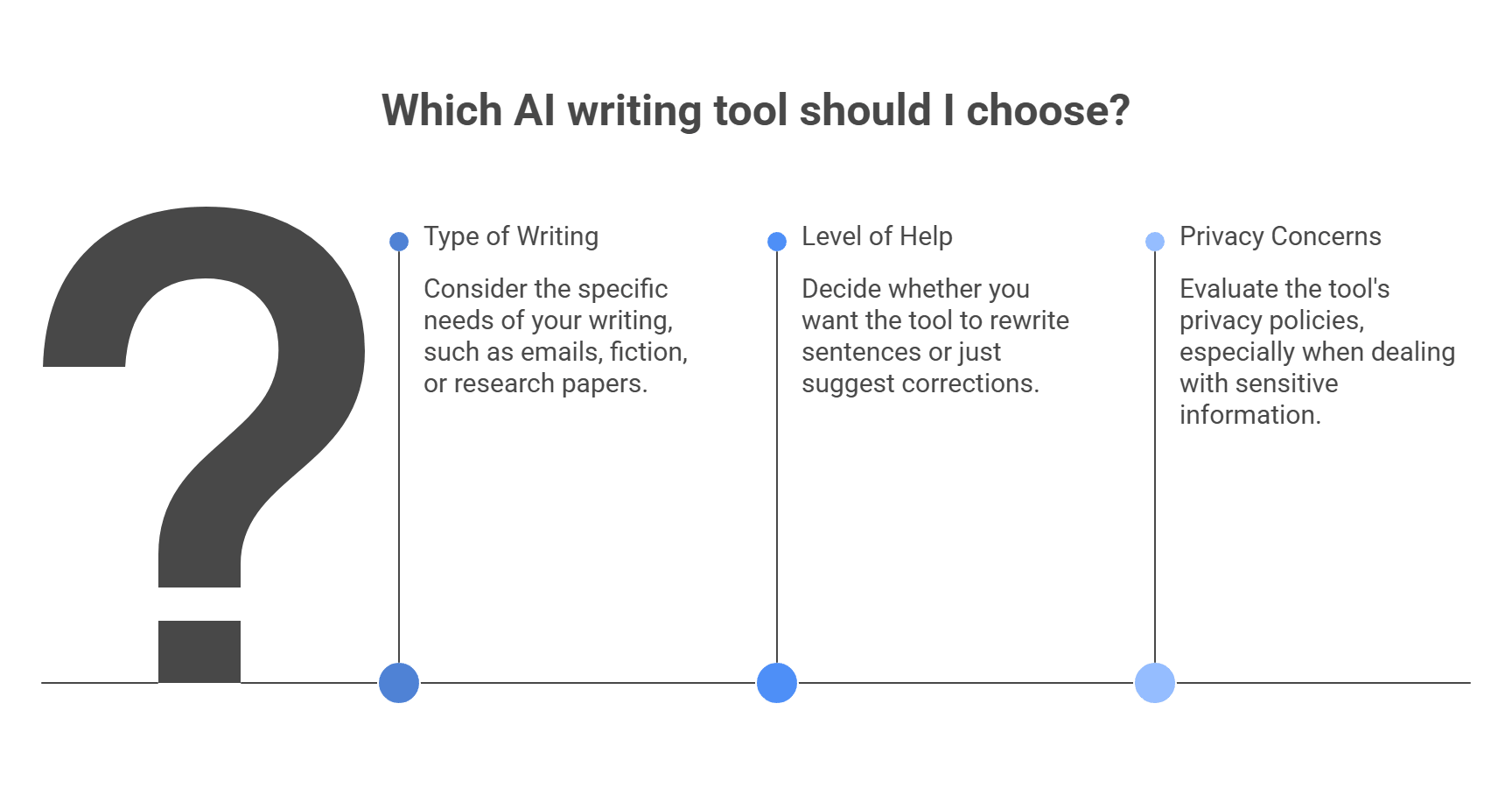
Writers on Reddit complain about the same three things over and over: grammar tools start to sound like ghostwriters, Google’s built-in suggestions get annoying fast, and some AI edits are just plain wrong. Those complaints also line up with what the tools themselves let you turn off or control.
The fix: Do not accept rewrite or tone suggestions blindly. In Grammarly, you can turn off specific suggestion groups, including things like word choice, sentence variety, filler-word flags, and other style-heavy prompts. If you want the tool to act more like a classic checker, keep spelling and punctuation help on, and dial back the style layer. Reddit complaints about Grammarly “flattening” voice are common, so this is one of the easiest fixes.
The fix: Turn off the parts you do not want. Gmail’s settings let you disable Grammar suggestions, Spelling suggestions, and Autocorrect directly from the General tab. Some users also report that Workspace smart-feature settings affect how aggressive Gmail feels, so if the nudges still bother you, check those too. Reddit threads about Google Docs and Gmail show this is a very common pain point.
The fix: Use a stricter proofing tool for the final pass, especially for technical writing, dialogue, or stylized copy. LanguageTool’s core engine is open source and can be self-hosted, which makes it a better fit when you want a more controlled proofreading layer instead of heavy generative rewriting. That will not make it perfect, but it is often a safer final check when an AI rewriter starts to guess too much.
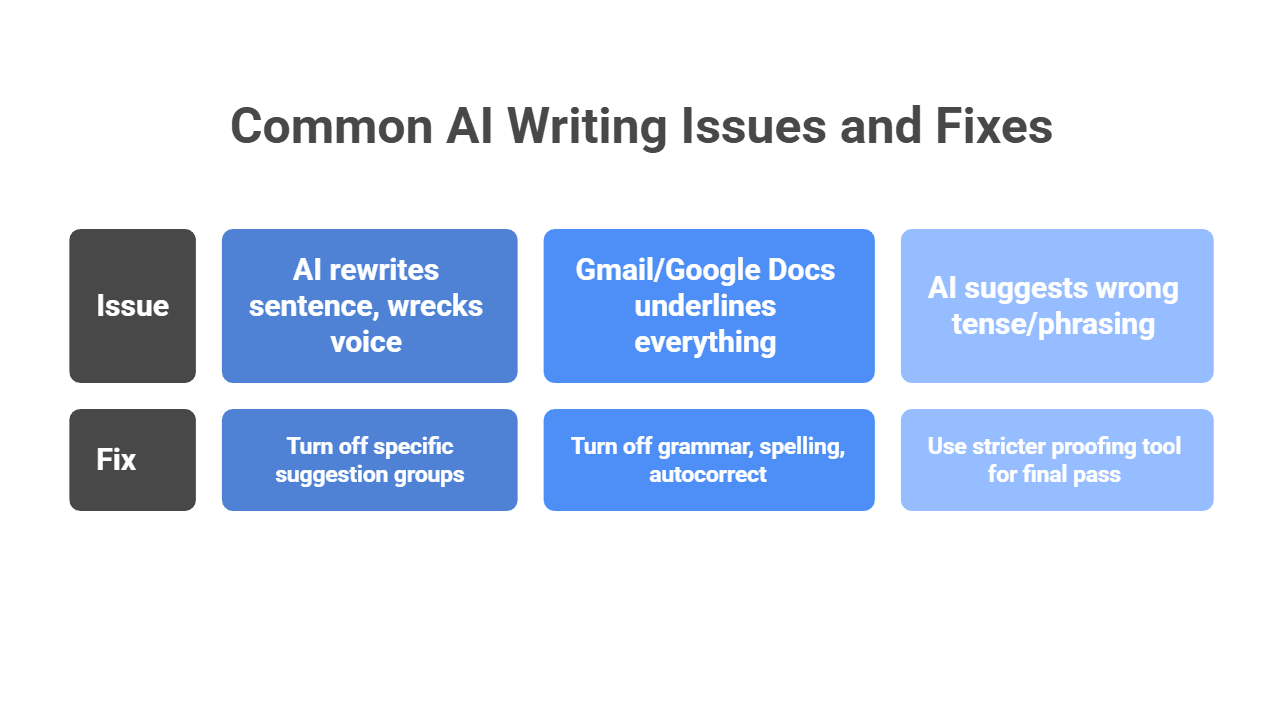
The best AI grammar checker is not always the one with the longest feature list. It is the one that fits naturally into your workflow and helps users improve writing without flattening their voice. Whether someone prefers Grammarly, Trinka, or LanguageTool, the bigger point is the same: writers want tools that feel helpful, fast, and natural.
If you are building that kind of experience into your own product, you do not need to train a grammar model from scratch. A unified layer like LLM API lets you route user text through advanced LLMs using one OpenAI-compatible API, with multi-provider access, performance monitoring, cost-aware analytics, and secure key management all in one place.
Why use LLM API for writing assistants?
If you want to build a writing assistant that feels polished without making the backend messy, LLM API is a strong layer to add. It gives you flexibility underneath, so your product can focus on helping people write better.
Yes. Modern AI grammar tools are strong for business and academic English because they understand context, not just rules. They can still be shaky with poetry, heavy slang, or very stylized writing.
Most tools push a paid tier, but QuillBot and LanguageTool usually have the most usable free plans for basic grammar fixes.
Some try. Tools like Grammarly and Trinka include AI detection, but false positives are common, so treat the result like a hint, not proof.
Use an LLM instead of training your own model. Send the user’s text with a clear instruction like: “You are an expert editor. Fix grammar and spelling. Keep meaning.” With LLM API, you can access multiple top models through one API.
Your app can keep working. LLM API supports load balancing and failover so requests can route to a backup model during outages or slowdowns.
Most people have seen this happen. You ask AI to write an email, blog post, or review, and the result sounds polished but flat. The grammar is fine. The structure is fine. But the voice feels stiff, repetitive, and easy to spot.
That is a problem because faster content does not always mean better content. Google’s guidance still focuses on helpful, reliable, people-first writing, not mass-produced copy that adds little value.
This is where AI humanizers come in. These tools rewrite AI-heavy text so it sounds more natural, more varied, and closer to how real people actually speak. The goal is not just to swap a few words. It is to fix rhythm, tone, flow, and phrasing so the result feels less mechanical.
Whether you are a marketer who wants stronger audience connection or a developer building support flows that need warmth and clarity, human-like language matters more now. Here is what AI humanizers do, how they work, and what to watch out for.
An AI humanizer works best as part of a simple workflow. It is not a magic button. You still need a solid draft, the right tone settings, and a quick human review at the end. Google’s guidance also keeps the focus on helpful, reliable, people-first content, which means the goal is not to “hide AI.” The goal is to make the text more useful and natural for real readers.
First, create the base draft with your AI tool, whether that is ChatGPT, Claude, or something else. At this stage, focus on the core pieces:
Do not worry too much yet about flow or personality. The main goal here is to get the content on the page in a usable shape.
Next, paste the draft into your AI humanizer and choose the settings that match the piece.
Usually, that means:
This step matters more than people think. If the settings are off, the output may sound smoother but wrong for the audience.
Now let the tool rewrite the text.
A good humanizer does more than swap words around. It usually helps by:
That is the part that makes the draft easier to read.
This step should never be skipped. Even a strong humanizer can:
So do one clean read-through and check:
Google’s content guidance still points toward unique, helpful, people-first writing, so the final check is where you make sure the piece still says something real and useful.
If you want to keep it practical, use this order every time:
That keeps the process fast without letting the tool do too much on its own.
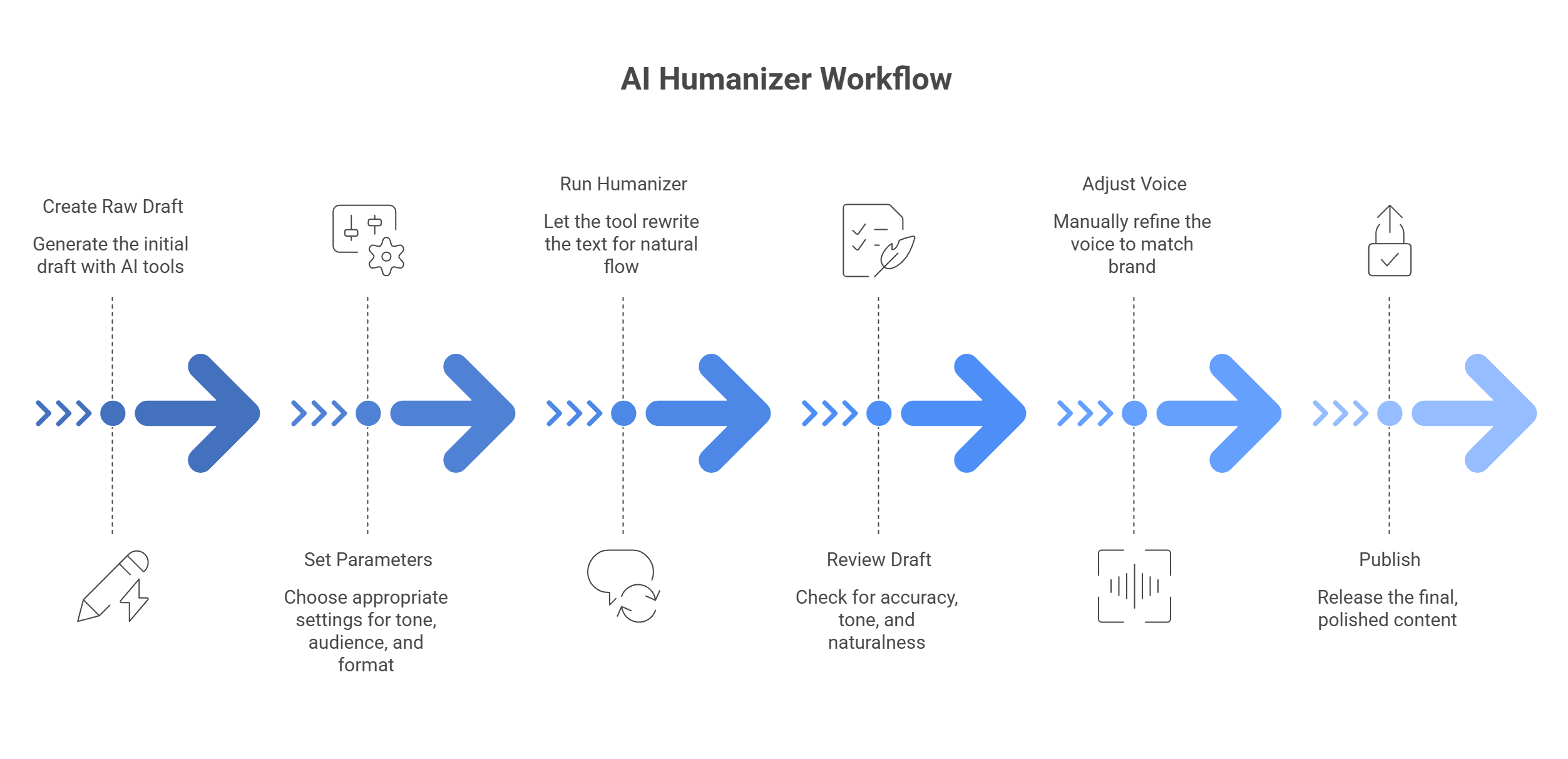
When AI text sounds stiff, you usually have four choices: leave it alone, edit it by hand, run it through a basic paraphraser, or use an AI humanizer. In most cases, the humanizer gives you the best balance of speed, readability, and tone control. That lines up with how major writing tools now position these products: humanizers focus on more natural, engaging language, while Google’s guidance still centers on people-first, useful content rather than text that simply looks polished on the surface.
Raw AI drafts are often clean, but they can still sound flat, repetitive, and too symmetrical. The wording may be correct while the rhythm feels off. That is usually where readers lose interest.
A humanizer helps by:
That matters because content should feel useful and human to the reader, not just technically correct. Google’s public guidance keeps pushing that same idea: focus on content made for people first.
Manual editing can work well, but it takes time. If the draft is packed with awkward AI phrasing, you can spend so long fixing tone, flow, and repetition that writing from scratch starts to feel easier.
A humanizer gives you a faster first pass. It can:
That does not remove the need for review. Even writing tools that promote humanizing and paraphrasing still note that outputs can miss nuance, drift from your intended tone, or need a final check for accuracy.
Older spinners mostly swap words. A sentence changes on the surface, but the structure often stays stiff. The result may look different while still sounding unnatural.
That is the big difference:
Modern paraphrasing tools can absolutely help with clarity, but even they admit that outputs may still sound less natural without light editing. Humanizers are built more directly for that problem.
This is the option people forget to compare. Sometimes the draft is not terrible, so it gets published as-is. That usually saves time in the moment but creates weaker copy.
What often slips through:
A humanizer is useful here because it helps you move from “acceptable” to “actually readable” without a full rewrite.
They tend to be most useful when the draft already has the right facts and structure, but the voice feels off.
Good use cases:
In these cases, the goal is usually not to rewrite the whole idea. It is to make the writing feel smoother, more natural, and easier for real people to stay with.
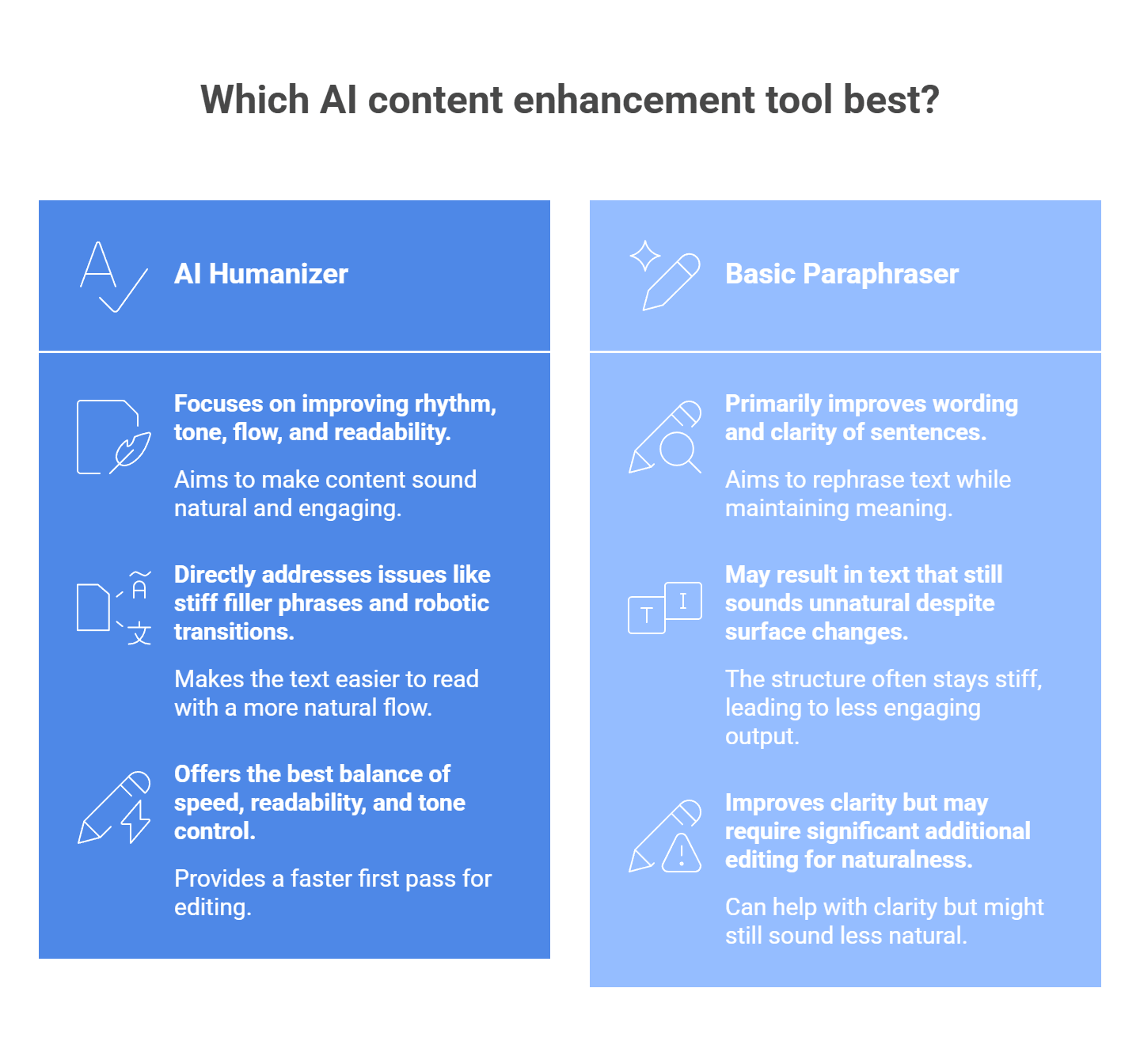
The biggest advantage is not that AI humanizers are magical. It is that they sit in the middle:
That is why they often end up as the most practical option. You still need a human check at the end, but the draft you start from is usually much stronger.
The best AI humanizer depends on what you need most. Some tools are better for polished business writing. Some are built for student-friendly rewrites. Some focus on quick cleanup with no signup. Before you pick one, check these things first:
One more thing: do not choose a tool only because it claims to “beat detectors.” That is weak buying logic. A better test is whether the output sounds natural, keeps the meaning, and still fits your use case and rules. Grammarly, for example, frames its humanizer around clearer, more natural writing, while Scribbr focuses on removing AI-like patterns without changing the message too much.
Grammarly is the safest pick if your main goal is professional polish. Its humanizer is built to make AI-assisted writing sound more natural, sincere, and engaging without changing what you mean. That makes it a strong choice for emails, blog drafts, proposals, and other work where clarity matters more than heavy rewriting.
Why choose it: Pick Grammarly if you want cleaner, more readable writing and already like Grammarly’s broader writing tools.
Walter Writes is more aggressive. It pitches itself as a tool that rewrites AI text into more natural language and openly markets itself around AI detection concerns. It also supports uploaded documents and different use cases, including student and academic pages. That makes it a stronger fit for users who want deeper text changes, not just light cleanup.
Why choose it: Choose Walter Writes if your text needs a heavier rewrite and you want the output to feel less obviously AI-shaped.
Scribbr’s tool is more focused on natural phrasing with a clean, simple interface. It says the goal is to spot AI-like patterns and replace them with more natural wording while keeping the original message intact. Since Scribbr already serves students and academic writers, this one makes the most sense for essays, papers, and more formal writing where you still want the text to sound human.
Why choose it: Choose Scribbr if you want a more academic-friendly tone and do not want the rewrite to become too casual.
SuperHumanizer is harder to pin down than the others because its web presence is lighter and less product-detailed, but it is still used as an AI humanizer tool and shows up in current tool roundups. If you want a lighter, simpler option and do not need a giant writing platform around it, it can still be worth a look. I would treat this one more as a quick-use option than a deeply documented professional tool.
Why choose it: Choose SuperHumanizer if you want a simple tool to test quickly and you do not need a full writing suite.
Clever AI Humanizer pushes the “free and easy” angle hard. Its site says it is fully free, supports multiple languages, and lets users adjust style while rewriting AI-heavy text into more natural wording. That makes it attractive for casual use, fast rewrites, and users who do not want a paywall right away. Since the tool leans heavily on detection-related marketing, it still makes more sense to judge it by readability and output quality, not flashy claims.
Why choose it: Choose Clever AI Humanizer if you want a free option with a simple interface and quick results.
A lot of people use AI humanizers because they want to get past tools like GPTZero or Turnitin. From an SEO point of view, that is the wrong thing to focus on.
Google’s guidance is pretty clear: it does not automatically punish content just because AI helped write it. What matters is whether the page is helpful, reliable, and made for people instead of search engines. Content that feels stiff, repetitive, or empty is the real problem.
That is where an AI humanizer can actually help. When it works well, it does not just change a few words. It improves flow, breaks up repetitive sentence patterns, and makes the text easier to read. That can make the page more satisfying for real visitors, which is a much better goal than chasing a low AI-detection score.
The practical SEO benefit is simple:
Those things support people-first content. And that is much closer to what search systems want than text written mainly to game a detector. Google also warns that large-scale AI content without real value can violate its spam policies, so “humanized” text still has to be useful.
One important detail: marketers often talk about bounce rate or dwell time as if they are direct ranking levers. Google’s public guidance does not frame them that way. They can still be useful site metrics because they may show whether readers find your page compelling, but the bigger point is user satisfaction, not one magic number.
People who use AI humanizers complain about the same few problems again and again: weird wording, text that still gets flagged, and unstable backends when they try to scale. Reddit threads around AI writing tools also mention “symmetry” and overly polished structure as common giveaways.
| The issue | The fix |
| Word salad effect: the tool swaps normal words for weird synonyms, so the text gets harder to read. | Clean the draft first. Ask the base AI to use plain English, avoid clichés, and vary sentence length before you run a humanizer. |
| Uniformity flags: the text still feels AI-written because the paragraphs look too neat and predictable. | Break the pattern. Mix paragraph length, add a short sentence here and there, and cut stiff transitions. |
| API rate limits and downtime: bulk humanizer tools break when one LLM provider slows down or blocks requests. | Use routing and failover. A gateway like llmapi.ai can spread traffic, retry requests, and switch providers when one goes down. |
We are past the stage where fast output alone feels impressive. What matters now is whether AI-generated text actually sounds natural, clear, and human enough to connect with real people. That is why tools focused on rewriting tone, smoothing phrasing, and improving rhythm have become so useful.
But if you want to bring that same human-like quality into your own app or workflow, depending on one provider can limit you fast. Different models shine in different areas, whether that is tone, restructuring, speed, or cost.
That is where LLM API fits in naturally. It gives you one OpenAI-compatible API with multi-provider access, so you can work across models more flexibly instead of building around a single vendor. It also brings cost-aware routing, performance monitoring, secure key management, and provider-level breakdowns into one place, which makes it easier to manage AI writing workflows as they grow.
Why use LLM API?
If you want your product to speak in a more natural voice without making the backend harder to manage, LLM API is a smart layer to add. It gives you the freedom to use the right model for the tone and job while keeping the integration simple underneath.
It rewrites AI-sounding text to feel more natural. Usually that means: mixing sentence lengths, removing repetitive transitions, smoothing awkward phrasing, and shifting tone to sound less stiff.
It can, mainly because it’s easier to read and keeps people engaged. Better engagement (people actually reading, not bouncing instantly) often lines up with better SEO outcomes.
No. Detectors change constantly, so no tool can promise a permanent 100% pass rate. The most reliable way to make text feel real is adding your own edits—specific details, examples, and your actual voice.
Humanizers tend to run lots of generations quickly. LLM API can help you scale by routing requests across multiple models and handling rate limits more smoothly through one endpoint.
Different models have different strengths. Some feel more natural for conversation and tone than others. With LLM API, you can switch models without rewriting your whole integration and route to the one that gives the best “human” output.
Passwords alone do not cover every use case anymore. If you build fintech onboarding, protect workspace access, or try to stop ticket fraud, you may need a fast way to check whether one face really matches another.
That is where AI face compare APIs come in. These tools compare two face images and return a similarity score that helps your app decide if both images show the same person.
Below, we break down the top 5 tools on the market, how to choose the right one, common developer problems, and how to scale without extra mess.
Based on current feature sets, pricing pages, and developer-facing docs, these five APIs stand out for face comparison in 2026. The right pick depends on what you need most: cloud scale, compliance, mobile speed, simpler setup, or privacy controls.
Amazon Rekognition is one of the biggest names in cloud vision. Its CompareFaces API handles 1:1 matching, and the wider Rekognition stack also covers face search, face analysis, streaming video, and liveness checks. It is a strong fit if you already run a lot of your stack on AWS and want a service that can scale without much custom ML work.
Key features:
Pricing: Pay-as-you-go. AWS lists Rekognition Image Group 1 APIs, which include CompareFaces, at $0.001 per image for the first 1 million images per month, with lower rates at higher volume.
Best for: Large-scale apps, identity flows on AWS, and teams that want strong liveness support plus deep cloud integration.
| Pros | Cons |
| Strong face compare and liveness stack | Easy to get pulled deep into AWS |
| Good fit for high-volume workloads | Costs can add up at scale |
| Supports video workflows too | IAM and setup can feel heavy |
| Mature docs and SDK coverage | No simple always-free tier for long-term prototyping |
Azure Face API is built more for enterprise identity and regulated use cases. It supports verification, identification, grouping, liveness sessions, and face lists, while Azure also separates face attributes into its broader detection flow. That makes it appealing for teams that need both verification and stricter operational controls.
Key features:
Pricing: Azure uses transaction-based pricing. Microsoft’s pricing page shows Face API as a paid service with usage-based billing, and Azure’s free-account offer can be used to test services, though exact free access depends on your account and offer type.
Best for: Healthcare, finance, enterprise identity flows, and teams that need a more compliance-oriented Microsoft environment.
| Pros | Cons |
| Strong identity-verification toolkit | Azure setup can feel bulky |
| Good fit for regulated environments | Pricing is less “instant clarity” than simpler tools |
| Supports large datasets and face lists | Learning curve is real for first-time users |
| Liveness is part of the platform | Some attribute features sit in separate flows |
Face++ is still a serious option if you want rich face analysis on top of face matching. Its platform covers face compare, search, liveness, dense landmarks, face attributes, skin analysis, and beauty scoring. That wider toolkit makes it especially useful for mobile, consumer, and image-heavy products that want more than a plain match score.
Key features:
Pricing: Face++ says its APIs can be used for free to start, with paid options through pay-as-you-go or QPS-based plans. Its pricing page also confirms a free plan with no credit card required.
Best for: Mobile apps, beauty or AR-style products, and teams that want detailed facial mapping along with face verification.
| Pros | Cons |
| Very feature-rich beyond face compare | Can be more than you need for basic KYC |
| Strong landmark and attribute coverage | Pricing gets less simple at higher scale |
| Good for consumer-facing image apps | Regional and compliance review may matter more for some teams |
| Easy to test with a free start | Docs and product sprawl can feel busy |
Kairos leans hard into identity verification, face matching, liveness, and a developer-friendly API story. The company also still positions itself around accessible pricing and ethical, unbiased face recognition. If you want a simpler face verification product without stepping into a giant cloud stack, Kairos is worth a look.
Key features:
Pricing: Kairos lists free trial access, 1,000 free API calls for biometric face recognition, and paid identity-verification plans starting at $49/month, with usage-based pricing that drops at higher volume.
Best for: Teams that want a more direct face-verification product with lighter setup and clear identity-check workflows.
| Pros | Cons |
| Straightforward identity-verification focus | Smaller ecosystem than AWS or Azure |
| Free trial path is easy to test | Fewer surrounding platform features |
| Has cloud and on-prem options | Less ideal for giant video-heavy workloads |
| Privacy and control story is clearer than many bigger clouds |
Luxand is the easy-entry option in this group. Its cloud API covers face recognition, verification, similarity, landmarks, age and gender detection, cropping, and liveness. It is not trying to be a giant cloud platform. That is part of the appeal. If you want something you can wire up fast, Luxand stays one of the more approachable choices.
Key features:
Pricing: Luxand offers a free tier with 500 API requests per month and paid plans starting at low monthly rates; its pricing page currently shows entry plans beginning at $9/month.
Best for: Indie developers, startups, and smaller teams that want face matching live fast without deep cloud setup.
| Pros | Cons |
| Very easy to try and integrate | UI feels simpler than enterprise tools |
| Covers the main face-compare basics well | Not the first pick for massive enterprise rollouts |
| Free tier is friendly for testing | Advanced usage can hit plan limits fast |
| Good SDK and feature breadth for the price |
The face recognition space is much bigger than the top five cloud APIs. If those tools do not match your setup, there are solid alternatives in a few more specific categories.
If privacy is the top priority, sending face images to a third-party API may not work for you. In that case, self-hosted tools make more sense.
If your real goal is not generic face matching, but selfie-to-ID verification for compliance, you are usually better off with a full identity platform.
Picking a face compare API is mostly about four things: law, spoof resistance, real-world accuracy, and cost at scale. If one of these breaks, the whole setup gets risky fast.
If you collect or process face geometry, do not treat this like ordinary image data. Illinois BIPA explicitly covers scans of face geometry, and GDPR treats biometric data as a special category with tighter rules and higher risk.
Check these points before you test vendors:
Practical shortcut:
Azure is useful here because Microsoft supports on-prem and near-data container deployments for some AI services, which can help when compliance or internal policy says data should stay close to your own environment.
A lot of teams skip this and regret it later. Face comparison alone only answers “do these two faces look like the same person?” It does not answer “is this a real live person right now?”
Use plain face compare when the job is low risk, for example:
Use liveness when the action has security or money attached to it, for example:
AWS describes Face Liveness as a way to detect spoof attempts such as printed photos, digital replays, 3D masks, and even some camera-bypass attacks. That is the level of protection you want for higher-risk flows.
A simple rule:
Vendor benchmarks help, but they do not tell you how the model will behave on your users, your camera quality, and your lighting. Face systems can still perform unevenly across demographics, image quality, and pose. European guidance also warns that facial recognition brings elevated rights risks and needs careful review.
When you test vendors, do not stop at “it worked in staging.” Test:
What to measure:
This gives you something far more useful than a generic “high accuracy” claim.
Face APIs often look cheap at first glance. The problem starts when usage grows, retries pile up, or you add liveness on top of matching.
Your cost model should include:
For example, AWS pricing shows Rekognition image analysis is usage-based, and AWS also charges separately for some related storage components. That means your bill may have more than one moving part.
A good pricing check:
That last step matters more than people think. A product that looks affordable in a pilot can get expensive once you add liveness, duplicate checks, and multi-step verification.
This is the fastest way to cut through the noise:
In short, the best tool is not the one with the longest feature list. It is the one that matches your legal risk, security level, user population, and expected volume without turning your costs or compliance work into a mess.
A lot of face-compare problems show up only after launch. The common pattern is simple: weak capture quality, no spoof protection, too many API calls, or threshold settings that are too loose for the risk level.
The issue: False rejections from bad lighting and off-angle photos.
The fix: Standardize capture as much as possible. AWS recommends face liveness checks in lighting that is not too dark or too bright and as even as possible, and Microsoft also points to more conservative session settings and stronger capture controls for better results.
Use a capture flow like this:
If you can, run light preprocessing before upload, such as exposure correction or blur checks, so you only send usable frames.
The issue: A printed photo or replay attack passes basic face matching.
The fix: Plain 1:1 face comparison is not enough for secure flows. AWS states that face liveness is designed to catch printed photos, digital photos, digital videos, 3D masks, and some camera-bypass attacks. Azure also separates liveness into its own workflow rather than treating it as normal face matching.
For anything high-risk:
That is the baseline for banking, KYC, password reset, and access control.
The issue: Costs explode because the app sends too many frames to the API.
The fix: Do not send every video frame to a paid cloud service. Filter locally first. OpenCV supports face detection from live camera input, and sharpness scoring methods can help you pick the best frame from a sequence instead of uploading dozens of weak ones.
A better flow looks like this:
This cuts waste fast and usually improves match quality too.
The issue: Bias, false positives, or uneven results across different groups.
The fix: Do not trust default thresholds blindly. NIST still tracks demographic effects in face recognition and notes that false positives can vary across populations, while Microsoft also warns that real-world performance depends on image quality, environment, and user diversity.
To reduce risk:
For low-risk apps, a looser threshold may be fine. For high-risk identity checks, stricter thresholds and liveness usually make more sense.
A face compare API and a secure authentication system do two different jobs.
Face matching asks one question: do these two faces look alike enough to count as the same person?
Liveness detection asks a different question: is there a real person physically present right now, or is someone trying to fool the camera?
That gap matters a lot. AWS says face liveness is built to detect spoof attacks such as printed photos, photos or videos shown on another screen, 3D masks, and even some pre-recorded or deepfake video attacks that try to bypass the camera. Azure describes liveness the same way: an anti-spoofing layer that checks whether a real person is actually in front of the camera, with both passive and passive-active modes now supported.
Basic 1:1 matching is useful for:
What it cannot prove on its own:
So if your flow protects money, access, accounts, or legal identity, plain face matching is not enough.
Modern liveness systems usually look for several signals at once, not one magic clue.
They may check:
AWS explicitly says its liveness flow analyzes a short selfie video to catch printed photos, digital photos, digital videos, 3D masks, and camera-bypass attacks such as pre-recorded or deepfake videos. Azure’s current liveness docs also split the feature into passive and passive-active modes, which is useful because some apps want less user friction, while others want stronger challenge-based proof.
This distinction helps a lot when you choose a vendor.
Passive liveness:
Active or passive-active liveness:
Azure’s current documentation specifically calls out both Passive and Passive-Active detection modes. That is a useful sign of where the market is going: less friction for simple cases, stronger challenge flows for higher-risk ones.
A few years ago, many teams mainly worried about printed photos or video replays. That is no longer enough. Vendors now openly talk about deepfakes and injection attacks as real threats to remote identity checks.
AWS says its liveness service is designed to detect spoofs that bypass the camera, including pre-recorded or deepfake videos. iProov also frames modern biometric defense around both presentation attacks, like photos and masks shown to a camera, and injected attacks, such as forged or deepfake media inserted into the stream.
That means your security bar should rise if your app handles:
A simple rule helps here.
You may not need liveness if the use case is low risk, such as:
You should treat liveness as required if the use case involves:
In those cases, a face compare API without liveness is only half a solution.
Before you choose a face API for secure flows, check:
AWS, for example, notes that its liveness flow can return a strong selfie frame for downstream face matching. That is useful because it reduces the need for separate capture logic.
So the bottom line is simple: if your app uses face verification for security, do not stop at “the faces match.” You also need proof that the second face belongs to a live, present human at the moment of capture. Without that layer, the system is much easier to fool.
An AI Face Compare API can help you build faster and more secure user flows. But in many products, facial recognition is only one part of the stack. Teams often also need text generation, document analysis, translation, or other multimodal features, and managing all of those through separate providers can get messy fast.
That is where a unified layer starts to matter. Instead of juggling extra API keys, billing setups, and provider limits for every generative feature, llmapi.ai gives you one OpenAI-compatible API with access to 200+ models, plus routing, fallback protection, unified billing, and team key management.
Why use LLM API alongside your face compare stack?
If you want to keep your specialized face recognition tool while making the rest of your AI infrastructure easier to manage, LLM API is a natural fit. It helps you consolidate the generative side of your stack without boxing your app into a single provider.
Usually yes, but the rules are strict and vary by location. Facial data is often treated as sensitive biometric data, so you typically need clear, informed consent, a retention/deletion policy, and limits on how you store and share templates. Laws like GDPR (EU) and Illinois BIPA are common “high bar” examples.
Keep it clean: use your Face Compare API only for identity checks, and route everything else (chat, summaries, analysis) through LLM API so you don’t juggle a bunch of different LLM SDKs and keys.
That’s a false positive, often caused by a low match threshold. A common fix is raising the required confidence score (many teams use something like 95%+, depending on the provider and risk level) and adding a second check for high-stakes flows.
Face compare fallbacks are usually on you to design, but for LLM features, LLM API can route to backup models via load balancing/failover so your app doesn’t lose chat or text features during outages.
Kong is a strong API management platform, but some teams find its AI Gateway too heavy or less flexible for modern AI workloads. When AI traffic grows, gaps in routing, visibility, cost control, and model switching can become harder to ignore.
That is why more teams now look at AI-first alternatives. The market has grown fast, and there are now several strong options built for generative AI from the start. Here is a closer look at the best Kong AI alternatives and how to choose the right one.
Based on current market momentum, developer interest, and feature depth, these are the top 7 platforms to manage, route, and monitor LLM traffic. Kong does offer AI-specific tooling today, including token usage tracking and observability, but many teams still compare it against platforms built around AI workloads first.
LLMAPI is a unified AI API platform built for teams that want broad model access without juggling separate provider integrations. Instead of wiring together multiple vendors one by one, you get one API layer for 200+ models, along with monitoring, provider breakdowns, and centralized control. That makes it a practical option for teams that care about flexibility and want less backend overhead.
Key features:
Pricing: Free tier available.
Best for: Teams that want one simple API layer for many models, with less integration work and better day-to-day visibility.
| Pros | Cons |
| Easy way to access many models through one API | Less suited for teams that want deep self-hosted control |
| Lower integration overhead for multi-model apps | Advanced enterprise needs may require more custom review |
| Helpful monitoring and provider-level visibility | Smaller ecosystem than some older open-source tools |
| Good fit for fast product teams |
Bifrost has picked up a lot of attention in 2026 as a high-performance open-source option. Built in Go, it focuses on low latency, high throughput, and strong budget control. It is a strong match for teams that treat AI traffic as core infrastructure and want tight control over how requests move across providers.
Key features:
Pricing: 100% free and open-source.
Best for: Platform engineering teams with high-volume production traffic that need strict budget control and very low latency.
| Pros | Cons |
| Very fast under heavy load | Harder setup for teams less familiar with Go |
| Strong control over multi-tenant budgets | Smaller UI layer than commercial tools |
| Free and self-hostable | More backend-focused than user-friendly |
| Works well with enterprise security stacks | |
| Large model catalog |
LiteLLM is one of the most popular open-source abstraction layers among developers. It works as a proxy that turns LLM requests into the standard OpenAI API format, which makes provider swaps much easier. For Python-heavy teams, it is often the fastest path to a flexible multi-model setup.
Key features:
Pricing: Free if self-hosted. Cloud-managed versions have custom pricing.
Best for: Python-focused teams that want broad provider access for prototypes, internal tools, and lightweight production use.
| Pros | Cons |
| Huge community and ecosystem | Python setup can slow down at very high RPS |
| Free to run locally | YAML config can get messy at larger scale |
| Simple for Python and LangChain teams | Lacks a strong native UI for team governance |
| Familiar OpenAI-style format | |
| Fast support for new models |
Cloudflare AI Gateway takes Cloudflare’s global edge network and applies it to AI traffic. It sits between your app and the model provider, with caching and edge delivery that can cut both latency and cost. It is especially appealing for teams already deep in the Cloudflare stack.
Key features:
Pricing: Free tier up to 100,000 requests per day, then usage-based.
Best for: Web and frontend teams that already use Cloudflare and want a lightweight AI gateway with very little setup.
| Pros | Cons |
| Very fast edge caching | Pulls you deeper into the Cloudflare ecosystem |
| No infrastructure to manage | Lacks deep prompt tooling and testing features |
| Generous free tier | Observability is lighter than AI-first LLMOps tools |
| Simple dashboard setup | |
| Strong global reliability |
Zuplo is an edge-native API platform with a strong product mindset. It stands out for GitOps workflows and built-in monetization, which makes it attractive for SaaS teams that want to package AI features as developer-facing APIs.
Key features:
Pricing: Usage-based, with premium plans starting around $30/month.
Best for: Startups and SaaS teams that want to ship and sell AI APIs directly to developers.
| Pros | Cons |
| Very good fit for AI API monetization | Code-first workflow may not suit UI-first teams |
| Strong developer experience with TypeScript | Costs can rise fast under heavy traffic |
| Native support for MCP tools | Not ideal for legacy on-prem environments |
| Works well with modern CI/CD flows | |
| Wide edge deployment footprint |
OpenRouter takes a marketplace-style approach. Instead of setting up separate accounts for OpenAI, Anthropic, Google, and others, you use one key to access a large model catalog at token-based rates. For teams that want variety and simple setup, that is a big draw.
Key features:
Pricing: Pay-as-you-go based on each model’s token cost.
Best for: Independent developers, open-source projects, and teams that want broad model choice without managing many vendor accounts.
| Pros | Cons |
| Huge model variety through one account | You depend on shared infrastructure |
| Clear marketplace pricing | Weak on enterprise RBAC and governance |
| Zero Data Retention option is attractive for privacy | No built-in prompt management or eval dashboard |
| Very simple integration path | |
| No monthly platform fee |
TrueFoundry is a heavier enterprise platform built for teams that need more than simple API routing. It focuses on secure deployments, governance, and control over both proprietary and open-source models, including setups in private and regulated environments.
Key features:
Pricing: Custom enterprise pricing.
Best for: Large enterprises in healthcare, finance, and other regulated industries that need tight control over data and infrastructure.
| Pros | Cons |
| Strong privacy and compliance posture | Setup can be complex |
| Full control over custom and fine-tuned models | Price point is too high for many startups |
| Good GPU cost optimization | Too much for simple routing needs |
| Strong support for agent workflows | |
| Works in fully air-gapped environments |
Not every gateway fits the same role. Depending on your team’s background and what matters most, you may find a better match in one of these more specialized groups.
Tools such as Apigee, Envoy, and F5 NGINX now have AI-related features or inference-focused extensions. These are often a practical fit for enterprises that already depend on them for core API traffic, security, and platform governance.
The tradeoff is that they usually feel more like an extension of an existing API stack than an AI-first control layer.
Vercel AI Gateway stands out for teams that already build around Next.js, React, and the broader Vercel platform. It gives you one endpoint for many models, plus budgets, usage monitoring, routing, and fallbacks.
That makes it very appealing for frontend-heavy teams, though it is still more tied to the Vercel ecosystem than a neutral infrastructure layer.
Tools such as Helicone and Langfuse grew out of the tracing and analytics side of the stack. Helicone positions itself as an AI gateway with routing, failover, caching, and cost tracking, while Langfuse remains more focused on tracing, prompts, evals, and monitoring across providers and tools.
These platforms make the most sense when deep telemetry and app-level visibility matter more than full gateway governance.
The right gateway usually comes down to three things: performance, governance, and ecosystem fit. You need the one tool that matches your traffic, your team setup, and the amount of control you want over providers, budgets, and fallback logic.
Before you compare features, look at the shape of your load.
Ask:
This first step matters because some tools fit high-throughput production traffic better than others. Bifrost leans hard into low-latency routing, automatic fallbacks, load balancing, and virtual-key controls, which makes it attractive for infra-heavy teams. LiteLLM can also handle serious traffic now, with published benchmarks that show 1,000 QPS and even 5,000 QPS under certain test conditions, but it still asks for proper production setup such as enough CPU and RAM.
A simple rule of thumb:
Helicone also positions its gateway around performance, failover, rate limits, caching, and observability, with Rust as part of that pitch.
A lot of teams underbuy here. The gateway works fine for a month, then five teams, three environments, and one shared provider account turn cost tracking into a mess.
Look at these questions next:
If the answer is yes, basic proxying is not enough. You need stronger governance. Bifrost puts virtual keys at the center of its model and supports budgets, rate limits, access rules, and routing by consumer. LiteLLM also supports budgets, team limits, user limits, and virtual-key controls, but its setup is more config-driven.
A practical way to think about it:
This part gets expensive fast when you ignore it. A gateway should tell you who used the budget, where the spend went, and what model caused the spike.
A lot of teams treat observability as a “later” problem. Then latency jumps, cost rises, or a fallback chain fails, and nobody can tell why.
You want answers to questions like:
Bifrost includes built-in observability with metadata such as inputs, outputs, tokens, cost, and latency. Helicone focuses heavily on analytics and gateway visibility. LiteLLM also tracks spend, routing, limits, and logs across its proxy flow.
That means:
This is where many teams feel the pain that pushed them away from Kong in the first place. The hard part is rarely one API call. The hard part is provider sprawl over time.
Think about:
If provider flexibility is a core need, look for a tool that gives you one stable endpoint and easy routing across vendors. LLMAPI focuses on that exact problem, with one API layer, multi-provider routing, fallbacks, monitoring, and an OpenAI-compatible style that keeps integration work lighter.
This kind of setup helps when you want to:
The best gateway on paper can still be the wrong pick if your team hates the workflow.
Ask yourself:
Examples:
This part matters more than people admit. A tool that fits your team’s habits usually wins over a tool with ten extra features nobody wants to touch.
Free or open-source does not always mean cheaper. Managed tools do not always mean more expensive either.
You need to weigh:
For example:
That is why “cheapest” can be misleading. The real question is which option gives your team the least friction at the scale you expect.
If you want a faster path, this simple filter helps:
In the end, the best choice is rarely about which gateway has the longest feature list. It comes down to what breaks first in your stack: speed, governance, or provider complexity. Pick the tool that solves that problem first, then grow from there.
A look through developer forums and issue threads shows the same problems over and over. The tools are useful, but once traffic grows or setup gets more complex, the weak spots show up fast. Recent LiteLLM issue threads still mention memory growth and OOM-related restarts, while fallback and unified routing remain common advice for teams that depend on one provider too heavily.
The fix: This usually points to scaling pressure, memory behavior, or weak production sizing rather than one simple bug. LiteLLM now has official troubleshooting guidance for memory issues, and public issue threads still show teams dealing with RAM growth and OOM kills in real deployments.
If you like the open-source proxy model but need a setup built around very high-throughput routing, Bifrost is often the cleaner next step because it focuses on low-latency, Go-based infrastructure and OpenAI-compatible routing.
A practical way to handle it:
The fix: Kong is powerful, but it still comes from the broader API gateway world. Its routing and plugin system remain tied to Kong’s own configuration model, admin APIs, and plugin architecture, which can feel heavy for teams that only want to add or change AI routes quickly. In cases like that, a managed control plane or simpler AI-first gateway can be easier to live with day to day.
What usually helps:
Tools such as Portkey or Cloudflare AI Gateway are often easier here because they focus more on fast setup, visual controls, and unified AI traffic patterns than on the full weight of classic API infrastructure.
The fix: Do not depend on one provider with no fallback path. Current gateway guidance from Portkey and other routing-focused tools puts automatic failover and unified retry logic at the center of production AI design. The basic idea is simple: if one model times out or returns errors, the same request moves to another provider or model that can handle it.
A simple fallback rule may look like this:
This is also where LLMAPI fits well. A unified endpoint with fallback rules, provider routing, and error monitoring gives you a much safer setup than a single hardcoded model path. It cuts down on frozen requests and gives users a better chance of getting a result even when one provider has a bad day.
A traditional API gateway can handle generative AI traffic, but it is rarely built for what modern AI apps actually need. LLM workloads depend on better observability, smarter routing, caching, and protection against provider outages and sudden cost swings. Purpose-built AI gateways solve that gap and help teams run model traffic with much more control.
Whether you lean toward a lightweight high-speed option, a fuller LLMOps platform, or an edge-friendly setup, moving to an AI-focused gateway can make your stack feel far more mature. But not every team wants to manage gateway infrastructure on its own.
That is where LLMAPI fits naturally. It gives you one OpenAI-compatible integration with access to 200+ models, plus routing, fallback protection, team keys, cost controls, unified billing, and usage visibility in one layer. That means you can get the practical benefits of an AI gateway without taking on the full operational burden yourself.
Why use LLMAPI?
If you want the benefits of an enterprise-style AI gateway without all the setup and maintenance work, LLMAPI is a strong shortcut. It keeps the integration simple while giving your app a more flexible and resilient AI layer underneath.
Kong is great for classic REST APIs, but many teams feel its AI features are more “added on” than native. It can treat LLM calls like regular HTTP traffic, which can limit things like token-level cost tracking and deeper LLM observability.
Yes. A big lever is semantic caching: if similar questions show up repeatedly, the gateway can reuse a previous answer instead of paying for a fresh LLM call. For high-repeat use cases, savings can be dramatic.
LiteLLM is powerful, but you host and maintain it yourself, plus manage keys and reliability. LLMAPI is managed: one key, one endpoint, built-in routing and load balancing, and no proxy infrastructure to run.
It’s a rule that routes traffic to a backup model when the primary model is slow or down (for example, “if response time exceeds 5 seconds, switch models”). This helps keep your app responsive during latency spikes or outages.
Yes. Instead of failing on a 429 Too Many Requests, traffic can be routed to other available models/providers so your app keeps working during spikes.
