Background removal looks like a simple image-editing task until you try to ship it inside a real app. Product photos arrive with shadows, hair, transparent objects, messy lighting, tiny accessories, white shirts on white walls, and marketplace rules that still expect clean cutouts every time.
For small batches, a browser tool may be enough. For apps, marketplaces, design platforms, DAM systems, and automation workflows, you need an API that can remove backgrounds reliably, return usable output formats, handle volume, and fit into the rest of your image or AI pipeline.
For this guide, we reviewed 7 background removal APIs based on what usually matters in production: cutout quality, edge handling, workflow fit, pricing clarity, developer experience, batch support, and how easily the API connects to downstream tasks like image enhancement, product content generation, moderation, tagging, and catalog automation.
We also looked at recent computer vision research around segmentation and matting. That part matters because background removal is not only “delete the backdrop.” The hard part is finding the real subject boundary: hair, fur, glass, shadows, clothing edges, hands, product packaging, and fine details.
A good background removal API should do more than return a transparent PNG.
In a real workflow, the API should help your app produce images that are ready for the next step: product listing, ad creative, profile upload, batch catalog cleanup, marketplace formatting, or AI-powered image editing.
Here’s what we checked:
| What we checked | Why it matters |
| Edge quality | Hair, fur, fingers, product handles, and transparent materials are usually where weak tools fail |
| Output formats | Transparent PNG, masks, JPG output, and background replacement all support different workflows |
| Batch support | E-commerce catalogs and DAM systems rarely process one image at a time |
| Pricing clarity | Per-image pricing, credits, resolution limits, and add-ons can change the real cost |
| API docs | Developers need predictable endpoints, SDK examples, and clear error handling |
| Workflow fit | Some APIs only remove backgrounds, while others support editing, enhancement, resizing, and asset management |
| Privacy and control | Some apps can send images to cloud APIs; others need tighter data handling and approval rules |
Research backs up why edge quality is such a big deal. The DIS5K paper, Highly Accurate Dichotomous Image Segmentation, introduced a high-resolution dataset for fine-grained object segmentation and proposed “human correction efforts” as a metric for how much manual work is needed to fix model errors. That is a useful way to think about background removal APIs too. The best API is not only the one that returns a mask. It is the one that creates the fewest annoying fixes after the mask is done.
This guide was created by an editorial team that has spent 6 years covering AI APIs, automation tools, developer platforms, SaaS infrastructure, and workflow software. Our process is pretty practical: we read official API docs, pricing pages, product pages, developer guides, and relevant research, then translate that into a comparison developers and product teams can actually use.
For this article, we checked official resources from LLMAPI, remove.bg, Photoroom, Clipdrop/Jasper, Cloudinary, Pixelcut, and PixLab.
We also looked at research on image segmentation and matting, including studies on dichotomous image segmentation, background matting, fashion image classification, and Segment Anything Model behavior in specialized image domains. The point was not to turn this into an academic paper. The point was to understand where background removal tools tend to succeed, where they fail, and what developers should test before choosing one.
Here’s our quick take before we get into the full reviews.
| Need | Best first choice |
| LLMAPI-centered AI image workflow | LLMAPI Background Removal API |
| Fast standalone background removal | remove.bg |
| Product-photo editing workflows | Photoroom API |
| Creative app background removal | Clipdrop / Jasper API |
| DAM and media automation | Cloudinary AI Background Removal |
| E-commerce app editing toolkit | Pixelcut API |
| Simple REST background removal | PixLab BG-REMOVE API |
Our top recommendation for apps already using LLMAPI is LLMAPI Background Removal API, because it can sit inside a wider AI workflow instead of acting like a disconnected image utility.
For pure background removal quality and brand recognition, remove.bg is still one of the safest standalone options. For e-commerce workflows, Photoroom and Pixelcut are more product-photo focused. For teams already using a digital asset management pipeline, Cloudinary is usually the better fit. For creative workflows, Clipdrop/Jasper is strong. For simple REST use cases, PixLab keeps things straightforward.
Best for: apps that want background removal as part of a broader AI workflow.
LLMAPI is best known as a unified AI gateway where teams can manage API keys, route requests across 200+ models, track cost, monitor reliability, and reduce vendor lock-in through one integration. The LLMAPI platform is built around the idea that AI apps should not have to juggle separate provider setups for every task.
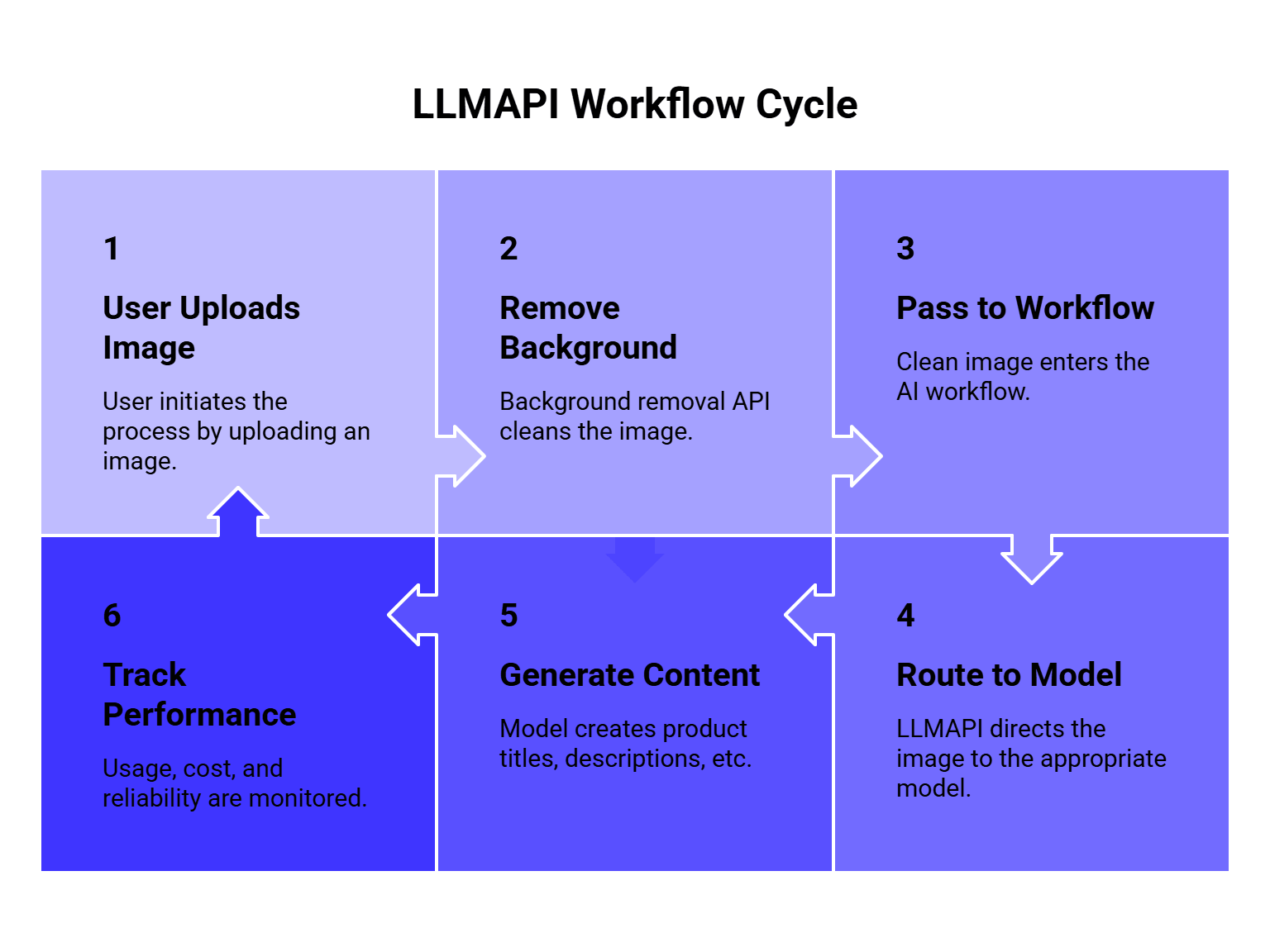
For background removal, that workflow angle matters. Many apps do not stop after removing the background. They may clean up a product image, generate a new background, classify the item, write a product description, moderate the image, resize it for a marketplace, or send it into another AI-powered editing step.
That is where LLMAPI can be useful: background removal becomes one part of a larger image automation chain.
| Category | Details |
| Best for | AI-first apps, internal workflows, catalog automation, image pipelines |
| Strength | Fits into broader LLMAPI routing and automation workflows |
| Good use case | Remove image backgrounds, then send the result into other AI tasks |
| Watch out for | Check current endpoint docs, limits, supported formats, and pricing before production use |
Compared with remove.bg, LLMAPI makes more sense when background removal is part of a bigger AI system. remove.bg is stronger as a dedicated standalone background removal brand. Compared with Cloudinary, LLMAPI is more AI-workflow oriented, while Cloudinary is more asset-management oriented.
We’d choose LLMAPI Background Removal API if the product already uses LLMAPI or needs image cleanup to connect with text generation, classification, visual workflows, or content automation.
We’d test another dedicated tool side by side if the only job is “remove background from image and return PNG.” In that narrow case, remove.bg, Photoroom, or Cloudinary may be easier to benchmark directly.
Best for: fast standalone background removal with strong brand recognition.
remove.bg API is one of the most well-known background removal APIs. The core promise is simple: send an image, remove the background automatically, and get a cutout that can be used in an app or workflow.
Its pricing page is credit-based, and remove.bg is often used for profile photos, product images, creator tools, marketplace images, and batch editing workflows.
| Category | Details |
| Best for | Dedicated background removal |
| Strength | Easy API, recognizable product, strong cutout workflow |
| Good use case | Apps that need fast background removal without extra image-stack complexity |
| Watch out for | Credit costs can matter at higher volume |
Compared with LLMAPI, remove.bg is more specialized. That is good if all you need is background removal. Compared with Photoroom, remove.bg is more focused on cutout automation, while Photoroom leans more into product-photo editing and e-commerce visuals.
We’d choose remove.bg if the team wants a dedicated API with a very clear job and fast setup.
We’d compare costs carefully if processing large catalogs. Per-image pricing can feel fine during testing and much less cute when the app starts processing thousands of images a day.
Best for: e-commerce product images and marketplace-ready visuals.
Photoroom API is built with product-photo workflows in mind. Its docs separate the Remove Background API from broader image editing features, which is useful if you only need clean cutouts and do not want to pay for heavier editing calls.
Photoroom’s docs also explain that the Image Editing API uses more credits than the basic Remove Background API, so developers should choose the endpoint based on what the workflow actually needs.
| Category | Details |
| Best for | Product photos, marketplace images, catalog cleanup |
| Strength | Strong e-commerce orientation |
| Good use case | Remove background, then create cleaner product visuals |
| Watch out for | Different API calls can consume credits differently |
Compared with remove.bg, Photoroom feels more e-commerce-specific. Compared with Pixelcut, both are strong for product images, but Photoroom’s API docs are especially clear about separating basic background removal from broader image editing.
We’d choose Photoroom if the app processes product photos for online stores, resale platforms, marketplace listings, or ad creatives.
This is also where research gets interesting. A study on the impact of background removal on fashion image classification and segmentation found that background removal can improve fashion classification accuracy by up to 5% in some shallow models trained from scratch, but it may not help deeper models when regularization and augmentation are involved. In plain English: background removal can make product images cleaner, but the downstream benefit depends on what your app does next.
For e-commerce teams, that means you should test both visual quality and downstream performance. A nice cutout is good. A cutout that improves search, classification, or conversion is better.
Best for: creative apps and design-first workflows.
Clipdrop’s Remove Background API, now connected with Jasper’s API ecosystem, gives developers a way to remove image backgrounds through an API. Its docs say one successful background removal call equals one credit, and API keys have a default quota of 60 requests per minute for the remove background endpoint.
Clipdrop is especially appealing for creator tools, AI design apps, social content workflows, and lightweight image editing products.
| Category | Details |
| Best for | Creative apps, design tools, content workflows |
| Strength | Simple API and strong visual editing focus |
| Good use case | Remove backgrounds for creator-facing tools |
| Watch out for | Check current Jasper/Clipdrop API pricing and quota before scaling |
Compared with Photoroom, Clipdrop feels more creator/design oriented. Compared with Cloudinary, Clipdrop is simpler for direct creative editing, while Cloudinary is better when the image needs to live inside a larger media-management pipeline.
We’d choose Clipdrop/Jasper for apps where users expect quick visual edits, creative image workflows, and background removal as part of a design experience.
The research angle here is matting. Background removal quality often depends on how well the model handles edges. The paper Real-Time High-Resolution Background Matting introduced a technique that achieved 30fps at 4K and 60fps at HD on a modern GPU while preserving fine details like hair. Most API users will never build that model themselves, but the takeaway is useful: high-quality cutouts depend heavily on matting quality, especially around soft edges.
Best for: media pipelines, DAM systems, and teams already using Cloudinary.
Cloudinary AI Background Removal is a strong choice if background removal is part of a larger image-management workflow. Cloudinary’s docs describe the add-on as combining deep-learning algorithms to recognize foreground objects and remove the background in seconds.
Cloudinary also supports programmatic background removal through its API and can connect the result to transformations, storage, delivery, optimization, and media workflows.
| Category | Details |
| Best for | Digital asset management and media automation |
| Strength | Background removal inside a full image pipeline |
| Good use case | Remove background, transform image, optimize delivery, store assets |
| Watch out for | Add-on setup and Cloudinary billing need review |
Compared with remove.bg, Cloudinary is heavier but better for full media operations. Compared with LLMAPI, Cloudinary is stronger for asset storage and delivery, while LLMAPI is stronger as a broader AI workflow gateway.
We’d choose Cloudinary if your team already stores, transforms, or serves images through Cloudinary. It keeps background removal closer to the rest of the media pipeline.
Cloudinary also works well when images need several steps after background removal: resizing, format conversion, CDN delivery, watermarking, moderation, or responsive image generation.
Best for: e-commerce apps that need background removal plus other image editing APIs.
Pixelcut API gives developers access to several image editing APIs, including background removal, image upscaling, generated backgrounds, outpainting, and try-on features. Pixelcut’s API page explains that credits are consumed by operation, with background removal using fewer credits than heavier editing actions.
That makes Pixelcut useful for apps that want a full product-image editing toolkit rather than one isolated background removal endpoint.
| Category | Details |
| Best for | E-commerce image tools and app builders |
| Strength | Background removal plus other image-editing APIs |
| Good use case | Product images, generated backgrounds, visual commerce workflows |
| Watch out for | Credit usage changes by operation |
Compared with Photoroom, Pixelcut feels similar in audience but broader in creative commerce features. Compared with remove.bg, Pixelcut is better when the app needs more than cutouts, such as upscaling, generated backgrounds, or try-on features.
We’d choose Pixelcut if the app needs background removal as one feature inside a larger product-photo workflow.
Pricing clarity matters here. The paper Pricing4APIs, which analyzed API pricing models and proposed a structured way to describe API plans and limitations, is a good reminder that “credits” are not always directly comparable between providers. One provider’s credit may mean one image. Another provider’s credit system may vary by feature, resolution, or operation type. For image APIs, always map credits to real workflow costs before choosing.
Best for: straightforward REST-based background removal.
PixLab BG-REMOVE is a background removal API that lets developers remove image backgrounds from photos, product shots, and video frames with a REST call. PixLab describes the endpoint as detecting the foreground subject, separating it from the scene, and returning an output image ready for transparent PNG workflows or downstream media processing.
| Category | Details |
| Best for | Simple REST integrations |
| Strength | Straightforward endpoint for background removal |
| Good use case | Product shots, photos, media processing, lightweight workflows |
| Watch out for | Compare output quality against dedicated visual-commerce APIs |
Compared with remove.bg, PixLab is less famous but may be practical for teams looking for a direct endpoint. Compared with Cloudinary, PixLab is lighter and less tied to a full media management platform.
We’d choose PixLab if the team wants a simple API endpoint and plans to evaluate quality, speed, and pricing against the more established tools.
Here is the more honest comparison.
| API | Strongest area | Weakest area | Best fit |
| LLMAPI Background Removal API | AI workflow integration | Needs endpoint-specific testing | Apps connecting image cleanup to broader AI tasks |
| remove.bg | Standalone background removal | Higher-volume credit costs | Simple cutout automation |
| Photoroom | Product-photo workflows | Credit planning across editing features | E-commerce catalogs |
| Clipdrop / Jasper | Creative image editing | Platform transition/pricing checks | Creator and design apps |
| Cloudinary | Media pipeline integration | Heavier setup | DAM, CDN, and asset workflows |
| Pixelcut | Commerce image editing toolkit | Credit math across operations | Marketplace and product-photo apps |
| PixLab | Simple REST removal | Less visible market benchmark data | Lightweight API workflows |
Our overall winner for AI-powered workflows is LLMAPI Background Removal API, because background removal often feeds into other model tasks.
Our winner for standalone background removal is remove.bg, because it is focused, mature, and easy to understand.
Our winner for e-commerce visuals is Photoroom, with Pixelcut close behind.
Our winner for media operations is Cloudinary, because it fits into a full image asset lifecycle.
Do not test these APIs with one perfect product photo. That tells you almost nothing.
Use a small test set that looks like your real images:
| Test image type | Why it matters |
| Hair or fur | Tests fine edge quality |
| White object on white background | Tests low contrast |
| Transparent objects | Tests difficult foreground boundaries |
| Product with shadows | Tests whether shadows are removed or preserved |
| Hands holding products | Tests foreground confusion |
| Busy background | Tests object separation |
| Multiple objects | Tests subject selection |
| Small accessories | Tests detail retention |
| Clothing and fashion images | Tests fabric edges and body shape |
| Marketplace product photos | Tests real catalog quality |
The 2025 paper BEN: Using Confidence-Guided Matting for Dichotomous Image Segmentation argues that combining segmentation and matting can improve dichotomous segmentation quality. That lines up with what developers see in real background removal: the mask can be mostly correct, but the edge refinement decides whether the image looks professional.
So when you test APIs, do not only ask, “Did it remove the background?” Ask, “How much manual cleanup would this still need?”
Most apps do not remove a background just to admire a transparent PNG. The image usually moves into another step.
Common workflows include:
| Workflow | What happens after background removal |
| E-commerce catalog cleanup | Resize, center, add white or branded background |
| Marketplace listing tools | Standardize product images for platform rules |
| Creator apps | Replace background, add design assets, export social creatives |
| DAM systems | Store, tag, transform, and deliver clean assets |
| AI content tools | Generate product descriptions, captions, or alt text |
| Moderation pipelines | Analyze the object without background noise |
| Advertising workflows | Create variants for campaigns |
This is where LLMAPI can make sense. The background removal step can clean the image, and then other AI models can help write descriptions, generate metadata, classify the product, create ad copy, or route the image into another workflow.
Backgrounds can affect computer vision models more than people expect.
The paper Removing the Background by Adding the Background looked at video representation learning and found that some models rely too much on background cues instead of motion. Their Background Erasing method improved performance by 16.4% and 19.1% with MoCo on heavily biased datasets and 14.5% on Diving48.
That study is about video representation learning, not product-photo APIs, but the lesson transfers well: backgrounds can bias models. If your app uses image classification, visual search, catalog matching, or moderation after upload, background cleanup may improve consistency.
There is a caveat, though. Background removal can also remove useful context. For fashion, lifestyle, real estate, food, or travel images, the background may help explain the scene. For clean product catalogs, removing the background often helps. For editorial or context-heavy images, it may hurt.
A background removal API can prepare the image. LLMAPI can help with the AI steps around it.
For example:
That kind of setup is useful for e-commerce apps, product feed automation, marketplaces, design platforms, and internal content workflows.
LLMAPI is especially helpful when the next step changes by task. A cheaper model may be fine for tag generation. A stronger model may be better for ad copy or brand-safe product descriptions. A vision-capable model may be needed for image understanding. A workflow can route each step differently instead of sending everything through one expensive model.
Background removal pricing can look simple and still surprise you later.
Check these details before choosing:
| Cost factor | Why it matters |
| Price per image | Basic comparison point |
| Credit rules | Some operations consume more credits than others |
| Resolution limits | HD output may cost more |
| Batch pricing | Catalog workflows need volume math |
| Storage fees | Some platforms also store assets |
| Add-on features | Upscaling, generated backgrounds, and editing may cost extra |
| Failed requests | Check whether failed calls consume credits |
| Rate limits | High-volume workflows need predictable throughput |
| Output format | PNG transparency can increase file size and storage cost |
Pricing clarity matters enough that API pricing has become its own research area. The Pricing4APIs paper analyzed 268 real-world APIs and highlighted how pricing plans, limits, and usage rules can be difficult to model consistently. For background removal APIs, that means you should not compare only the headline price. Compare the actual cost of your full image workflow.
Images can contain faces, IDs, product prototypes, addresses, documents, private rooms, children, license plates, medical context, or confidential business assets.
Before sending images to any background removal API, ask:
| Question | Why it matters |
| What images are allowed? | Some providers restrict sensitive or regulated content |
| Are images stored? | Storage and retention affect privacy |
| Can images be used for model training? | Important for private business assets |
| Where is data processed? | Region matters for compliance |
| Can we delete images? | Needed for user rights and internal policies |
| Are logs visible to admins? | Helps auditing and debugging |
| Are API keys managed safely? | Prevents unauthorized image access |
If background removal is part of a larger AI workflow, central key management and monitoring become more important. LLMAPI’s gateway model can help teams reduce API key sprawl, though teams still need to review each provider’s image-processing terms and privacy rules.
Here is a practical flow for an app:
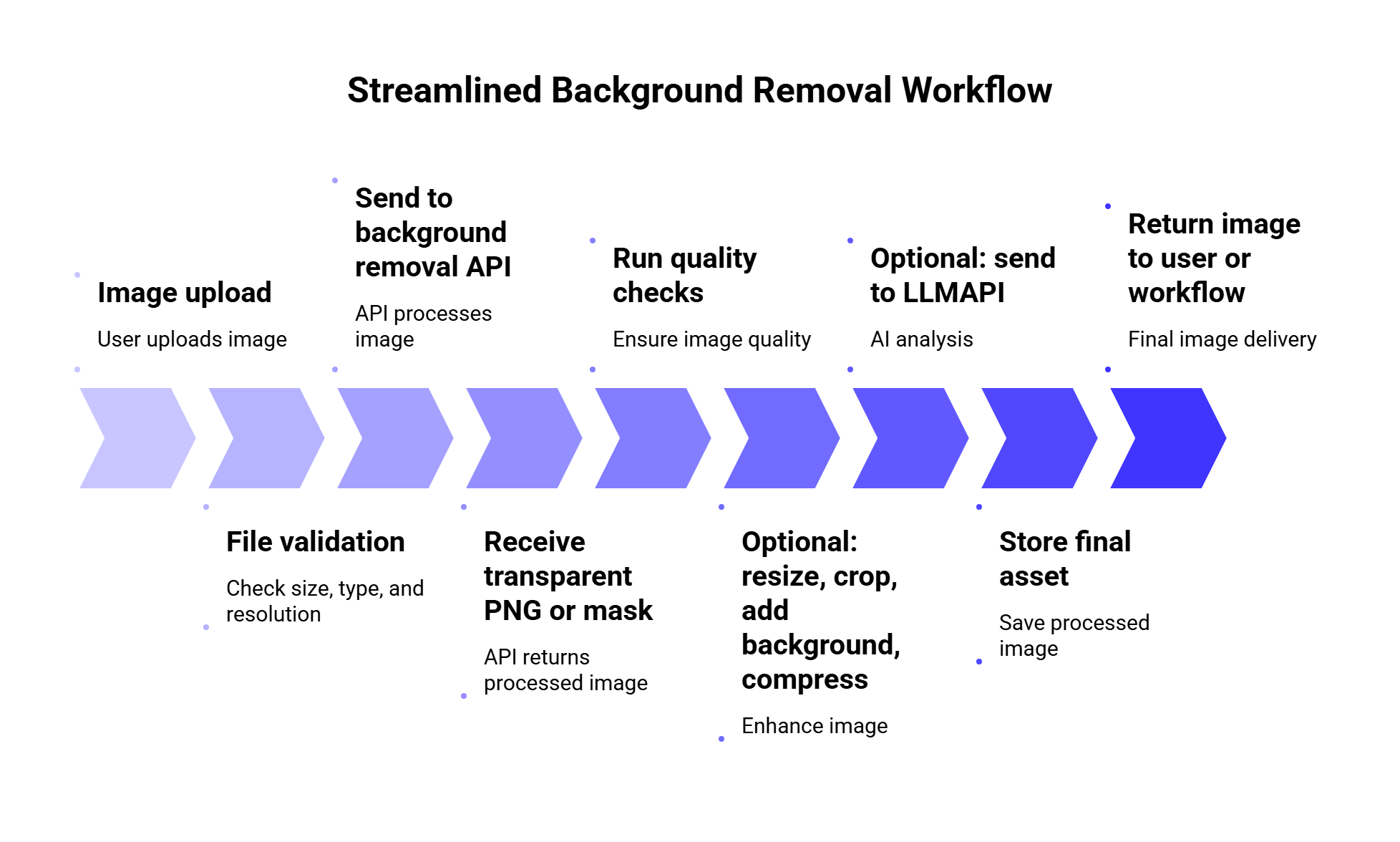
Quality checks can be simple at first:
| Check | Why it helps |
| Output exists | Confirms the API returned a usable image |
| Transparent area present | Confirms the background was actually removed |
| Subject not too small | Catches bad cropping or missing object |
| File size acceptable | Prevents huge PNGs from hurting performance |
| Retry/fallback rule | Handles temporary API failures |
| Manual review flag | Helps with images that look uncertain |
For high-volume apps, you may also want a fallback provider. For example, if one background removal API fails or returns poor results on a batch, route the image to a second provider. This works best when you measure quality and cost across both providers instead of guessing.
A background removal API is a service that automatically detects the main subject in an image and removes the surrounding background. Most APIs return a transparent PNG, a mask, or an edited image that can be used in apps, product catalogs, design tools, and automation workflows.
For standalone background removal, remove.bg is one of the strongest first choices. For product photos, Photoroom and Pixelcut are strong candidates. For media asset workflows, Cloudinary is a better fit. For AI workflows that continue after background removal, LLMAPI Background Removal API is the most natural option to test.
Photoroom and Pixelcut are the strongest e-commerce-focused options in this list. remove.bg is also useful if you only need clean cutouts. Cloudinary is better when product images need storage, transformation, optimization, and delivery inside the same media pipeline.
Yes, in some cases. Removing background clutter can make product images cleaner for classification, catalog matching, visual search, and content generation. However, it depends on the task. For context-heavy images, the background may carry useful information.
Some can, but this is one of the hardest parts of the task. Hair, fur, transparent materials, shadows, and low-contrast edges should always be included in your test set before choosing an API.
LLMAPI is broader than background removal. It works as a unified AI gateway for routing requests across many models and providers. For image workflows, background removal can be one step before other AI tasks like product description generation, tagging, classification, moderation, or visual content automation.
For small apps, one API is usually enough. For high-volume or quality-sensitive workflows, testing two providers can be useful. Some images fail on one model and work better on another. Just make sure fallback routing does not make costs unpredictable.
Background removal APIs are useful because they turn messy image editing into a repeatable workflow. The best choice depends on what happens around that cutout.
Choose remove.bg if you want a focused standalone background removal API. Choose Photoroom or Pixelcut if your app is built around product images and e-commerce visuals. Choose Cloudinary if background removal belongs inside a larger asset pipeline. Choose Clipdrop/Jasper if you are building creative tools. Choose PixLab if you want a simple REST endpoint to test.
Choose LLMAPI Background Removal API when background removal is part of a bigger AI workflow. Once the background is removed, your app may need to generate descriptions, tags, captions, ad copy, moderation labels, or structured metadata. LLMAPI helps connect that next layer through one gateway, with model routing, cost visibility, provider management, and reliability monitoring.
The best test is still your own image set. Clean studio photos are easy. Hair, glass, white objects, product shadows, hands, pets, clothing, and messy backgrounds are where the real difference shows up.
Free speech-to-text tools can be surprisingly good now. You can transcribe podcasts, meetings, support calls, interviews, lectures, short videos, and voice notes without building an ASR model from scratch or signing a huge vendor contract on day one.
The tricky part is that “free” means different things depending on the tool. Some options are open-source and free to run locally. Some APIs give you one-time credits. Some cloud providers offer a small monthly free tier. Some tools are free for testing and become paid once you move into production.
For this guide, we looked at 9 speech-to-text tools, APIs, and open-source models that developers can realistically test for free. We compared them by accuracy, setup time, free usage, language support, deployment model, real-time support, and how well each tool fits into a larger AI workflow.
We also looked at what happens after transcription. Many apps now use speech-to-text as the first step before summarization, translation, sentiment analysis, customer support routing, meeting note generation, or LLM-based search. That is where a unified gateway like LLMAPI can help teams route the transcribed text into downstream AI models through one API layer.
Before we compare the tools, let’s define the free part clearly.
| Free type | What it means | Best for | Watch out for |
| Open-source model | You can download and run it locally | Privacy, offline use, experiments | You pay through hardware and setup time |
| API free credits | You get a fixed credit amount when you sign up | Testing accuracy and latency | Credits run out |
| Monthly free tier | You get limited usage each month | Small recurring projects | Quotas are usually low |
| Free developer plan | You can build without upfront payment | Prototypes and MVPs | Concurrency and rate limits may apply |
| Research toolkit | Free code and models for advanced users | Fine-tuning and custom ASR | Needs more ML experience |
This matters because a “free” API can become expensive once you process thousands of hours of audio. An open-source model can cost nothing per request, while still requiring CPU, GPU, storage, maintenance, and engineering time.
Our practical advice: treat free speech-to-text tools as a testing ground first. Run your own audio samples, measure accuracy, check latency, and calculate what the same workload would cost at production volume.
If you want the quick version, here is how we’d choose:
| Need | Best free option to test first |
| Best open-source baseline | Whisper |
| Best local/offline deployment | whisper.cpp |
| Best lightweight edge/offline setup | Vosk |
| Best managed real-time API trial | Deepgram |
| Best API for audio intelligence features | AssemblyAI |
| Best Google Cloud-native option | Google Cloud Speech-to-Text |
| Best Microsoft ecosystem option | Azure AI Speech |
| Best AWS-native option | Amazon Transcribe |
| Best model playground for developers | Hugging Face ASR models |
For most developers, we would start with Whisper if local transcription is acceptable and Deepgram or AssemblyAI if a managed API is easier. For teams already committed to Google Cloud, Azure, or AWS, the native cloud service will usually be easier to plug into existing infrastructure.
This guide was prepared by a technical content team with 6 years of experience researching APIs, AI infrastructure, developer tools, SaaS platforms, and model integration workflows. Our work focuses on turning technical documentation, pricing pages, and engineering use cases into practical buying guides for developers, product teams, and startup founders.
For this article, we reviewed official documentation and pricing pages from OpenAI Whisper, Deepgram, AssemblyAI, Google Cloud, Azure, AWS, Vosk, Hugging Face, and related open-source projects. We also looked at recent research on automatic speech recognition, Whisper-style models, ASR hallucinations, accent and dialect performance, and custom language modeling.
We compared each tool by the criteria that usually matter in production: transcription quality, setup effort, free usage, language support, privacy, latency, customization, and how easily the transcript can move into an LLM workflow.
Best for: open-source multilingual transcription and local experiments.
Whisper is one of the strongest free speech-to-text options to test first. OpenAI released it as a general-purpose speech recognition model trained on a large dataset of diverse audio. The official repository describes Whisper as a multitask model that can perform multilingual speech recognition, speech translation, and language identification.
Whisper’s research paper, Robust Speech Recognition via Large-Scale Weak Supervision, says the model was trained on 680,000 hours of multilingual and multitask supervised data. That scale is one reason Whisper became such a common baseline for transcription tools, internal automation, and open-source ASR projects.
| Category | Details |
| Free type | Open-source model |
| Best use case | Local transcription, multilingual audio, research, prototyping |
| Real-time support | Possible with wrappers, but not the easiest default |
| Language support | Multilingual |
| Main strength | Strong general-purpose transcription quality |
| Main weakness | Needs local compute and can hallucinate on noisy/non-speech audio |
Compared with Vosk, Whisper is usually stronger for multilingual transcription and messy real-world audio. Compared with Deepgram or AssemblyAI, it gives you more local control, though you have to manage setup, speed, scaling, and post-processing yourself.
We’d choose Whisper if the team wants a free model that can run locally and handle a wide range of audio types. It is also a strong choice for product research, internal transcription tools, and proof-of-concept workflows.
We’d be careful with Whisper in high-stakes settings. A 2025 paper on Whisper ASR hallucinations induced by non-speech audio found that non-speech segments can trigger hallucinated transcripts. Another 2024 study, Careless Whisper: Speech-to-Text Hallucination Harms, reported harmful hallucination patterns in Whisper outputs. For production apps, especially medical, legal, or compliance workflows, Whisper needs silence trimming, voice activity detection, human review, or confidence checks.
Best for: fast local Whisper inference on laptops, servers, mobile devices, and edge environments.
whisper.cpp is a high-performance C/C++ implementation of Whisper inference. It is popular because it makes local Whisper transcription more practical across platforms like macOS, Windows, Linux, iOS, Android, WebAssembly, Raspberry Pi, and Docker.
If Whisper is the model, whisper.cpp is one of the easiest ways to run it efficiently without a heavy Python stack.
| Category | Details |
| Free type | Open-source implementation |
| Best use case | Local apps, desktop transcription, edge devices, offline workflows |
| Real-time support | Possible depending on model size and hardware |
| Language support | Depends on Whisper model used |
| Main strength | Efficient local inference |
| Main weakness | You still need to manage audio preprocessing and model choice |
Compared with the original Whisper Python setup, whisper.cpp is usually better for lightweight deployment. Compared with cloud APIs, it gives more privacy and lower long-term per-minute cost, but you take care of hardware, updates, and tuning.
We’d choose whisper.cpp for apps where audio should stay on-device or on a private server. It is also useful for internal transcription tools where paying per minute to an API would become expensive.
One research angle matters here: Whisper-style models are strong, but the open-source community is still working on reproducibility and customization. The paper Reproducing Whisper-Style Training Using an Open-Source Toolkit and Publicly Available Data points out that Whisper’s full training pipeline was not publicly accessible and introduces OWSM as an open Whisper-style model trained with public data and open tooling. That is a useful reminder: running Whisper is easy now, while training or deeply adapting a Whisper-like model is still a serious ML project.
Best for: offline speech recognition on lightweight devices.
Vosk is an offline open-source speech recognition toolkit. The project says it supports 20+ languages and dialects and works on lightweight devices, including Raspberry Pi, Android, and iOS. It can be installed with Python and supports multiple programming languages, including Python, Java, C#, Swift, and Node.js.
| Category | Details |
| Free type | Open-source toolkit |
| Best use case | Offline transcription, embedded apps, lightweight devices |
| Real-time support | Yes |
| Language support | 20+ languages and dialects |
| Main strength | Works offline on modest hardware |
| Main weakness | Less impressive general accuracy than newer large ASR models |
Compared with Whisper, Vosk is lighter and easier to run on small devices. Whisper is usually the better first test for general transcription quality. Compared with Google, AWS, or Azure, Vosk gives you offline control and avoids per-minute billing, but cloud APIs usually provide stronger managed infrastructure and broader product features.
We’d choose Vosk for offline dictation, voice commands, kiosk apps, local assistants, and privacy-sensitive workflows where lightweight deployment matters more than maximum accuracy.
Vosk is also worth considering when domain-specific vocabulary matters. A 2025 paper on improving speech recognition accuracy using custom language models with Vosk found that custom models reduced word error rates, especially in domain-specific scenarios with technical terminology, accents, or background noise. That is exactly where a generic cloud transcript may struggle.
Best for: testing, comparing, and fine-tuning open-source ASR models.
Hugging Face is less of a single speech-to-text tool and more of a model ecosystem. Developers can test Whisper, wav2vec2, HuBERT, MMS, SeamlessM4T, and many other ASR models through the Transformers library or hosted inference options.
The Transformers ASR documentation shows how developers can fine-tune wav2vec2-style models and use automatic speech recognition pipelines for inference. This makes Hugging Face useful when you want to compare models or adapt one to a specific domain.
| Category | Details |
| Free type | Open-source models and tooling |
| Best use case | Model testing, fine-tuning, research, custom ASR |
| Real-time support | Depends on model and deployment |
| Language support | Depends on selected model |
| Main strength | Huge model selection |
| Main weakness | More setup and evaluation work |
Compared with Whisper alone, Hugging Face gives you more model choice. Compared with a managed API like Deepgram or AssemblyAI, it needs more engineering work and model evaluation.
We’d choose Hugging Face if the team wants to test several open-source ASR models, fine-tune on custom audio, or build a more specialized transcription pipeline.
This matters for languages, accents, and domains where mainstream models perform unevenly. Research on ASR disparities has shown that speech systems can perform worse for some accents and speaker groups. The 2020 PNAS paper Racial disparities in automated speech recognition found substantial error-rate gaps across speaker groups in commercial ASR systems. More recent work has continued to examine accent and dialect performance, including studies on Whisper across diverse native and non-native English accents. If your product serves users with varied accents, a model playground and custom evaluation set are worth the extra effort.
Best for: managed real-time speech-to-text API testing.
Deepgram is a managed speech AI platform with speech-to-text, text-to-speech, and voice agent APIs. Its pricing page currently offers a free start with $200 in credit, which makes it a strong API to test before committing to paid volume.
Deepgram is especially interesting for real-time apps, contact center analytics, voice agents, call transcription, and developer teams that want API-based ASR without maintaining their own models.
| Category | Details |
| Free type | Free API credits |
| Best use case | Real-time transcription, voice apps, call analytics |
| Real-time support | Yes |
| Language support | Model-dependent |
| Main strength | Strong API-first developer experience |
| Main weakness | Free usage is credit-based, so production use becomes paid |
Compared with Whisper, Deepgram is easier for production streaming because you do not have to manage inference infrastructure. Compared with Google, AWS, and Azure, Deepgram feels more focused on voice AI workflows rather than a general cloud ecosystem.
We’d choose Deepgram if the app needs low-latency transcription, speaker-aware workflows, or a path toward real-time voice products.
Deepgram also publishes market comparisons around speech-to-text pricing and deployment. Its 2026 guide to best speech-to-text APIs highlights how pricing models vary across providers and why deployment cost matters beyond the sticker price. Since Deepgram is a vendor, we would treat its comparisons as market context rather than neutral benchmarking. Still, its point is valid: speech-to-text cost depends on volume, streaming needs, add-ons, and infrastructure.
Best for: speech-to-text plus audio intelligence features.
AssemblyAI is a managed speech AI platform with transcription, streaming speech-to-text, and audio intelligence features. Its pricing page lists pay-as-you-go transcription and streaming options, and its product pages focus on developer-friendly APIs for voice agents, pre-recorded audio, and speech understanding.
AssemblyAI is a good option when transcription is only one part of the workflow. For example, you may also want speaker labels, summaries, chapters, sentiment, entities, or moderation-style metadata.
| Category | Details |
| Free type | Free developer access / trial-style usage depending on plan |
| Best use case | Transcription plus audio intelligence |
| Real-time support | Yes |
| Language support | Product/model-dependent |
| Main strength | Good developer experience and audio analysis features |
| Main weakness | More platform-style than minimal transcription-only tools |
Compared with Deepgram, AssemblyAI is strong when you care about analysis features around the transcript. Deepgram is usually one of the first APIs we’d test for real-time streaming. Compared with open-source tools, AssemblyAI reduces setup work, but you pay once usage grows.
We’d choose AssemblyAI for meeting platforms, media indexing, podcast tools, customer call analysis, and apps where raw transcripts need extra structure.
AssemblyAI’s own 2026 pricing breakdown notes that real-time streaming transcription can cost more than batch processing because low-latency infrastructure is more demanding. That matches what we see across the market: live transcription, diarization, redaction, summarization, and custom vocabulary can all change the real cost of a “speech-to-text” workflow.
Best for: Google Cloud teams and large-scale cloud transcription.
Google Cloud Speech-to-Text is a mature managed API for transcribing audio to text. Google’s Speech-to-Text pricing page explains that pricing depends on the amount of audio processed and the selected model/version. Google Cloud’s free products page also lists monthly free usage for Speech-to-Text.
| Category | Details |
| Free type | Monthly free tier / cloud credits depending on account |
| Best use case | Google Cloud-native apps, scalable transcription |
| Real-time support | Yes |
| Language support | Broad cloud language support |
| Main strength | Mature cloud infrastructure |
| Main weakness | Cloud setup and pricing details can feel heavier than focused APIs |
Compared with Deepgram or AssemblyAI, Google Cloud Speech-to-Text is stronger when the app already uses Google Cloud storage, IAM, logging, and data workflows. Compared with Whisper, Google gives you managed infrastructure, while Whisper gives local control.
We’d choose Google Cloud Speech-to-Text if the product already lives in GCP or needs transcription connected to other Google Cloud services.
We’d be careful with pricing and workflow design. For example, batch transcription, model choice, enhanced models, storage requirements, and long audio processing can affect both cost and latency. Testing a few minutes is easy. Modeling 50,000 hours per month needs more serious math.
Best for: Microsoft ecosystem teams and enterprise speech workflows.
Azure AI Speech supports real-time and batch speech-to-text. Microsoft’s documentation describes it as a service for converting audio streams and recorded audio into text, with support for transcription workflows inside Azure AI services. Azure’s speech pricing page lists free audio hours for speech-to-text under its free tier, with details varying by feature and region.
| Category | Details |
| Free type | Free tier available |
| Best use case | Azure-native apps, Microsoft enterprise workflows |
| Real-time support | Yes |
| Language support | Broad Azure speech support |
| Main strength | Strong Microsoft ecosystem fit |
| Main weakness | Pricing, quotas, and deployment settings need careful review |
Compared with Google Cloud Speech-to-Text, Azure AI Speech is the better fit for Microsoft-heavy stacks. Compared with Amazon Transcribe, Azure is usually easier when your product already uses Azure identity, storage, and enterprise compliance tooling.
We’d choose Azure AI Speech for products already built around Microsoft infrastructure, especially internal enterprise tools, call center systems, and apps that need speech-to-text close to other Azure services.
Azure can also fit custom speech scenarios where teams want to adapt recognition to industry terms, product names, or domain-specific phrases. For speech recognition, that customization can matter a lot. Research on ASR context biasing, including NVIDIA’s 2025 TurboBias paper, shows why phrase boosting and domain vocabulary remain important. Product names, medical terms, legal phrases, and technical acronyms are exactly the words generic transcription systems often damage first.
Best for: AWS-native transcription, call analytics, and media workflows.
Amazon Transcribe adds automatic speech recognition to AWS applications. The Amazon Transcribe pricing page says new customers can start with 60 minutes of call audio monthly for the first 12 months under the AWS Free Tier, with usage calculated across most AWS Regions.
| Category | Details |
| Free type | 60 minutes/month for 12 months |
| Best use case | AWS-native transcription and call analytics |
| Real-time support | Yes |
| Language support | AWS-supported languages and use cases |
| Main strength | Native fit for AWS storage, analytics, and contact center workflows |
| Main weakness | Free tier is time-limited and small |
Compared with Google Cloud and Azure, Amazon Transcribe is the obvious first test for AWS teams. Compared with Deepgram or AssemblyAI, AWS feels more infrastructure-native and less focused on standalone developer transcription UX. Compared with Whisper, it saves you from running models locally, but you accept cloud billing and service limits.
We’d choose Amazon Transcribe for apps already using S3, Lambda, Amazon Connect, AWS analytics, or AWS-based compliance workflows.
We’d avoid assuming the free tier will cover much beyond testing. Sixty minutes per month is useful for evaluation, but even a small production transcription feature can exceed that quickly.
Here is the practical split.
| Choose an API if… | Choose open source if… |
| You need fast setup | You need offline control |
| You want managed scaling | You want lower long-term per-minute cost |
| You need real-time streaming quickly | You can manage infrastructure |
| You want vendor support | You need to inspect or modify the pipeline |
| You want built-in diarization or add-ons | You need private/local processing |
For most teams, the best approach is to test one managed API and one open-source option side by side. For example, compare Deepgram or AssemblyAI against Whisper or whisper.cpp using the same audio files.
That gives you a realistic view of accuracy, latency, cost, and engineering effort.
| Tool | Ease of setup | Free value | Local/privacy fit | Real-time fit | Production fit | Our rating |
| Whisper | Medium | High | High | Medium | High | 9/10 |
| whisper.cpp | Medium | High | High | Medium | High | 8.5/10 |
| Vosk | Medium | High | High | High | Good | 8/10 |
| Deepgram | Easy | High | Low | High | High | 8.5/10 |
| AssemblyAI | Easy | Good | Low | High | High | 8/10 |
| Google Cloud Speech-to-Text | Medium | Good | Low | High | High | 8/10 |
| Azure AI Speech | Medium | Good | Low | High | High | 8/10 |
| Amazon Transcribe | Medium | Limited | Low | High | High | 7.5/10 |
| Hugging Face ASR models | Medium-Hard | High | High | Depends | Good | 7.5/10 |
These scores are based on practical production fit, not one isolated benchmark. A tool can have excellent transcription quality and still be a poor match if it is too expensive, too slow to deploy, or hard to maintain for your team.
Speech-to-text demos usually use clean audio. Real apps rarely get that luxury.
Before choosing a tool, test audio that looks like your actual use case:
| Test file type | Why it matters |
| Clean studio audio | Shows best-case accuracy |
| Zoom meeting audio | Tests compression and interruptions |
| Phone call audio | Tests narrowband speech |
| Noisy room recording | Tests background noise handling |
| Multi-speaker conversation | Tests diarization needs |
| Accented speech | Reveals fairness and coverage gaps |
| Domain-specific terms | Tests vocabulary handling |
| Long recording | Tests stability and cost |
| Silence/non-speech segments | Checks hallucination risk |
This is especially important with open-source models. Whisper can be very strong, but hallucination research shows that silence and non-speech audio can create fluent text that was never spoken. If you use ASR for medical, legal, compliance, or safety-sensitive workflows, add post-processing, silence detection, and human review.
Speech-to-text usually creates the input for the next AI step.
A meeting app may transcribe a recording, summarize it, extract action items, and send follow-up emails. A support platform may transcribe a call, detect sentiment, classify intent, and route the ticket. A media tool may transcribe a video, translate the captions, generate clips, and produce SEO metadata.
That is where LLMAPI fits into the workflow. The speech-to-text tool creates the transcript. LLMAPI can help route that transcript to different LLMs for summarization, classification, translation, moderation, extraction, or response generation.
This matters because downstream tasks may need different models. A cheap fast model may be enough for keyword extraction. A stronger model may be better for customer-facing summaries. A long-context model may be needed for hour-long transcripts. With a unified gateway, teams can route these tasks without rebuilding every provider integration separately.
Research on multi-provider LLM workflows supports this direction. The paper Prompto: An Open Source Library for Querying Large Language Models notes that LLMs often live behind different proprietary or self-hosted endpoints, and working across several endpoints can require custom code. That is the kind of integration sprawl a gateway can reduce.
Use speech-to-text to transcribe calls, then send the transcript to an LLM for summaries, decisions, and action items. Whisper, AssemblyAI, Deepgram, Google, and Azure are all worth testing here.
Support teams can transcribe calls, detect topics, flag urgent issues, and summarize conversations inside a CRM. Deepgram, AssemblyAI, Amazon Transcribe, Google, and Azure are strong API candidates.
Creators can turn audio into captions, blog drafts, social posts, and searchable archives. Whisper and whisper.cpp are great free starting points, while APIs reduce operational work.
Real-time voice agents need fast streaming transcription. Deepgram, AssemblyAI, Google, Azure, and Amazon Transcribe are better first tests than local-only setups unless your team already has real-time infrastructure.
For apps that need to work without internet, Vosk, whisper.cpp, and local Hugging Face models are the better direction.
Companies can transcribe internal calls, training videos, or recorded meetings and send the transcript into search, classification, or summarization workflows. Privacy and data retention rules should drive the tool choice here.
Free tiers are useful, but speech-to-text costs scale with audio length. A five-minute demo tells you almost nothing about production cost.
Here is the kind of math we’d run:
| Monthly audio volume | What it means |
| 10 hours | Personal project or early prototype |
| 100 hours | Small SaaS feature |
| 1,000 hours | Real product workload |
| 10,000+ hours | Cost optimization becomes critical |
At low volume, managed APIs are usually easier. At high volume, open-source models may become attractive, especially if privacy or predictable cost matters. The tradeoff is infrastructure. Local models still need compute, monitoring, updates, and engineering support.
Also check pricing details beyond base transcription:
| Cost factor | Why it matters |
| Streaming vs batch | Real-time often costs more |
| Diarization | Speaker labels may be an add-on |
| Redaction | PII removal can add cost |
| Summarization | Often billed separately |
| Storage | Cloud audio files may need storage buckets |
| Minimum billing units | Short clips can become inefficient |
| Concurrency limits | Scaling may require a higher tier |
This is why our top recommendation is to test accuracy and model total cost at the same time. Cheap transcription with poor accuracy creates cleanup work. Accurate transcription with hidden add-on costs creates billing surprises.
| Rank | Tool | Best for | Why we ranked it here |
| 1 | Whisper | Open-source general transcription | Strong baseline, multilingual, widely adopted |
| 2 | Deepgram | Real-time API testing | Generous free credit and strong voice API focus |
| 3 | whisper.cpp | Local/private deployment | Efficient way to run Whisper locally |
| 4 | AssemblyAI | Transcription plus audio intelligence | Good API experience and analysis features |
| 5 | Google Cloud Speech-to-Text | GCP workflows | Mature cloud API with free monthly usage |
| 6 | Azure AI Speech | Microsoft workflows | Strong enterprise fit and speech service ecosystem |
| 7 | Vosk | Offline lightweight apps | Runs locally on small devices |
| 8 | Amazon Transcribe | AWS workflows | Useful AWS-native option with a small free tier |
| 9 | Hugging Face ASR models | Research and fine-tuning | Best for model comparison and custom ASR work |
Our top overall free pick is Whisper because it gives developers a strong local baseline with no per-minute API cost. Our top managed API pick is Deepgram because its free credit makes real API testing easier, especially for streaming and voice workflows. Our top lightweight offline pick is Vosk because it works on smaller devices and can run without cloud dependency.
Whisper is the best free tool to test first if you can run transcription locally. It is open-source, multilingual, and widely used. If you need a managed API, Deepgram and AssemblyAI are easier starting points.
Deepgram, AssemblyAI, Google Cloud Speech-to-Text, Azure AI Speech, and Amazon Transcribe all have free credits or free-tier options. Deepgram is one of the strongest first tests for real-time API workflows because it offers free startup credit and focuses heavily on voice AI.
Whisper is open-source and free to use locally, but running it still requires compute. If you process a lot of audio, your real cost becomes CPU/GPU time, storage, maintenance, and engineering work.
Whisper, whisper.cpp, Vosk, and many Hugging Face ASR models can run offline. Vosk is especially useful for lightweight offline apps, while whisper.cpp is a strong option for local Whisper inference.
Deepgram, AssemblyAI, Google Cloud Speech-to-Text, Azure AI Speech, and Amazon Transcribe are the best API candidates for real-time transcription. whisper.cpp and Vosk can also support real-time-style local workflows depending on hardware and setup.
Open-source local options are usually the best starting point for privacy. Whisper, whisper.cpp, Vosk, and Hugging Face models can run without sending audio to an external API.
LLMAPI is better understood as the AI routing layer after transcription. A speech-to-text tool creates the transcript first. Then LLMAPI can route that text to models for summarization, translation, classification, moderation, extraction, or response generation.
Free speech-to-text tools are good enough to build real prototypes, internal tools, and even early production workflows. The best choice depends on your audio, privacy needs, latency requirements, and what happens after transcription.
Start with Whisper if you want a strong open-source baseline. Try Deepgram or AssemblyAI if you want a managed API with less setup. Use Google, Azure, or Amazon if your product already lives inside one of those clouds. Test Vosk or whisper.cpp if offline deployment matters. Use Hugging Face if your team wants to compare or fine-tune models.
Then test everything with your real audio. Clean demos are easy. Noisy calls, accents, silence, overlapping speakers, product names, and domain terms are where speech-to-text tools show their real limits.
Once you have the transcript, the next step often belongs to an LLM workflow. That is where LLMAPI can help teams route text into summarization, translation, classification, and response generation models through one unified gateway.
Rate limits are one of those problems that look small during testing and suddenly become very real in production. Your demo works fine with five requests. Then users arrive, traffic spikes, one provider starts returning 429 errors, another model slows down, and your app has to decide what to do next.
For LLM apps, this gets even messier because every request has two moving parts: the number of calls and the number of tokens. A short classification prompt and a long document-analysis prompt may both count as one request, but they use very different amounts of capacity and money.
That is why rate limits and fallbacks should be part of the architecture from the beginning. With LLMAPI, teams can route requests across 200+ models, manage provider keys in one place, monitor usage and reliability, compare model costs, and use built-in fallback handling through a unified gateway. This gives developers a cleaner way to build around provider limits instead of hardcoding one model into the app and hoping it always works.
In this guide, we’ll walk through how rate limits work, when to retry, when to fallback, how to design a fallback chain, and how to use LLMAPI as the control layer for more reliable multi-provider AI workflows.
This guide was prepared by a technical content team with 6 years of experience researching APIs, AI infrastructure, SaaS tools, and developer platforms. Our work focuses on turning technical documentation, pricing details, provider behavior, and engineering patterns into practical guides for developers and product teams.
For this article, we reviewed official rate-limit documentation from OpenAI, Anthropic, and Google Gemini, along with Google Cloud’s guidance on reducing 429 errors on Vertex AI. We also looked at recent research on LLM routing, multi-provider workflows, tool-output handling, and multi-tenant SaaS security.
Our goal is practical: explain how teams can keep LLM apps stable when provider limits, traffic spikes, outages, and model differences start affecting real users.
The best setup is usually a layered one:
| Layer | What it does | Why it matters |
| Request pacing | Slows down traffic before limits are hit | Prevents avoidable 429 errors |
| Token budgeting | Tracks input/output token usage per model | Protects TPM limits and cost |
| Retry with backoff | Retries temporary failures after a delay | Recovers without hammering the provider |
| Fallback routing | Sends failed requests to another model/provider | Keeps the app working during limits or outages |
| Circuit breaker | Stops sending traffic to unhealthy models | Prevents repeated failures |
| Queueing | Buffers non-urgent tasks | Keeps batch jobs from hurting live traffic |
| Monitoring | Tracks error rate, latency, spend, and fallback usage | Helps teams fix root causes instead of guessing |
In LLMAPI, the practical pattern looks like this:
That last part matters a lot. Fallbacks save availability, but they can also change cost, response quality, latency, and output style.
Rate limits control how much traffic your app can send to an API within a specific time window. Traditional APIs often limit simple request volume, such as “100 requests per minute.” LLM APIs usually add token-based limits because model usage depends heavily on prompt size and response length.
For example, Gemini API documentation explains that rate limits are commonly measured across requests per minute (RPM), input tokens per minute (TPM), and requests per day (RPD). Anthropic’s Claude API docs describe rate limits across requests per minute, input tokens per minute, and output tokens per minute for each model class.
That means your app can hit a limit in several ways:
| Limit type | What it means | Example problem |
| RPM | Requests per minute | Too many users send prompts at once |
| TPM | Tokens per minute | A few long prompts consume the whole token budget |
| RPD | Requests per day | A free or lower-tier project hits daily quota |
| Concurrency | Requests running at the same time | Too many long generations run in parallel |
| Output token limit | Response length exceeds allowed output | The model stops early or fails |
| Provider capacity | Shared capacity is temporarily constrained | Valid requests receive 429/503 responses |
The hard part is that users usually do not care which limit was hit. They only see that the app slowed down or failed. So your architecture needs to decide what to do before the error becomes a bad user experience.
LLM rate limits are harder to manage than many normal API limits because usage is less predictable.
A search request or payment API call usually has a fairly stable shape. A model request can vary wildly. One user asks for a one-sentence answer. Another pastes a 30-page contract. A third user starts an agent workflow that calls the model 15 times in a row.
That creates three practical problems:
| Problem | What happens |
| Token spikes | A small number of long prompts can burn through TPM quickly |
| Burst traffic | A sudden traffic spike can trigger 429 errors even if average usage looks fine |
| Agent loops | Multi-step agents can multiply calls without users noticing |
Google’s guide to reducing 429 errors on Vertex AI recommends smart retries, global routing, context caching, prompt optimization, and traffic shaping. Those ideas apply beyond Vertex AI because the underlying problem is the same: LLM workloads need pacing, routing, and token control.
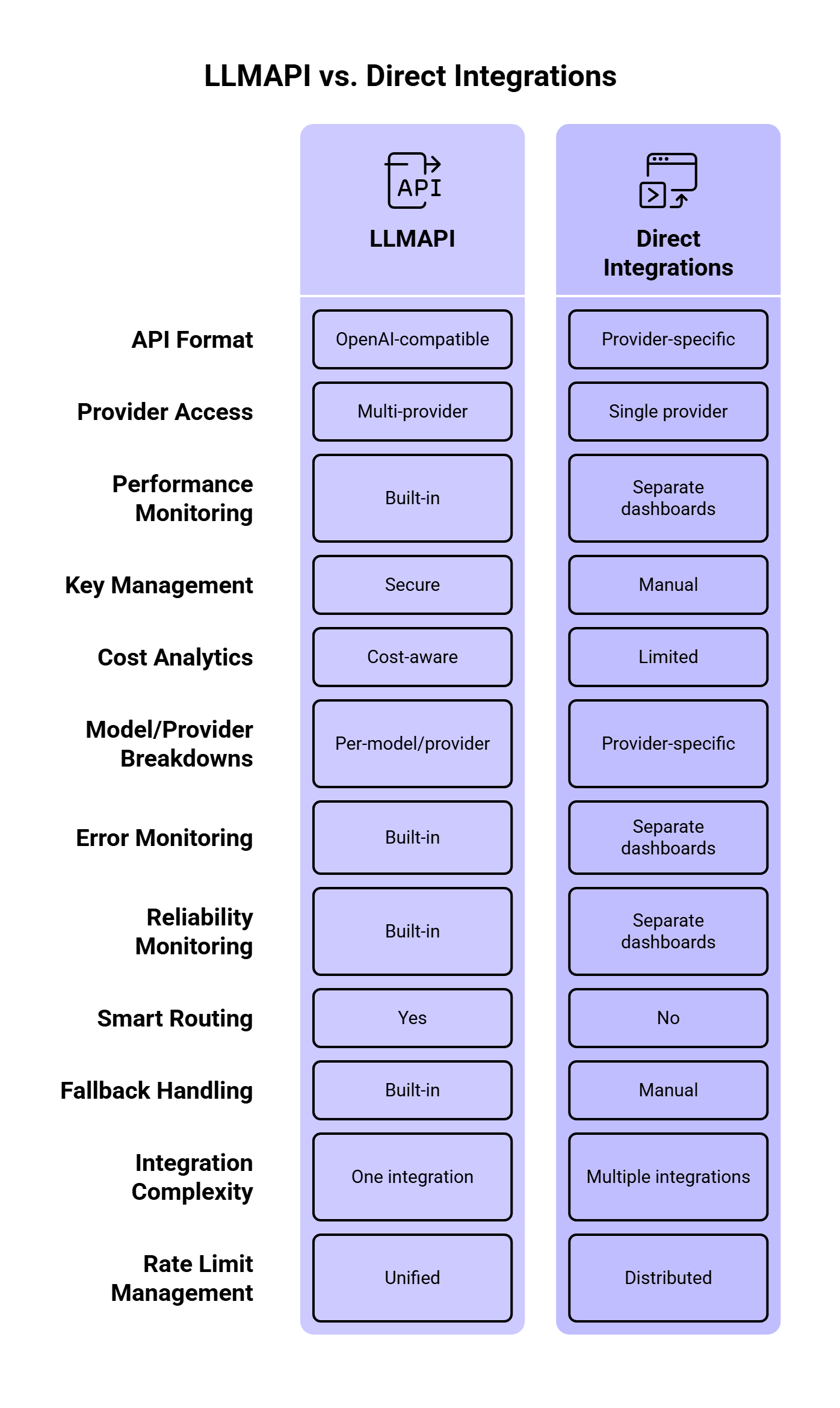
LLMAPI works as a unified gateway between your application and multiple LLM providers. According to the LLMAPI website, the platform supports an OpenAI-compatible API format, multi-provider access, performance monitoring, secure key management, cost-aware analytics, per-model/provider breakdowns, error and reliability monitoring, smart routing, and built-in fallback handling.
That matters because direct model integrations get messy fast.
If your app calls only one provider directly, rate-limit handling is simple at first. You check for a 429 error, wait, and retry. Then your product grows. You add another model for cheaper classification, another provider for long-context tasks, another backup for outages, and another model for premium users. Suddenly, rate limits live in five dashboards and every provider reports errors differently.
LLMAPI gives teams one place to manage that routing layer. The app can keep one integration while LLMAPI handles provider choice, model routing, usage tracking, and fallback behavior behind the scenes.
Most LLM teams eventually run into these errors:
| Error / signal | What it usually means | Best response |
| 429 Too Many Requests | Rate limit or quota exceeded | Wait, retry with backoff, or fallback |
| 503 Service Unavailable | Provider overload or temporary outage | Retry, then fallback |
| Timeout | Model took too long or connection failed | Retry once, then fallback or queue |
| Context length error | Prompt is too large | Reduce prompt, summarize context, or use a larger-context model |
| Quota/billing error | Account quota, tier, or billing issue | Stop retries and alert the team |
| Safety/policy error | Provider rejected the request | Avoid fallback unless policy behavior is understood |
A key detail: failed retries can still consume capacity. OpenAI’s rate-limit guide recommends exponential backoff with jitter and also notes that unsuccessful requests contribute to per-minute limits. So if your app retries too aggressively, it can make the problem worse.
Retries and fallbacks solve different problems.
A retry is useful when the same provider may recover quickly. A fallback is useful when waiting is likely to hurt the user experience or when a provider/model is temporarily unavailable.
| Situation | Retry first? | Fallback? | Why |
| Temporary 429 with Retry-After header | Yes | Maybe | The provider tells you when to retry |
| Short timeout | Yes | Yes after 1–2 retries | Could be a network blip |
| Provider outage | No or minimal | Yes | Waiting may waste time |
| Model-specific capacity issue | Maybe | Yes | Another model may have capacity |
| Context length error | No | Use larger-context model or shorten prompt | Same request will keep failing |
| Billing/quota exhaustion | No | Yes, if another provider is configured | Retrying the same route will fail |
| Safety/policy rejection | Usually no | Carefully | Providers may behave differently |
A good LLMAPI setup should treat 429 errors, timeouts, provider overload, and quota issues differently. One generic “retry everything three times” rule is easy to build, but it creates messy production behavior.
Before adding fallback logic, define what each user, team, environment, and workload is allowed to consume.
A good policy usually includes:
| Policy | Example |
| Per-user RPM | 20 chat requests per minute |
| Per-team TPM | 500K tokens per hour |
| Per-environment limits | Lower limits for staging and dev |
| Per-model access | Premium models only for paid users |
| Daily spend cap | Stop or downgrade after budget threshold |
| Priority levels | Production traffic gets priority over batch jobs |
This matters because rate limits should protect both reliability and cost. A runaway script in staging should never consume the same provider quota as a live customer workflow.
LLMAPI’s cost-aware analytics and per-model/provider breakdowns are useful here because teams can see requests, tokens, spend, and provider-level usage from one dashboard.
When a provider returns a temporary rate-limit error, immediate retries are usually a bad idea. If 1,000 requests fail and all 1,000 retry instantly, you get a second traffic spike right after the first one.
OpenAI recommends random exponential backoff for rate-limit errors. Google’s Vertex AI guidance also recommends exponential backoff with jitter for temporary overload errors like 429 and 503.
A simple pattern:
async function retryWithBackoff<T>(
  fn: () => Promise<T>,
  maxRetries = 3,
  baseDelayMs = 500
): Promise<T> {
  let lastError: unknown;

  for (let attempt = 0; attempt <= maxRetries; attempt++) {
    try {
      return await fn();
    } catch (error: any) {
      lastError = error;

      const retryable =
        error.status === 429 ||
        error.status === 503 ||
        error.code === "ETIMEDOUT";

      if (!retryable || attempt === maxRetries) {
        throw error;
      }

      const jitter = Math.random() * 250;
      const delay = baseDelayMs * Math.pow(2, attempt) + jitter;

      await new Promise((resolve) => setTimeout(resolve, delay));
    }
  }

  throw lastError;
}
This gives the provider time to recover and spreads retry traffic across slightly different moments.
When a provider gives you a retry window, use it.
Anthropic’s rate-limit documentation says that when a limit is exceeded, the API returns a 429 error with a retry-after header indicating how long to wait. This is better than guessing.
A practical rule:
function getRetryDelayMs(error: any, fallbackDelayMs = 1000): number {
  const retryAfter = error.headers?.["retry-after"];

  if (retryAfter) {
    const seconds = Number(retryAfter);
    if (!Number.isNaN(seconds)) {
      return seconds * 1000;
    }
  }

  return fallbackDelayMs;
}
Use provider headers first, then your own exponential backoff rule when no header is available.
Fallbacks keep the app running when the primary model cannot serve a request. In LLMAPI, this is where multi-provider routing becomes valuable.
A fallback chain should be intentional. A cheap model may work as a fallback for classification, but a legal review assistant may need a model with similar reasoning quality. A fast model may be fine for internal summaries, while customer-facing responses may need stronger guardrails and better instruction-following.
A useful fallback chain can look like this:
| Task type | Primary model | Fallback 1 | Fallback 2 | Notes |
| Simple classification | Low-cost fast model | Similar cheap model | Stronger model | Optimize for cost |
| Customer support reply | Balanced model | Similar quality model | Premium model | Keep tone and quality stable |
| Long document summary | Long-context model | Another long-context model | Queue for later | Avoid context errors |
| Internal data extraction | Cost-efficient model | Deterministic parser + LLM | Queue | Accuracy matters more than speed |
| Real-time chat | Fast model | Another fast model | Short apology + retry option | Latency matters most |
Orq’s AI Router retry/fallback docs recommend keeping fallback chains short, using a maximum of three fallback models, and choosing models with similar capabilities. That is a good production rule. Long fallback chains can hide problems, increase latency, and create output inconsistency.
A circuit breaker temporarily stops traffic from going to a provider or model after repeated failures.
Without a circuit breaker, your app may keep sending requests to a route that is already failing. That wastes time, increases user-facing latency, and can burn more rate-limit capacity.
A simple circuit breaker rule:
| Signal | Action |
| Error rate above 20% for 2 minutes | Stop routing new traffic to that model |
| p95 latency above threshold | Reduce traffic share |
| Repeated 429s | Pause route until reset window |
| Provider outage | Switch to fallback provider |
| Recovery checks pass | Gradually restore traffic |
Kong’s AI Gateway docs list retry and fallback, rate limiting, semantic routing, load balancing, metrics, audit logs, and cost control as gateway capabilities. These features work best together. Rate limits tell you when traffic is too high, fallbacks provide another path, and circuit breakers keep unhealthy paths from dragging down the whole system.
Live user requests and background jobs should have different limits. A chatbot response needs to come back quickly. A nightly data-enrichment job can wait. If both share the same provider quota, a batch job can accidentally break the live app.
A better setup:
| Traffic type | Priority | Recommended handling |
| Live chat | High | Fast model, short retries, quick fallback |
| Support automation | High | Reliable model, quality-matched fallback |
| Bulk summarization | Medium | Queue, batch, lower-cost model |
| Offline tagging | Low | Delay-friendly queue |
| Experiments | Low | Strict budget and token caps |
Google’s Vertex AI guidance suggests using different consumption patterns for different workloads, including provisioned throughput for essential real-time traffic and batch or flexible options for latency-tolerant jobs. The same idea applies when you design LLMAPI routing policies.
A lot of rate-limit problems are token problems in disguise.
If your prompt sends the same long system instructions, full conversation history, oversized JSON schemas, and unused context on every request, you burn through TPM faster than needed.
Ways to reduce token pressure:
| Technique | How it helps |
| Summarize long chat history | Reduces repeated context |
| Cache repeated prompts | Avoids paying for similar work again |
| Trim unused documents | Reduces input tokens |
| Use smaller models for simple tasks | Saves premium quota |
| Set response length caps | Controls output token usage |
| Compress structured context | Keeps prompts smaller |
| Split long workflows | Sends each model only what it needs |
Google recommends context caching, prompt optimization, and traffic shaping as ways to reduce 429 errors on Vertex AI. LLMAPI also highlights semantic caching and cost-aware routing, which can help teams avoid paying for identical or similar requests repeatedly.
Fallbacks can keep the app available, but they can also change the response.
Different models may vary in tone, formatting, refusal behavior, JSON reliability, tool-calling behavior, and latency. So every fallback should have quality checks.
Track these fields:
| Metric | Why it matters |
| Fallback rate | Shows how often primary routes fail |
| Retry rate | Reveals provider pressure or bad pacing |
| Fallback model output quality | Confirms backup models can do the task |
| JSON/schema failure rate | Shows whether fallback models break structured output |
| p95 latency | Measures user impact |
| Cost per successful request | Shows fallback cost impact |
| User correction rate | Helps detect worse fallback answers |
Recent research makes this point stronger. The paper How Good Are LLMs at Processing Tool Outputs? found that LLMs can struggle with structured tool outputs, and different processing strategies caused performance differences from 3% to 50%. If your primary model reliably returns clean JSON and your fallback model does not, the fallback can keep the request alive while still breaking the workflow.
So for structured outputs, validate the response before returning it or sending it to the next step.
Rate limits and fallbacks are hard to debug without logs.
At minimum, log:
{
  "request_id": "req_123",
  "user_id": "user_456",
  "route": "support_reply",
  "primary_model": "model_a",
  "final_model": "model_b",
  "fallback_used": true,
  "retry_count": 2,
  "error_code": 429,
  "latency_ms": 4200,
  "input_tokens": 1800,
  "output_tokens": 420,
  "estimated_cost": 0.014
}
You want to answer questions like:
LLMAPI’s dashboard features, including cost-aware analytics, per-model/provider breakdowns, and reliability monitoring, are useful because rate-limit debugging needs visibility across models and providers.
A raw 429 error is awful UX.
For internal tools, you can be direct:
We hit the current model’s rate limit. Retrying in a few seconds.
For customer-facing apps, keep it calmer:
This request is taking longer than usual. We’re trying another model now.
For queued tasks:
Your request is queued and will run when capacity is available.
Avoid showing provider names, quota numbers, or internal fallback chains to end users unless the product is built for developers. Most users only need to know whether they should wait, retry, or expect a delayed result.
Here is a simple production-ready flow:
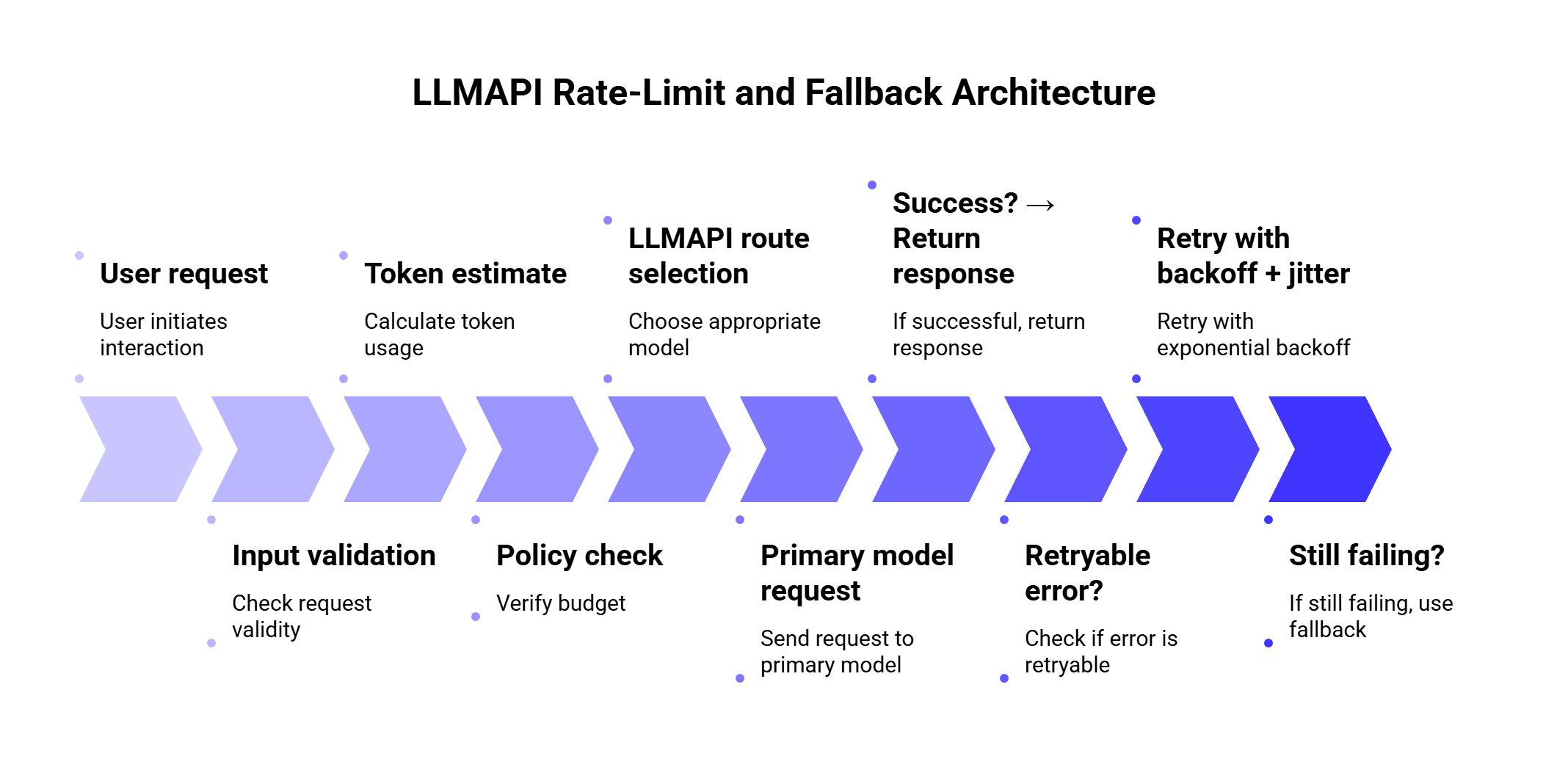
This gives you a safer default because every request goes through budget checks, routing, retries, fallback, validation, and monitoring.
Here is a simplified TypeScript-style example. The exact fields depend on your app and LLMAPI setup, but the logic is the important part.
type LLMRequest = {
  route: "support_reply" | "classification" | "summary";
  prompt: string;
  userId: string;
};

const fallbackChains = {
  support_reply: ["primary-balanced", "backup-balanced", "premium-safe"],
  classification: ["cheap-fast", "backup-cheap", "balanced"],
  summary: ["long-context-primary", "long-context-backup"]
};

async function callWithFallback(request: LLMRequest) {
  const models = fallbackChains[request.route];

  let lastError: any;

  for (const model of models) {
    try {
      const response = await retryWithBackoff(() =>
        callLLMAPI({
          model,
          prompt: request.prompt,
          metadata: {
            user_id: request.userId,
            route: request.route
          }
        })
      );

      await validateResponse(response, request.route);

      return {
        response,
        final_model: model,
        fallback_used: model !== models[0]
      };
    } catch (error: any) {
      lastError = error;

      if (!isFallbackSafe(error)) {
        throw error;
      }

      await markRouteHealth(model, error);
    }
  }

  throw lastError;
}

function isFallbackSafe(error: any) {
  return (
    error.status === 429 ||
    error.status === 503 ||
    error.code === "ETIMEDOUT" ||
    error.code === "PROVIDER_UNAVAILABLE"
  );
}
The key idea: fallback on capacity and reliability problems. Be more careful with safety errors, validation errors, and context-length problems because switching models may create inconsistent behavior.
Usually two or three is enough.
One primary model and two fallbacks gives you a good balance between availability and control. Longer chains can create long waits, unexpected cost jumps, and inconsistent answers.
| Fallback setup | Best for |
| 1 primary + 1 fallback | Simple apps |
| 1 primary + 2 fallbacks | Most production apps |
| Cost-based routing + quality fallback | High-volume SaaS |
| Provider-diverse fallback | Apps that need higher availability |
| Queue after fallback failure | Batch or non-urgent work |
A practical chain should answer four questions:
If the answer to question four is unclear, add validation before shipping the output.
Fallbacks can quietly increase spend.
For example, imagine your default classification route uses a low-cost model. During traffic spikes, the system falls back to a premium model. The app stays available, which is good. Your bill also jumps, which may be very bad.
Use different fallback rules by task:
| Task | Cost strategy |
| Classification | Fallback to similar low-cost model first |
| Internal summaries | Queue before using premium model |
| Customer support | Use stronger fallback if user impact is high |
| Legal/finance content | Prefer quality over cost |
| Batch enrichment | Delay instead of escalating cost |
Recent routing research supports this kind of thinking. The 2026 paper Robust Batch-Level Query Routing for Large Language Models under Cost and Capacity Constraints studies routing under cost, GPU resource, and concurrency limits. The authors report that robust routing improved accuracy by 1–14% over non-robust counterparts, while batch-level routing outperformed per-query methods by up to 24% under adversarial batching.
That research is a useful reminder: routing decisions should consider cost and capacity together. A fallback that keeps quality high while destroying budget creates another production problem.
Fallbacks can also affect security and compliance.
If the primary route uses a provider approved for sensitive data, the fallback provider should meet the same requirements. Otherwise, a rate-limit event could accidentally send sensitive user content to a provider that was never approved for that data type.
Before enabling fallbacks, check:
| Security question | Why it matters |
| Can this provider process the same data category? | Prevents policy violations |
| Are logs stored safely? | Protects user prompts and outputs |
| Are API keys managed centrally? | Reduces leakage risk |
| Can teams audit fallback usage? | Helps compliance and debugging |
| Are tenant boundaries preserved? | Protects multi-tenant SaaS apps |
The 2026 paper Security Challenges of LLM Integration in Multi-Tenant SaaS identified 18 vulnerability classes and found that 12 had stronger impact in multi-tenant deployments than in single-tenant systems. That matters for LLM gateways because fallback routing, shared tools, and centralized provider access all need careful controls.
LLMAPI’s secure key management and centralized team access can help reduce key sprawl, but teams still need clear rules for which providers can handle which workloads.
Structured output deserves special care.
If your app expects JSON, the fallback model must follow the same schema. Otherwise, a successful fallback can still break the product.
Example:
{
  "intent": "refund_request",
  "urgency": "high",
  "language": "es",
  "summary": "Customer received a damaged order and needs help."
}
Validation checklist:
| Check | Example |
| Valid JSON | Can the response be parsed? |
| Required fields | Are intent, urgency, and summary present? |
| Allowed values | Is urgency one of low, medium, high? |
| Language consistency | Does response language match the request? |
| Safety constraints | Did the model include disallowed content? |
If validation fails, you can retry once with a stricter prompt, fallback to another model, or route to a queue/manual review.
Fast retries can make rate-limit issues worse. Use provider headers, exponential backoff, and jitter.
This keeps requests alive, but it can wreck cost control. Match fallback quality and cost to the task.
A fallback model should be able to produce the same format, tone, and task quality. If the response changes too much, users will notice.
Some teams track requests and forget tokens. With LLMs, token usage often matters more than request count.
A background job should never consume the same critical capacity as a live user flow without limits.
If a fallback happens and nobody can see it, debugging becomes guesswork.
Different providers can handle safety and compliance differently. Treat policy failures carefully.
Use this checklist before going live:
| Area | What to configure |
| Routing | Primary model per task type |
| Fallbacks | 1–2 backup models with similar capability |
| Retry policy | Exponential backoff, jitter, retry cap |
| Error handling | Different rules for 429, 503, timeout, quota, context errors |
| Token budgeting | Per-user/team/model token limits |
| Cost controls | Daily/monthly spend caps and model downgrade rules |
| Monitoring | Error rate, latency, retries, fallback rate, cost |
| Validation | JSON/schema checks for structured outputs |
| Security | Provider approvals by data type |
| User messaging | Clear messages for delay, queue, or temporary failure |
| Use case | Primary route | Fallback behavior |
| Chatbot | Fast balanced model | Retry once, then use similar model |
| Support assistant | Reliable model | Fallback to quality-matched provider |
| Bulk summarization | Cheap model | Queue before premium fallback |
| Intent classification | Low-cost model | Fallback to another low-cost model |
| Document extraction | Structured-output model | Validate JSON, retry with stricter prompt |
| Internal analytics | Batch model | Delay during limits |
| Customer-facing legal content | Premium model | Fallback only to approved premium model |
A rate limit controls how many requests or tokens can move through your LLM workflow within a specific time window. In an LLM gateway setup, limits can apply by user, team, provider, model, route, or environment.
A 429 error usually means the request exceeded a rate limit or quota. The best response depends on the provider and error details. In many cases, you should wait, retry with exponential backoff, or route to a fallback model.
Many 429 errors should retry first, especially when the provider sends a Retry-After header. Fallback makes sense when waiting would hurt the user experience, the primary route is repeatedly failing, or another provider/model has available capacity.
Two or three models in a chain is usually enough. Use one primary route and one or two fallbacks with similar capability. Long chains add latency and make quality harder to control.
It depends on the task. For classification and internal workflows, cheaper fallbacks often make sense. For customer-facing, legal, finance, or high-stakes outputs, use quality-matched fallbacks.
LLMAPI helps by giving teams a unified gateway for provider access, routing, usage tracking, cost analytics, secure key management, and fallback handling. This makes it easier to manage rate limits across multiple models and providers from one layer.
Track 429 errors, retry count, fallback rate, p95 latency, token usage, model/provider spend, validation failures, and user-facing errors. These metrics show whether the system is healthy or quietly leaning too much on fallbacks.
Rate limits are normal in LLM apps. Provider capacity changes, traffic spikes, users send long prompts, and agents can create more calls than expected. The goal is to design for that reality before users feel it.
A strong LLMAPI setup should combine token-aware limits, smart retries, short fallback chains, circuit breakers, cost controls, and clear monitoring. Retry temporary failures. Fallback when the primary route is unavailable or over capacity. Queue work that can wait. Validate structured outputs before they move deeper into the system.
LLMAPI gives teams a cleaner way to manage this across providers. Instead of scattering rate-limit logic, API keys, model choices, and fallback rules across the application, teams can centralize more of that behavior in one gateway.
The best fallback strategy is the one users barely notice. The request may retry, reroute, or wait behind the scenes, but the product still feels stable.
Language detection sounds like a small feature until real users get involved. One person writes “hola,” another mixes English and French in the same message, someone adds emojis, and someone else types Ukrainian words with Latin letters. A basic detector may still return a language code, but that result may not be reliable enough to route a support ticket, trigger translation, moderate user content, or power a multilingual AI workflow.
For this guide, we researched 10 language detection APIs and libraries based on what developers usually care about in production: supported languages, confidence scores, batch processing, pricing, setup time, deployment options, and how each tool fits into a larger AI pipeline.
We also looked at what happens after language detection. In many apps, detection is the first step before translation, summarization, moderation, classification, or localized response generation. That is where a unified model gateway like LLMAPI can help teams manage the next layer through one API connection instead of wiring every AI provider separately. LLMAPI gives developers access to 200+ models, centralized API key management, request routing, cost-aware analytics, provider breakdowns, and reliability monitoring through one gateway.
This guide was prepared by a technical content team with 6 years of experience researching APIs, AI infrastructure, SaaS platforms, and developer tools. Our work focuses on turning technical product documentation, pricing pages, and engineering use cases into practical buying guides for developers, product teams, and startup founders.
For this article, we reviewed official API documentation, pricing pages, vendor feature lists, and third-party research on LLM tool use, orchestration, SaaS security, code-mixed language identification, and multi-provider AI workflows. We compared each language detection option by the criteria that matter most in production: short-text handling, confidence scores, batch support, deployment model, pricing predictability, and how well the tool fits into a larger AI workflow.
We also treated vendor pages carefully. Official docs are useful for facts like pricing, supported languages, and response formats, while third-party research helps explain why these details matter in real systems.
| API / Tool | Best for | Deployment | Confidence score | Batch support | Free option | Main limitation |
| Google Cloud Translation | Translation-first workflows | Cloud API | Yes | Yes | Monthly free character credit | Can feel expensive for detection-only use |
| Amazon Comprehend | AWS NLP pipelines | Cloud API | Yes | Yes | 12-month free tier | Focuses on dominant language detection |
| Azure AI Language | Microsoft/Azure teams | Cloud API / container | Yes | Yes | Free tier available | Text-record billing needs planning |
| DetectLanguage.com | Lightweight standalone detection | Cloud API | Yes | Yes | 1,000 requests/day | Narrower NLP feature set |
| IBM Watson NLU | Broader enterprise text analytics | Cloud API | Yes | Yes | 30K NLU items/month | More setup than simple detection tools |
| Eden AI | Multi-provider testing and fallback | Unified API | Depends on provider | Yes | Trial/pay-as-you-go options | Adds another routing layer |
| LibreTranslate | Self-hosted translation and detection | Self-hosted API | Limited | Yes | Open source | Requires hosting and model upkeep |
| fastText | High-speed local language ID | Local model/library | Yes | Yes | Open source | Short/noisy text needs testing |
| Lingua | Short text and chat-style inputs | Local library | Yes | Yes | Open source | Smaller language coverage than fastText |
| LanguageTool API | Grammar apps with auto language handling | HTTP API | Limited | Limited | Public API limits | Built for proofreading, not bulk detection |
Google Cloud Translation pricing depends on the translation model and usage volume, with a monthly free character credit before paid tiers apply. Amazon Comprehend pricing is measured in character units for many NLP APIs, with minimum request sizes that matter for short-text workloads. DetectLanguage.com lists support for 216 languages, short text, batch requests, and free/premium plans.
If we had to choose one default option for most developer teams, we would start with Google Cloud Translation when language detection is tied to translation, and Amazon Comprehend when the product already runs on AWS. Both are mature, well-documented, and easier to trust in production than smaller tools.
For a simple standalone detector, DetectLanguage.com is easier to set up and more focused. It does one job without pulling in a full cloud NLP stack.
For privacy-sensitive or high-volume local workflows, fastText and Lingua are better choices than cloud APIs. fastText wins on language coverage and speed, while Lingua is more interesting for short text, chat messages, and small user inputs.
Some tools are more situational. IBM Watson NLU is powerful, though too heavy if the only task is language detection. LanguageTool API is useful for proofreading apps, though it is a weak fit for bulk language classification. Eden AI is useful for testing several providers through one interface, though it adds another layer between your app and the actual model.
So the short answer is:
| Need | Best choice |
| Translation workflows | Google Cloud Translation |
| AWS-native NLP pipelines | Amazon Comprehend |
| Azure enterprise workflows | Azure AI Language |
| Simple standalone language detection | DetectLanguage.com |
| Local high-volume processing | fastText |
| Local short-text detection | Lingua |
| Self-hosted translation + detection | LibreTranslate |
| Provider comparison and fallback | Eden AI |
| Grammar apps with auto-detection | LanguageTool API |
| Downstream LLM routing after detection | LLMAPI |
| Tool | Overall fit | Accuracy confidence | Setup effort | Cost predictability | Best use case | Our rating |
| Google Cloud Translation | Strong | High | Medium | Medium | Detection before translation | 9/10 |
| Amazon Comprehend | Strong | High | Medium | Strong | AWS-native NLP pipelines | 8.5/10 |
| Azure AI Language | Strong | High | Medium | Medium | Microsoft/Azure environments | 8/10 |
| DetectLanguage.com | Strong | Medium-High | Low | Strong | Simple standalone detection | 8/10 |
| fastText | Strong | Medium-High | Medium | Strong | Local high-volume processing | 8/10 |
| Lingua | Strong | Medium-High | Medium | Strong | Short local text detection | 8/10 |
| LibreTranslate | Good | Medium | High | Strong | Self-hosted translation workflows | 7/10 |
| Eden AI | Good | Depends on provider | Low | Medium | Multi-provider testing | 7/10 |
| IBM Watson NLU | Situational | High | High | Medium | Enterprise text analytics | 6.5/10 |
| LanguageTool API | Situational | Limited for detection-only use | Low | Medium | Grammar and writing tools | 6/10 |
These ratings are based on production fit, not raw model accuracy alone. A tool can be technically strong and still be the wrong choice if it is too expensive, too heavy, or built for a different workflow.
A language detection API takes a text input and returns the language it believes the text is written in. In a simple case, you send something like:
{
“text”: “Bonjour, comment puis-je vous aider?”
}
And the API returns something like:
{
“language”: “fr”,
“confidence”: 0.98
}
Most tools return short language codes like en, es, fr, or uk. That looks simple, but it matters. These codes decide which translation model gets called, which moderation rules apply, which support queue receives the ticket, and how content gets indexed.
Some APIs also return confidence scores. Google Cloud Translation documentation shows language detection responses with language codes and confidence values, while Azure AI Language documentation says its language detection feature returns the main language, ISO 639-1 code, readable name, confidence score, script name, and ISO 15924 script code.
Before choosing a tool, it helps to separate the main categories.
| Option | Best for | Tradeoff |
| Dedicated language detection API | Simple cloud-based detection | Another vendor to manage |
| Cloud NLP platform | Detection plus sentiment, entities, PII, or classification | Heavier setup |
| Open-source/local library | Privacy and low-cost high-volume processing | More maintenance |
| Self-hosted API | Private translation and detection workflows | You handle uptime and infrastructure |
| Unified AI gateway | Downstream AI workflows after detection | Works best as part of a larger model-routing setup |
This is also where LLMAPI fits into the bigger picture. We would treat LLMAPI as the next layer in the workflow. Once your app knows the language, LLMAPI can help route the text to translation, summarization, classification, moderation, or response generation models through one API gateway.
For our research, we focused on tools that developers can realistically use in production. We checked official documentation, pricing pages, response formats, language coverage, deployment options, and whether each tool has a clear use case.
We paid attention to six things:
| What we checked | Why it matters |
| Accuracy on short text | Many real inputs are tiny: “hola,” “merci,” “дякую,” or “help pls.” |
| Confidence scores | Your app needs to know when a result is uncertain. |
| Batch support | High-volume apps rarely send one text string at a time. |
| Pricing model | Character-based, request-based, and record-based pricing can change the real cost a lot. |
| Deployment | Some teams are fine with cloud APIs, while others need local or self-hosted options. |
| Next-step workflow | Detection often leads into translation, moderation, summarization, or routing. |
We also looked at whether each tool detects the dominant language of a full text block or can support more complex language handling. This matters for code-switched messages like:
Hola, can you help me with my order?
Many APIs will return one main language for the whole input. For mixed-language content, developers may need to split text into smaller chunks and run detection on each segment.
This problem is bigger than a small edge case. Research on code-mixed text shows that online and social media content often mixes languages at sentence, word, and even sub-word level. The COMI-LINGUA dataset paper introduced a large manually annotated Hindi-English code-mixed dataset with 100,970 instances evaluated by three expert annotators, covering tasks such as language identification, matrix language identification, POS tagging, named entity recognition, and translation. That is why we do not recommend judging language detection tools only with clean paragraph-length samples.
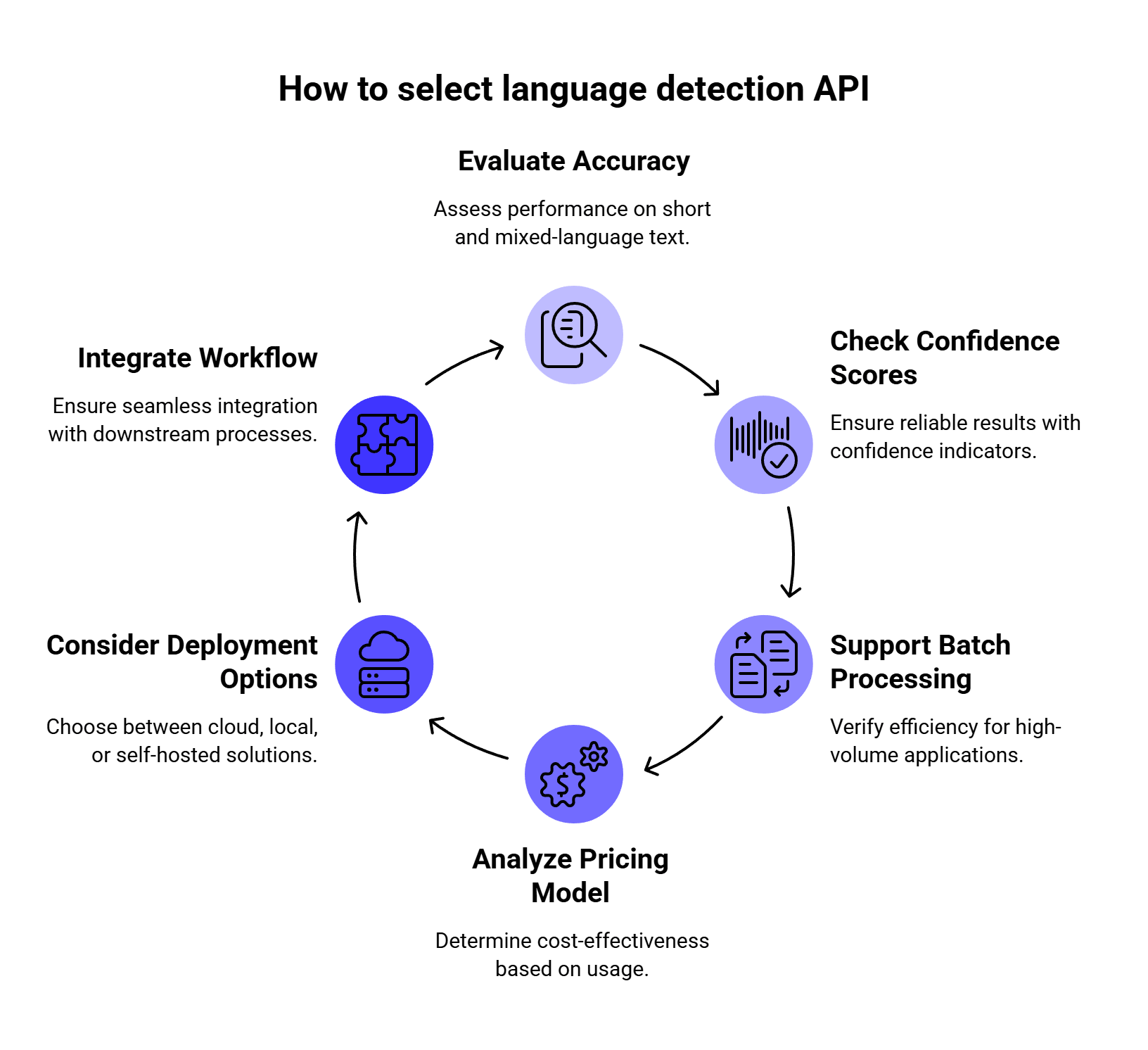
Best for: teams that need language detection as part of a translation workflow.
Google Cloud Translation is one of the strongest choices when language detection sits right before machine translation. Your app can detect the source language, translate the text, and keep the full workflow inside Google Cloud.
We like it most for products that already handle localization, multilingual support, international documentation, marketplaces, or customer-facing translation. Google’s language detection documentation shows that its API returns detected languages with confidence values, which helps when a workflow needs to decide whether to translate automatically or send the input for review.
| Feature | Details |
| Deployment | Cloud API |
| Response | Language code + confidence |
| Best use case | Translation routing |
| Pricing | Character-based |
| Free usage | Monthly free character credit |
| Main drawback | Price can feel high for simple detection-only use |
Compared with Amazon Comprehend: Google Cloud Translation is the better fit when the next step is translation. Amazon Comprehend is stronger when the next step is broader AWS text analytics.
Compared with DetectLanguage.com: Google is heavier, though it gives you a stronger translation ecosystem. DetectLanguage.com is simpler for detection-only use.
We’d choose Google Cloud Translation if detection is part of a translation flow. For example, a support app can detect that a user wrote in German, translate the message into English for the support team, then generate a German reply.
We’d skip it if the app only needs low-cost standalone detection. For basic language identification, a lighter API or local library may be easier to justify.
Best for: AWS-native NLP pipelines.
Amazon Comprehend includes dominant language detection as part of its broader NLP feature set. It works well when language detection is one step before sentiment analysis, entity recognition, PII detection, classification, or document processing inside AWS.
Amazon’s dominant language documentation says Comprehend determines the dominant language of input text and uses RFC 5646-style identifiers. If a two-letter ISO 639-1 identifier exists, Comprehend uses it, with a regional subtag when needed. Otherwise, it uses an ISO 639-2 three-letter code.
| Feature | Details |
| Deployment | Cloud API |
| Response | Language code + confidence score |
| Best use case | AWS text analytics pipelines |
| Pricing | Character-unit based |
| Free usage | 12-month free tier |
| Main drawback | Dense code-switching may need preprocessing |
Compared with Google Cloud Translation: Comprehend is usually better for AWS-based analytics workflows. Google is better when translation is the main next step.
Compared with Azure AI Language: the best choice often depends on your cloud stack. AWS teams will usually move faster with Comprehend, while Microsoft-heavy teams will prefer Azure AI Language.
We’d choose Amazon Comprehend if your team already uses AWS and needs language detection inside a bigger NLP pipeline. It is especially useful for S3-based document processing, Lambda workflows, analytics jobs, and support data classification.
We’d watch out for short inputs and transliterated text. Amazon’s language documentation notes that Comprehend does not support phonetic language detection, so inputs like “arigato” or “nihao” may not be detected as Japanese or Chinese.
Best for: Microsoft and Azure-based teams.
Azure AI Language includes language detection as a prebuilt feature. Microsoft’s language detection overview says it can identify more than 100 languages in their primary script and returns the main language, ISO 639-1 code, readable name, confidence score, script name, and ISO 15924 script code.
This is useful for enterprise apps where language detection connects to Azure AI Search, Azure Functions, Microsoft compliance tooling, or internal data platforms.
| Feature | Details |
| Deployment | Cloud API or container |
| Response | Language name, code, confidence score, script data |
| Best use case | Azure-native enterprise apps |
| Pricing | Text-record based |
| Main benefit | Strong Microsoft ecosystem fit |
| Main drawback | Pricing needs payload planning |
One detail we like: Azure lets developers use a country/region hint to help with ambiguous text. Microsoft gives the example of “communication,” a word shared by English and French, where a France hint can help the model choose French.
Compared with Amazon Comprehend: Azure AI Language is the better choice for Microsoft environments. Comprehend is the better choice for AWS pipelines.
Compared with Google Cloud Translation: Azure is stronger for Azure-native text analytics, while Google is easier to justify when detection leads directly into translation.
We’d choose Azure AI Language if your app already lives in the Microsoft ecosystem and you want language detection close to the rest of your Azure services.
We’d watch out for many tiny inputs. Text-record pricing can become awkward if every short phrase counts as a separate record, so batching strategy matters.
Best for: simple standalone language detection.
DetectLanguage.com is one of the easiest options to understand. It focuses on language detection and avoids the extra weight of full NLP platforms. Its API documentation says the service returns JSON and provides official API clients for Ruby, Python, Node.js, Go, Java, PHP, .NET, Perl, and Crystal.
The service says it detects 216 languages, supports short texts and batch requests, and offers both free and premium plans.
| Feature | Details |
| Deployment | Cloud API |
| Response | JSON language detection result |
| Best use case | Lightweight standalone detection |
| Free plan | 1,000 requests/day |
| Paid plans | Start at $5/month |
| Main drawback | Fewer extra NLP features |
Compared with Google, AWS, and Azure: DetectLanguage.com is simpler and easier to set up. The tradeoff is that it does not give you the same broad NLP or cloud ecosystem.
Compared with fastText and Lingua: DetectLanguage.com is easier if you want a managed API. fastText and Lingua give you more control if you want local execution.
We’d choose DetectLanguage.com if the app needs quick language detection without setting up Google Cloud, AWS, or Azure. It is a good fit for smaller SaaS products, internal tools, CMS workflows, and simple routing tasks.
We’d skip it if the same text also needs deep NLP features like entity extraction, sentiment analysis, PII detection, or translation.
Best for: enterprise text analytics where language detection is part of a larger analysis workflow.
IBM Watson Natural Language Understanding is built for broader text analysis. IBM describes it as a service for extracting metadata from unstructured text, including categories, concepts, entities, keywords, sentiment, emotion, relations, and syntax.
This makes it more powerful than a simple detector, although that also means it may be more than you need for basic routing.
| Feature | Details |
| Deployment | Cloud API |
| Best use case | Enterprise content analytics |
| Free plan | 30,000 NLU items/month |
| Main benefit | Rich text analysis beyond detection |
| Main drawback | Too heavy for simple language checks |
IBM’s pricing documentation lists a Lite plan with 30,000 NLU items per month, which is useful for proofs of concept or small workloads.
Compared with Amazon Comprehend and Azure AI Language: Watson NLU is another enterprise text analytics tool, though AWS and Azure are usually easier choices for teams already committed to those clouds.
Compared with DetectLanguage.com: Watson NLU is much broader. DetectLanguage.com is cleaner for standalone detection.
We’d choose IBM Watson NLU if language detection is part of a wider enterprise analytics flow, such as analyzing customer feedback, documents, reviews, or knowledge base content.
We’d skip it if the only goal is “detect language, then route text.” A narrower API will usually be easier to set up and cheaper to run.
Best for: comparing multiple providers or adding fallback logic.
Eden AI gives developers a unified API for language detection and access to multiple AI providers through one platform. Its language detection page focuses on easy integration, model comparison, pay-per-use pricing, and switching between providers without managing many separate accounts.
This can be useful when you are still testing which provider works best for your inputs.
| Feature | Details |
| Deployment | Unified cloud API |
| Best use case | Provider comparison and fallback |
| Pricing | Pay-per-use / platform-based |
| Main benefit | Easier multi-provider testing |
| Main drawback | Adds another layer between your app and the model |
Compared with direct cloud APIs: Eden AI is better for testing and fallback. Direct APIs are cleaner when you already know which provider you want.
Compared with LLMAPI: Eden AI fits language detection provider comparison more directly. LLMAPI fits better after detection, when the app needs to route text to LLMs for translation, classification, moderation, summarization, or response generation.
We’d choose Eden AI if the team wants to compare several detection engines quickly or build a fallback flow when one provider returns a low-confidence result.
We’d skip it if the app is extremely latency-sensitive or the team prefers direct vendor contracts and direct API integrations.
Best for: self-hosted translation and detection workflows.
LibreTranslate is a free and open-source machine translation API powered by Argos Translate. Its documentation says it does not rely on proprietary providers such as Google or Azure, and the project can be self-hosted. The API usage guide also includes language detection and auto-detection workflows.
That makes it useful for teams that want an API-style setup while keeping text inside their own infrastructure.
| Feature | Details |
| Deployment | Self-hosted API |
| Best use case | Private translation and detection |
| Pricing | Open source + infrastructure cost |
| Main benefit | No third-party cloud API needed |
| Main drawback | You manage hosting, uptime, and quality |
Compared with Google Cloud Translation: LibreTranslate gives you more control over hosting and data flow. Google gives you a managed service with stronger cloud support.
Compared with fastText and Lingua: LibreTranslate is more API-style and translation-focused. fastText and Lingua are better when you only need local language identification.
We’d choose LibreTranslate if data privacy is a major concern and the app needs both language detection and translation in a self-hosted environment.
We’d skip it if the team wants managed uptime, enterprise support, and no server maintenance.
Best for: fast local language identification at scale.
fastText provides pre-trained language identification models that can recognize 176 languages. The official documentation says the models were trained on Wikipedia, Tatoeba, and SETimes data.
This is a strong option when sending every text input to an external API would be too slow, too expensive, or impossible for privacy reasons.
| Feature | Details |
| Deployment | Local model/library |
| Supported languages | 176 |
| Best use case | High-volume local detection |
| Pricing | Open source + local compute |
| Main benefit | Fast and low-cost at scale |
| Main drawback | Short/noisy inputs need testing |
Compared with Lingua: fastText has wider language coverage. Lingua is more attractive for short snippets and chat-style input.
Compared with cloud APIs: fastText avoids API latency and per-request costs. Cloud APIs are easier to manage if you do not want to handle local models.
We’d choose fastText if the workload involves large datasets, crawled pages, logs, document archives, or high-volume content filtering.
We’d test carefully before using it for one-word messages, slang, typos, emojis, or transliterated text. Local models can be very fast, but messy user input can still be weird. Tiny goblin inputs ruin everything, naturally.
Best for: short text, chat messages, and local detection.
Lingua is a local language detection library available for several ecosystems, including Python, Rust, Go, and JVM-based environments. The Python project describes Lingua as suitable for short text and mixed-language text.
That makes it one of the more interesting choices for apps that process chat messages, search queries, comments, and support snippets.
| Feature | Details |
| Deployment | Local library |
| Best use case | Short text detection |
| Pricing | Open source |
| Main benefit | Strong focus on short inputs |
| Main drawback | Smaller language coverage than fastText |
Compared with fastText: Lingua is the better first test for short text. fastText is better when you need broader language coverage and high-volume processing.
Compared with DetectLanguage.com: Lingua runs locally, which is better for privacy and internal processing. DetectLanguage.com is easier if you prefer a managed API.
We’d choose Lingua if the app needs local language detection for short user inputs and privacy matters.
We’d skip it if the main requirement is maximum language coverage across hundreds of languages.
Best for: writing tools that need grammar checking plus language auto-detection.
LanguageTool is mainly a grammar, spelling, and style checker. Its public HTTP API documentation lets developers send text to the /v2/check endpoint and use language=auto for automatic language handling.
LanguageTool is useful when language detection supports proofreading, spelling, and writing assistance.
| Feature | Details |
| Deployment | HTTP API |
| Best use case | Grammar, spelling, and writing apps |
| Language handling | Auto language option |
| Main benefit | Detection works inside proofreading flow |
| Main drawback | Not designed for bulk language classification |
Compared with dedicated detectors: LanguageTool is weaker for bulk classification, though very practical inside proofreading products.
Compared with cloud NLP platforms: LanguageTool is lighter and more writing-focused. Cloud NLP tools are better for analytics, routing, and data processing.
We’d choose LanguageTool API if the product is a writing assistant, editor, CMS plugin, browser extension, or grammar-checking tool.
We’d skip it if the app needs to classify millions of text records by language.
Language detection APIs look simple from the outside, but they often sit inside larger AI systems. Recent research helps explain why response structure, routing, security, and mixed-language handling matter.
Language detection APIs usually return structured output: language code, confidence score, alternatives, and sometimes script metadata. If that output goes into an LLM workflow, the model still has to read and use it correctly.
In the paper How Good Are LLMs at Processing Tool Outputs?, Kate et al. studied how well LLMs process tool outputs and evaluated 15 open and closed-weight models. Their results show that JSON processing remains difficult even for frontier models, and different response-processing strategies caused performance differences from 3% to 50%.
For language detection workflows, this means developers should avoid vague handoffs like “detect the language, then let the LLM figure out what to do.” A stronger setup uses clear JSON fields, confidence thresholds, fallback rules, and prompt templates that tell the model exactly how to handle low-confidence results.
Language detection often feeds into translation, moderation, summarization, support automation, and other LLM-powered tasks. In SaaS products, those workflows may run inside multi-tenant infrastructure.
In Security Challenges of LLM Integration in Multi-Tenant SaaS: Threats, Vulnerabilities, and Mitigations, Romankiv and Sytnikov identified 18 vulnerability classes and found that 12 of them had stronger impact in multi-tenant deployments than in single-tenant systems. The paper highlights cross-tenant data leakage, RAG poisoning, and shared tool infrastructure as especially important risks.
For developers, this matters because language detection is often connected to user-generated content. Once that content moves into LLM routing or automation, teams need proper API key management, tenant isolation, input filtering, output checks, logging, and monitoring.
Zhu’s 2026 survey, LLM-Based Multi-Agent Orchestration: A Survey of Frameworks, Communication Protocols, and Emerging Patterns, describes how modern AI systems are moving toward coordinated model workflows, communication protocols, and orchestration layers rather than isolated model calls.
That shift matters for language detection. A multilingual AI app may need to detect the language, choose a translation model, summarize the message, classify intent, send it to a CRM, and generate a localized reply. This is no longer one API call. It is a routed workflow.
A separate 2026 paper on multi-agent orchestration architectures and enterprise adoption makes a similar point: enterprise AI systems increasingly need planning, policy enforcement, state management, quality operations, and observability inside an orchestration layer. For production AI teams, this makes routing, monitoring, governance, and fallback logic more important than simply calling one model endpoint.
Code-mixed text is common in multilingual online communication. The COMI-LINGUA dataset paper introduced 100,970 expert-annotated Hindi-English code-mixed instances across tasks such as language identification, matrix language identification, POS tagging, named entity recognition, and translation.
Another study, L3Cube-HingCorpus and HingBERT, describes code-switching as more prominent on social media platforms and presents a large real Hindi-English code-mixed corpus with 52.93M sentences and 1.04B tokens. That scale shows why language detection systems should be tested beyond clean, single-language paragraphs.
This supports a practical point: teams should test language detection APIs with the kind of language their users actually write. Clean English, Spanish, or French paragraphs are easy. A message that mixes scripts, languages, slang, names, emojis, and transliteration is much harder.
Language detection is usually the first step. The real work often starts right after that.
A support platform may detect that a message is written in Spanish, translate it into English, summarize the issue, classify the ticket as urgent, and generate a Spanish reply for the customer. A content platform may detect the language first, then send the text to moderation, topic classification, SEO analysis, or localization.
That is why we would not choose a language detection API in isolation. The right tool depends on the next step.
If your app only needs to identify a language, a dedicated tool like DetectLanguage.com, fastText, or Lingua may be enough. If your app also needs translation, moderation, summarization, or LLM-based routing, a gateway like LLMAPI can make the rest of the workflow easier to manage.
LLMAPI is useful when language detection feeds into a bigger AI system.
For example, your app might use a dedicated language detector first. Then, based on the detected language, it can send the text to an LLM for translation, summarization, sentiment analysis, intent classification, moderation, or response generation.
Instead of connecting separately to every model provider, teams can use LLMAPI as a unified gateway for those downstream AI tasks. LLMAPI lets developers replace multiple API keys with one integration, route requests across 200+ models, track usage and spend, compare provider performance, and monitor reliability from one dashboard.
This is especially useful for multilingual apps because the “right” model may change depending on the task. A cheap, fast model may be enough for simple classification. A stronger model may be better for customer-facing replies, legal text, or nuanced translation review. With routing in place, teams can make those decisions without rebuilding the whole integration every time.
Research on multi-provider LLM workflows points in the same direction. The paper Prompto: An Open Source Library for Querying Large Language Models notes that LLMs often live behind different proprietary or self-hosted API endpoints, and interacting with several endpoints can require custom code that slows down comparison and experimentation. That is the exact kind of engineering mess a unified gateway is meant to reduce.
This is the classic use case. The app detects the source language, sends the text to a translation service, and returns the translated output.
This works well for support platforms, marketplaces, learning apps, travel apps, and international documentation portals.
Support teams can use language detection to route tickets to the right regional team or queue. Confidence scores matter here. If the score is low, the ticket can go to manual review instead of being routed incorrectly.
Moderation tools need to know the language before they apply rules. Profanity filters, toxicity models, and compliance rules may all vary by country, region, or language.
Search engines, knowledge bases, and content platforms can use language codes to index content properly and serve better localized results.
Data teams often use language detection before training NLP models or preparing multilingual datasets. It helps split corpora by language and remove irrelevant records.
Language detection can also decide which prompt, model, or provider gets used next. For example, a multilingual chatbot may detect the user’s language, select the right system prompt, call an LLM through LLMAPI, and return a localized response.
Start with your actual input.
If your app processes long text, such as support emails, documents, reviews, or articles, cloud APIs like Google Cloud Translation, Amazon Comprehend, and Azure AI Language are strong candidates. They have enough context to make better predictions.
If your app processes short text, such as chat messages, search queries, or one-word inputs, test Lingua, DetectLanguage.com, and fastText with your own examples before choosing.
Then check your privacy needs.
If text can leave your infrastructure, cloud APIs are easier to manage. If text must stay private, use local or self-hosted options like fastText, Lingua, or LibreTranslate.
Next, look at the pricing model.
Character-based pricing works well when text length varies. Request-based or record-based pricing may become inefficient when your app sends many tiny messages. Local libraries remove per-request API costs, though you still pay through infrastructure and maintenance.
Finally, think about the next step.
If detection leads straight to translation, Google Cloud Translation may be enough. If detection feeds into several AI tasks, such as translation, classification, moderation, and response generation, LLMAPI can help simplify the model layer after detection.
Before choosing a provider, run your own test set. Clean demo text is easy. Real user text is where language detection gets interesting.
| Test type | Example | Why it matters |
| Long text | 300-word article excerpt | Most APIs perform better with context |
| Short text | “дякую”, “merci”, “hola” | Short inputs are harder to classify |
| Mixed-language text | “Hola, I need help with my order” | Many APIs return the dominant language |
| Transliteration | “privit”, “spasibo” | Some tools struggle with phonetic text |
| Noisy text | “hellooo 😭 merciii” | UGC often includes typos and emojis |
| Similar languages | Croatian vs Serbian, Malay vs Indonesian | Closely related languages can confuse models |
| Support text | “My order arrived broken, necesito ayuda” | Real messages often mix languages and intent |
We’d also track these fields during testing:
| Metric | What to check |
| Correct language | Did the API return the expected language? |
| Confidence score | Was the score high enough to trust? |
| Alternative languages | Did the API return useful second choices? |
| Latency | Is it fast enough for live workflows? |
| Cost per 1M characters or requests | Does pricing still make sense at scale? |
| Failure behavior | What happens when the text is too short or unknown? |
For mixed-language apps, we would also add a token-level test. A full-text detector may return the dominant language, while a token-level language identifier can mark each word separately. That difference matters for social posts, chats, and multilingual support messages.
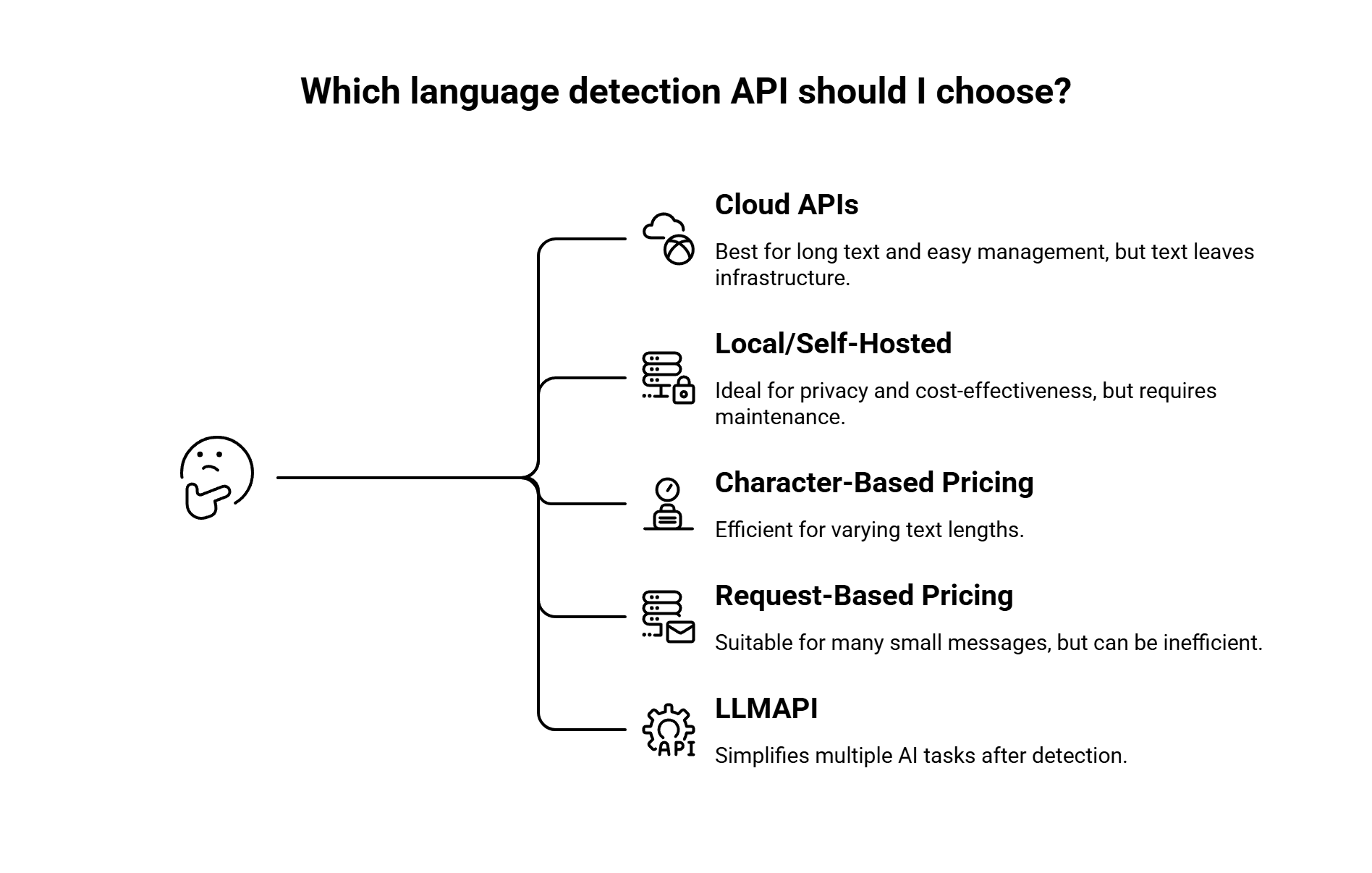
There is no single best option for every app. Google Cloud Translation is strong when detection leads into translation. Amazon Comprehend is a good fit for AWS pipelines. Azure AI Language works well for Microsoft-heavy teams. DetectLanguage.com is one of the simpler standalone APIs. For local processing, fastText and Lingua are usually the first tools we’d test.
Lingua is one of the strongest candidates for short text because it is designed for short and mixed-language inputs. DetectLanguage.com is also worth testing for short phrases and single words, since it positions itself around short text support.
Many APIs return the main or dominant language for the full input. For mixed-language content, developers often split the text into sentences or smaller chunks and detect the language of each segment.
If the app needs word-level detection, use or test tools designed for token-level language identification. Research on code-mixed text shows that mixed-language posts can switch languages at sentence, word, or sub-word level, so dominant-language detection may be too broad for some use cases.
Yes. fastText, Lingua, and LibreTranslate are open-source options. Managed APIs also have free tiers or credits. Google Cloud Translation lists a monthly free character credit, Amazon Comprehend offers a 12-month free tier, and DetectLanguage.com has a free plan with 1,000 requests/day.
Local and self-hosted tools are the safest starting point for privacy-sensitive workflows. fastText and Lingua run locally, while LibreTranslate can be self-hosted as an API.
LLMAPI is better understood as a unified gateway for AI models rather than a dedicated language detection API. It fits after the detection step, when your app needs to translate, summarize, classify, moderate, or generate content using different models through one integration.
Our main takeaway is simple: choose a language detection API based on the text you actually process.
If your app mostly handles long text and translation workflows, Google Cloud Translation is a strong fit. If your team already runs on AWS or Azure, Amazon Comprehend or Azure AI Language will usually be easier to plug into your stack. If you need a simple standalone detector, DetectLanguage.com keeps things lighter. If privacy or local processing matters most, fastText, Lingua, or LibreTranslate are worth testing.
The bigger point: language detection rarely stands alone. Once your app knows the language, it often needs to do something with that text — translate it, moderate it, summarize it, classify it, or generate a localized reply.
That is where LLMAPI can help with the next layer. Instead of managing separate integrations for every AI provider, teams can use one gateway to access 200+ models, manage API keys centrally, route requests, and keep better control over usage and cost.
Before you commit to any tool, test it with your real inputs. Clean demo text is easy. Short, messy, multilingual user content is where the right API actually proves itself.
