
Most people have seen this happen. You ask AI to write an email, blog post, or review, and the result sounds polished but flat. The grammar is fine. The structure is fine. But the voice feels stiff, repetitive, and easy to spot.
That is a problem because faster content does not always mean better content. Google’s guidance still focuses on helpful, reliable, people-first writing, not mass-produced copy that adds little value.
This is where AI humanizers come in. These tools rewrite AI-heavy text so it sounds more natural, more varied, and closer to how real people actually speak. The goal is not just to swap a few words. It is to fix rhythm, tone, flow, and phrasing so the result feels less mechanical.
Whether you are a marketer who wants stronger audience connection or a developer building support flows that need warmth and clarity, human-like language matters more now. Here is what AI humanizers do, how they work, and what to watch out for.
How to use an AI humanizer
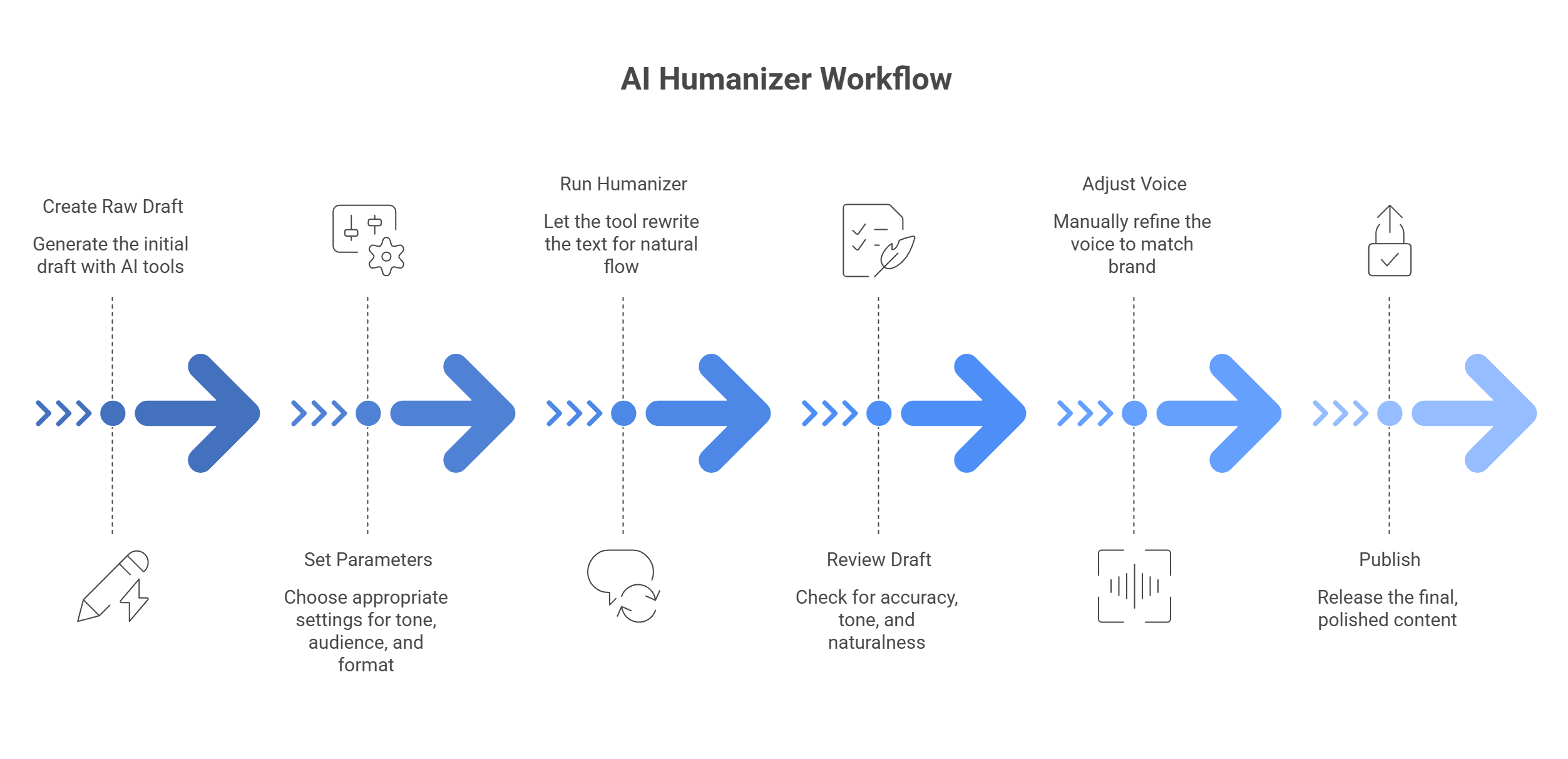
An AI humanizer works best as part of a simple workflow. It is not a magic button. You still need a solid draft, the right tone settings, and a quick human review at the end. Google’s guidance also keeps the focus on helpful, reliable, people-first content, which means the goal is not to “hide AI.” The goal is to make the text more useful and natural for real readers.
Start with the raw draft
First, create the base draft with your AI tool, whether that is ChatGPT, Claude, or something else. At this stage, focus on the core pieces:
- facts
- structure
- key points
- keywords
- rough tone
Do not worry too much yet about flow or personality. The main goal here is to get the content on the page in a usable shape.
Set the right parameters
Next, paste the draft into your AI humanizer and choose the settings that match the piece.
Usually, that means:
- tone: casual, professional, warm, direct
- audience level: beginner, general reader, expert
- format: blog post, email, landing page, social copy
- intensity: light cleanup or heavier rewrite
This step matters more than people think. If the settings are off, the output may sound smoother but wrong for the audience.
Run the humanizer
Now let the tool rewrite the text.
A good humanizer does more than swap words around. It usually helps by:
- breaking up repetitive sentence patterns
- removing stiff filler phrases
- making transitions sound less robotic
- adjusting rhythm and flow
- making the wording feel closer to natural speech
That is the part that makes the draft easier to read.
Review it like a human
This step should never be skipped. Even a strong humanizer can:
- soften the tone too much
- change the original meaning
- remove useful details
- make the text sound too casual
- flatten brand voice
So do one clean read-through and check:
- are the facts still correct?
- did any important nuance disappear?
- does the tone still fit your brand?
- does it sound natural, not weirdly polished?
Google’s content guidance still points toward unique, helpful, people-first writing, so the final check is where you make sure the piece still says something real and useful.
A simple way to use this workflow
If you want to keep it practical, use this order every time:
- draft with AI
- humanize the text
- fact-check the output
- adjust the voice by hand
- publish only after a final read
That keeps the process fast without letting the tool do too much on its own.
Why AI humanizers work better than the usual options?
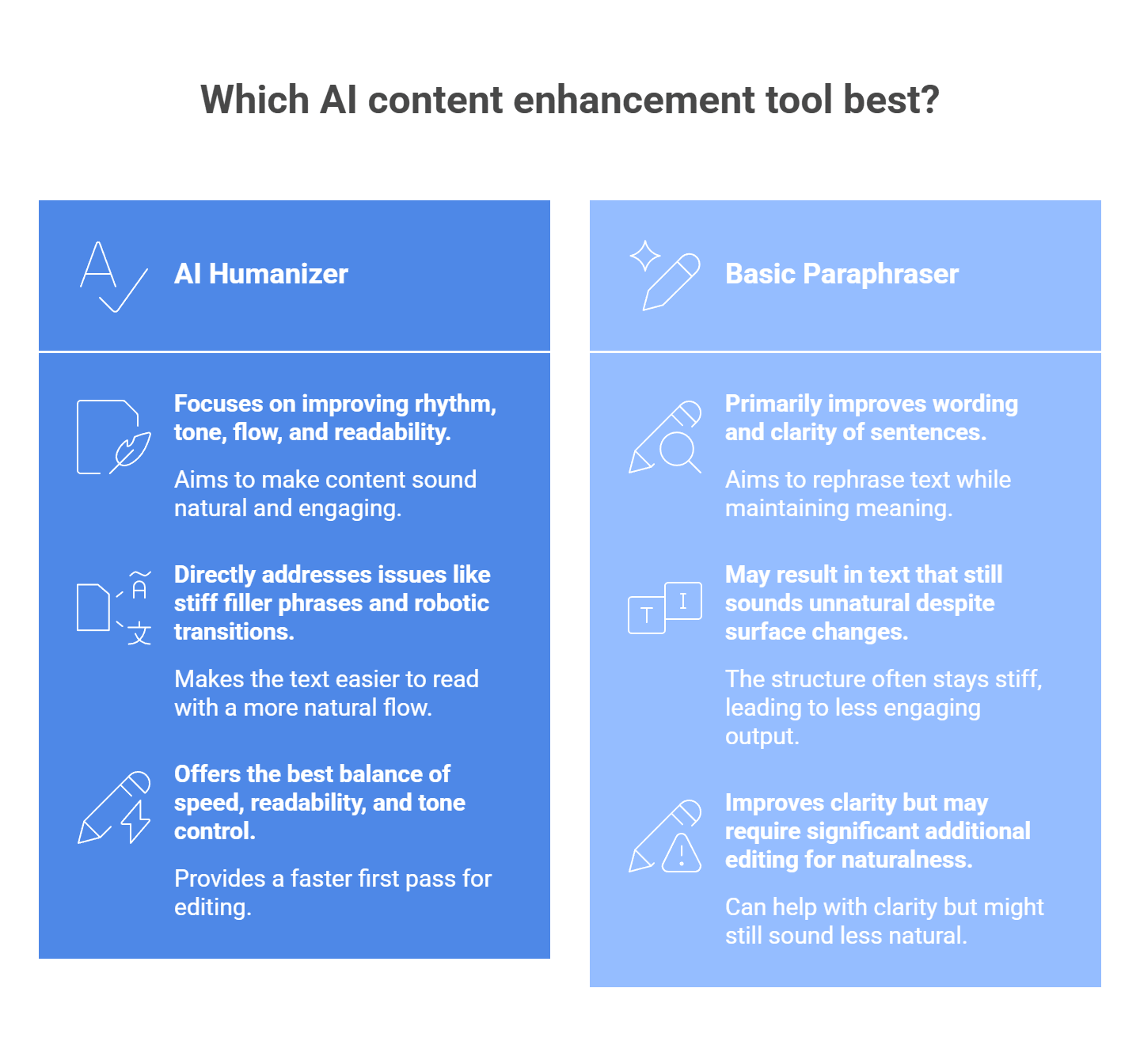
When AI text sounds stiff, you usually have four choices: leave it alone, edit it by hand, run it through a basic paraphraser, or use an AI humanizer. In most cases, the humanizer gives you the best balance of speed, readability, and tone control. That lines up with how major writing tools now position these products: humanizers focus on more natural, engaging language, while Google’s guidance still centers on people-first, useful content rather than text that simply looks polished on the surface.
Versus raw AI output
Raw AI drafts are often clean, but they can still sound flat, repetitive, and too symmetrical. The wording may be correct while the rhythm feels off. That is usually where readers lose interest.
A humanizer helps by:
- breaking up repetitive sentence patterns
- removing stiff filler phrases
- making transitions feel less robotic
- adding a more natural flow from line to line
- making the text easier to read without changing the whole message
That matters because content should feel useful and human to the reader, not just technically correct. Google’s public guidance keeps pushing that same idea: focus on content made for people first.
Versus manual editing
Manual editing can work well, but it takes time. If the draft is packed with awkward AI phrasing, you can spend so long fixing tone, flow, and repetition that writing from scratch starts to feel easier.
A humanizer gives you a faster first pass. It can:
- clean up the obvious robotic phrasing
- smooth out tone before you edit by hand
- cut down the time spent on line-by-line fixes
- give you a better draft to polish, not a blank page to fight with
That does not remove the need for review. Even writing tools that promote humanizing and paraphrasing still note that outputs can miss nuance, drift from your intended tone, or need a final check for accuracy.
Versus traditional article spinners or basic paraphrasers
Older spinners mostly swap words. A sentence changes on the surface, but the structure often stays stiff. The result may look different while still sounding unnatural.
That is the big difference:
- article spinners mostly replace words
- basic paraphrasers improve wording and clarity
- AI humanizers try to improve rhythm, tone, flow, and readability too
Modern paraphrasing tools can absolutely help with clarity, but even they admit that outputs may still sound less natural without light editing. Humanizers are built more directly for that problem.
Versus leaving the draft “good enough”
This is the option people forget to compare. Sometimes the draft is not terrible, so it gets published as-is. That usually saves time in the moment but creates weaker copy.
What often slips through:
- repeated sentence openings
- generic transitions
- flat emotional tone
- no real voice
- phrasing that sounds familiar in a bad way
A humanizer is useful here because it helps you move from “acceptable” to “actually readable” without a full rewrite.
Where AI humanizers help most
They tend to be most useful when the draft already has the right facts and structure, but the voice feels off.
Good use cases:
- blog posts
- emails
- landing page copy
- product descriptions
- ad copy
- support responses
- social posts
In these cases, the goal is usually not to rewrite the whole idea. It is to make the writing feel smoother, more natural, and easier for real people to stay with.
The real advantage
The biggest advantage is not that AI humanizers are magical. It is that they sit in the middle:
- better flow than raw AI
- faster than full manual rewriting
- more natural than old-school spinners
- usually easier to read than a plain paraphrase
That is why they often end up as the most practical option. You still need a human check at the end, but the draft you start from is usually much stronger.
How to choose the right AI humanizer
The best AI humanizer depends on what you need most. Some tools are better for polished business writing. Some are built for student-friendly rewrites. Some focus on quick cleanup with no signup. Before you pick one, check these things first:
- Tone control: Can you make the text sound casual, formal, warm, or more direct?
- Meaning retention: Does the tool keep your original point, or does it drift too far?
- Ease of use: Do you need a fast browser tool, or something deeper with extra writing features?
- Word limits and pricing: Free tools often cap how much text you can rewrite at once.
- Workflow fit: Some tools work best for emails and business copy, while others lean more toward academic or general-purpose rewriting.
One more thing: do not choose a tool only because it claims to “beat detectors.” That is weak buying logic. A better test is whether the output sounds natural, keeps the meaning, and still fits your use case and rules. Grammarly, for example, frames its humanizer around clearer, more natural writing, while Scribbr focuses on removing AI-like patterns without changing the message too much.
5 AI humanizers worth looking at
1. Grammarly AI Humanizer
Grammarly is the safest pick if your main goal is professional polish. Its humanizer is built to make AI-assisted writing sound more natural, sincere, and engaging without changing what you mean. That makes it a strong choice for emails, blog drafts, proposals, and other work where clarity matters more than heavy rewriting.
Why choose it: Pick Grammarly if you want cleaner, more readable writing and already like Grammarly’s broader writing tools.
2. Walter Writes AI
Walter Writes is more aggressive. It pitches itself as a tool that rewrites AI text into more natural language and openly markets itself around AI detection concerns. It also supports uploaded documents and different use cases, including student and academic pages. That makes it a stronger fit for users who want deeper text changes, not just light cleanup.
Why choose it: Choose Walter Writes if your text needs a heavier rewrite and you want the output to feel less obviously AI-shaped.
3. Scribbr AI Humanizer
Scribbr’s tool is more focused on natural phrasing with a clean, simple interface. It says the goal is to spot AI-like patterns and replace them with more natural wording while keeping the original message intact. Since Scribbr already serves students and academic writers, this one makes the most sense for essays, papers, and more formal writing where you still want the text to sound human.
Why choose it: Choose Scribbr if you want a more academic-friendly tone and do not want the rewrite to become too casual.
4. SuperHumanizer
SuperHumanizer is harder to pin down than the others because its web presence is lighter and less product-detailed, but it is still used as an AI humanizer tool and shows up in current tool roundups. If you want a lighter, simpler option and do not need a giant writing platform around it, it can still be worth a look. I would treat this one more as a quick-use option than a deeply documented professional tool.
Why choose it: Choose SuperHumanizer if you want a simple tool to test quickly and you do not need a full writing suite.
5. Clever AI Humanizer
Clever AI Humanizer pushes the “free and easy” angle hard. Its site says it is fully free, supports multiple languages, and lets users adjust style while rewriting AI-heavy text into more natural wording. That makes it attractive for casual use, fast rewrites, and users who do not want a paywall right away. Since the tool leans heavily on detection-related marketing, it still makes more sense to judge it by readability and output quality, not flashy claims.
Why choose it: Choose Clever AI Humanizer if you want a free option with a simple interface and quick results.
The SEO angle: Why readability matters more than detection scores
A lot of people use AI humanizers because they want to get past tools like GPTZero or Turnitin. From an SEO point of view, that is the wrong thing to focus on.
Google’s guidance is pretty clear: it does not automatically punish content just because AI helped write it. What matters is whether the page is helpful, reliable, and made for people instead of search engines. Content that feels stiff, repetitive, or empty is the real problem.
That is where an AI humanizer can actually help. When it works well, it does not just change a few words. It improves flow, breaks up repetitive sentence patterns, and makes the text easier to read. That can make the page more satisfying for real visitors, which is a much better goal than chasing a low AI-detection score.
The practical SEO benefit is simple:
- better readability
- clearer flow
- more natural pacing
- fewer robotic phrases
- stronger connection with the reader
Those things support people-first content. And that is much closer to what search systems want than text written mainly to game a detector. Google also warns that large-scale AI content without real value can violate its spam policies, so “humanized” text still has to be useful.
One important detail: marketers often talk about bounce rate or dwell time as if they are direct ranking levers. Google’s public guidance does not frame them that way. They can still be useful site metrics because they may show whether readers find your page compelling, but the bigger point is user satisfaction, not one magic number.
Common issues and how to fix them
People who use AI humanizers complain about the same few problems again and again: weird wording, text that still gets flagged, and unstable backends when they try to scale. Reddit threads around AI writing tools also mention “symmetry” and overly polished structure as common giveaways.
| The issue | The fix |
| Word salad effect: the tool swaps normal words for weird synonyms, so the text gets harder to read. | Clean the draft first. Ask the base AI to use plain English, avoid clichés, and vary sentence length before you run a humanizer. |
| Uniformity flags: the text still feels AI-written because the paragraphs look too neat and predictable. | Break the pattern. Mix paragraph length, add a short sentence here and there, and cut stiff transitions. |
| API rate limits and downtime: bulk humanizer tools break when one LLM provider slows down or blocks requests. | Use routing and failover. A gateway like llmapi.ai can spread traffic, retry requests, and switch providers when one goes down. |
Want your AI writing to sound more human without locking yourself into one model?
We are past the stage where fast output alone feels impressive. What matters now is whether AI-generated text actually sounds natural, clear, and human enough to connect with real people. That is why tools focused on rewriting tone, smoothing phrasing, and improving rhythm have become so useful.
But if you want to bring that same human-like quality into your own app or workflow, depending on one provider can limit you fast. Different models shine in different areas, whether that is tone, restructuring, speed, or cost.
That is where LLM API fits in naturally. It gives you one OpenAI-compatible API with multi-provider access, so you can work across models more flexibly instead of building around a single vendor. It also brings cost-aware routing, performance monitoring, secure key management, and provider-level breakdowns into one place, which makes it easier to manage AI writing workflows as they grow.
Why use LLM API?
- One API across multiple providers
- OpenAI-compatible setup for easier integration
- Cost-aware routing to match tasks more efficiently
- Performance and reliability monitoring in one dashboard
- Secure key management for cleaner team workflows
If you want your product to speak in a more natural voice without making the backend harder to manage, LLM API is a smart layer to add. It gives you the freedom to use the right model for the tone and job while keeping the integration simple underneath.
FAQs
What does an AI humanizer do?
It rewrites AI-sounding text to feel more natural. Usually that means: mixing sentence lengths, removing repetitive transitions, smoothing awkward phrasing, and shifting tone to sound less stiff.
Does “humanized” text rank better on Google?
It can, mainly because it’s easier to read and keeps people engaged. Better engagement (people actually reading, not bouncing instantly) often lines up with better SEO outcomes.
Can an AI humanizer guarantee 100% bypass of AI detectors?
No. Detectors change constantly, so no tool can promise a permanent 100% pass rate. The most reliable way to make text feel real is adding your own edits—specific details, examples, and your actual voice.
I want to build my own humanizer tool. How can LLM API help?
Humanizers tend to run lots of generations quickly. LLM API can help you scale by routing requests across multiple models and handling rate limits more smoothly through one endpoint.
Why use LLM API instead of a direct OpenAI key for a “human-like” chatbot?
Different models have different strengths. Some feel more natural for conversation and tone than others. With LLM API, you can switch models without rewriting your whole integration and route to the one that gives the best “human” output.
