
Passwords alone do not cover every use case anymore. If you build fintech onboarding, protect workspace access, or try to stop ticket fraud, you may need a fast way to check whether one face really matches another.
That is where AI face compare APIs come in. These tools compare two face images and return a similarity score that helps your app decide if both images show the same person.
Below, we break down the top 5 tools on the market, how to choose the right one, common developer problems, and how to scale without extra mess.
The top 5 AI face compare APIs
Based on current feature sets, pricing pages, and developer-facing docs, these five APIs stand out for face comparison in 2026. The right pick depends on what you need most: cloud scale, compliance, mobile speed, simpler setup, or privacy controls.
Amazon Rekognition
Amazon Rekognition is one of the biggest names in cloud vision. Its CompareFaces API handles 1:1 matching, and the wider Rekognition stack also covers face search, face analysis, streaming video, and liveness checks. It is a strong fit if you already run a lot of your stack on AWS and want a service that can scale without much custom ML work.
Key features:
- 1:1 face comparison with CompareFaces.
- 1:N face search with face collections.
- Real-time and stored video support.
- Facial attributes like landmarks, pose, occlusion, and emotion.
- Face liveness checks for spoof protection.
- S3-based workflows and AWS-native integration.
Pricing: Pay-as-you-go. AWS lists Rekognition Image Group 1 APIs, which include CompareFaces, at $0.001 per image for the first 1 million images per month, with lower rates at higher volume.
Best for: Large-scale apps, identity flows on AWS, and teams that want strong liveness support plus deep cloud integration.
| Pros | Cons |
| Strong face compare and liveness stack | Easy to get pulled deep into AWS |
| Good fit for high-volume workloads | Costs can add up at scale |
| Supports video workflows too | IAM and setup can feel heavy |
| Mature docs and SDK coverage | No simple always-free tier for long-term prototyping |
Microsoft Azure Face API
Azure Face API is built more for enterprise identity and regulated use cases. It supports verification, identification, grouping, liveness sessions, and face lists, while Azure also separates face attributes into its broader detection flow. That makes it appealing for teams that need both verification and stricter operational controls.
Key features:
- 1:1 verification and 1:N identification.
- Face grouping and similarity features.
- Liveness session APIs.
- Facial landmarks and attribute detection through Detect.
- Large face lists and person groups for matching workflows.
Pricing: Azure uses transaction-based pricing. Microsoft’s pricing page shows Face API as a paid service with usage-based billing, and Azure’s free-account offer can be used to test services, though exact free access depends on your account and offer type.
Best for: Healthcare, finance, enterprise identity flows, and teams that need a more compliance-oriented Microsoft environment.
| Pros | Cons |
| Strong identity-verification toolkit | Azure setup can feel bulky |
| Good fit for regulated environments | Pricing is less “instant clarity” than simpler tools |
| Supports large datasets and face lists | Learning curve is real for first-time users |
| Liveness is part of the platform | Some attribute features sit in separate flows |
Face++ (by Megvii)
Face++ is still a serious option if you want rich face analysis on top of face matching. Its platform covers face compare, search, liveness, dense landmarks, face attributes, skin analysis, and beauty scoring. That wider toolkit makes it especially useful for mobile, consumer, and image-heavy products that want more than a plain match score.
Key features:
- 1:1 face comparing with confidence thresholds.
- 1:N face search.
- Liveness detection.
- 106-point facial landmarks.
- Face attributes, skin analysis, and beauty scoring.
- Free start with upgrade paths for higher usage.
Pricing: Face++ says its APIs can be used for free to start, with paid options through pay-as-you-go or QPS-based plans. Its pricing page also confirms a free plan with no credit card required.
Best for: Mobile apps, beauty or AR-style products, and teams that want detailed facial mapping along with face verification.
| Pros | Cons |
| Very feature-rich beyond face compare | Can be more than you need for basic KYC |
| Strong landmark and attribute coverage | Pricing gets less simple at higher scale |
| Good for consumer-facing image apps | Regional and compliance review may matter more for some teams |
| Easy to test with a free start | Docs and product sprawl can feel busy |
Kairos
Kairos leans hard into identity verification, face matching, liveness, and a developer-friendly API story. The company also still positions itself around accessible pricing and ethical, unbiased face recognition. If you want a simpler face verification product without stepping into a giant cloud stack, Kairos is worth a look.
Key features:
- Biometric face matching.
- Liveness checks.
- Identity verification workflows.
- Document verification options.
- Cloud API and on-prem deployment choices.
Pricing: Kairos lists free trial access, 1,000 free API calls for biometric face recognition, and paid identity-verification plans starting at $49/month, with usage-based pricing that drops at higher volume.
Best for: Teams that want a more direct face-verification product with lighter setup and clear identity-check workflows.
| Pros | Cons |
| Straightforward identity-verification focus | Smaller ecosystem than AWS or Azure |
| Free trial path is easy to test | Fewer surrounding platform features |
| Has cloud and on-prem options | Less ideal for giant video-heavy workloads |
| Privacy and control story is clearer than many bigger clouds |
Luxand
Luxand is the easy-entry option in this group. Its cloud API covers face recognition, verification, similarity, landmarks, age and gender detection, cropping, and liveness. It is not trying to be a giant cloud platform. That is part of the appeal. If you want something you can wire up fast, Luxand stays one of the more approachable choices.
Key features:
- Face recognition and face verification.
- Face similarity API.
- Facial landmarks.
- Age and gender detection.
- Face cropping and liveness detection.
- Simple signup flow with a free tier.
Pricing: Luxand offers a free tier with 500 API requests per month and paid plans starting at low monthly rates; its pricing page currently shows entry plans beginning at $9/month.
Best for: Indie developers, startups, and smaller teams that want face matching live fast without deep cloud setup.
| Pros | Cons |
| Very easy to try and integrate | UI feels simpler than enterprise tools |
| Covers the main face-compare basics well | Not the first pick for massive enterprise rollouts |
| Free tier is friendly for testing | Advanced usage can hit plan limits fast |
| Good SDK and feature breadth for the price |
Other face compare tools, grouped by use case
The face recognition space is much bigger than the top five cloud APIs. If those tools do not match your setup, there are solid alternatives in a few more specific categories.
Open-source and self-hosted options
If privacy is the top priority, sending face images to a third-party API may not work for you. In that case, self-hosted tools make more sense.
- DeepFace (Python). A lightweight Python framework for face recognition and facial attribute analysis. It supports verification, recognition, and multiple underlying models, which makes it a flexible choice for local experiments and custom pipelines.
- CompreFace (by Exadel). One of the strongest open-source self-hosted options. It offers a REST API, Docker-based deployment, face verification, face detection, and access control features, so it fits teams that want a more complete API layer without handing data to an outside vendor.
- face_recognition (Python API). A very popular Python library built on top of dlib. It is known for a simple command-line and Python interface, which makes it useful for local face matching, small tools, and prototypes.
Dedicated KYC platforms
If your real goal is not generic face matching, but selfie-to-ID verification for compliance, you are usually better off with a full identity platform.
- Onfido. Built around remote identity verification, with government ID checks, selfie comparison, and fraud-focused verification workflows. Onfido is now part of Entrust, which matters if you are looking at long-term enterprise adoption.
- Veriff. Focused on global identity and document verification, with wide document support and strong fraud-prevention positioning. It is often considered when businesses need broad country coverage and selfie-to-document matching at scale.
- Jumio. A large enterprise identity platform with ID verification, selfie verification, premium liveness detection, and wider risk signals. It makes the most sense for teams that need a more complete identity and anti-fraud stack, not just a face match endpoint.
How to choose the best tool for your app
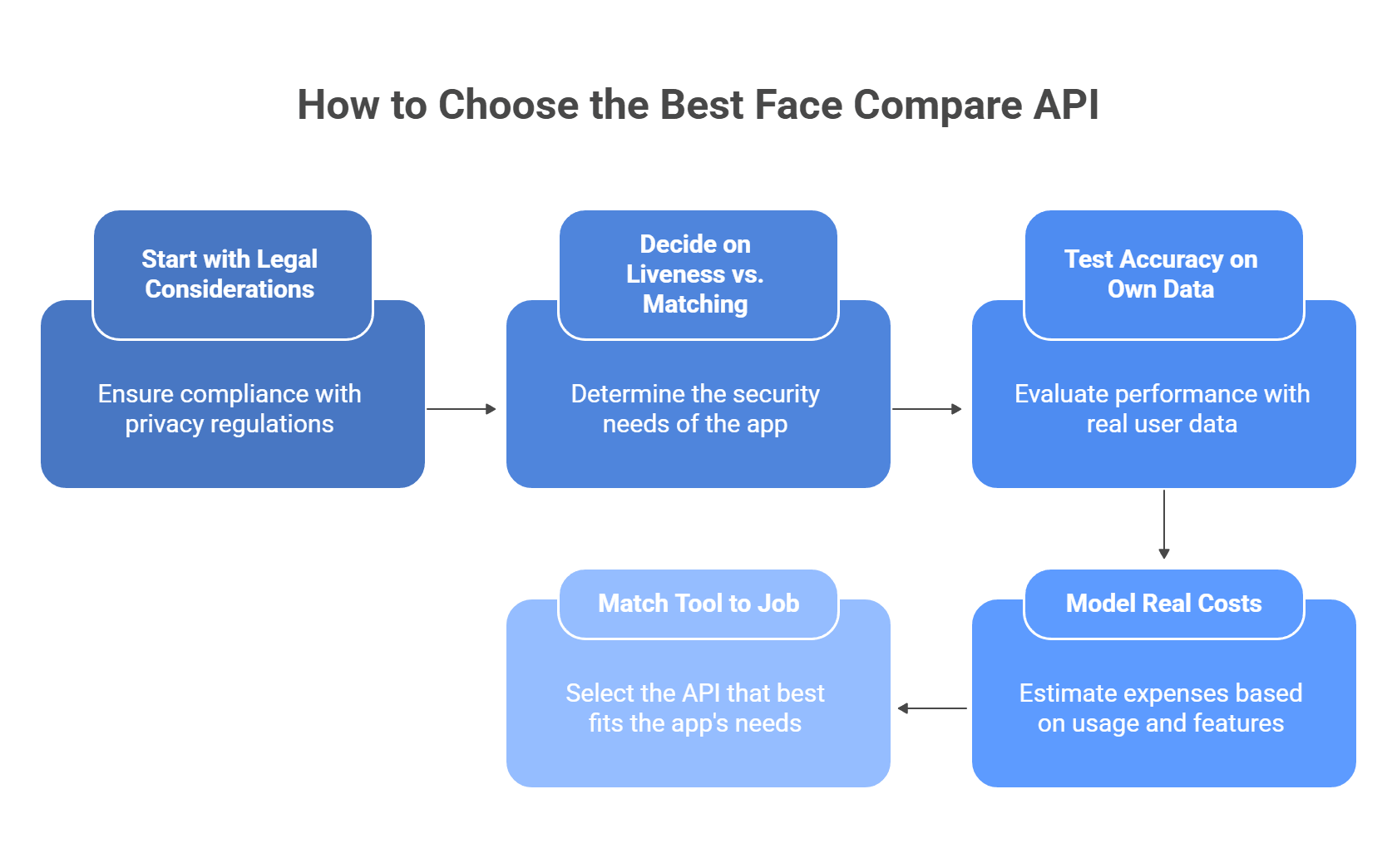
Picking a face compare API is mostly about four things: law, spoof resistance, real-world accuracy, and cost at scale. If one of these breaks, the whole setup gets risky fast.
Start with the legal side first
If you collect or process face geometry, do not treat this like ordinary image data. Illinois BIPA explicitly covers scans of face geometry, and GDPR treats biometric data as a special category with tighter rules and higher risk.
Check these points before you test vendors:
- where user images get stored
- how long they stay there
- whether the vendor uses data for model training
- whether you can turn retention off
- whether you can keep processing on your own infrastructure
Practical shortcut:
- strict privacy or regulated market: favor zero-retention or self-hosted/container options
- EU users: review lawful basis, proportionality, and data minimization early
- Illinois users: treat face matching as a biometric-data workflow, not a normal photo feature
Azure is useful here because Microsoft supports on-prem and near-data container deployments for some AI services, which can help when compliance or internal policy says data should stay close to your own environment.
Decide whether you need liveness or just matching
A lot of teams skip this and regret it later. Face comparison alone only answers “do these two faces look like the same person?” It does not answer “is this a real live person right now?”
Use plain face compare when the job is low risk, for example:
- photo deduplication
- gallery organization
- internal media search
- light user convenience features
Use liveness when the action has security or money attached to it, for example:
- account opening
- password reset
- employee access
- ticket validation
- government ID checks
AWS describes Face Liveness as a way to detect spoof attempts such as printed photos, digital replays, 3D masks, and even some camera-bypass attacks. That is the level of protection you want for higher-risk flows.
A simple rule:
- low-risk app flow: face compare may be enough
- high-risk auth or KYC flow: face compare plus liveness is the safer baseline
Test accuracy on your own data, not vendor demos
Vendor benchmarks help, but they do not tell you how the model will behave on your users, your camera quality, and your lighting. Face systems can still perform unevenly across demographics, image quality, and pose. European guidance also warns that facial recognition brings elevated rights risks and needs careful review.
When you test vendors, do not stop at “it worked in staging.” Test:
- different skin tones
- different age groups
- glasses, hats, masks, partial occlusion
- low light and backlight
- front camera vs. cheap Android camera
- sharp selfie vs. compressed upload
- slight head turns and non-ideal angles
What to measure:
- false accepts
- false rejects
- match confidence by condition
- liveness pass rate
- retry rate in real user flows
This gives you something far more useful than a generic “high accuracy” claim.
Model the real cost before launch
Face APIs often look cheap at first glance. The problem starts when usage grows, retries pile up, or you add liveness on top of matching.
Your cost model should include:
- face compare calls
- liveness checks
- failed attempts and retries
- storage fees for face metadata or galleries
- video processing, if your flow uses it
- peak-month volume, not just average month
For example, AWS pricing shows Rekognition image analysis is usage-based, and AWS also charges separately for some related storage components. That means your bill may have more than one moving part.
A good pricing check:
- estimate cost at 10,000
- then at 100,000
- then at 1,000,000 monthly checks
- then add a buffer for retries, fraud checks, and seasonal spikes
That last step matters more than people think. A product that looks affordable in a pilot can get expensive once you add liveness, duplicate checks, and multi-step verification.
Match the tool to the actual job
This is the fastest way to cut through the noise:
- Need strong cloud scale and built-in liveness? Look at AWS
- Need more compliance control or container-style deployment? Look at Azure
- Need fast setup for a smaller app? Simpler vendors may be enough
- Need strict privacy or no third-party storage? Look at self-hosted options first
- Need selfie-to-ID verification for compliance? Skip generic face APIs and look at KYC platforms instead
In short, the best tool is not the one with the longest feature list. It is the one that matches your legal risk, security level, user population, and expected volume without turning your costs or compliance work into a mess.
Common issues and how to fix them
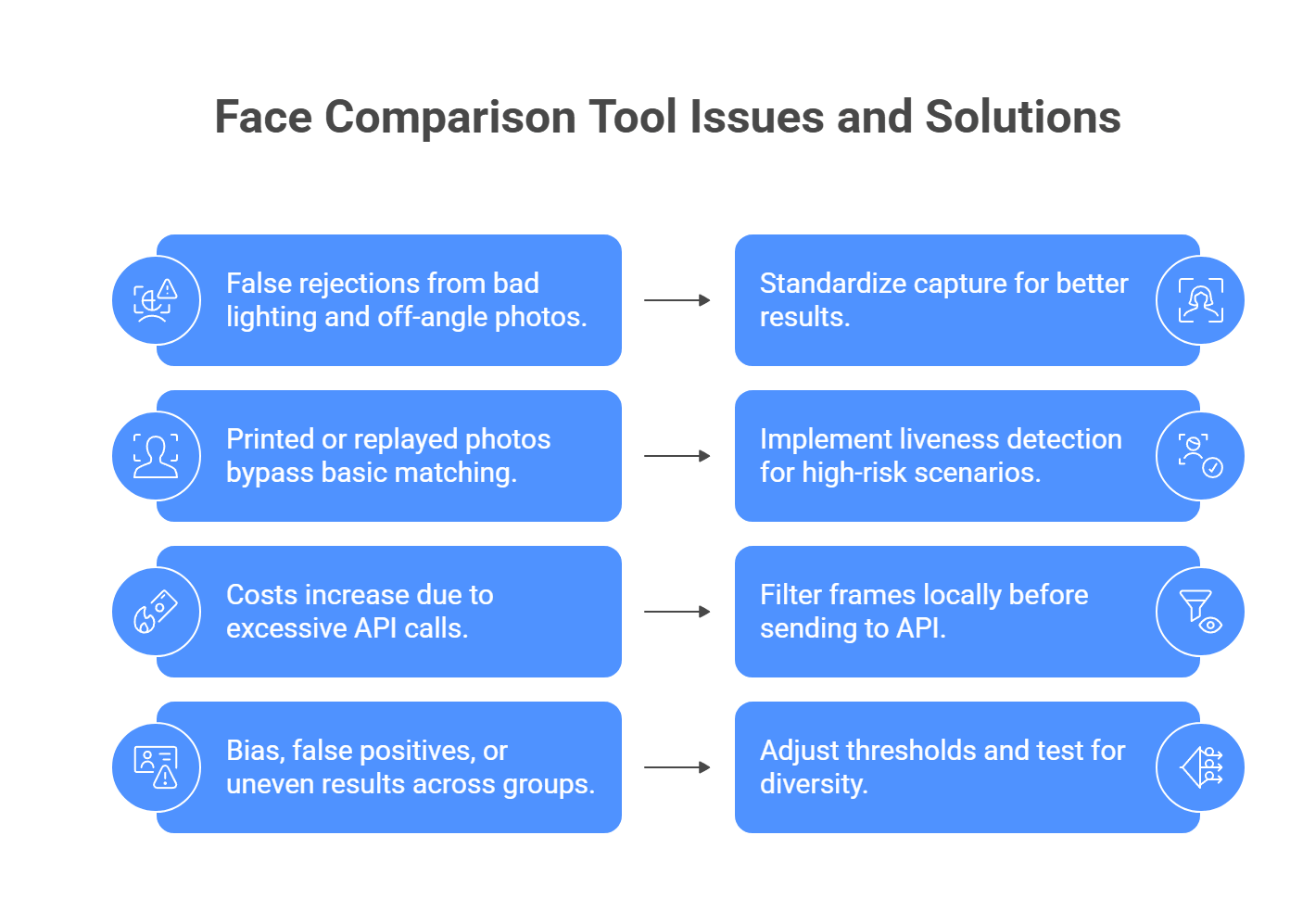
A lot of face-compare problems show up only after launch. The common pattern is simple: weak capture quality, no spoof protection, too many API calls, or threshold settings that are too loose for the risk level.
The issue: False rejections from bad lighting and off-angle photos.
The fix: Standardize capture as much as possible. AWS recommends face liveness checks in lighting that is not too dark or too bright and as even as possible, and Microsoft also points to more conservative session settings and stronger capture controls for better results.
Use a capture flow like this:
- show an oval or face frame on screen
- require the user to face the camera straight on
- reject frames that are too dark, blurry, or overexposed
- ask users to move to better lighting before retry
- during enrollment, capture a clean reference image, not a random selfie
If you can, run light preprocessing before upload, such as exposure correction or blur checks, so you only send usable frames.
The issue: A printed photo or replay attack passes basic face matching.
The fix: Plain 1:1 face comparison is not enough for secure flows. AWS states that face liveness is designed to catch printed photos, digital photos, digital videos, 3D masks, and some camera-bypass attacks. Azure also separates liveness into its own workflow rather than treating it as normal face matching.
For anything high-risk:
- add liveness, not just face compare
- use selfie video or guided capture
- require simple motion or passive liveness checks
- do not unlock accounts based on a still image alone
That is the baseline for banking, KYC, password reset, and access control.
The issue: Costs explode because the app sends too many frames to the API.
The fix: Do not send every video frame to a paid cloud service. Filter locally first. OpenCV supports face detection from live camera input, and sharpness scoring methods can help you pick the best frame from a sequence instead of uploading dozens of weak ones.
A better flow looks like this:
- detect the face locally
- wait until the face is centered
- check sharpness and brightness
- grab one strong frame
- send only that frame to the paid API
This cuts waste fast and usually improves match quality too.
The issue: Bias, false positives, or uneven results across different groups.
The fix: Do not trust default thresholds blindly. NIST still tracks demographic effects in face recognition and notes that false positives can vary across populations, while Microsoft also warns that real-world performance depends on image quality, environment, and user diversity.
To reduce risk:
- test on a diverse internal dataset
- measure false accepts and false rejects separately
- raise the confidence threshold for high-security flows
- review results under poor lighting, glasses, masks, and age variation
- choose vendors only after your own testing, not marketing claims
For low-risk apps, a looser threshold may be fine. For high-risk identity checks, stricter thresholds and liveness usually make more sense.
Why liveness detection matters more than basic face matching?
A face compare API and a secure authentication system do two different jobs.
Face matching asks one question: do these two faces look alike enough to count as the same person?
Liveness detection asks a different question: is there a real person physically present right now, or is someone trying to fool the camera?
That gap matters a lot. AWS says face liveness is built to detect spoof attacks such as printed photos, photos or videos shown on another screen, 3D masks, and even some pre-recorded or deepfake video attacks that try to bypass the camera. Azure describes liveness the same way: an anti-spoofing layer that checks whether a real person is actually in front of the camera, with both passive and passive-active modes now supported.
What basic face matching can and cannot do
Basic 1:1 matching is useful for:
- selfie-to-photo comparison
- duplicate face checks
- gallery organization
- low-risk identity convenience features
What it cannot prove on its own:
- that the image came from a live camera session
- that the user is not holding up a printed photo
- that the feed is not a replayed video
- that the session is not a deepfake or injected stream
So if your flow protects money, access, accounts, or legal identity, plain face matching is not enough.
What liveness detection actually checks
Modern liveness systems usually look for several signals at once, not one magic clue.
They may check:
- texture and light response: real skin reflects light differently than a screen or paper photo
- depth and contour: head shape, angle changes, and 3D structure help separate a live face from a flat image
- motion patterns: subtle movement across frames helps expose static or replayed content
- session integrity: some systems also look for signs that the camera stream itself has been tampered with or injected
AWS explicitly says its liveness flow analyzes a short selfie video to catch printed photos, digital photos, digital videos, 3D masks, and camera-bypass attacks such as pre-recorded or deepfake videos. Azure’s current liveness docs also split the feature into passive and passive-active modes, which is useful because some apps want less user friction, while others want stronger challenge-based proof.
Passive vs. active liveness
This distinction helps a lot when you choose a vendor.
Passive liveness:
- works mostly in the background
- asks the user for little or no extra action
- feels smoother in onboarding flows
- may reduce user drop-off
Active or passive-active liveness:
- asks the user to do something during capture
- may include guided motion or challenge steps
- usually adds stronger evidence of real presence
- fits higher-risk authentication flows better
Azure’s current documentation specifically calls out both Passive and Passive-Active detection modes. That is a useful sign of where the market is going: less friction for simple cases, stronger challenge flows for higher-risk ones.
Deepfakes changed the threat model
A few years ago, many teams mainly worried about printed photos or video replays. That is no longer enough. Vendors now openly talk about deepfakes and injection attacks as real threats to remote identity checks.
AWS says its liveness service is designed to detect spoofs that bypass the camera, including pre-recorded or deepfake videos. iProov also frames modern biometric defense around both presentation attacks, like photos and masks shown to a camera, and injected attacks, such as forged or deepfake media inserted into the stream.
That means your security bar should rise if your app handles:
- banking or fintech onboarding
- employee or admin login
- account recovery
- ticketing and fraud prevention
- government or regulated identity checks
When liveness is optional, and when it is not
A simple rule helps here.
You may not need liveness if the use case is low risk, such as:
- photo deduplication
- media search
- light personalization
- internal content sorting
You should treat liveness as required if the use case involves:
- account access
- KYC or ID verification
- money movement
- password reset
- sensitive workspace access
- fraud prevention
In those cases, a face compare API without liveness is only half a solution.
What to look for in a vendor
Before you choose a face API for secure flows, check:
- does it support liveness at all
- is the liveness passive, active, or both
- does it mention protection against photos, screens, masks, and deepfakes
- does it return a high-quality frame you can reuse for downstream face verification
- can it run in your required environment and compliance setup
AWS, for example, notes that its liveness flow can return a strong selfie frame for downstream face matching. That is useful because it reduces the need for separate capture logic.
So the bottom line is simple: if your app uses face verification for security, do not stop at “the faces match.” You also need proof that the second face belongs to a live, present human at the moment of capture. Without that layer, the system is much easier to fool.
Want a simpler way to handle the AI parts beyond face recognition?
An AI Face Compare API can help you build faster and more secure user flows. But in many products, facial recognition is only one part of the stack. Teams often also need text generation, document analysis, translation, or other multimodal features, and managing all of those through separate providers can get messy fast.
That is where a unified layer starts to matter. Instead of juggling extra API keys, billing setups, and provider limits for every generative feature, llmapi.ai gives you one OpenAI-compatible API with access to 200+ models, plus routing, fallback protection, unified billing, and team key management.
Why use LLM API alongside your face compare stack?
- One API for your generative AI features
- 200+ models in one place
- OpenAI-compatible setup for easier integration
- Routing and fallback options for more stable apps
- Unified billing and team keys for simpler management
If you want to keep your specialized face recognition tool while making the rest of your AI infrastructure easier to manage, LLM API is a natural fit. It helps you consolidate the generative side of your stack without boxing your app into a single provider.
FAQs
Is it legal to use a Face Compare API?
Usually yes, but the rules are strict and vary by location. Facial data is often treated as sensitive biometric data, so you typically need clear, informed consent, a retention/deletion policy, and limits on how you store and share templates. Laws like GDPR (EU) and Illinois BIPA are common “high bar” examples.
What’s the difference between Face Detection, Face Comparison, and Face Search?
- Face detection: finds a face in an image (bounding box).
- Face comparison (1:1): checks whether two faces match.
- Face search (1:N): finds a match inside a database of many faces.
If I’m building an app, how can I manage my LLMs alongside my Face Compare API?
Keep it clean: use your Face Compare API only for identity checks, and route everything else (chat, summaries, analysis) through LLM API so you don’t juggle a bunch of different LLM SDKs and keys.
Why did the API say two different people were a match?
That’s a false positive, often caused by a low match threshold. A common fix is raising the required confidence score (many teams use something like 95%+, depending on the provider and risk level) and adding a second check for high-stakes flows.
How does LLM API protect my app if an AI provider goes offline?
Face compare fallbacks are usually on you to design, but for LLM features, LLM API can route to backup models via load balancing/failover so your app doesn’t lose chat or text features during outages.
