
Text anonymization sounds like a big privacy-engineering task, but the first version can be surprisingly simple.
If your app stores logs, user messages, support tickets, form submissions, analytics events, or AI prompts, you may need to remove personal details before that text moves into another system. That can mean replacing names, emails, phone numbers, credit card numbers, IP addresses, or IDs with safe placeholders.
In this quick guide, we’ll build a small JavaScript anonymizer that replaces common personally identifiable information, or PII, with labels like [EMAIL], [PHONE], and [CARD].
This will not replace a full privacy platform. It gives you a fast working base that you can improve with stronger rules, NLP-based detection, human review, or tools like Microsoft Presidio, which supports PII detection and anonymization for text, images, and structured data.
What we’ll build
We’ll create a simple JavaScript function that takes this:
Hi, my name is Sarah Miller. Email me at [email protected] or call +1 (312) 555-9821. My card is 4111 1111 1111 1111.And returns this:
Hi, my name is [NAME]. Email me at [EMAIL] or call [PHONE]. My card is [CARD].The goal is simple:
| PII type | Replacement |
| Email address | [EMAIL] |
| Phone number | [PHONE] |
| Credit card number | [CARD] |
| IP address | [IP_ADDRESS] |
| Social Security number | [SSN] |
| Simple full name pattern | [NAME] |
JavaScript makes this easy with regular expressions and String.prototype.replace(), which returns a new string with matched patterns replaced by another value, according to MDN’s JavaScript docs.
Step 1: Create the anonymizer
Here is a small version you can paste into a Node.js file or browser console.
function anonymizeText(text) {
  return text
    // Email addresses
    .replace(
      /\b[A-Z0-9._%+-]+@[A-Z0-9.-]+\.[A-Z]{2,}\b/gi,
      "[EMAIL]"
    )

    // US-style phone numbers
    .replace(
      /(\+?\d{1,2}[\s.-]?)?(\(?\d{3}\)?[\s.-]?)\d{3}[\s.-]?\d{4}/g,
      "[PHONE]"
    )

    // Credit card-like numbers
    .replace(
      /\b(?:\d[ -]*?){13,19}\b/g,
      "[CARD]"
    )

    // US Social Security numbers
    .replace(
      /\b\d{3}-\d{2}-\d{4}\b/g,
      "[SSN]"
    )

    // IPv4 addresses
    .replace(
      /\b(?:\d{1,3}\.){3}\d{1,3}\b/g,
      "[IP_ADDRESS]"
    )

    // Simple full-name pattern
    .replace(
      /\b[A-Z][a-z]+ [A-Z][a-z]+\b/g,
      "[NAME]"
    );
}
Now test it:
const input = `
Hi, my name is Sarah Miller.
Email me at [email protected].
Call me at +1 (312) 555-9821.
My card is 4111 1111 1111 1111.
My SSN is 123-45-6789.
My IP is 192.168.0.1.
`;

console.log(anonymizeText(input));
Output:
Hi, my name is [NAME].
Email me at [EMAIL].
Call me at [PHONE].
My card is [CARD].
My SSN is [SSN].
My IP is [IP_ADDRESS].
That is the basic version.
Step 2: Make it easier to extend
The first version works, but it is messy to maintain. A cleaner approach is to keep patterns in one array.
const piiPatterns = [
  {
    label: "EMAIL",
    regex: /\b[A-Z0-9._%+-]+@[A-Z0-9.-]+\.[A-Z]{2,}\b/gi
  },
  {
    label: "PHONE",
    regex: /(\+?\d{1,2}[\s.-]?)?(\(?\d{3}\)?[\s.-]?)\d{3}[\s.-]?\d{4}/g
  },
  {
    label: "CARD",
    regex: /\b(?:\d[ -]*?){13,19}\b/g
  },
  {
    label: "SSN",
    regex: /\b\d{3}-\d{2}-\d{4}\b/g
  },
  {
    label: "IP_ADDRESS",
    regex: /\b(?:\d{1,3}\.){3}\d{1,3}\b/g
  },
  {
    label: "NAME",
    regex: /\b[A-Z][a-z]+ [A-Z][a-z]+\b/g
  }
];

function anonymizeText(text) {
  return piiPatterns.reduce((result, pattern) => {
    return result.replace(pattern.regex, `[${pattern.label}]`);
  }, text);
}
This version is easier to update. If you want to detect passport numbers, account numbers, order IDs, or employee IDs, add another object to piiPatterns.
Step 3: Keep a map for reversible anonymization
Sometimes you need consistent fake labels.
For example, if Sarah Miller appears five times, you may want every mention to become [NAME_1], not just [NAME].
That helps with debugging, AI prompts, conversation analysis, and support workflows.
function createAnonymizer() {
  const entityMap = new Map();
  const counters = {};

  function getReplacement(label, value) {
    const key = `${label}:${value}`;

    if (!entityMap.has(key)) {
      counters[label] = (counters[label] || 0) + 1;
      entityMap.set(key, `[${label}_${counters[label]}]`);
    }

    return entityMap.get(key);
  }

  function anonymize(text) {
    let result = text;

    for (const pattern of piiPatterns) {
      result = result.replace(pattern.regex, (match) => {
        return getReplacement(pattern.label, match);
      });
    }

    return result;
  }

  return { anonymize, entityMap };
}
Test it:
const { anonymize, entityMap } = createAnonymizer();

const message = `
Sarah Miller emailed [email protected].
Later, Sarah Miller called from +1 (312) 555-9821.
`;

console.log(anonymize(message));
console.log(entityMap);
Output:
[NAME_1] emailed [EMAIL_1].
Later, [NAME_1] called from [PHONE_1].
This is useful when you need consistency while still hiding the original values.
Step 4: Use it before logs or AI prompts
A common use case is protecting logs.
OWASP’s Logging Cheat Sheet warns against logging sensitive personal data, access tokens, passwords, bank data, secrets, and similar information.
You can anonymize text before writing it to logs:
function safeLog(message) {
  console.log(anonymizeText(message));
}

safeLog("User [email protected] failed login from 192.168.0.1");
Output:
User [EMAIL] failed login from [IP_ADDRESS]You can also use it before sending text into an AI workflow:
async function preparePrompt(userText) {
  const cleanText = anonymizeText(userText);

  return `
Summarize this support request:

${cleanText}
`;
}
This helps reduce the chance of sending raw PII into third-party tools, logs, analytics platforms, or LLM calls.
Step 5: Know the limits
Regex anonymization is fast, cheap, and easy to understand. It also has limits.
| What regex handles well | What regex struggles with |
| Emails | Names in unusual formats |
| Phone numbers | Addresses |
| SSNs | Nicknames |
| Credit card-like numbers | Company-specific IDs |
| IP addresses | Context-dependent PII |
| Simple patterns | Multilingual text |
| Fixed identifiers | Misspellings and messy input |
For example, the simple name regex may catch Sarah Miller, but it may miss Dr. Sarah J. Miller, SARAH MILLER, Iryna Pylypchuk, or names in non-Latin scripts. It may also replace phrases that are not names, such as Project Apollo.
That is why production anonymization often combines:
| Method | Use |
| Regex | Emails, phone numbers, IDs, fixed patterns |
| Dictionaries | Known names, locations, terms |
| NLP models | People, places, organizations |
| Checksums or hashing | Stable pseudonymous IDs |
| Human review | High-risk data |
| Allow/block lists | Business-specific rules |
| Privacy tools | Presidio, DLP tools, cloud privacy APIs |
A 2025 paper on PIIvot also points out that real PII anonymization has a recall and precision tradeoff. In plain English: a detector can miss private data, or it can over-mask harmless text. The right balance depends on the data and the risk.
Better production pattern
For a real app, use a layered workflow.
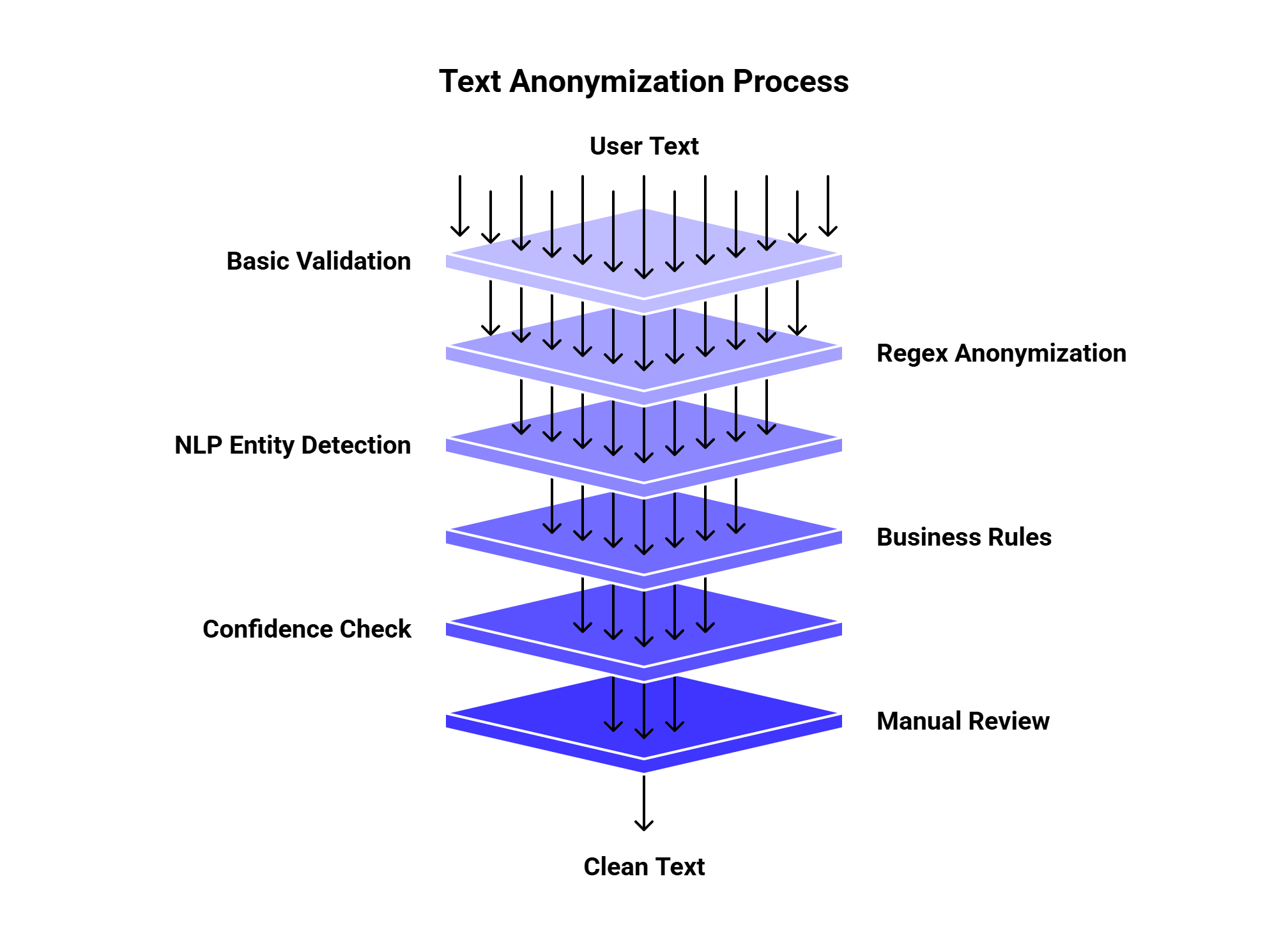
If the text goes into an LLM workflow, you can place anonymization before the model call:
User input ⟶ Anonymize with JavaScript ⟶ Send clean prompt to LLMAPI ⟶ Route to the best model ⟶ Store response without raw PII
This is useful for support apps, chatbots, analytics tools, document processing, HR tools, healthcare intake, and customer feedback systems.
Full copy-paste example
Here is the full 5-minute version:
const piiPatterns = [

  {

    label: "EMAIL",

    regex: /\b[A-Z0-9._%+-]+@[A-Z0-9.-]+\.[A-Z]{2,}\b/gi

  },

  {

    label: "PHONE",

    regex: /(\+?\d{1,2}[\s.-]?)?(\(?\d{3}\)?[\s.-]?)\d{3}[\s.-]?\d{4}/g

  },

  {

    label: "CARD",

    regex: /\b(?:\d[ -]*?){13,19}\b/g

  },

  {

    label: "SSN",

    regex: /\b\d{3}-\d{2}-\d{4}\b/g

  },

  {

    label: "IP_ADDRESS",

    regex: /\b(?:\d{1,3}\.){3}\d{1,3}\b/g

  },

  {

    label: "NAME",

    regex: /\b[A-Z][a-z]+ [A-Z][a-z]+\b/g

  }

];

function anonymizeText(text) {

  return piiPatterns.reduce((result, pattern) => {

    return result.replace(pattern.regex, `[${pattern.label}]`);

  }, text);

}

const input = `

Sarah Miller emailed [email protected].

Call her at +1 (312) 555-9821.

Card: 4111 1111 1111 1111.

SSN: 123-45-6789.

IP: 192.168.0.1.

`;

console.log(anonymizeText(input));
Final thoughts
You can anonymize basic text in JavaScript with a few regex rules and replace(). That is enough for a quick prototype, simple logs, demos, and low-risk internal tools.
For production, add stronger detection, review rules, and privacy controls. Tools like Microsoft Presidio can help with more advanced PII detection and anonymization, while JavaScript can still handle fast preprocessing at the app layer.
If anonymized text moves into AI workflows, connect the clean text to LLMAPI so your app can route prompts across models, track cost, and reduce the risk of sending sensitive raw text into every provider.