
OCR sounds simple until you actually need to use it in a real product.
At first, the goal seems obvious: take a scanned page, receipt, ID, invoice, or screenshot and turn it into text. Then the real questions start showing up. Does the tool understand tables? Can it handle handwriting? What about low-quality phone photos? Does it keep the reading order? Can it pull invoice totals into clean JSON? Can it process private documents without creating a compliance headache?
That is why choosing an OCR solution should start with the workflow, not the vendor list.
Some teams only need raw text extraction. Some need searchable PDFs. Some need structured fields from invoices, receipts, bank statements, IDs, and forms. Some need multilingual OCR. Some need document parsing for LLM pipelines. Some need a private, offline setup because the documents contain sensitive data.
For this guide, we looked at modern OCR options across cloud APIs, open-source engines, document AI platforms, and AI workflow tools. We also added newer research around OCR accuracy, document parsing, OCR hallucinations, and post-OCR correction so the article is not just “here are some tools, good luck.”
Quick answer: Which OCR tool should you choose?
Here is the short version before we get into the deeper comparison.
| Need | Best first choice |
| Simple text extraction from clean scans | Tesseract, Azure OCR, Google Cloud Vision |
| Open-source OCR with modern document parsing | PaddleOCR |
| Quick Python OCR for images and multilingual text | EasyOCR |
| AWS-native document workflows | Amazon Textract |
| Google Cloud document processing | Google Document AI |
| Microsoft/Azure ecosystem | Azure AI Vision or Azure Document Intelligence |
| Enterprise document automation | ABBYY Vantage |
| Invoices, receipts, IDs, business documents | Nanonets, Mindee, Textract, Google Document AI |
| Layout-heavy PDFs and tables | PaddleOCR, Docling, Unstructured, LlamaParse |
| OCR plus AI routing, extraction, summaries, and automation | OCR provider + LLMAPI |
If your app only needs text, start with a basic OCR API or open-source OCR engine.
If your app needs structured data, use document AI.
If your app needs to process OCR output with LLMs, connect OCR to a model gateway like LLMAPI so you can route extraction, summarization, validation, and fallback steps across models.
What OCR actually means now
Traditional OCR reads characters from images. Modern OCR solutions often include much more:
| Capability | What it does |
| Text recognition | Extracts printed or handwritten text |
| Layout detection | Finds paragraphs, columns, blocks, headers, and footers |
| Table extraction | Reads table rows, columns, and cells |
| Form parsing | Finds labels and values, such as “Name: Sarah Lee” |
| Checkbox detection | Reads selected and unselected boxes |
| Entity extraction | Finds dates, names, totals, invoice numbers, addresses |
| Document classification | Sorts files into types like invoice, receipt, ID, contract |
| Handwriting recognition | Reads filled-in forms or notes |
| Post-OCR correction | Fixes OCR mistakes using context or language models |
| Human review | Sends uncertain results to manual validation |
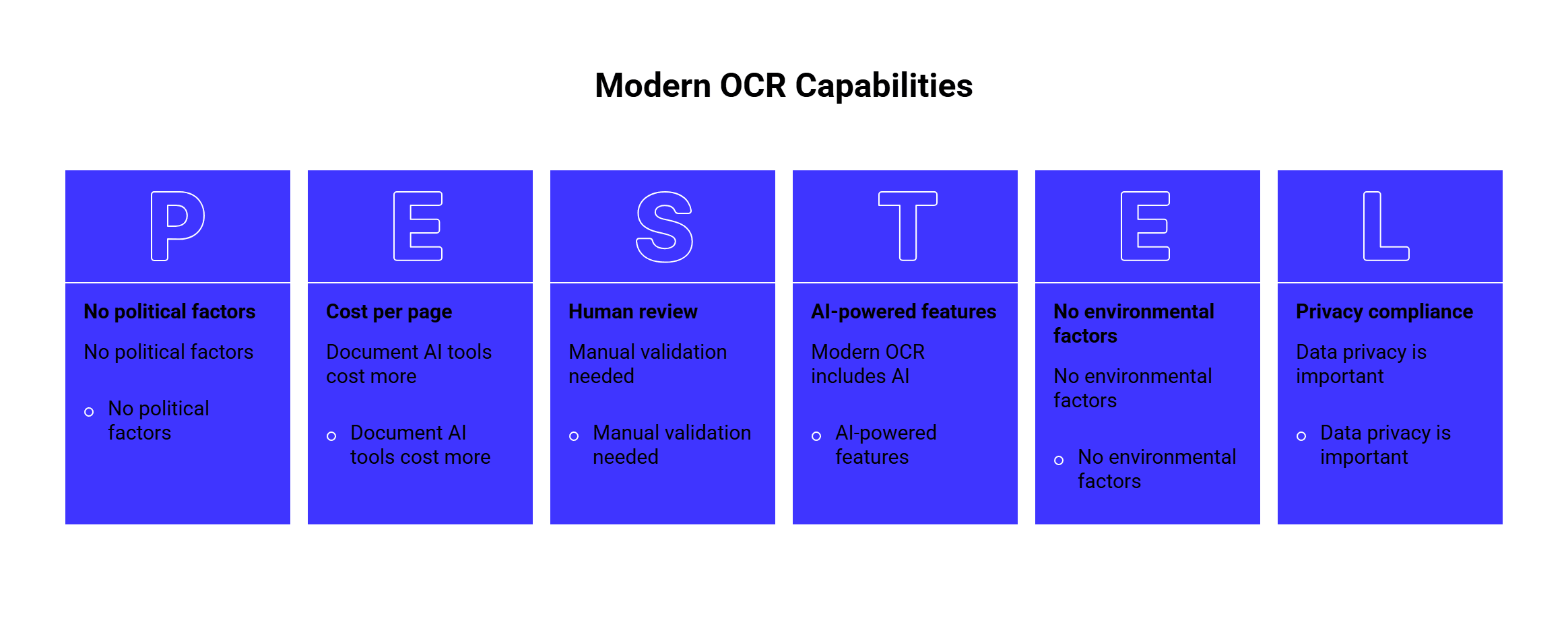
This is where tool selection gets tricky. A basic OCR engine may read text well but ignore table structure. A document AI tool may extract fields well but cost more per page. A vision-language model may understand document context but may also hallucinate text under poor image conditions.
The right choice depends on what happens after the text is extracted.
Start with the document type
The document type should drive the shortlist.
| Document type | What matters most | Tools to test |
| Clean scanned pages | Text accuracy, speed, language support | Tesseract, Azure OCR, Google Vision |
| Invoices | Totals, vendors, dates, line items | Textract, Google Document AI, Nanonets, Mindee |
| Receipts | Small text, totals, merchant names | Nanonets, Mindee, Google Document AI |
| Bank statements | Tables, transactions, dates, amounts | Textract, ABBYY, Google Document AI |
| IDs and passports | Field extraction, MRZ, privacy | ABBYY, Mindee, Nanonets, Azure |
| Forms | Key-value pairs, checkboxes, handwriting | Textract, Azure Document Intelligence, ABBYY |
| Contracts | Long PDFs, layout, clauses, summaries | Azure, Google Document AI, OCR + LLMAPI |
| Historical documents | Damaged text, old fonts, correction | Tesseract, PaddleOCR, post-OCR LLM correction |
| Multilingual documents | Language and script support | PaddleOCR, EasyOCR, Tesseract, Google, Azure |
| Mobile photos | Blur, skew, rotation, lighting | Cloud OCR APIs, PaddleOCR, Google, Azure |
The safest approach is to test three document types:
- The cleanest version your users upload.
- The average real-world version.
- The worst version that still needs to work.
That third group matters most. OCR tools often look amazing on polished samples and much weaker on blurry phone photos, tilted receipts, stamps, handwriting, or tables with merged cells.
OCR engine, OCR API, or document AI platform?
Before choosing a product, pick the category.
| Category | Best for | Examples |
| Open-source OCR engine | Control, offline processing, low software cost | Tesseract, EasyOCR |
| Open-source OCR toolkit | More advanced OCR and document parsing | PaddleOCR |
| Cloud OCR API | Fast integration and scale | Google Vision, Azure OCR |
| Cloud document AI | Forms, tables, entities, business documents | Google Document AI, Amazon Textract |
| Enterprise IDP platform | Review workflows, compliance, large operations | ABBYY, Nanonets |
| OCR + LLM workflow | Classification, summarization, structured extraction | OCR API + LLMAPI |
A small internal tool can start with Tesseract or EasyOCR.
A production app that processes invoices should start with document AI.
A document-heavy AI product should think about OCR, parsing, validation, and model routing as one workflow.
1. Tesseract OCR
Best for: low-cost, offline OCR on clean printed documents.
Tesseract is one of the most widely used open-source OCR engines. The official tessdoc notes that Tesseract 4 introduced an LSTM-based OCR engine and that official language model data is available for 100+ languages and 35+ scripts.
| Category | Details |
| Type | Open-source OCR engine |
| Best for | Clean scans, offline OCR, internal tools |
| Strength | Free, mature, local processing |
| Good use case | Convert scanned pages into searchable text |
| Watch out for | Tables, handwriting, layout parsing, messy photos |
Choose Tesseract if you need a local OCR engine, have predictable scans, and can build your own preprocessing pipeline.
Do not expect it to behave like a full document AI platform. For example, Tesseract can extract text, but you will need extra logic for table reconstruction, key-value extraction, document classification, and confidence-based review.
Tesseract is a good fit for:
| Use case | Fit |
| Searchable PDF generation | Strong |
| Offline batch OCR | Strong |
| Simple printed text | Strong |
| Handwritten forms | Weak |
| Invoices with line items | Weak without extra tooling |
| Enterprise review workflow | Weak without custom development |
Research also shows that tuning matters. A study on adapting Tesseract for Tamil and Sinhala legacy fonts reduced character-level error rates after training on specific font data. That is a useful reminder: open-source OCR can work well, but real accuracy may require domain-specific training and cleanup.
2. PaddleOCR
Best for: modern open-source OCR, multilingual OCR, and document parsing.
PaddleOCR has become one of the strongest open-source OCR toolkits. It supports multilingual OCR, scene text recognition, document parsing, table recognition, and deployment tooling.
The PaddleOCR 3.0 Technical Report describes three major parts: PP-OCRv5 for multilingual recognition, PP-StructureV3 for document parsing, and PP-ChatOCRv4 for key information extraction. The paper also says the toolkit is Apache-licensed and designed for OCR and document parsing workflows.
| Category | Details |
| Type | Open-source OCR and document parsing toolkit |
| Best for | Developers building custom OCR/document AI pipelines |
| Strength | Multilingual OCR, layout parsing, active research |
| Good use case | Build a private OCR pipeline for PDFs, forms, and images |
| Watch out for | Requires engineering and ML setup |
PaddleOCR is a strong choice when you want more than a basic OCR engine but still want open-source control.
It is also interesting because recent OCR research pushes back against the idea that every OCR task needs a huge vision-language model. The PP-OCRv5 paper argues that a specialized 5M-parameter OCR model can compete with many billion-parameter VLMs on OCR tasks while giving better text localization and fewer hallucinations.
In practical terms, specialized OCR still matters.
Choose PaddleOCR if:
| Need | Why PaddleOCR fits |
| Multilingual OCR | Broad language coverage |
| Document parsing | PP-Structure tools help with layout |
| Private deployment | Can run in your own environment |
| Custom workflows | More flexible than fixed cloud APIs |
| Developer control | Open-source pipeline and models |
PaddleOCR is less ideal if your team wants a no-code workflow, sales support, review queues, and managed compliance features. In that case, ABBYY, Nanonets, Google Document AI, or Textract may fit better.
3. EasyOCR
Best for: quick OCR prototypes and multilingual image OCR.
EasyOCR is a Python OCR library with support for 80+ languages and major writing systems, including Latin, Chinese, Arabic, Devanagari, and Cyrillic.
| Category | Details |
| Type | Open-source OCR library |
| Best for | Fast Python OCR experiments |
| Strength | Easy setup, broad language support |
| Good use case | Extract text from images in a small app or prototype |
| Watch out for | Limited business document workflow features |
EasyOCR is helpful when you want to test OCR quickly without setting up a full document AI service.
It works well for:
| Use case | Fit |
| Image OCR prototypes | Strong |
| Multilingual text extraction | Good |
| Scene text recognition | Good |
| Invoice automation | Limited |
| Complex PDFs | Limited |
| Compliance-heavy workflows | Limited |
Choose EasyOCR when the team needs something lightweight and developer-friendly. Move to PaddleOCR, Textract, Google Document AI, Azure, or ABBYY when the workflow needs structured extraction and production controls.
4. Amazon Textract
Best for: AWS-native OCR, forms, tables, layout, and handwriting.
Amazon Textract is a machine learning service that extracts text, handwriting, layout elements, and data from scanned documents. AWS docs also explain that Textract can extract form data as key-value pairs.
| Category | Details |
| Type | Cloud document AI service |
| Best for | AWS teams processing forms, tables, PDFs, and scans |
| Strength | Forms, tables, handwriting, AWS integration |
| Good use case | Extract fields from applications, invoices, reports, and forms |
| Watch out for | Output may need cleanup and validation |
Textract is a good fit when your app already uses S3, Lambda, Step Functions, or other AWS services. It can sit inside a document pipeline without much infrastructure friction.
Choose Textract if:
| Need | Why Textract fits |
| AWS document workflow | Native cloud fit |
| Forms and key-value pairs | Built-in extraction |
| Tables | Table extraction support |
| Handwriting | Useful for filled forms |
| Batch processing | Works well in AWS pipelines |
Textract may be less convenient if your stack is mostly Google Cloud, Azure, or on-prem. It also still needs downstream validation. For example, extracting a total from an invoice is only useful if your app can check confidence, normalize currency, compare line items, and flag uncertain results.
5. Google Document AI
Best for: Google Cloud teams and processor-based document extraction.
Google Document AI is Google’s document processing suite. Its processor list includes OCR, form parsing, entity extraction, checkboxes, tables, and specialized document processors.
| Category | Details |
| Type | Cloud document AI platform |
| Best for | Google Cloud workflows and structured document processing |
| Strength | Pretrained processors, forms, entities, tables |
| Good use case | Extract structured data from invoices, forms, IDs, and business documents |
| Watch out for | Processor selection and pricing need planning |
Google Document AI is useful when you need more than raw text. It can extract fields, document structure, and entities from documents.
Choose Google Document AI if:
| Need | Why it fits |
| Google Cloud stack | Natural integration |
| Specialized processors | Many document-specific options |
| Form parsing | Good for key-value extraction |
| Batch processing | Useful for large document jobs |
| Structured output | Better than plain OCR text |
The biggest decision is processor fit. If there is a processor close to your document type, Google Document AI can save a lot of custom work. If your documents are unusual, you may need custom extraction or an OCR + LLM workflow.
6. Azure AI Vision and Azure Document Intelligence
Best for: Microsoft/Azure teams, OCR with confidence scores, and document workflows.
Microsoft has OCR capabilities across Azure AI Vision and Azure AI Document Intelligence. The Azure OCR overview says the Read OCR model supports printed and handwritten text, mixed languages, location data, confidence scores, and container deployment for on-premises use cases.
| Category | Details |
| Type | Cloud OCR and document intelligence |
| Best for | Azure-based apps and enterprise workflows |
| Strength | Printed and handwritten OCR, confidence scores, Microsoft ecosystem |
| Good use case | Extract text from images, PDFs, forms, and enterprise documents |
| Watch out for | Choose the right Azure service for the job |
Azure is a strong fit when your company already uses Microsoft tools, Azure storage, Power Platform, SharePoint, or enterprise identity systems.
Choose Azure OCR if:
| Need | Better fit |
| Text extraction from images | Azure AI Vision Read |
| Forms and structured documents | Azure Document Intelligence |
| Enterprise Microsoft workflow | Azure ecosystem |
| On-prem/container option | Azure OCR container |
| Confidence and bounding boxes | Azure OCR output |
The main thing is product selection. For basic image OCR, Azure AI Vision may be enough. For business documents, forms, and structured extraction, Azure Document Intelligence is usually the better starting point.
7. ABBYY Vantage
Best for: enterprise OCR and intelligent document processing.
ABBYY has a long history in OCR and now offers document AI APIs and ABBYY Vantage for intelligent document processing. ABBYY’s API page describes converting unstructured documents into structured data using OCR and document processing APIs.
| Category | Details |
| Type | Enterprise document AI / IDP platform |
| Best for | High-volume business document automation |
| Strength | Mature OCR, enterprise workflows, structured extraction |
| Good use case | Finance, insurance, operations, compliance-heavy processes |
| Watch out for | May be heavier than needed for simple OCR |
Choose ABBYY if document processing is a serious business process, not a side feature.
ABBYY is especially useful for:
| Use case | Fit |
| Enterprise invoice automation | Strong |
| Regulated document workflows | Strong |
| Complex extraction rules | Strong |
| Human review and validation | Strong |
| Simple hobby OCR | Too heavy |
| Small prototype | Usually too much setup |
ABBYY is best when accuracy, workflow control, and enterprise support matter more than the lowest per-page cost.
8. Nanonets
Best for: business document extraction, invoices, receipts, IDs, and workflow automation.
Nanonets OCR API focuses on AI-powered document OCR and extraction. Its site lists many document extractors, including invoices, receipts, purchase orders, bills of lading, bank statements, passports, driver’s licenses, and ID cards.
| Category | Details |
| Type | AI OCR and document extraction platform |
| Best for | Business teams automating document intake |
| Strength | Prebuilt extractors and workflow focus |
| Good use case | Extract structured fields from recurring business documents |
| Watch out for | Test accuracy on your own documents before scaling |
Choose Nanonets if you want a practical document extraction workflow without building every parser yourself.
It fits:
| Need | Why it fits |
| Invoices and receipts | Prebuilt extraction paths |
| Document routing | Classification and routing features |
| Business automation | Workflow focus |
| Less custom ML work | Pretrained extractors |
| Structured output | Better fit than plain OCR |
Nanonets is less suited for teams that need full control over model internals or fully offline processing. For that, PaddleOCR or a custom open-source pipeline may be better.
What about Mindee, OCR.Space, Docling, Unstructured, and LlamaParse?
These are worth adding to the research list, even if they are not the main focus.
| Tool | Best for |
| Mindee | APIs for receipts, invoices, IDs, and business documents |
| OCR.Space | Simple OCR API and quick text extraction |
| Docling | Open-source document conversion and parsing |
| Unstructured | Preparing PDFs and documents for LLM/RAG workflows |
| LlamaParse | Parsing documents for LLM pipelines |
Mindee is useful if your product needs document-specific APIs, especially for business documents like receipts and invoices.
OCR.Space can be useful for lightweight OCR needs, simple integrations, or smaller tools that do not need advanced document intelligence.
Docling, Unstructured, and LlamaParse are especially relevant when OCR is part of a retrieval, search, or LLM workflow. They focus more on turning messy documents into usable structured text, markdown, or chunks.
The 2025 OmniDocBench paper is useful here because it evaluates diverse PDF document parsing with annotations for layout, OCR, tables, and formulas. That kind of benchmark reflects a real shift: teams now care about full document parsing, not just character recognition.
Direct comparison: Which tool is better for what?
Here is the practical comparison.
| Tool | Strongest area | Weakest area | Best fit |
| Tesseract | Free local OCR | Weak document intelligence | Clean scans, offline OCR |
| PaddleOCR | Open-source OCR and parsing | Needs engineering setup | Custom OCR/document AI pipelines |
| EasyOCR | Quick multilingual OCR | Limited document workflows | Python prototypes and image OCR |
| Amazon Textract | AWS forms/tables/OCR | AWS-centered setup | AWS document automation |
| Google Document AI | Pretrained processors | Processor and pricing planning | Google Cloud document extraction |
| Azure OCR/Document Intelligence | Microsoft enterprise fit | Product choice can be confusing | Azure apps and enterprise workflows |
| ABBYY | Enterprise IDP | Heavier setup | High-volume business processes |
| Nanonets | Business document extraction | Needs sample-based testing | Invoices, receipts, IDs, routing |
| Mindee | Document-specific APIs | May need multiple endpoints | Receipts, invoices, IDs |
| OCR.Space | Simple OCR API | Basic extraction | Lightweight OCR tasks |
| Docling/Unstructured/LlamaParse | LLM-ready document parsing | Less classic OCR-only focus | RAG and document AI pipelines |
| LLMAPI | AI workflow routing after OCR | Needs OCR provider underneath | Extraction, summaries, validation, fallback |
Our top open-source pick is PaddleOCR, because it covers modern OCR and document parsing better than older OCR-only engines.
Our top simple local OCR pick is Tesseract, because it is mature, free, and widely supported.
Our top AWS pick is Amazon Textract.
Our top Google Cloud pick is Google Document AI.
Our top enterprise IDP pick is ABBYY.
Our top workflow layer is LLMAPI, because OCR output often needs classification, extraction, summarization, validation, and routing after the first OCR pass.
How to evaluate OCR accuracy
OCR accuracy should be tested at several levels.
| Metric | What it tells you |
| Character Error Rate | How many characters are wrong |
| Word Error Rate | How many words are wrong |
| Field accuracy | Whether extracted fields are correct |
| Table accuracy | Whether rows, columns, and cells are usable |
| Reading order | Whether text follows the correct flow |
| Layout accuracy | Whether blocks, headers, footers, and columns are detected |
| Confidence quality | Whether low-confidence results are actually risky |
| Manual correction rate | How much human cleanup remains |
Character Error Rate and Word Error Rate are common text metrics. A 2024 paper on multilingual evaluation argues that CER can be more consistent than WER across writing systems, which matters for multilingual OCR and speech tasks.
For business documents, field accuracy matters more than raw character accuracy.
An OCR tool can read most characters correctly and still fail the workflow if it extracts the wrong invoice total, misses a table row, or swaps buyer and seller addresses.
Test OCR with your real documents:
| Test sample | Why it matters |
| Clean scan | Baseline performance |
| Low-resolution scan | Tests image quality tolerance |
| Phone photo | Tests blur, skew, lighting |
| Rotated page | Tests orientation handling |
| Multi-column PDF | Tests reading order |
| Table-heavy document | Tests layout structure |
| Handwritten form | Tests handwriting support |
| Mixed-language page | Tests language handling |
| Stamped or signed document | Tests visual noise |
| Long PDF | Tests speed and cost |
| Scanned contract | Tests text flow and clause extraction |
A good test set usually has 50 to 200 documents. If the workflow is high-value or regulated, use more.
OCR and LLMs: Useful, but be careful
LLMs can help after OCR.
They can classify documents, extract fields, normalize messy text, summarize long PDFs, create metadata, and correct obvious OCR errors.
Research supports this direction. A 2024 paper on LLMs for post-OCR correction of historical documents found that instruction-tuned Llama 2 improved OCR correction quality on historical newspaper text, with a large reduction in character error rate compared with a BART baseline.
Another paper, CLOCR-C, found that transformer-based language models can reduce OCR error rates for historical print archives, especially when context is used carefully.
There is also a warning. Vision-language models can hallucinate. A 2025 paper on OCR hallucinations in multimodal models found that degraded document images can cause models to rely on language priors and generate unsupported content.
So use LLMs thoughtfully.
Good LLM uses after OCR:
| Task | LLM fit |
| Classify document type | Strong |
| Extract fields from OCR text | Strong |
| Normalize dates and currencies | Strong |
| Summarize contracts or reports | Strong |
| Flag missing information | Strong |
| Correct obvious OCR errors | Useful |
| Read unclear text from bad scans | Risky |
| Replace OCR without validation | Risky |
For production workflows, combine OCR confidence, validation rules, and LLM reasoning.
Where LLMAPI fits
LLMAPI is useful when OCR is part of a larger AI workflow.
The OCR provider handles the document reading step. LLMAPI can help route the next steps across models and providers.
Example workflow:
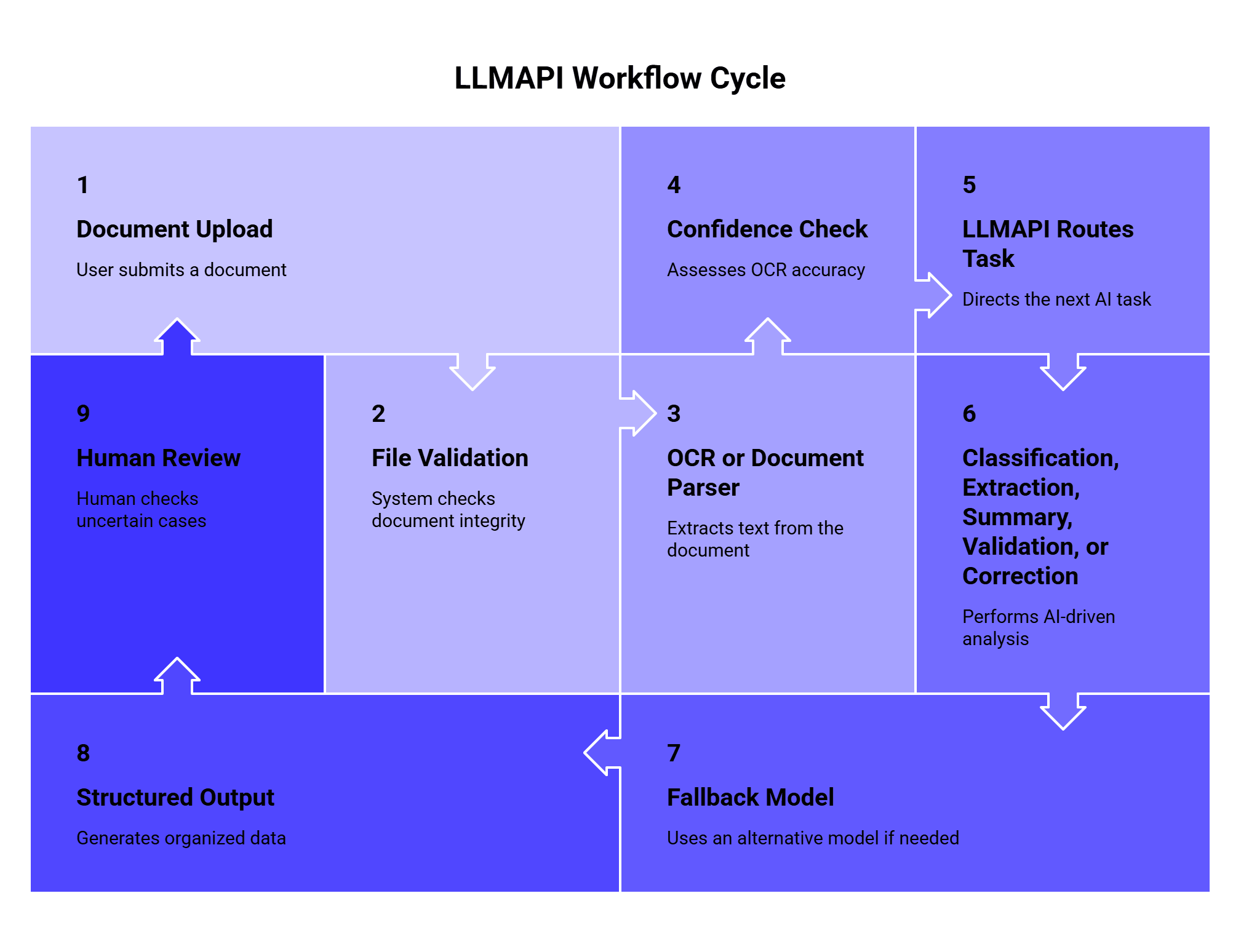
This setup is useful when different OCR tasks need different AI models.
| Task after OCR | Possible model route |
| Simple document classification | Lower-cost model |
| Invoice field extraction | Strong structured-output model |
| Contract summary | Long-context model |
| Compliance review | Higher-accuracy model |
| OCR correction | Text-focused model |
| Fallback for failures | Backup model/provider |
LLMAPI is especially helpful when your app uses more than one model, needs fallback rules, or tracks usage and cost across providers.
Cost checklist
OCR pricing can look simple on the surface and messy in production. Check these details before choosing:
| Cost factor | Why it matters |
| Price per page | Main cost for scanned PDFs |
| Price per document | Better for multi-page document workflows |
| Image vs PDF pricing | Some tools price them differently |
| Synchronous vs batch pricing | Batch jobs may be cheaper |
| Custom model cost | Needed for unusual document types |
| Human review cost | Often required for business-critical workflows |
| Storage cost | Some platforms store files and results |
| Failed requests | Check if failed pages are billed |
| LLM post-processing | Adds cost after OCR |
| Minimum contract | Enterprise tools may require commitments |
| Rate limits | High-volume apps need predictable throughput |
The best cost metric is simple:
Cost per accurate finished document.
That includes OCR, retries, validation, LLM steps, review, storage, and engineering maintenance.
Open-source OCR can reduce API fees, but it adds infrastructure and maintenance work. Managed OCR APIs cost more per page, but they can save development time. Enterprise IDP platforms cost more, but they may reduce manual work in finance, operations, legal, or compliance teams.
Privacy and compliance questions
OCR often touches sensitive data.
Documents may contain names, addresses, passports, driver’s licenses, bank details, tax forms, contracts, medical information, signatures, payroll data, or confidential business records.
Before choosing a tool, ask:
| Question | Why it matters |
| Are documents stored after processing? | Affects retention and privacy |
| Can data be used for training? | Important for private documents |
| Where is data processed? | Region rules may apply |
| Is encryption supported? | Needed for sensitive files |
| Are audit logs available? | Useful for compliance |
| Can files be deleted? | Important for user rights |
| Is on-prem deployment available? | Needed for strict environments |
| Can access be controlled by role? | Prevents internal leakage |
| Are confidence scores available? | Helps prevent silent errors |
| Is human review supported? | Useful for high-risk workflows |
For highly sensitive documents, test open-source OCR, on-prem deployment, private cloud options, or enterprise providers with clear security terms.
Simple decision map
Use this if you need to choose quickly.
Need simple OCR from clean scans?
→ Start with Tesseract, Azure OCR, or Google Vision.
Need open-source OCR with stronger parsing?
→ Test PaddleOCR.
Need quick Python OCR?
→ Try EasyOCR.
Already on AWS?
→ Test Amazon Textract.
Already on Google Cloud?
→ Test Google Document AI.
Already on Azure or Microsoft stack?
→ Test Azure AI Vision and Document Intelligence.
Need enterprise document automation?
→ Test ABBYY or Nanonets.
Need invoices, receipts, IDs, or forms?
→ Test Textract, Google Document AI, Nanonets, Mindee, or ABBYY.
Need OCR output for LLM workflows?
→ Use OCR provider + LLMAPI for routing, extraction, summaries, and validation.
Implementation pattern
A simple production OCR workflow can look like this:
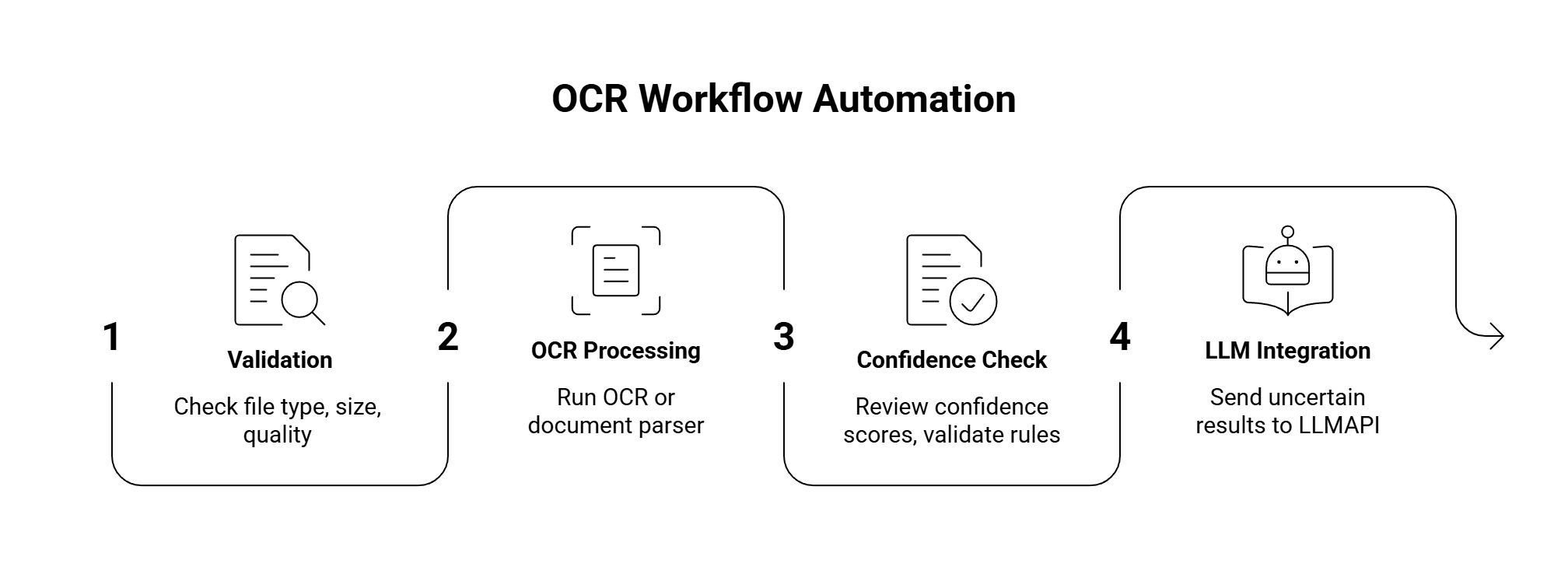
Useful quality checks:
| Check | Why it helps |
| File type allowed | Avoids broken inputs |
| Page count limit | Controls cost |
| Resolution check | Catches bad scans early |
| Orientation detection | Fixes rotated pages |
| Confidence threshold | Flags risky text |
| Required fields present | Catches incomplete extraction |
| Total math validation | Useful for invoices |
| Duplicate detection | Prevents repeated processing |
| Manual review flag | Keeps bad data out of production |
For high-volume apps, also add retry rules and a fallback provider. For example, if one OCR API fails on a document type, route it to a second OCR provider or send it to manual review.
Common mistakes when choosing OCR
| Mistake | Better approach |
| Testing only clean samples | Test messy real documents |
| Comparing only raw text accuracy | Test fields, tables, layout, and review effort |
| Ignoring confidence scores | Use confidence for routing and review |
| Choosing open source only for cost | Count engineering and maintenance time |
| Choosing enterprise IDP for simple OCR | Use a lighter API if text is enough |
| Sending every OCR result to an LLM | Route only tasks that need reasoning |
| Ignoring privacy terms | Review storage, training, deletion, and region rules |
| Skipping human review | Add review for high-risk fields |
| Assuming one tool handles every document | Use different tools for different document types |
FAQ
What is the best OCR solution?
The best OCR solution depends on the document type and workflow. For simple local OCR, Tesseract is a good starting point. For modern open-source OCR and parsing, PaddleOCR is stronger. For cloud document processing, test Amazon Textract, Google Document AI, or Azure Document Intelligence. For enterprise workflows, ABBYY and Nanonets are strong options.
What is the best open-source OCR tool?
Tesseract is the classic open-source OCR engine. PaddleOCR is the stronger modern choice for multilingual OCR, layout parsing, and document AI pipelines. EasyOCR is a good lightweight option for Python projects and image OCR.
Which OCR tool is best for invoices?
Amazon Textract, Google Document AI, Nanonets, Mindee, and ABBYY are all worth testing for invoice OCR. The best choice depends on line-item accuracy, total extraction, pricing, review tools, and integration with your stack.
Can OCR read handwriting?
Some OCR tools can read handwriting, including Amazon Textract and Azure OCR. Handwriting quality varies a lot, so test with real samples. Cursive writing, messy forms, and mixed printed/handwritten fields are harder.
Should I use an LLM for OCR?
Use OCR for reading the document and LLMs for the next layer: classification, extraction, summaries, correction, and validation. Vision-language models can help with document understanding, but they need checks because they can hallucinate under poor image quality.
How should I measure OCR quality?
Measure character accuracy, word accuracy, field accuracy, table accuracy, reading order, confidence quality, latency, cost, and manual correction rate. For business workflows, field accuracy and review effort usually matter more than raw character accuracy.
Where does LLMAPI fit in OCR workflows?
LLMAPI fits after OCR. It can route extracted text to different models for classification, structured extraction, summaries, validation, correction, and fallback. This is useful when OCR is part of a larger AI workflow instead of a standalone text extraction step.
Final thoughts
Choosing the right OCR solution starts with your documents.
Choose Tesseract if you need simple local OCR for clean scans. Choose EasyOCR for quick Python OCR and multilingual image text. Choose PaddleOCR if you want a modern open-source toolkit for OCR, layout, and document parsing.
Choose Amazon Textract if your document workflow already lives in AWS. Choose Google Document AI if you want Google Cloud processors for forms, tables, and entities. Choose Azure AI Vision or Azure Document Intelligence if your team works in the Microsoft ecosystem. Choose ABBYY for enterprise document automation. Choose Nanonets or Mindee for business documents like invoices, receipts, IDs, and forms.
When OCR is the first step in a larger AI pipeline, connect it to LLMAPI. OCR can read the document, while LLMAPI can help route the next tasks: extraction, summarization, validation, correction, metadata generation, and fallback.
The real test is your own document set. Use clean scans, messy scans, phone photos, handwriting, tables, long PDFs, and multilingual pages. The right OCR tool is the one that gives you accurate, usable output with the least cleanup, the right privacy controls, and a cost model your workflow can survive.