
Rate limits are one of those problems that look small during testing and suddenly become very real in production. Your demo works fine with five requests. Then users arrive, traffic spikes, one provider starts returning 429 errors, another model slows down, and your app has to decide what to do next.
For LLM apps, this gets even messier because every request has two moving parts: the number of calls and the number of tokens. A short classification prompt and a long document-analysis prompt may both count as one request, but they use very different amounts of capacity and money.
That is why rate limits and fallbacks should be part of the architecture from the beginning. With LLMAPI, teams can route requests across 200+ models, manage provider keys in one place, monitor usage and reliability, compare model costs, and use built-in fallback handling through a unified gateway. This gives developers a cleaner way to build around provider limits instead of hardcoding one model into the app and hoping it always works.
In this guide, we’ll walk through how rate limits work, when to retry, when to fallback, how to design a fallback chain, and how to use LLMAPI as the control layer for more reliable multi-provider AI workflows.
Why Trust This Guide?
This guide was prepared by a technical content team with 6 years of experience researching APIs, AI infrastructure, SaaS tools, and developer platforms. Our work focuses on turning technical documentation, pricing details, provider behavior, and engineering patterns into practical guides for developers and product teams.
For this article, we reviewed official rate-limit documentation from OpenAI, Anthropic, and Google Gemini, along with Google Cloud’s guidance on reducing 429 errors on Vertex AI. We also looked at recent research on LLM routing, multi-provider workflows, tool-output handling, and multi-tenant SaaS security.
Our goal is practical: explain how teams can keep LLM apps stable when provider limits, traffic spikes, outages, and model differences start affecting real users.
Quick Answer: How Should You Handle Rate Limits in LLMAPI?
The best setup is usually a layered one:
| Layer | What it does | Why it matters |
| Request pacing | Slows down traffic before limits are hit | Prevents avoidable 429 errors |
| Token budgeting | Tracks input/output token usage per model | Protects TPM limits and cost |
| Retry with backoff | Retries temporary failures after a delay | Recovers without hammering the provider |
| Fallback routing | Sends failed requests to another model/provider | Keeps the app working during limits or outages |
| Circuit breaker | Stops sending traffic to unhealthy models | Prevents repeated failures |
| Queueing | Buffers non-urgent tasks | Keeps batch jobs from hurting live traffic |
| Monitoring | Tracks error rate, latency, spend, and fallback usage | Helps teams fix root causes instead of guessing |
In LLMAPI, the practical pattern looks like this:
- Send normal requests through your preferred model.
- If the provider returns a temporary error, retry with exponential backoff and jitter.
- If the provider is rate-limited or unhealthy, route to a fallback model.
- If all fallback options fail, return a clear user-facing message or queue the task.
- Track every retry, fallback, latency spike, and cost increase.
That last part matters a lot. Fallbacks save availability, but they can also change cost, response quality, latency, and output style.
What Are Rate Limits in LLM Apps?
Rate limits control how much traffic your app can send to an API within a specific time window. Traditional APIs often limit simple request volume, such as “100 requests per minute.” LLM APIs usually add token-based limits because model usage depends heavily on prompt size and response length.
For example, Gemini API documentation explains that rate limits are commonly measured across requests per minute (RPM), input tokens per minute (TPM), and requests per day (RPD). Anthropic’s Claude API docs describe rate limits across requests per minute, input tokens per minute, and output tokens per minute for each model class.
That means your app can hit a limit in several ways:
| Limit type | What it means | Example problem |
| RPM | Requests per minute | Too many users send prompts at once |
| TPM | Tokens per minute | A few long prompts consume the whole token budget |
| RPD | Requests per day | A free or lower-tier project hits daily quota |
| Concurrency | Requests running at the same time | Too many long generations run in parallel |
| Output token limit | Response length exceeds allowed output | The model stops early or fails |
| Provider capacity | Shared capacity is temporarily constrained | Valid requests receive 429/503 responses |
The hard part is that users usually do not care which limit was hit. They only see that the app slowed down or failed. So your architecture needs to decide what to do before the error becomes a bad user experience.
Why Rate Limits Feel Different with LLMs
LLM rate limits are harder to manage than many normal API limits because usage is less predictable.
A search request or payment API call usually has a fairly stable shape. A model request can vary wildly. One user asks for a one-sentence answer. Another pastes a 30-page contract. A third user starts an agent workflow that calls the model 15 times in a row.
That creates three practical problems:
| Problem | What happens |
| Token spikes | A small number of long prompts can burn through TPM quickly |
| Burst traffic | A sudden traffic spike can trigger 429 errors even if average usage looks fine |
| Agent loops | Multi-step agents can multiply calls without users noticing |
Google’s guide to reducing 429 errors on Vertex AI recommends smart retries, global routing, context caching, prompt optimization, and traffic shaping. Those ideas apply beyond Vertex AI because the underlying problem is the same: LLM workloads need pacing, routing, and token control.
Where LLMAPI Fits
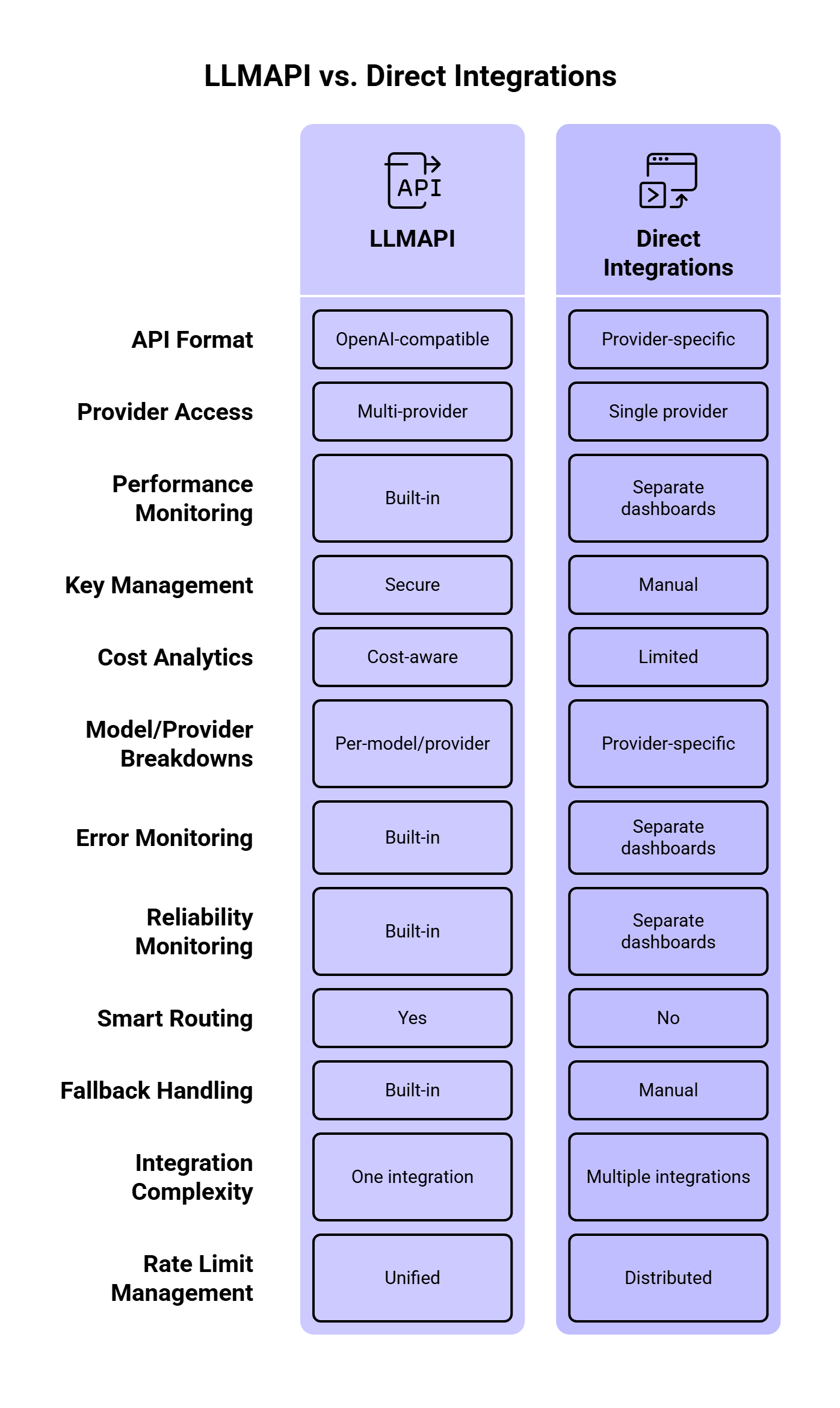
LLMAPI works as a unified gateway between your application and multiple LLM providers. According to the LLMAPI website, the platform supports an OpenAI-compatible API format, multi-provider access, performance monitoring, secure key management, cost-aware analytics, per-model/provider breakdowns, error and reliability monitoring, smart routing, and built-in fallback handling.
That matters because direct model integrations get messy fast.
If your app calls only one provider directly, rate-limit handling is simple at first. You check for a 429 error, wait, and retry. Then your product grows. You add another model for cheaper classification, another provider for long-context tasks, another backup for outages, and another model for premium users. Suddenly, rate limits live in five dashboards and every provider reports errors differently.
LLMAPI gives teams one place to manage that routing layer. The app can keep one integration while LLMAPI handles provider choice, model routing, usage tracking, and fallback behavior behind the scenes.
The Main Rate-Limit Errors to Watch
Most LLM teams eventually run into these errors:
| Error / signal | What it usually means | Best response |
| 429 Too Many Requests | Rate limit or quota exceeded | Wait, retry with backoff, or fallback |
| 503 Service Unavailable | Provider overload or temporary outage | Retry, then fallback |
| Timeout | Model took too long or connection failed | Retry once, then fallback or queue |
| Context length error | Prompt is too large | Reduce prompt, summarize context, or use a larger-context model |
| Quota/billing error | Account quota, tier, or billing issue | Stop retries and alert the team |
| Safety/policy error | Provider rejected the request | Avoid fallback unless policy behavior is understood |
A key detail: failed retries can still consume capacity. OpenAI’s rate-limit guide recommends exponential backoff with jitter and also notes that unsuccessful requests contribute to per-minute limits. So if your app retries too aggressively, it can make the problem worse.
Retry or Fallback: How to Choose
Retries and fallbacks solve different problems.
A retry is useful when the same provider may recover quickly. A fallback is useful when waiting is likely to hurt the user experience or when a provider/model is temporarily unavailable.
| Situation | Retry first? | Fallback? | Why |
| Temporary 429 with Retry-After header | Yes | Maybe | The provider tells you when to retry |
| Short timeout | Yes | Yes after 1–2 retries | Could be a network blip |
| Provider outage | No or minimal | Yes | Waiting may waste time |
| Model-specific capacity issue | Maybe | Yes | Another model may have capacity |
| Context length error | No | Use larger-context model or shorten prompt | Same request will keep failing |
| Billing/quota exhaustion | No | Yes, if another provider is configured | Retrying the same route will fail |
| Safety/policy rejection | Usually no | Carefully | Providers may behave differently |
A good LLMAPI setup should treat 429 errors, timeouts, provider overload, and quota issues differently. One generic “retry everything three times” rule is easy to build, but it creates messy production behavior.
Step 1: Set Clear Rate-Limit Policies
Before adding fallback logic, define what each user, team, environment, and workload is allowed to consume.
A good policy usually includes:
| Policy | Example |
| Per-user RPM | 20 chat requests per minute |
| Per-team TPM | 500K tokens per hour |
| Per-environment limits | Lower limits for staging and dev |
| Per-model access | Premium models only for paid users |
| Daily spend cap | Stop or downgrade after budget threshold |
| Priority levels | Production traffic gets priority over batch jobs |
This matters because rate limits should protect both reliability and cost. A runaway script in staging should never consume the same provider quota as a live customer workflow.
LLMAPI’s cost-aware analytics and per-model/provider breakdowns are useful here because teams can see requests, tokens, spend, and provider-level usage from one dashboard.
Step 2: Use Exponential Backoff with Jitter
When a provider returns a temporary rate-limit error, immediate retries are usually a bad idea. If 1,000 requests fail and all 1,000 retry instantly, you get a second traffic spike right after the first one.
OpenAI recommends random exponential backoff for rate-limit errors. Google’s Vertex AI guidance also recommends exponential backoff with jitter for temporary overload errors like 429 and 503.
A simple pattern:
async function retryWithBackoff<T>(
  fn: () => Promise<T>,
  maxRetries = 3,
  baseDelayMs = 500
): Promise<T> {
  let lastError: unknown;

  for (let attempt = 0; attempt <= maxRetries; attempt++) {
    try {
      return await fn();
    } catch (error: any) {
      lastError = error;

      const retryable =
        error.status === 429 ||
        error.status === 503 ||
        error.code === "ETIMEDOUT";

      if (!retryable || attempt === maxRetries) {
        throw error;
      }

      const jitter = Math.random() * 250;
      const delay = baseDelayMs * Math.pow(2, attempt) + jitter;

      await new Promise((resolve) => setTimeout(resolve, delay));
    }
  }

  throw lastError;
}
This gives the provider time to recover and spreads retry traffic across slightly different moments.
Step 3: Respect Retry-After Headers
When a provider gives you a retry window, use it.
Anthropic’s rate-limit documentation says that when a limit is exceeded, the API returns a 429 error with a retry-after header indicating how long to wait. This is better than guessing.
A practical rule:
function getRetryDelayMs(error: any, fallbackDelayMs = 1000): number {
  const retryAfter = error.headers?.["retry-after"];

  if (retryAfter) {
    const seconds = Number(retryAfter);
    if (!Number.isNaN(seconds)) {
      return seconds * 1000;
    }
  }

  return fallbackDelayMs;
}
Use provider headers first, then your own exponential backoff rule when no header is available.
Step 4: Build a Fallback Chain
Fallbacks keep the app running when the primary model cannot serve a request. In LLMAPI, this is where multi-provider routing becomes valuable.
A fallback chain should be intentional. A cheap model may work as a fallback for classification, but a legal review assistant may need a model with similar reasoning quality. A fast model may be fine for internal summaries, while customer-facing responses may need stronger guardrails and better instruction-following.
A useful fallback chain can look like this:
| Task type | Primary model | Fallback 1 | Fallback 2 | Notes |
| Simple classification | Low-cost fast model | Similar cheap model | Stronger model | Optimize for cost |
| Customer support reply | Balanced model | Similar quality model | Premium model | Keep tone and quality stable |
| Long document summary | Long-context model | Another long-context model | Queue for later | Avoid context errors |
| Internal data extraction | Cost-efficient model | Deterministic parser + LLM | Queue | Accuracy matters more than speed |
| Real-time chat | Fast model | Another fast model | Short apology + retry option | Latency matters most |
Orq’s AI Router retry/fallback docs recommend keeping fallback chains short, using a maximum of three fallback models, and choosing models with similar capabilities. That is a good production rule. Long fallback chains can hide problems, increase latency, and create output inconsistency.
Step 5: Use Circuit Breakers for Bad Routes
A circuit breaker temporarily stops traffic from going to a provider or model after repeated failures.
Without a circuit breaker, your app may keep sending requests to a route that is already failing. That wastes time, increases user-facing latency, and can burn more rate-limit capacity.
A simple circuit breaker rule:
| Signal | Action |
| Error rate above 20% for 2 minutes | Stop routing new traffic to that model |
| p95 latency above threshold | Reduce traffic share |
| Repeated 429s | Pause route until reset window |
| Provider outage | Switch to fallback provider |
| Recovery checks pass | Gradually restore traffic |
Kong’s AI Gateway docs list retry and fallback, rate limiting, semantic routing, load balancing, metrics, audit logs, and cost control as gateway capabilities. These features work best together. Rate limits tell you when traffic is too high, fallbacks provide another path, and circuit breakers keep unhealthy paths from dragging down the whole system.
Step 6: Separate Real-Time and Batch Traffic
Live user requests and background jobs should have different limits. A chatbot response needs to come back quickly. A nightly data-enrichment job can wait. If both share the same provider quota, a batch job can accidentally break the live app.
A better setup:
| Traffic type | Priority | Recommended handling |
| Live chat | High | Fast model, short retries, quick fallback |
| Support automation | High | Reliable model, quality-matched fallback |
| Bulk summarization | Medium | Queue, batch, lower-cost model |
| Offline tagging | Low | Delay-friendly queue |
| Experiments | Low | Strict budget and token caps |
Google’s Vertex AI guidance suggests using different consumption patterns for different workloads, including provisioned throughput for essential real-time traffic and batch or flexible options for latency-tolerant jobs. The same idea applies when you design LLMAPI routing policies.
Step 7: Reduce Token Load Before You Hit Limits
A lot of rate-limit problems are token problems in disguise.
If your prompt sends the same long system instructions, full conversation history, oversized JSON schemas, and unused context on every request, you burn through TPM faster than needed.
Ways to reduce token pressure:
| Technique | How it helps |
| Summarize long chat history | Reduces repeated context |
| Cache repeated prompts | Avoids paying for similar work again |
| Trim unused documents | Reduces input tokens |
| Use smaller models for simple tasks | Saves premium quota |
| Set response length caps | Controls output token usage |
| Compress structured context | Keeps prompts smaller |
| Split long workflows | Sends each model only what it needs |
Google recommends context caching, prompt optimization, and traffic shaping as ways to reduce 429 errors on Vertex AI. LLMAPI also highlights semantic caching and cost-aware routing, which can help teams avoid paying for identical or similar requests repeatedly.
Step 8: Track Fallback Quality
Fallbacks can keep the app available, but they can also change the response.
Different models may vary in tone, formatting, refusal behavior, JSON reliability, tool-calling behavior, and latency. So every fallback should have quality checks.
Track these fields:
| Metric | Why it matters |
| Fallback rate | Shows how often primary routes fail |
| Retry rate | Reveals provider pressure or bad pacing |
| Fallback model output quality | Confirms backup models can do the task |
| JSON/schema failure rate | Shows whether fallback models break structured output |
| p95 latency | Measures user impact |
| Cost per successful request | Shows fallback cost impact |
| User correction rate | Helps detect worse fallback answers |
Recent research makes this point stronger. The paper How Good Are LLMs at Processing Tool Outputs? found that LLMs can struggle with structured tool outputs, and different processing strategies caused performance differences from 3% to 50%. If your primary model reliably returns clean JSON and your fallback model does not, the fallback can keep the request alive while still breaking the workflow.
So for structured outputs, validate the response before returning it or sending it to the next step.
Step 9: Add Observability from Day One
Rate limits and fallbacks are hard to debug without logs.
At minimum, log:
{
  "request_id": "req_123",
  "user_id": "user_456",
  "route": "support_reply",
  "primary_model": "model_a",
  "final_model": "model_b",
  "fallback_used": true,
  "retry_count": 2,
  "error_code": 429,
  "latency_ms": 4200,
  "input_tokens": 1800,
  "output_tokens": 420,
  "estimated_cost": 0.014
}
You want to answer questions like:
- Which users or teams hit limits most often?
- Which model fails most often?
- Which route triggers the most fallbacks?
- How much do fallbacks cost?
- Do fallback responses fail validation more often?
- Are batch jobs hurting live traffic?
- Did a provider issue start before users reported it?
LLMAPI’s dashboard features, including cost-aware analytics, per-model/provider breakdowns, and reliability monitoring, are useful because rate-limit debugging needs visibility across models and providers.
Step 10: Give Users a Better Failure Message
A raw 429 error is awful UX.
For internal tools, you can be direct:
We hit the current model’s rate limit. Retrying in a few seconds.
For customer-facing apps, keep it calmer:
This request is taking longer than usual. We’re trying another model now.
For queued tasks:
Your request is queued and will run when capacity is available.
Avoid showing provider names, quota numbers, or internal fallback chains to end users unless the product is built for developers. Most users only need to know whether they should wait, retry, or expect a delayed result.
Recommended LLMAPI Rate-Limit and Fallback Architecture
Here is a simple production-ready flow:
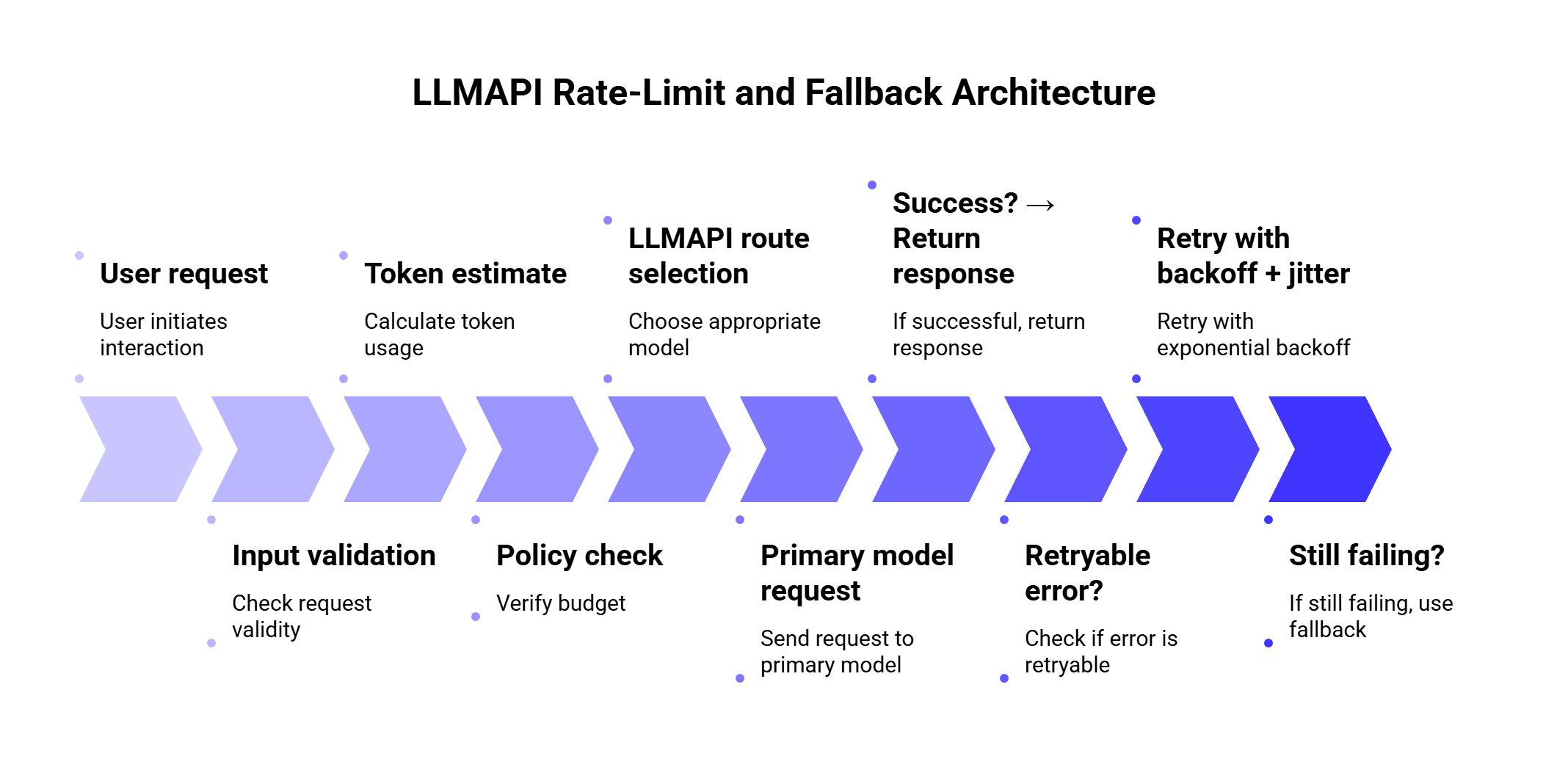
This gives you a safer default because every request goes through budget checks, routing, retries, fallback, validation, and monitoring.
Example: Fallback Logic with LLMAPI-Style Routing
Here is a simplified TypeScript-style example. The exact fields depend on your app and LLMAPI setup, but the logic is the important part.
type LLMRequest = {
  route: "support_reply" | "classification" | "summary";
  prompt: string;
  userId: string;
};

const fallbackChains = {
  support_reply: ["primary-balanced", "backup-balanced", "premium-safe"],
  classification: ["cheap-fast", "backup-cheap", "balanced"],
  summary: ["long-context-primary", "long-context-backup"]
};

async function callWithFallback(request: LLMRequest) {
  const models = fallbackChains[request.route];

  let lastError: any;

  for (const model of models) {
    try {
      const response = await retryWithBackoff(() =>
        callLLMAPI({
          model,
          prompt: request.prompt,
          metadata: {
            user_id: request.userId,
            route: request.route
          }
        })
      );

      await validateResponse(response, request.route);

      return {
        response,
        final_model: model,
        fallback_used: model !== models[0]
      };
    } catch (error: any) {
      lastError = error;

      if (!isFallbackSafe(error)) {
        throw error;
      }

      await markRouteHealth(model, error);
    }
  }

  throw lastError;
}

function isFallbackSafe(error: any) {
  return (
    error.status === 429 ||
    error.status === 503 ||
    error.code === "ETIMEDOUT" ||
    error.code === "PROVIDER_UNAVAILABLE"
  );
}
The key idea: fallback on capacity and reliability problems. Be more careful with safety errors, validation errors, and context-length problems because switching models may create inconsistent behavior.
How Many Fallback Models Should You Use?
Usually two or three is enough.
One primary model and two fallbacks gives you a good balance between availability and control. Longer chains can create long waits, unexpected cost jumps, and inconsistent answers.
| Fallback setup | Best for |
| 1 primary + 1 fallback | Simple apps |
| 1 primary + 2 fallbacks | Most production apps |
| Cost-based routing + quality fallback | High-volume SaaS |
| Provider-diverse fallback | Apps that need higher availability |
| Queue after fallback failure | Batch or non-urgent work |
A practical chain should answer four questions:
- Is the fallback model good enough for this task?
- Is the fallback provider independent from the primary provider?
- Will the fallback cost more?
- Does the fallback produce output in the same format?
If the answer to question four is unclear, add validation before shipping the output.
Cost-Aware Fallbacks
Fallbacks can quietly increase spend.
For example, imagine your default classification route uses a low-cost model. During traffic spikes, the system falls back to a premium model. The app stays available, which is good. Your bill also jumps, which may be very bad.
Use different fallback rules by task:
| Task | Cost strategy |
| Classification | Fallback to similar low-cost model first |
| Internal summaries | Queue before using premium model |
| Customer support | Use stronger fallback if user impact is high |
| Legal/finance content | Prefer quality over cost |
| Batch enrichment | Delay instead of escalating cost |
Recent routing research supports this kind of thinking. The 2026 paper Robust Batch-Level Query Routing for Large Language Models under Cost and Capacity Constraints studies routing under cost, GPU resource, and concurrency limits. The authors report that robust routing improved accuracy by 1–14% over non-robust counterparts, while batch-level routing outperformed per-query methods by up to 24% under adversarial batching.
That research is a useful reminder: routing decisions should consider cost and capacity together. A fallback that keeps quality high while destroying budget creates another production problem.
Security Considerations for Fallbacks
Fallbacks can also affect security and compliance.
If the primary route uses a provider approved for sensitive data, the fallback provider should meet the same requirements. Otherwise, a rate-limit event could accidentally send sensitive user content to a provider that was never approved for that data type.
Before enabling fallbacks, check:
| Security question | Why it matters |
| Can this provider process the same data category? | Prevents policy violations |
| Are logs stored safely? | Protects user prompts and outputs |
| Are API keys managed centrally? | Reduces leakage risk |
| Can teams audit fallback usage? | Helps compliance and debugging |
| Are tenant boundaries preserved? | Protects multi-tenant SaaS apps |
The 2026 paper Security Challenges of LLM Integration in Multi-Tenant SaaS identified 18 vulnerability classes and found that 12 had stronger impact in multi-tenant deployments than in single-tenant systems. That matters for LLM gateways because fallback routing, shared tools, and centralized provider access all need careful controls.
LLMAPI’s secure key management and centralized team access can help reduce key sprawl, but teams still need clear rules for which providers can handle which workloads.
Fallbacks for Structured Output
Structured output deserves special care.
If your app expects JSON, the fallback model must follow the same schema. Otherwise, a successful fallback can still break the product.
Example:
{
  "intent": "refund_request",
  "urgency": "high",
  "language": "es",
  "summary": "Customer received a damaged order and needs help."
}
Validation checklist:
| Check | Example |
| Valid JSON | Can the response be parsed? |
| Required fields | Are intent, urgency, and summary present? |
| Allowed values | Is urgency one of low, medium, high? |
| Language consistency | Does response language match the request? |
| Safety constraints | Did the model include disallowed content? |
If validation fails, you can retry once with a stricter prompt, fallback to another model, or route to a queue/manual review.
Common Mistakes to Avoid
1. Retrying too aggressively
Fast retries can make rate-limit issues worse. Use provider headers, exponential backoff, and jitter.
2. Sending every fallback to the most expensive model
This keeps requests alive, but it can wreck cost control. Match fallback quality and cost to the task.
3. Using fallbacks with very different behavior
A fallback model should be able to produce the same format, tone, and task quality. If the response changes too much, users will notice.
4. Ignoring token limits
Some teams track requests and forget tokens. With LLMs, token usage often matters more than request count.
5. Mixing live and batch traffic
A background job should never consume the same critical capacity as a live user flow without limits.
6. Hiding fallback usage from logs
If a fallback happens and nobody can see it, debugging becomes guesswork.
7. Falling back on policy errors without review
Different providers can handle safety and compliance differently. Treat policy failures carefully.
LLMAPI Setup Checklist for Rate Limits and Fallbacks
Use this checklist before going live:
| Area | What to configure |
| Routing | Primary model per task type |
| Fallbacks | 1–2 backup models with similar capability |
| Retry policy | Exponential backoff, jitter, retry cap |
| Error handling | Different rules for 429, 503, timeout, quota, context errors |
| Token budgeting | Per-user/team/model token limits |
| Cost controls | Daily/monthly spend caps and model downgrade rules |
| Monitoring | Error rate, latency, retries, fallback rate, cost |
| Validation | JSON/schema checks for structured outputs |
| Security | Provider approvals by data type |
| User messaging | Clear messages for delay, queue, or temporary failure |
Example Fallback Policies by Use Case
| Use case | Primary route | Fallback behavior |
| Chatbot | Fast balanced model | Retry once, then use similar model |
| Support assistant | Reliable model | Fallback to quality-matched provider |
| Bulk summarization | Cheap model | Queue before premium fallback |
| Intent classification | Low-cost model | Fallback to another low-cost model |
| Document extraction | Structured-output model | Validate JSON, retry with stricter prompt |
| Internal analytics | Batch model | Delay during limits |
| Customer-facing legal content | Premium model | Fallback only to approved premium model |
FAQs
What is a rate limit in LLMAPI?
A rate limit controls how many requests or tokens can move through your LLM workflow within a specific time window. In an LLM gateway setup, limits can apply by user, team, provider, model, route, or environment.
What does a 429 error mean?
A 429 error usually means the request exceeded a rate limit or quota. The best response depends on the provider and error details. In many cases, you should wait, retry with exponential backoff, or route to a fallback model.
Should every 429 trigger a fallback?
Many 429 errors should retry first, especially when the provider sends a Retry-After header. Fallback makes sense when waiting would hurt the user experience, the primary route is repeatedly failing, or another provider/model has available capacity.
How many fallback models should I configure?
Two or three models in a chain is usually enough. Use one primary route and one or two fallbacks with similar capability. Long chains add latency and make quality harder to control.
Should fallback models be cheaper or stronger?
It depends on the task. For classification and internal workflows, cheaper fallbacks often make sense. For customer-facing, legal, finance, or high-stakes outputs, use quality-matched fallbacks.
How can LLMAPI help with rate limits?
LLMAPI helps by giving teams a unified gateway for provider access, routing, usage tracking, cost analytics, secure key management, and fallback handling. This makes it easier to manage rate limits across multiple models and providers from one layer.
What should I monitor?
Track 429 errors, retry count, fallback rate, p95 latency, token usage, model/provider spend, validation failures, and user-facing errors. These metrics show whether the system is healthy or quietly leaning too much on fallbacks.
Final Thoughts
Rate limits are normal in LLM apps. Provider capacity changes, traffic spikes, users send long prompts, and agents can create more calls than expected. The goal is to design for that reality before users feel it.
A strong LLMAPI setup should combine token-aware limits, smart retries, short fallback chains, circuit breakers, cost controls, and clear monitoring. Retry temporary failures. Fallback when the primary route is unavailable or over capacity. Queue work that can wait. Validate structured outputs before they move deeper into the system.
LLMAPI gives teams a cleaner way to manage this across providers. Instead of scattering rate-limit logic, API keys, model choices, and fallback rules across the application, teams can centralize more of that behavior in one gateway.
The best fallback strategy is the one users barely notice. The request may retry, reroute, or wait behind the scenes, but the product still feels stable.