
Language detection sounds like a small feature until real users get involved. One person writes “hola,” another mixes English and French in the same message, someone adds emojis, and someone else types Ukrainian words with Latin letters. A basic detector may still return a language code, but that result may not be reliable enough to route a support ticket, trigger translation, moderate user content, or power a multilingual AI workflow.
For this guide, we researched 10 language detection APIs and libraries based on what developers usually care about in production: supported languages, confidence scores, batch processing, pricing, setup time, deployment options, and how each tool fits into a larger AI pipeline.
We also looked at what happens after language detection. In many apps, detection is the first step before translation, summarization, moderation, classification, or localized response generation. That is where a unified model gateway like LLMAPI can help teams manage the next layer through one API connection instead of wiring every AI provider separately. LLMAPI gives developers access to 200+ models, centralized API key management, request routing, cost-aware analytics, provider breakdowns, and reliability monitoring through one gateway.
Why Trust This Guide?
This guide was prepared by a technical content team with 6 years of experience researching APIs, AI infrastructure, SaaS platforms, and developer tools. Our work focuses on turning technical product documentation, pricing pages, and engineering use cases into practical buying guides for developers, product teams, and startup founders.
For this article, we reviewed official API documentation, pricing pages, vendor feature lists, and third-party research on LLM tool use, orchestration, SaaS security, code-mixed language identification, and multi-provider AI workflows. We compared each language detection option by the criteria that matter most in production: short-text handling, confidence scores, batch support, deployment model, pricing predictability, and how well the tool fits into a larger AI workflow.
We also treated vendor pages carefully. Official docs are useful for facts like pricing, supported languages, and response formats, while third-party research helps explain why these details matter in real systems.
Quick Comparison of the Best Language Detection APIs
| API / Tool | Best for | Deployment | Confidence score | Batch support | Free option | Main limitation |
| Google Cloud Translation | Translation-first workflows | Cloud API | Yes | Yes | Monthly free character credit | Can feel expensive for detection-only use |
| Amazon Comprehend | AWS NLP pipelines | Cloud API | Yes | Yes | 12-month free tier | Focuses on dominant language detection |
| Azure AI Language | Microsoft/Azure teams | Cloud API / container | Yes | Yes | Free tier available | Text-record billing needs planning |
| DetectLanguage.com | Lightweight standalone detection | Cloud API | Yes | Yes | 1,000 requests/day | Narrower NLP feature set |
| IBM Watson NLU | Broader enterprise text analytics | Cloud API | Yes | Yes | 30K NLU items/month | More setup than simple detection tools |
| Eden AI | Multi-provider testing and fallback | Unified API | Depends on provider | Yes | Trial/pay-as-you-go options | Adds another routing layer |
| LibreTranslate | Self-hosted translation and detection | Self-hosted API | Limited | Yes | Open source | Requires hosting and model upkeep |
| fastText | High-speed local language ID | Local model/library | Yes | Yes | Open source | Short/noisy text needs testing |
| Lingua | Short text and chat-style inputs | Local library | Yes | Yes | Open source | Smaller language coverage than fastText |
| LanguageTool API | Grammar apps with auto language handling | HTTP API | Limited | Limited | Public API limits | Built for proofreading, not bulk detection |
Google Cloud Translation pricing depends on the translation model and usage volume, with a monthly free character credit before paid tiers apply. Amazon Comprehend pricing is measured in character units for many NLP APIs, with minimum request sizes that matter for short-text workloads. DetectLanguage.com lists support for 216 languages, short text, batch requests, and free/premium plans.
Our Verdict: Which Language Detection API Is Best?
If we had to choose one default option for most developer teams, we would start with Google Cloud Translation when language detection is tied to translation, and Amazon Comprehend when the product already runs on AWS. Both are mature, well-documented, and easier to trust in production than smaller tools.
For a simple standalone detector, DetectLanguage.com is easier to set up and more focused. It does one job without pulling in a full cloud NLP stack.
For privacy-sensitive or high-volume local workflows, fastText and Lingua are better choices than cloud APIs. fastText wins on language coverage and speed, while Lingua is more interesting for short text, chat messages, and small user inputs.
Some tools are more situational. IBM Watson NLU is powerful, though too heavy if the only task is language detection. LanguageTool API is useful for proofreading apps, though it is a weak fit for bulk language classification. Eden AI is useful for testing several providers through one interface, though it adds another layer between your app and the actual model.
So the short answer is:
| Need | Best choice |
| Translation workflows | Google Cloud Translation |
| AWS-native NLP pipelines | Amazon Comprehend |
| Azure enterprise workflows | Azure AI Language |
| Simple standalone language detection | DetectLanguage.com |
| Local high-volume processing | fastText |
| Local short-text detection | Lingua |
| Self-hosted translation + detection | LibreTranslate |
| Provider comparison and fallback | Eden AI |
| Grammar apps with auto-detection | LanguageTool API |
| Downstream LLM routing after detection | LLMAPI |
Language Detection APIs Compared by Production Fit
| Tool | Overall fit | Accuracy confidence | Setup effort | Cost predictability | Best use case | Our rating |
| Google Cloud Translation | Strong | High | Medium | Medium | Detection before translation | 9/10 |
| Amazon Comprehend | Strong | High | Medium | Strong | AWS-native NLP pipelines | 8.5/10 |
| Azure AI Language | Strong | High | Medium | Medium | Microsoft/Azure environments | 8/10 |
| DetectLanguage.com | Strong | Medium-High | Low | Strong | Simple standalone detection | 8/10 |
| fastText | Strong | Medium-High | Medium | Strong | Local high-volume processing | 8/10 |
| Lingua | Strong | Medium-High | Medium | Strong | Short local text detection | 8/10 |
| LibreTranslate | Good | Medium | High | Strong | Self-hosted translation workflows | 7/10 |
| Eden AI | Good | Depends on provider | Low | Medium | Multi-provider testing | 7/10 |
| IBM Watson NLU | Situational | High | High | Medium | Enterprise text analytics | 6.5/10 |
| LanguageTool API | Situational | Limited for detection-only use | Low | Medium | Grammar and writing tools | 6/10 |
These ratings are based on production fit, not raw model accuracy alone. A tool can be technically strong and still be the wrong choice if it is too expensive, too heavy, or built for a different workflow.
What Is a Language Detection API?
A language detection API takes a text input and returns the language it believes the text is written in. In a simple case, you send something like:
{
“text”: “Bonjour, comment puis-je vous aider?”
}
And the API returns something like:
{
“language”: “fr”,
“confidence”: 0.98
}
Most tools return short language codes like en, es, fr, or uk. That looks simple, but it matters. These codes decide which translation model gets called, which moderation rules apply, which support queue receives the ticket, and how content gets indexed.
Some APIs also return confidence scores. Google Cloud Translation documentation shows language detection responses with language codes and confidence values, while Azure AI Language documentation says its language detection feature returns the main language, ISO 639-1 code, readable name, confidence score, script name, and ISO 15924 script code.
Language Detection API vs Local Library vs AI Gateway
Before choosing a tool, it helps to separate the main categories.
| Option | Best for | Tradeoff |
| Dedicated language detection API | Simple cloud-based detection | Another vendor to manage |
| Cloud NLP platform | Detection plus sentiment, entities, PII, or classification | Heavier setup |
| Open-source/local library | Privacy and low-cost high-volume processing | More maintenance |
| Self-hosted API | Private translation and detection workflows | You handle uptime and infrastructure |
| Unified AI gateway | Downstream AI workflows after detection | Works best as part of a larger model-routing setup |
This is also where LLMAPI fits into the bigger picture. We would treat LLMAPI as the next layer in the workflow. Once your app knows the language, LLMAPI can help route the text to translation, summarization, classification, moderation, or response generation models through one API gateway.
How We Chose These Language Detection APIs
For our research, we focused on tools that developers can realistically use in production. We checked official documentation, pricing pages, response formats, language coverage, deployment options, and whether each tool has a clear use case.
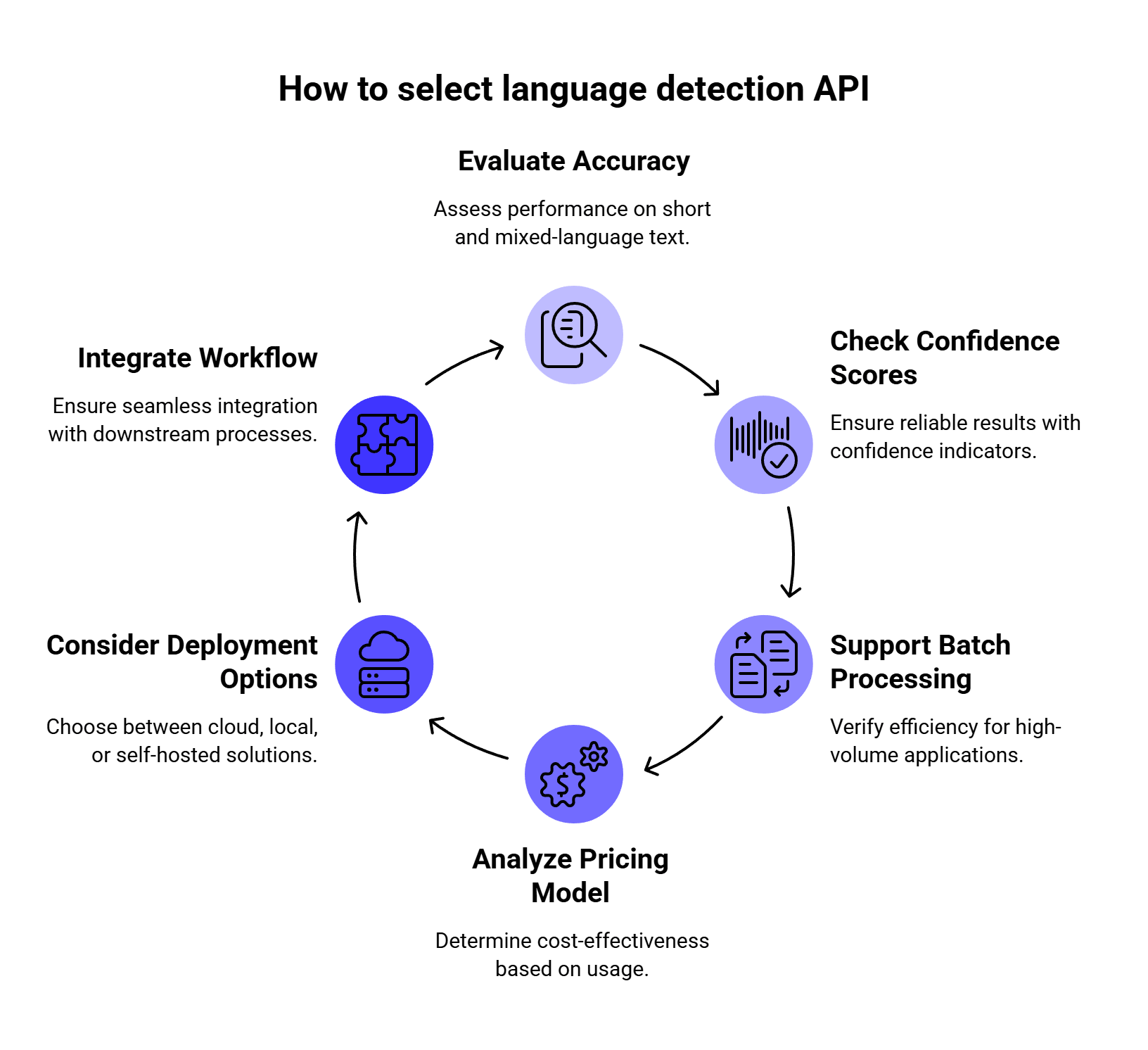
We paid attention to six things:
| What we checked | Why it matters |
| Accuracy on short text | Many real inputs are tiny: “hola,” “merci,” “дякую,” or “help pls.” |
| Confidence scores | Your app needs to know when a result is uncertain. |
| Batch support | High-volume apps rarely send one text string at a time. |
| Pricing model | Character-based, request-based, and record-based pricing can change the real cost a lot. |
| Deployment | Some teams are fine with cloud APIs, while others need local or self-hosted options. |
| Next-step workflow | Detection often leads into translation, moderation, summarization, or routing. |
We also looked at whether each tool detects the dominant language of a full text block or can support more complex language handling. This matters for code-switched messages like:
Hola, can you help me with my order?
Many APIs will return one main language for the whole input. For mixed-language content, developers may need to split text into smaller chunks and run detection on each segment.
This problem is bigger than a small edge case. Research on code-mixed text shows that online and social media content often mixes languages at sentence, word, and even sub-word level. The COMI-LINGUA dataset paper introduced a large manually annotated Hindi-English code-mixed dataset with 100,970 instances evaluated by three expert annotators, covering tasks such as language identification, matrix language identification, POS tagging, named entity recognition, and translation. That is why we do not recommend judging language detection tools only with clean paragraph-length samples.
1. Google Cloud Translation
Best for: teams that need language detection as part of a translation workflow.
Google Cloud Translation is one of the strongest choices when language detection sits right before machine translation. Your app can detect the source language, translate the text, and keep the full workflow inside Google Cloud.
We like it most for products that already handle localization, multilingual support, international documentation, marketplaces, or customer-facing translation. Google’s language detection documentation shows that its API returns detected languages with confidence values, which helps when a workflow needs to decide whether to translate automatically or send the input for review.
| Feature | Details |
| Deployment | Cloud API |
| Response | Language code + confidence |
| Best use case | Translation routing |
| Pricing | Character-based |
| Free usage | Monthly free character credit |
| Main drawback | Price can feel high for simple detection-only use |
Compared with Amazon Comprehend: Google Cloud Translation is the better fit when the next step is translation. Amazon Comprehend is stronger when the next step is broader AWS text analytics.
Compared with DetectLanguage.com: Google is heavier, though it gives you a stronger translation ecosystem. DetectLanguage.com is simpler for detection-only use.
We’d choose Google Cloud Translation if detection is part of a translation flow. For example, a support app can detect that a user wrote in German, translate the message into English for the support team, then generate a German reply.
We’d skip it if the app only needs low-cost standalone detection. For basic language identification, a lighter API or local library may be easier to justify.
2. Amazon Comprehend
Best for: AWS-native NLP pipelines.
Amazon Comprehend includes dominant language detection as part of its broader NLP feature set. It works well when language detection is one step before sentiment analysis, entity recognition, PII detection, classification, or document processing inside AWS.
Amazon’s dominant language documentation says Comprehend determines the dominant language of input text and uses RFC 5646-style identifiers. If a two-letter ISO 639-1 identifier exists, Comprehend uses it, with a regional subtag when needed. Otherwise, it uses an ISO 639-2 three-letter code.
| Feature | Details |
| Deployment | Cloud API |
| Response | Language code + confidence score |
| Best use case | AWS text analytics pipelines |
| Pricing | Character-unit based |
| Free usage | 12-month free tier |
| Main drawback | Dense code-switching may need preprocessing |
Compared with Google Cloud Translation: Comprehend is usually better for AWS-based analytics workflows. Google is better when translation is the main next step.
Compared with Azure AI Language: the best choice often depends on your cloud stack. AWS teams will usually move faster with Comprehend, while Microsoft-heavy teams will prefer Azure AI Language.
We’d choose Amazon Comprehend if your team already uses AWS and needs language detection inside a bigger NLP pipeline. It is especially useful for S3-based document processing, Lambda workflows, analytics jobs, and support data classification.
We’d watch out for short inputs and transliterated text. Amazon’s language documentation notes that Comprehend does not support phonetic language detection, so inputs like “arigato” or “nihao” may not be detected as Japanese or Chinese.
3. Azure AI Language
Best for: Microsoft and Azure-based teams.
Azure AI Language includes language detection as a prebuilt feature. Microsoft’s language detection overview says it can identify more than 100 languages in their primary script and returns the main language, ISO 639-1 code, readable name, confidence score, script name, and ISO 15924 script code.
This is useful for enterprise apps where language detection connects to Azure AI Search, Azure Functions, Microsoft compliance tooling, or internal data platforms.
| Feature | Details |
| Deployment | Cloud API or container |
| Response | Language name, code, confidence score, script data |
| Best use case | Azure-native enterprise apps |
| Pricing | Text-record based |
| Main benefit | Strong Microsoft ecosystem fit |
| Main drawback | Pricing needs payload planning |
One detail we like: Azure lets developers use a country/region hint to help with ambiguous text. Microsoft gives the example of “communication,” a word shared by English and French, where a France hint can help the model choose French.
Compared with Amazon Comprehend: Azure AI Language is the better choice for Microsoft environments. Comprehend is the better choice for AWS pipelines.
Compared with Google Cloud Translation: Azure is stronger for Azure-native text analytics, while Google is easier to justify when detection leads directly into translation.
We’d choose Azure AI Language if your app already lives in the Microsoft ecosystem and you want language detection close to the rest of your Azure services.
We’d watch out for many tiny inputs. Text-record pricing can become awkward if every short phrase counts as a separate record, so batching strategy matters.
4. DetectLanguage.com
Best for: simple standalone language detection.
DetectLanguage.com is one of the easiest options to understand. It focuses on language detection and avoids the extra weight of full NLP platforms. Its API documentation says the service returns JSON and provides official API clients for Ruby, Python, Node.js, Go, Java, PHP, .NET, Perl, and Crystal.
The service says it detects 216 languages, supports short texts and batch requests, and offers both free and premium plans.
| Feature | Details |
| Deployment | Cloud API |
| Response | JSON language detection result |
| Best use case | Lightweight standalone detection |
| Free plan | 1,000 requests/day |
| Paid plans | Start at $5/month |
| Main drawback | Fewer extra NLP features |
Compared with Google, AWS, and Azure: DetectLanguage.com is simpler and easier to set up. The tradeoff is that it does not give you the same broad NLP or cloud ecosystem.
Compared with fastText and Lingua: DetectLanguage.com is easier if you want a managed API. fastText and Lingua give you more control if you want local execution.
We’d choose DetectLanguage.com if the app needs quick language detection without setting up Google Cloud, AWS, or Azure. It is a good fit for smaller SaaS products, internal tools, CMS workflows, and simple routing tasks.
We’d skip it if the same text also needs deep NLP features like entity extraction, sentiment analysis, PII detection, or translation.
5. IBM Watson Natural Language Understanding
Best for: enterprise text analytics where language detection is part of a larger analysis workflow.
IBM Watson Natural Language Understanding is built for broader text analysis. IBM describes it as a service for extracting metadata from unstructured text, including categories, concepts, entities, keywords, sentiment, emotion, relations, and syntax.
This makes it more powerful than a simple detector, although that also means it may be more than you need for basic routing.
| Feature | Details |
| Deployment | Cloud API |
| Best use case | Enterprise content analytics |
| Free plan | 30,000 NLU items/month |
| Main benefit | Rich text analysis beyond detection |
| Main drawback | Too heavy for simple language checks |
IBM’s pricing documentation lists a Lite plan with 30,000 NLU items per month, which is useful for proofs of concept or small workloads.
Compared with Amazon Comprehend and Azure AI Language: Watson NLU is another enterprise text analytics tool, though AWS and Azure are usually easier choices for teams already committed to those clouds.
Compared with DetectLanguage.com: Watson NLU is much broader. DetectLanguage.com is cleaner for standalone detection.
We’d choose IBM Watson NLU if language detection is part of a wider enterprise analytics flow, such as analyzing customer feedback, documents, reviews, or knowledge base content.
We’d skip it if the only goal is “detect language, then route text.” A narrower API will usually be easier to set up and cheaper to run.
6. Eden AI
Best for: comparing multiple providers or adding fallback logic.
Eden AI gives developers a unified API for language detection and access to multiple AI providers through one platform. Its language detection page focuses on easy integration, model comparison, pay-per-use pricing, and switching between providers without managing many separate accounts.
This can be useful when you are still testing which provider works best for your inputs.
| Feature | Details |
| Deployment | Unified cloud API |
| Best use case | Provider comparison and fallback |
| Pricing | Pay-per-use / platform-based |
| Main benefit | Easier multi-provider testing |
| Main drawback | Adds another layer between your app and the model |
Compared with direct cloud APIs: Eden AI is better for testing and fallback. Direct APIs are cleaner when you already know which provider you want.
Compared with LLMAPI: Eden AI fits language detection provider comparison more directly. LLMAPI fits better after detection, when the app needs to route text to LLMs for translation, classification, moderation, summarization, or response generation.
We’d choose Eden AI if the team wants to compare several detection engines quickly or build a fallback flow when one provider returns a low-confidence result.
We’d skip it if the app is extremely latency-sensitive or the team prefers direct vendor contracts and direct API integrations.
7. LibreTranslate
Best for: self-hosted translation and detection workflows.
LibreTranslate is a free and open-source machine translation API powered by Argos Translate. Its documentation says it does not rely on proprietary providers such as Google or Azure, and the project can be self-hosted. The API usage guide also includes language detection and auto-detection workflows.
That makes it useful for teams that want an API-style setup while keeping text inside their own infrastructure.
| Feature | Details |
| Deployment | Self-hosted API |
| Best use case | Private translation and detection |
| Pricing | Open source + infrastructure cost |
| Main benefit | No third-party cloud API needed |
| Main drawback | You manage hosting, uptime, and quality |
Compared with Google Cloud Translation: LibreTranslate gives you more control over hosting and data flow. Google gives you a managed service with stronger cloud support.
Compared with fastText and Lingua: LibreTranslate is more API-style and translation-focused. fastText and Lingua are better when you only need local language identification.
We’d choose LibreTranslate if data privacy is a major concern and the app needs both language detection and translation in a self-hosted environment.
We’d skip it if the team wants managed uptime, enterprise support, and no server maintenance.
8. fastText
Best for: fast local language identification at scale.
fastText provides pre-trained language identification models that can recognize 176 languages. The official documentation says the models were trained on Wikipedia, Tatoeba, and SETimes data.
This is a strong option when sending every text input to an external API would be too slow, too expensive, or impossible for privacy reasons.
| Feature | Details |
| Deployment | Local model/library |
| Supported languages | 176 |
| Best use case | High-volume local detection |
| Pricing | Open source + local compute |
| Main benefit | Fast and low-cost at scale |
| Main drawback | Short/noisy inputs need testing |
Compared with Lingua: fastText has wider language coverage. Lingua is more attractive for short snippets and chat-style input.
Compared with cloud APIs: fastText avoids API latency and per-request costs. Cloud APIs are easier to manage if you do not want to handle local models.
We’d choose fastText if the workload involves large datasets, crawled pages, logs, document archives, or high-volume content filtering.
We’d test carefully before using it for one-word messages, slang, typos, emojis, or transliterated text. Local models can be very fast, but messy user input can still be weird. Tiny goblin inputs ruin everything, naturally.
9. Lingua
Best for: short text, chat messages, and local detection.
Lingua is a local language detection library available for several ecosystems, including Python, Rust, Go, and JVM-based environments. The Python project describes Lingua as suitable for short text and mixed-language text.
That makes it one of the more interesting choices for apps that process chat messages, search queries, comments, and support snippets.
| Feature | Details |
| Deployment | Local library |
| Best use case | Short text detection |
| Pricing | Open source |
| Main benefit | Strong focus on short inputs |
| Main drawback | Smaller language coverage than fastText |
Compared with fastText: Lingua is the better first test for short text. fastText is better when you need broader language coverage and high-volume processing.
Compared with DetectLanguage.com: Lingua runs locally, which is better for privacy and internal processing. DetectLanguage.com is easier if you prefer a managed API.
We’d choose Lingua if the app needs local language detection for short user inputs and privacy matters.
We’d skip it if the main requirement is maximum language coverage across hundreds of languages.
10. LanguageTool API
Best for: writing tools that need grammar checking plus language auto-detection.
LanguageTool is mainly a grammar, spelling, and style checker. Its public HTTP API documentation lets developers send text to the /v2/check endpoint and use language=auto for automatic language handling.
LanguageTool is useful when language detection supports proofreading, spelling, and writing assistance.
| Feature | Details |
| Deployment | HTTP API |
| Best use case | Grammar, spelling, and writing apps |
| Language handling | Auto language option |
| Main benefit | Detection works inside proofreading flow |
| Main drawback | Not designed for bulk language classification |
Compared with dedicated detectors: LanguageTool is weaker for bulk classification, though very practical inside proofreading products.
Compared with cloud NLP platforms: LanguageTool is lighter and more writing-focused. Cloud NLP tools are better for analytics, routing, and data processing.
We’d choose LanguageTool API if the product is a writing assistant, editor, CMS plugin, browser extension, or grammar-checking tool.
We’d skip it if the app needs to classify millions of text records by language.
Research Notes: What Recent Studies Tell Us
Language detection APIs look simple from the outside, but they often sit inside larger AI systems. Recent research helps explain why response structure, routing, security, and mixed-language handling matter.
Structured API outputs need careful handling
Language detection APIs usually return structured output: language code, confidence score, alternatives, and sometimes script metadata. If that output goes into an LLM workflow, the model still has to read and use it correctly.
In the paper How Good Are LLMs at Processing Tool Outputs?, Kate et al. studied how well LLMs process tool outputs and evaluated 15 open and closed-weight models. Their results show that JSON processing remains difficult even for frontier models, and different response-processing strategies caused performance differences from 3% to 50%.
For language detection workflows, this means developers should avoid vague handoffs like “detect the language, then let the LLM figure out what to do.” A stronger setup uses clear JSON fields, confidence thresholds, fallback rules, and prompt templates that tell the model exactly how to handle low-confidence results.
Multi-tenant AI workflows need stronger security controls
Language detection often feeds into translation, moderation, summarization, support automation, and other LLM-powered tasks. In SaaS products, those workflows may run inside multi-tenant infrastructure.
In Security Challenges of LLM Integration in Multi-Tenant SaaS: Threats, Vulnerabilities, and Mitigations, Romankiv and Sytnikov identified 18 vulnerability classes and found that 12 of them had stronger impact in multi-tenant deployments than in single-tenant systems. The paper highlights cross-tenant data leakage, RAG poisoning, and shared tool infrastructure as especially important risks.
For developers, this matters because language detection is often connected to user-generated content. Once that content moves into LLM routing or automation, teams need proper API key management, tenant isolation, input filtering, output checks, logging, and monitoring.
AI workflows are moving toward orchestration
Zhu’s 2026 survey, LLM-Based Multi-Agent Orchestration: A Survey of Frameworks, Communication Protocols, and Emerging Patterns, describes how modern AI systems are moving toward coordinated model workflows, communication protocols, and orchestration layers rather than isolated model calls.
That shift matters for language detection. A multilingual AI app may need to detect the language, choose a translation model, summarize the message, classify intent, send it to a CRM, and generate a localized reply. This is no longer one API call. It is a routed workflow.
A separate 2026 paper on multi-agent orchestration architectures and enterprise adoption makes a similar point: enterprise AI systems increasingly need planning, policy enforcement, state management, quality operations, and observability inside an orchestration layer. For production AI teams, this makes routing, monitoring, governance, and fallback logic more important than simply calling one model endpoint.
Code-mixed text needs special testing
Code-mixed text is common in multilingual online communication. The COMI-LINGUA dataset paper introduced 100,970 expert-annotated Hindi-English code-mixed instances across tasks such as language identification, matrix language identification, POS tagging, named entity recognition, and translation.
Another study, L3Cube-HingCorpus and HingBERT, describes code-switching as more prominent on social media platforms and presents a large real Hindi-English code-mixed corpus with 52.93M sentences and 1.04B tokens. That scale shows why language detection systems should be tested beyond clean, single-language paragraphs.
This supports a practical point: teams should test language detection APIs with the kind of language their users actually write. Clean English, Spanish, or French paragraphs are easy. A message that mixes scripts, languages, slang, names, emojis, and transliteration is much harder.
What Happens After Language Detection?
Language detection is usually the first step. The real work often starts right after that.
A support platform may detect that a message is written in Spanish, translate it into English, summarize the issue, classify the ticket as urgent, and generate a Spanish reply for the customer. A content platform may detect the language first, then send the text to moderation, topic classification, SEO analysis, or localization.
That is why we would not choose a language detection API in isolation. The right tool depends on the next step.
If your app only needs to identify a language, a dedicated tool like DetectLanguage.com, fastText, or Lingua may be enough. If your app also needs translation, moderation, summarization, or LLM-based routing, a gateway like LLMAPI can make the rest of the workflow easier to manage.
Where LLMAPI Fits Into a Language Detection Workflow
LLMAPI is useful when language detection feeds into a bigger AI system.
For example, your app might use a dedicated language detector first. Then, based on the detected language, it can send the text to an LLM for translation, summarization, sentiment analysis, intent classification, moderation, or response generation.
Instead of connecting separately to every model provider, teams can use LLMAPI as a unified gateway for those downstream AI tasks. LLMAPI lets developers replace multiple API keys with one integration, route requests across 200+ models, track usage and spend, compare provider performance, and monitor reliability from one dashboard.
This is especially useful for multilingual apps because the “right” model may change depending on the task. A cheap, fast model may be enough for simple classification. A stronger model may be better for customer-facing replies, legal text, or nuanced translation review. With routing in place, teams can make those decisions without rebuilding the whole integration every time.
Research on multi-provider LLM workflows points in the same direction. The paper Prompto: An Open Source Library for Querying Large Language Models notes that LLMs often live behind different proprietary or self-hosted API endpoints, and interacting with several endpoints can require custom code that slows down comparison and experimentation. That is the exact kind of engineering mess a unified gateway is meant to reduce.
Common Language Detection API Use Cases
Translation Routing
This is the classic use case. The app detects the source language, sends the text to a translation service, and returns the translated output.
This works well for support platforms, marketplaces, learning apps, travel apps, and international documentation portals.
Multilingual Support Ticket Routing
Support teams can use language detection to route tickets to the right regional team or queue. Confidence scores matter here. If the score is low, the ticket can go to manual review instead of being routed incorrectly.
User-Generated Content Moderation
Moderation tools need to know the language before they apply rules. Profanity filters, toxicity models, and compliance rules may all vary by country, region, or language.
Search and Content Indexing
Search engines, knowledge bases, and content platforms can use language codes to index content properly and serve better localized results.
Dataset Cleaning
Data teams often use language detection before training NLP models or preparing multilingual datasets. It helps split corpora by language and remove irrelevant records.
LLM Workflow Routing
Language detection can also decide which prompt, model, or provider gets used next. For example, a multilingual chatbot may detect the user’s language, select the right system prompt, call an LLM through LLMAPI, and return a localized response.
How to Choose the Right Language Detection API
Start with your actual input.
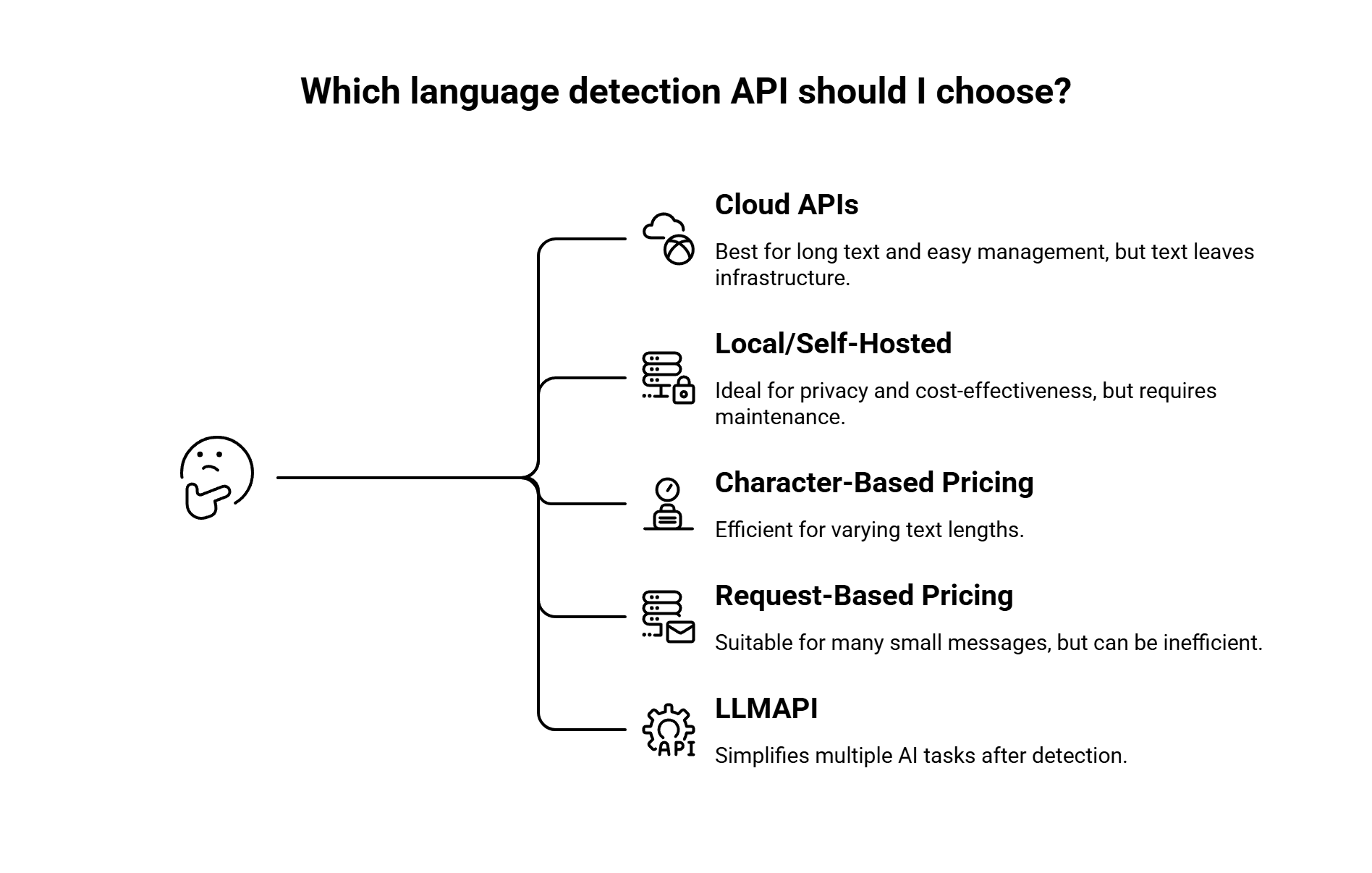
If your app processes long text, such as support emails, documents, reviews, or articles, cloud APIs like Google Cloud Translation, Amazon Comprehend, and Azure AI Language are strong candidates. They have enough context to make better predictions.
If your app processes short text, such as chat messages, search queries, or one-word inputs, test Lingua, DetectLanguage.com, and fastText with your own examples before choosing.
Then check your privacy needs.
If text can leave your infrastructure, cloud APIs are easier to manage. If text must stay private, use local or self-hosted options like fastText, Lingua, or LibreTranslate.
Next, look at the pricing model.
Character-based pricing works well when text length varies. Request-based or record-based pricing may become inefficient when your app sends many tiny messages. Local libraries remove per-request API costs, though you still pay through infrastructure and maintenance.
Finally, think about the next step.
If detection leads straight to translation, Google Cloud Translation may be enough. If detection feeds into several AI tasks, such as translation, classification, moderation, and response generation, LLMAPI can help simplify the model layer after detection.
Sample Testing Methodology
Before choosing a provider, run your own test set. Clean demo text is easy. Real user text is where language detection gets interesting.
| Test type | Example | Why it matters |
| Long text | 300-word article excerpt | Most APIs perform better with context |
| Short text | “дякую”, “merci”, “hola” | Short inputs are harder to classify |
| Mixed-language text | “Hola, I need help with my order” | Many APIs return the dominant language |
| Transliteration | “privit”, “spasibo” | Some tools struggle with phonetic text |
| Noisy text | “hellooo 😭 merciii” | UGC often includes typos and emojis |
| Similar languages | Croatian vs Serbian, Malay vs Indonesian | Closely related languages can confuse models |
| Support text | “My order arrived broken, necesito ayuda” | Real messages often mix languages and intent |
We’d also track these fields during testing:
| Metric | What to check |
| Correct language | Did the API return the expected language? |
| Confidence score | Was the score high enough to trust? |
| Alternative languages | Did the API return useful second choices? |
| Latency | Is it fast enough for live workflows? |
| Cost per 1M characters or requests | Does pricing still make sense at scale? |
| Failure behavior | What happens when the text is too short or unknown? |
For mixed-language apps, we would also add a token-level test. A full-text detector may return the dominant language, while a token-level language identifier can mark each word separately. That difference matters for social posts, chats, and multilingual support messages.
FAQs
What is the best language detection API?
There is no single best option for every app. Google Cloud Translation is strong when detection leads into translation. Amazon Comprehend is a good fit for AWS pipelines. Azure AI Language works well for Microsoft-heavy teams. DetectLanguage.com is one of the simpler standalone APIs. For local processing, fastText and Lingua are usually the first tools we’d test.
What is the best language detection API for short text?
Lingua is one of the strongest candidates for short text because it is designed for short and mixed-language inputs. DetectLanguage.com is also worth testing for short phrases and single words, since it positions itself around short text support.
Can language detection APIs identify multiple languages in one text?
Many APIs return the main or dominant language for the full input. For mixed-language content, developers often split the text into sentences or smaller chunks and detect the language of each segment.
If the app needs word-level detection, use or test tools designed for token-level language identification. Research on code-mixed text shows that mixed-language posts can switch languages at sentence, word, or sub-word level, so dominant-language detection may be too broad for some use cases.
Are there free language detection APIs?
Yes. fastText, Lingua, and LibreTranslate are open-source options. Managed APIs also have free tiers or credits. Google Cloud Translation lists a monthly free character credit, Amazon Comprehend offers a 12-month free tier, and DetectLanguage.com has a free plan with 1,000 requests/day.
Which language detection API is best for privacy?
Local and self-hosted tools are the safest starting point for privacy-sensitive workflows. fastText and Lingua run locally, while LibreTranslate can be self-hosted as an API.
Is LLMAPI a language detection API?
LLMAPI is better understood as a unified gateway for AI models rather than a dedicated language detection API. It fits after the detection step, when your app needs to translate, summarize, classify, moderate, or generate content using different models through one integration.
Final Thoughts
Our main takeaway is simple: choose a language detection API based on the text you actually process.
If your app mostly handles long text and translation workflows, Google Cloud Translation is a strong fit. If your team already runs on AWS or Azure, Amazon Comprehend or Azure AI Language will usually be easier to plug into your stack. If you need a simple standalone detector, DetectLanguage.com keeps things lighter. If privacy or local processing matters most, fastText, Lingua, or LibreTranslate are worth testing.
The bigger point: language detection rarely stands alone. Once your app knows the language, it often needs to do something with that text — translate it, moderate it, summarize it, classify it, or generate a localized reply.
That is where LLMAPI can help with the next layer. Instead of managing separate integrations for every AI provider, teams can use one gateway to access 200+ models, manage API keys centrally, route requests, and keep better control over usage and cost.
Before you commit to any tool, test it with your real inputs. Clean demo text is easy. Short, messy, multilingual user content is where the right API actually proves itself.
